Sentry-react-native: Could not connect to Sentry native SDK.
OS:
- [ ] Windows
- [X] MacOS
- [ ] Linux
_Platform:_
- [X] iOS
- [ ] Android
SDK:
- [X]
@sentry/react-native - [ ]
react-native-sentry
react-native version: 0.60.5
@sentry/react-native version: 1.0.6
Init Code:
Sentry.init({
  dsn: 'https://[email protected]/1726750',
  debug: true,
});
I have following issue:
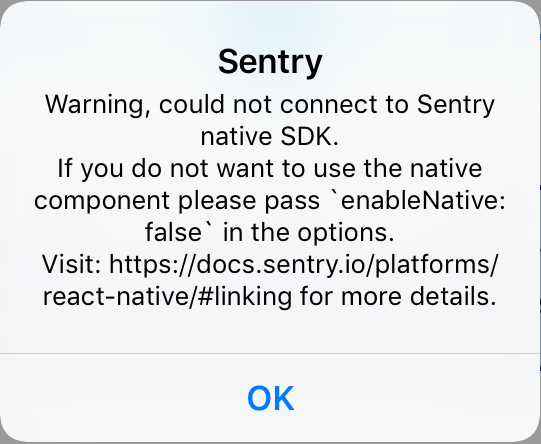
Installation is successful using sentry-wizard, however, prompted with "... cannot connect to Sentry Native SDK".
Steps to reproduce:
- Installed sentry package using
yarn add @sentry/react-native. (I also have@sentry/wizardglobally installed for other projects). - Ran the sentry wizard
sentry-wizard --debug; stdout of--debug. cd ios && pod install; stdout of pod installation below:
➜  ios git:(feat/sentry) ✗ pod install
Detected React Native module pods for RNDeviceInfo, RNGestureHandler, RNSVG, RNScreens, and react-native-aes
Analyzing dependencies
Fetching podspec for `DoubleConversion` from `../node_modules/react-native/third-party-podspecs/DoubleConversion.podspec`
Fetching podspec for `FBLazyVector` from `../node_modules/react-native/Libraries/FBLazyVector`
[!] No podspec found for `FBLazyVector` in `../node_modules/react-native/Libraries/FBLazyVector`

[!] use_native_modules! skipped the react-native dependency 'react-native-rsa-native'. No podspec file was found.
    - Check to see if there is an updated version that contains the necessary podspec file
    - Contact the library maintainers or send them a PR to add a podspec. The react-native-webview podspec is a good example of a package.json driven podspec. See https://github.com/react-native-community/react-native-webview/blob/master/react-native-webview.podspec
    - If necessary, you can disable autolinking for the dependency and link it manually. See https://github.com/react-native-community/cli/blob/master/docs/autolinking.md#how-can-i-disable-autolinking-for-unsupported-library

[!] use_native_modules! skipped the react-native dependency 'realm'. No podspec file was found.
    - Check to see if there is an updated version that contains the necessary podspec file
    - Contact the library maintainers or send them a PR to add a podspec. The react-native-webview podspec is a good example of a package.json driven podspec. See https://github.com/react-native-community/react-native-webview/blob/master/react-native-webview.podspec
    - If necessary, you can disable autolinking for the dependency and link it manually. See https://github.com/react-native-community/cli/blob/master/docs/autolinking.md#how-can-i-disable-autolinking-for-unsupported-library
- Rebuilt the app using xcode.
- Opened the app after initialising sentry and received:
 .
.
Notes
- Should I expect to see
RNSentryin cocoa pod installation stdout e.g.
Detected React Native module pods for RNDeviceInfo, RNGestureHandler, RNSVG, RNScreens, and react-native-aes sentry.propertiesfile is populated with the right data;cli.executableis correct.- Changes to
project.pbxgroupinclude:
        B01732A670324C0683690BD9 /* Frameworks */ = {
            isa = PBXGroup;
            children = (
            );
            name = Frameworks;
            path = Application;
            sourceTree = "<group>";
        };
        5BFB0AD478EB4D31A0F78D2B /* Frameworks */ = {
            isa = PBXGroup;
            children = (
            );
            name = Frameworks;
            path = Application;
            sourceTree = "<group>";
        };
/* Begin PBXShellScriptBuildPhase section */
shellScript = "export SENTRY_PROPERTIES=sentry.properties\nexport NODE_BINARY=node\n../node_modules/@sentry/cli/bin/sentry-cli react-native xcode ../node_modules/react-native/scripts/react-native-xcode.sh";


md5-d3a38c738777a71a989f710dff2e986a


/* Upload Debug Symbols to Sentry */
isa = PBXShellScriptBuildPhase;
            buildActionMask = 2147483647;
            files = (
            );
            runOnlyForDeploymentPostprocessing = 0;
            name = "Upload Debug Symbols to Sentry";
            inputPaths = (
            );
            outputPaths = (
            );
            shellPath = /bin/sh;
            shellScript = "export SENTRY_PROPERTIES=sentry.properties\n../node_modules/@sentry/cli/bin/sentry-cli upload-dsym";
 hugofovargue
All 19 comments
I think this is more than likely an issue with my apps autolinking. The pod installation doesn't seem right.
hugofovargue
on 26 Sep 2019
i have the same issue. but in my case, that message alter both in android and ios
@sentry/react-native version: 1.0.9
 WizardPro
on 12 Oct 2019
WizardPro
on 12 Oct 2019
I was getting the same issue. I was able to resolve it by deleting my node_modules and ios/Pods directories, then running yarn install; cd ios; pod install -- was also able to confirm that my thrown error was received by Sentry after doing this.
 chelshaw
on 30 Nov 2019
chelshaw
on 30 Nov 2019
I'm having a similar issue. I tried deleting node_modules and ios/Pods, and neither worked. Following this thread to see if there's a solution.
RN Version 0.59.9
@sentry/react-native version: 1.2.0
 mishroom
on 17 Dec 2019
mishroom
on 17 Dec 2019
I am experiencing the same issue on RN 0.60.5, @sentry/react-native version 1.2.0.
We suspect it to be due to autolinking not working properly, which we have experienced with other modules after upgrading from RN <0.60, when we had to do the switch from manual to automatic linking.
Following this anyway, in case its not related to our specific setup.
 TBGerstenberg
on 17 Dec 2019
TBGerstenberg
on 17 Dec 2019
Had exactly the same problem, after i ran these commands it worked on android (developing on Windows) i am using
"react-native": "0.61.4",
rm -rf node_modules
react-native unlink @sentry/react-native
npm install
react-native link @sentry/react-native
gradlew.bat clean
react-native start "--clear-cache"
npm run android
so it seems that if you link with react-native link it works
i used the wizard before and it was finishing succesfully but i still got the same popup as op
hope this helps
 superphil0
on 8 Jan 2020
superphil0
on 8 Jan 2020
I am closing this issue for now since this is almost always related to that the @sentry/react-native is not linked properly.
We created this popup so you are aware of it, it's a debug thing.
If you see this autolinking of react-native might not work, or you upgraded react-native from an old version. Make sure to relink
rm -rf node_modules
react-native unlink @sentry/react-native
npm install
react-native link @sentry/react-native
 HazAT
on 9 Jan 2020
HazAT
on 9 Jan 2020
I think why many people are confused is because it is not clear from this documentation that you havce to link at all https://docs.sentry.io/platforms/react-native/#linking
The documentation only tells me to link if i am running react-native < 0.60
Adjusting the documentation will bring clarity
superphil0
on 9 Jan 2020
>= 0.60 supports autolinking and I just created a clean project and it works without calling link.
So I am not sure what to write.
Sadly RN is very bad when it comes to upgrading it from an older version it also sometimes heavily depends on the setup of your project.
HazAT
on 9 Jan 2020
I also get the error that it cannot connect to the SDK and I'm not sure how i'm supposed to follow this setup while using npm
npx sentry-wizard -i reactNative -p ios android throws the following error
npm ERR! code E404
npm ERR! 404 Not Found - GET https://registry.npmjs.org/sentry-wizard - Not found
npm ERR! 404
npm ERR! 404  'sentry-wizard@latest' is not in the npm registry.
npm ERR! 404 You should bug the author to publish it (or use the name yourself!)
npm ERR! 404
npm ERR! 404 Note that you can also install from a
npm ERR! 404 tarball, folder, http url, or git url.
 nealoke
on 21 Jan 2020
nealoke
on 21 Jan 2020
I also get the error that it cannot connect to the SDK and I'm not sure how i'm supposed to follow this setup while using npm
npx sentry-wizard -i reactNative -p ios androidthrows the following errornpm ERR! code E404 npm ERR! 404 Not Found - GET https://registry.npmjs.org/sentry-wizard - Not found npm ERR! 404 npm ERR! 404 'sentry-wizard@latest' is not in the npm registry. npm ERR! 404 You should bug the author to publish it (or use the name yourself!) npm ERR! 404 npm ERR! 404 Note that you can also install from a npm ERR! 404 tarball, folder, http url, or git url.
It seems that the issue is the npm repo moved and the docs haven't been updated.
https://www.npmjs.com/package/@sentry/wizard
Doing:
npx @sentry/wizard -i reactNative -p ios android
looks to work and so far, so good.
 EthanDM
on 26 Feb 2020
EthanDM
on 26 Feb 2020
my android is right,but ios has this problem.
so link it
1/ get RNSentry.xcodeproj from @sentry/react-native/ios, add it to ios project Libraries.
2/ Targets --- General---Frameworks, Libraries.. add libRNSentry.a
3/ Targets--- Build Phases --- Link Binary..... add libRNSentry.a
WORKS
 leer561
on 12 Mar 2020
leer561
on 12 Mar 2020
I had to add this line to Podfile:
pod 'RNSentry', :podspec => '../node_modules/@sentry/react-native/RNSentry.podspec' # or your path to node_modules
 marcosnc08
on 21 Apr 2020
marcosnc08
on 21 Apr 2020
proper linking sorted out for me by adding
pod 'RNSentry', :path => '../node_modules/@sentry/react-native'
then pod install
 nateblog
on 28 Apr 2020
nateblog
on 28 Apr 2020
proper linking sorted out for me by adding
pod 'RNSentry', :path => '../node_modules/@sentry/react-native'then pod install
This also worked for me. on react-native: 0.60.4 and @sentry/react-native: 1.3.9
Note that Xcode could not compile when I refered to RNSentry.podspec, the key difference was referring to the index at react-native only
 anthonychung14
on 18 May 2020
anthonychung14
on 18 May 2020
My issue was that @sentry/react-native was installed as an indirect dependency which causes autolinking to skip the package. By adding it as a direct dependency to my project, the autolinking began working
 awinograd
on 27 May 2020
awinograd
on 27 May 2020
Been having this issue all day. Can't seem to find a fix. Started up a fresh project and can confirm that it works as expected, however when I duplicate the install steps into my existing project I get the pop-up every time. enableNative: false seems to have no effect.
@HazAT is there any steps that I might try, other than the above to see what I've got wrong?
 jamesdunay
on 2 Jun 2020
jamesdunay
on 2 Jun 2020
Double post here, but just adding some more information.
Followed these steps from @superphil0
rm -rf node_modules
react-native unlink @sentry/react-native
npm install
react-native link @sentry/react-native
gradlew.bat clean
react-native start "--clear-cache"
npm run android
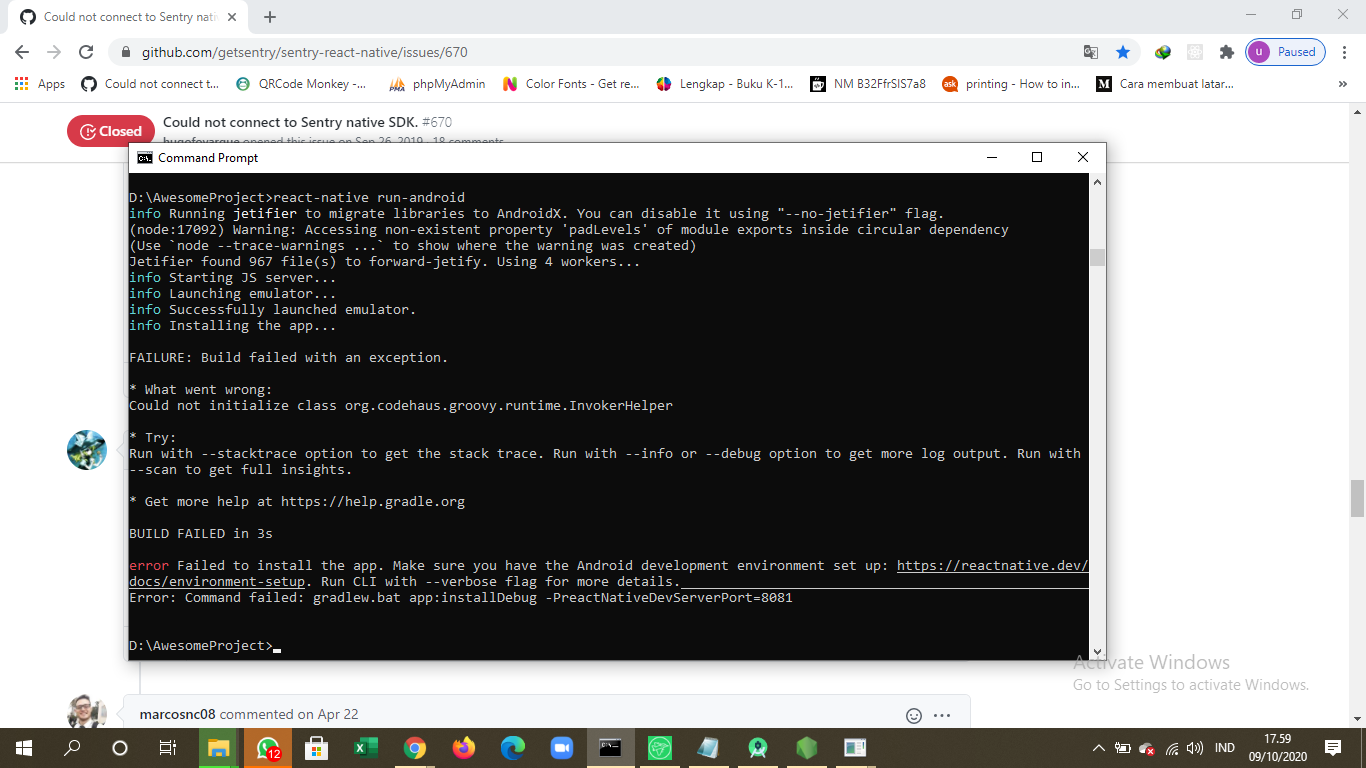
Still getting the same popup. Errors do make it up to the Sentry console, but I'm unable to get the popup to go away. Both Android and iOS. For sure it's a linking issue on my end, just not sure how to handle it.
My package.json :
{
  "name": "highthere",
  "version": "0.0.1",
  "private": true,
  "scripts": {
    "android": "react-native run-android",
    "ios": "react-native run-ios",
    "start": "react-native start",
    "test": "jest",
    "lint": "eslint .",
    "android-staging": "ENVFILE=.env.staging react-native run-android",
    "ios-staging": "ENVFILE=.env.staging react-native run-ios",
    "ios-production": "ENVFILE=.env.production react-native run-ios",
    "start-max": "node --max-old-space-size=8192 node_modules/react-native/local-cli/cli.js start"
  },
  "dependencies": {
    "@aws-amplify/pubsub": "^2.1.9",
    "@react-native-community/blur": "^3.6.0",
    "@react-native-community/cameraroll": "^1.6.2",
    "@react-native-community/datetimepicker": "2.2.3",
    "@react-native-community/masked-view": "^0.1.10",
    "@react-native-community/netinfo": "^5.9.2",
    "@react-native-community/voice": "^1.1.4",
    "@react-navigation/native": "^5.2.4",
    "@react-navigation/stack": "^5.2.19",
    "@sentry/react-native": "^1.4.1",
    "amazon-cognito-identity-js": "^4.2.4",
    "apollo-boost": "^0.4.9",
    "aws-amplify": "^3.0.11",
    "aws-appsync": "^3.0.3",
    "bufferutil": "^4.0.1",
    "graphql": "^15.0.0",
    "lottie-ios": "^3.1.3",
    "lottie-react-native": "^3.4.0",
    "moment": "^2.25.3",
    "react": "^16.11.0",
    "react-dom": "^16.8.0",
    "react-native": "0.62.2",
    "react-native-animated-linear-gradient": "^1.2.2",
    "react-native-cli": "^2.0.1",
    "react-native-config": "^1.0.0",
    "react-native-elements": "^2.0.0",
    "react-native-fast-image": "^8.1.5",
    "react-native-gesture-handler": "^1.6.1",
    "react-native-image-crop-picker": "^0.31.1",
    "react-native-image-picker": "^2.3.1",
    "react-native-linear-gradient": "^2.5.6",
    "react-native-modal-datetime-picker": "^8.6.0",
    "react-native-progress": "^4.1.2",
    "react-native-reanimated": "^1.8.0",
    "react-native-safari-view": "^2.1.0",
    "react-native-safe-area-context": "^0.7.3",
    "react-native-screens": "^2.7.0",
    "react-native-shared-element": "^0.7.0",
    "react-native-snap-carousel": "^3.9.0",
    "react-native-svg": "^12.1.0",
    "react-native-vector-icons": "^6.6.0",
    "react-navigation-shared-element": "^5.0.0-alpha1",
    "typescript": "^3.8.3",
    "utf-8-validate": "^5.0.2"
  },
  "devDependencies": {
    "@babel/core": "^7.6.2",
    "@babel/runtime": "^7.6.2",
    "@react-native-community/eslint-config": "^0.0.5",
    "babel-jest": "^24.9.0",
    "eslint": "^5.16.0",
    "jest": "^24.9.0",
    "metro-react-native-babel-preset": "^0.58.0",
    "react-test-renderer": "16.11.0"
  },
  "jest": {
    "preset": "react-native"
  }
}
HELP ME PLEASE
 musa-bi2906
on 9 Oct 2020
musa-bi2906
on 9 Oct 2020
Related issues
 jamesone
·
3Comments
jamesone
·
3Comments
 poocart
·
3Comments
poocart
·
3Comments
 brainbicycle
·
3Comments
brainbicycle
·
3Comments
 sercanov
·
3Comments
sercanov
·
3Comments
 JonasBAJ
·
3Comments
JonasBAJ
·
3Comments
Most helpful comment
I was getting the same issue. I was able to resolve it by deleting my
node_modulesandios/Podsdirectories, then runningyarn install; cd ios; pod install-- was also able to confirm that my thrown error was received by Sentry after doing this.