Sentry-react-native: error: http error: Invalid token (401)
OS:
- [ ] Windows
- [10.12.6 ] MacOS
- [ ] Linux
_Platform:_
- [ ] iOS
- [ +] Android
Output of node -v && npm -v && npm ls --prod --depth=0
v8.6.0
5.4.2
[email protected] /Users/xyz/dharma
Config:
Sentry.config('__DSN__').install()
I have following issue:
After
cd android && ./gradlew assembleRelease
Processing react-native sourcemaps for Sentry upload.
> Analyzing 2 sources
> Rewriting sources
> Adding source map references
error: http error: Invalid token (401)
:app:bundleReleaseJsAndAssets FAILED

FAILURE: Build failed with an exception.

* Where:
Script '/Users/xyz/dharma/node_modules/react-native-sentry/sentry.gradle' line: 154

* What went wrong:
Execution failed for task ':app:bundleReleaseJsAndAssetsreleaseSentryUpload'.
> Process 'command 'node_modules/sentry-cli-binary/bin/sentry-cli'' finished with non-zero exit value 1

* Try:
Run with --stacktrace option to get the stack trace. Run with --info or --debug option to get more log output.

BUILD FAILED
Actual result:
- Actual
21:40:12.357 [DEBUG] [org.gradle.api.internal.tasks.execution.ExecuteAtMostOnceTaskExecuter] Finished executing task ':app:bundleReleaseJsAndAssets'
21:40:12.358 [LIFECYCLE] [class org.gradle.internal.buildevents.TaskExecutionLogger] :app:bundleReleaseJsAndAssets FAILED
21:40:12.361 [INFO] [org.gradle.execution.taskgraph.AbstractTaskPlanExecutor] :app:bundleReleaseJsAndAssets (Thread[Daemon worker Thread 7,5,main]) completed. Took 47.381 secs.
21:40:12.361 [DEBUG] [org.gradle.internal.operations.DefaultBuildOperationWorkerRegistry] Worker root.228 completed (0 in use)
21:40:12.362 [DEBUG] [org.gradle.execution.taskgraph.AbstractTaskPlanExecutor] Task worker [Thread[Daemon worker Thread 7,5,main]] finished, busy: 48.768 secs, idle: 0.121 secs
21:40:12.367 [ERROR] [org.gradle.internal.buildevents.BuildExceptionReporter]
21:40:12.368 [ERROR] [org.gradle.internal.buildevents.BuildExceptionReporter] FAILURE: Build failed with an exception.
21:40:12.368 [ERROR] [org.gradle.internal.buildevents.BuildExceptionReporter]
21:40:12.368 [ERROR] [org.gradle.internal.buildevents.BuildExceptionReporter] * Where:
21:40:12.368 [ERROR] [org.gradle.internal.buildevents.BuildExceptionReporter] Script '/Users/xyz/dharma/node_modules/react-native-sentry/sentry.gradle' line: 154
21:40:12.368 [ERROR] [org.gradle.internal.buildevents.BuildExceptionReporter]
21:40:12.368 [ERROR] [org.gradle.internal.buildevents.BuildExceptionReporter] * What went wrong:
21:40:12.368 [ERROR] [org.gradle.internal.buildevents.BuildExceptionReporter] Execution failed for task ':app:bundleReleaseJsAndAssetsreleaseSentryUpload'.
21:40:12.368 [ERROR] [org.gradle.internal.buildevents.BuildExceptionReporter] > Process 'command 'node_modules/sentry-cli-binary/bin/sentry-cli'' finished with non-zero exit value 1
21:40:12.368 [ERROR] [org.gradle.internal.buildevents.BuildExceptionReporter]
21:40:12.369 [ERROR] [org.gradle.internal.buildevents.BuildExceptionReporter] * Try:
21:40:12.369 [ERROR] [org.gradle.internal.buildevents.BuildExceptionReporter] Run with --stacktrace option to get the stack trace.
21:40:12.369 [LIFECYCLE] [org.gradle.internal.buildevents.BuildResultLogger]
21:40:12.369 [LIFECYCLE] [org.gradle.internal.buildevents.BuildResultLogger] BUILD FAILED
21:40:12.369 [LIFECYCLE] [org.gradle.internal.buildevents.BuildResultLogger]
21:40:12.369 [LIFECYCLE] [org.gradle.internal.buildevents.BuildResultLogger] Total time: 54.848 secs
21:40:12.379 [DEBUG] [org.gradle.cache.internal.LockOnDemandCrossProcessCacheAccess] Releasing file lock for task history cache (/Users/xyz/dharma/android/.gradle/3.3/taskArtifacts)
21:40:12.379 [DEBUG] [org.gradle.cache.internal.btree.BTreePersistentIndexedCache] Closing cache fileHashes.bin (/Users/xyz/dharma/android/.gradle/3.3/taskArtifacts/fileHashes.bin)
21:40:12.380 [DEBUG] [org.gradle.cache.internal.DefaultFileLockManager] Releasing lock on task history cache (/Users/xyz/dharma/android/.gradle/3.3/taskArtifacts).
21:40:12.382 [DEBUG] [org.gradle.api.internal.artifacts.ivyservice.resolveengine.store.CachedStoreFactory] Resolution result cache closed. Cache reads: 0, disk reads: 0 (avg: 0.0 secs, total: 0.0 secs)
21:40:12.382 [DEBUG] [org.gradle.api.internal.artifacts.ivyservice.resolveengine.store.CachedStoreFactory] Resolution result cache closed. Cache reads: 0, disk reads: 44 (avg: 0.0 secs, total: 0.035 secs)
21:40:12.382 [DEBUG] [org.gradle.api.internal.artifacts.ivyservice.resolveengine.store.ResolutionResultsStoreFactory] Deleted 2 resolution results binary files in 0.001 secs
21:40:12.383 [DEBUG] [org.gradle.cache.internal.DefaultCacheAccess] Cache Plugin Resolution Cache (/Users/xyz/.gradle/caches/3.3/plugin-resolution) was closed 0 times.
21:40:12.398 [DEBUG] [org.gradle.process.internal.daemon.WorkerDaemonManager] Stopping 0 worker daemon(s).
21:40:12.398 [INFO] [org.gradle.process.internal.daemon.WorkerDaemonManager] Stopped 0 worker daemon(s).
21:40:12.399 [DEBUG] [org.gradle.cache.internal.DefaultCacheAccess] Cache Generated Gradle JARs cache (/Users/xyz/.gradle/caches/3.3/generated-gradle-jars) was closed 0 times.
21:40:12.399 [DEBUG] [org.gradle.cache.internal.LockOnDemandCrossProcessCacheAccess] Releasing file lock for artifact cache (/Users/xyz/.gradle/caches/modules-2)
21:40:12.399 [DEBUG] [org.gradle.cache.internal.btree.BTreePersistentIndexedCache] Closing cache artifact-at-repository.bin (/Users/xyz/.gradle/caches/modules-2/metadata-2.23/artifact-at-repository.bin)
21:40:12.400 [DEBUG] [org.gradle.cache.internal.btree.BTreePersistentIndexedCache] Closing cache module-metadata.bin (/Users/xyz/.gradle/caches/modules-2/metadata-2.23/module-metadata.bin)
21:40:12.400 [DEBUG] [org.gradle.cache.internal.btree.BTreePersistentIndexedCache] Closing cache module-artifacts.bin (/Users/xyz/.gradle/caches/modules-2/metadata-2.23/module-artifacts.bin)
21:40:12.400 [DEBUG] [org.gradle.cache.internal.btree.BTreePersistentIndexedCache] Closing cache module-versions.bin (/Users/xyz/.gradle/caches/modules-2/metadata-2.23/module-versions.bin)
21:40:12.400 [DEBUG] [org.gradle.cache.internal.DefaultFileLockManager] Releasing lock on artifact cache (/Users/xyz/.gradle/caches/modules-2).
21:40:12.404 [DEBUG] [org.gradle.launcher.daemon.server.exec.ExecuteBuild] The daemon has finished executing the build.
21:40:12.518 [DEBUG] [org.gradle.launcher.daemon.client.DaemonClientInputForwarder] Dispatching close input message: org.gradle.launcher.daemon.protocol.CloseInput@68b7df28
21:40:12.518 [DEBUG] [org.gradle.launcher.daemon.client.DaemonClientConnection] thread 13: dispatching class org.gradle.launcher.daemon.protocol.CloseInput
21:40:12.521 [INFO] [org.gradle.launcher.daemon.client.DaemonClient] Received result Failure[value=org.gradle.initialization.ReportedException: org.gradle.internal.exceptions.LocationAwareException: Script '/Users/xyz/dharma/node_modules/react-native-sentry/sentry.gradle' line: 154
Execution failed for task ':app:bundleReleaseJsAndAssetsreleaseSentryUpload'.] from daemon DaemonInfo{pid=6924, address=[bfbcc32d-6b9e-4497-8053-51d77b8869a8 port:54848, addresses:[/0:0:0:0:0:0:0:1, /127.0.0.1]], state=Idle, lastBusy=1508092455852, context=DefaultDaemonContext[uid=7c2204b9-542f-4c96-ad1b-ce1b8a98397d,javaHome=/Library/Java/JavaVirtualMachines/jdk1.8.0_144.jdk/Contents/Home,daemonRegistryDir=/Users/xyz/.gradle/daemon,pid=6924,idleTimeout=10800000,daemonOpts=-XX:MaxPermSize=256m,-XX:+HeapDumpOnOutOfMemoryError,-Xmx1024m,-Dfile.encoding=UTF-8,-Duser.country=RU,-Duser.language=ru,-Duser.variant]} (build should be done).
21:40:12.521 [DEBUG] [org.gradle.launcher.daemon.client.DaemonClientConnection] thread 1: dispatching class org.gradle.launcher.daemon.protocol.Finished
21:40:12.524 [DEBUG] [org.gradle.launcher.daemon.client.DaemonClientConnection] thread 1: connection stop
Where is the mistake?
 gHashTag
All 16 comments
Can you check your sentry.properties file and see if you paste in the correct credentials?
See: https://github.com/getsentry/react-native-sentry/issues/195
https://github.com/getsentry/react-native-sentry/issues/181
 HazAT
on 16 Oct 2017
HazAT
on 16 Oct 2017
@HazAT
Correctly?
defaults.url=https://sentry.io/
defaults.org=@playra
defaults.project=dharma
auth.token=__TOKEN__
cli.executable=node_modules/sentry-cli-binary/bin/sentry-cli
Change
@playra to playra
:)
HazAT
on 16 Oct 2017
But same error(
error: http error: Invalid token (401)
:app:bundleReleaseJsAndAssets FAILED

FAILURE: Build failed with an exception.

* Where:
Script '/Users/xyz/dharma/node_modules/react-native-sentry/sentry.gradle' line: 154

* What went wrong:
Execution failed for task ':app:bundleReleaseJsAndAssetsreleaseSentryUpload'.
> Process 'command 'node_modules/sentry-cli-binary/bin/sentry-cli'' finished with non-zero exit value
my sentry.properties
defaults.url=https://sentry.io/
defaults.org=playra
defaults.project=dharma
auth.token=7a54692575e4433a88a74566585b63ab:363e0cb33d2440ecb21c5e3248a7dd2a
cli.executable=node_modules/sentry-cli-binary/bin/sentry-cli
Correctly my auth.token?

gHashTag
on 16 Oct 2017
oh sorry, your auth token is also wrong.
You can create one here:
https://sentry.io/api/
Also, I advise you to stop posting your secrets publicly on Github.
HazAT
on 16 Oct 2017
I am with the same issue. I read the forum and done some research before posting here. I have been trying to login without success for more than 2 days now.
These are my sentry.properties
defaults.url=https://sentry.io/
defaults.org=inoche
defaults.project=sentry-test
auth.token=[PUBLIC_KEY:PRIVATE_KEY]
cli.executable=node_modules/sentry-cli-binary/bin/sentry-cli
But I always get this. Running on Xcode and a real device, not a simulator.
Many thanks
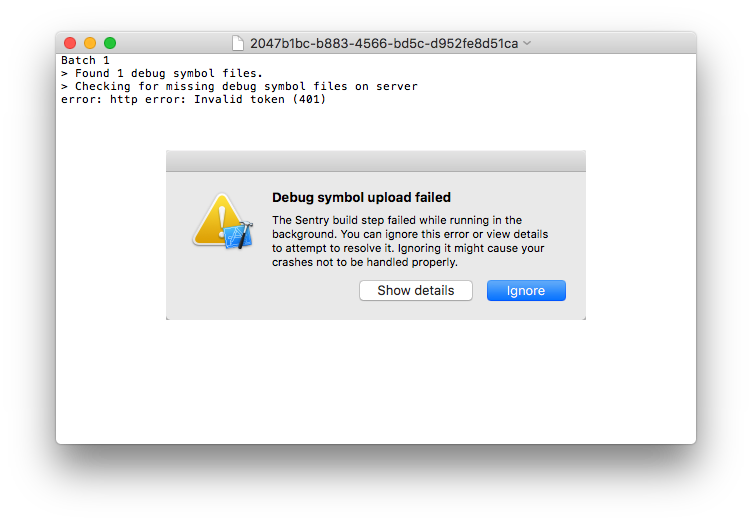
NOTE: I have tried to access to this end point natively in iOS with no problem using the same credentials. I only can see this issue happening while trying on React Native.
$ sentry-cli info
Sentry Server: https://sentry.io/
Default Organization: inoche
Default Project: sentry-test
Authentication Info:
Method: Auth Token
(failure on authentication: http error: Invalid token (401))
 inoche
on 23 Nov 2017
inoche
on 23 Nov 2017
@inoche It seems like you copied the wrong auth token.
Create and copy one from here: https://sentry.io/api/
HazAT
on 23 Nov 2017
Hi Daniel,
Hats off.
Thank you very much. I saw that option before but I didn’t understand why I should have to generate a new one.
After trying it I think I understand now; this token is for the Web API access, am I right?
Thank you very much again
Ismael Noche
On 23 Nov 2017, at 13:06, Daniel Griesser notifications@github.com wrote:
@inoche https://github.com/inoche It seems like you copied the wrong auth token.
Create and copy one from here: https://sentry.io/api/ https://sentry.io/api/
—
You are receiving this because you were mentioned.
Reply to this email directly, view it on GitHub https://github.com/getsentry/react-native-sentry/issues/267#issuecomment-346601443, or mute the thread https://github.com/notifications/unsubscribe-auth/AGoXvVsJ-M9KjaWgwxLX-JL7p02uQ747ks5s5V_dgaJpZM4P52XV.
inoche
on 23 Nov 2017
Right, sentry-cli needs this to authenticate with the API to upload assets.
HazAT
on 23 Nov 2017
oh sorry, your auth token is also wrong.
You can create one here:
https://sentry.io/api/
Also, I advise you to stop posting your secrets publicly on Github.
After create auth token using this link and copied and applied on sentry.properties file, still getting same error while creating a release build .
my sentry.properties ;
ddefaults.url=https://sentry.
defaults.org=sentry
defaults.project=react-native
auth.token=🔑...............................................................1a09f
cli.executable=node_modules\@sentry\cli\bin\sentry-cli
 PrantikMondal
on 11 Aug 2020
PrantikMondal
on 11 Aug 2020
Hi there, I just edited this for you. Please never post your auth token in public places like Github, Stack Overflow or the support forum. Doing so might give others access to sensitive data in your account.
![sentry-probot[bot] picture](https://avatars.githubusercontent.com/u/1396951?v=4&s=40) sentry-probot[bot]
on 11 Aug 2020
sentry-probot[bot]
on 11 Aug 2020
@PrantikMondal What is the error message that shows? Also, there it looks like you have the sentry org set as your org in the settings there; you will have to use your own organization.
 jennmueng
on 11 Aug 2020
jennmueng
on 11 Aug 2020
@PrantikMondal What is the error message that shows? Also, there it looks like you have the sentry org set as your org in the settings there; you will have to use your own organization.
where did i get my own organization name?
my project url is : https://sentry._name_.com/sentry/react-native/getting-started/react-native/
So i have used sentry as org name.
error: API request failed
caused by: sentry reported an error: Invalid token (http status: 401)
PrantikMondal
on 11 Aug 2020
@PrantikMondal You can get your organization name from the settings page on your Sentry dashboard:
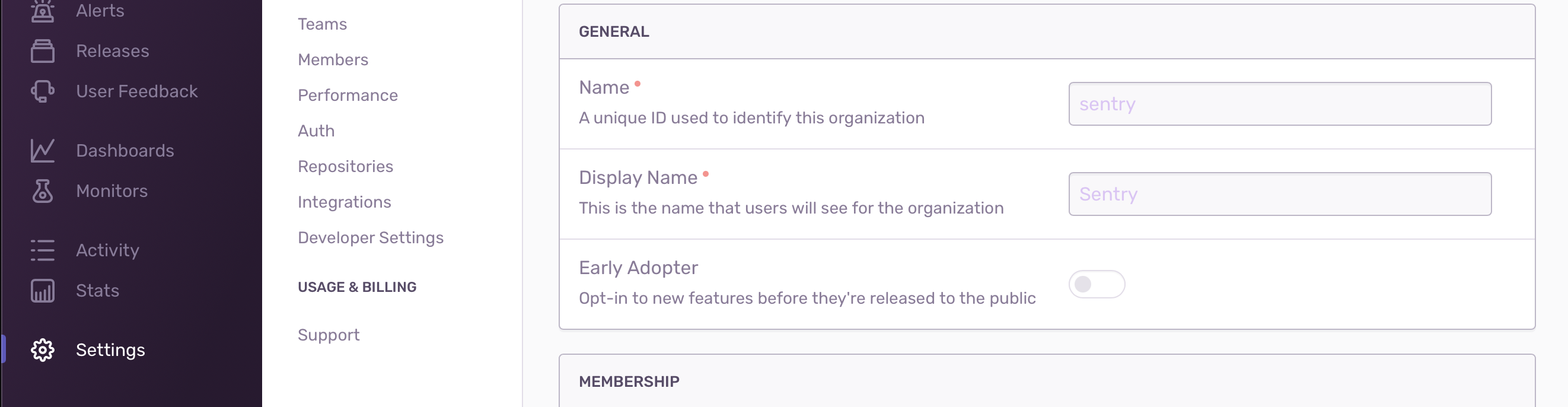
And the reason you're getting the failed request is because the sentry org is our company organization and you don't have access, you need to use your own org.
jennmueng
on 12 Aug 2020
@PrantikMondal You can get your organization name from the settings page on your Sentry dashboard:
And the reason you're getting the failed request is because the sentry org is our company organization and you don't have access, you need to use your own org.
Thanks to let me know. It worked for me. Thanks a lot.
PrantikMondal
on 12 Aug 2020
Related issues
 dht
·
3Comments
dht
·
3Comments
 KevinColemanInc
·
3Comments
KevinColemanInc
·
3Comments
 lwmouneyrac
·
3Comments
lwmouneyrac
·
3Comments
 jamesone
·
3Comments
jamesone
·
3Comments
 JonasBAJ
·
3Comments
JonasBAJ
·
3Comments
Most helpful comment
oh sorry, your auth token is also wrong.
You can create one here:
https://sentry.io/api/
Also, I advise you to stop posting your secrets publicly on Github.