Sentry-java: Sentry.init takes too much time and blocks ui thread
On some android devices Sentry initialization may take up to 1-2 seconds
what could be critical for a lot of apps.

The root of the problem is static initialization block in Lookup class which tries to find sentry.properties files in classpath. Sentry uses this Lookup class during initialization stage for getting initialization params from dsn. Even if all needed information is presented in dsn Sentry tries to load properties file because of static block that may take a lot of time.
@mcomella have already mentioned this problem in similar issue.
 danikula
All 17 comments
This article explains why Android's resources are so slow.
I'm working around this problem by overriding all the methods of AndroidSentryClientFactory that use Lookup.lookup to instead just look in an instance of Properties which I store in my client factory class.
A proper solution to this could be to add a lookup method to SentryClientFactory which AndroidSentryClientFactory could override to not try to find a sentry.properties file in resources, and instead access the properties through the assets mechanism. This is what the java.time backport for Android does to avoid the slow resources mechanism when loading its timezone database, so the properties would instead be accessed like context.getAssets().open("sentry.properties").
For backwards compatibility, it could still look for the config in the resources folder if it doesn't find the config as an asset, and we print a warning about this happening to say they can get better startup performance if they put the properties file in the assets folder
 angusholder
on 7 May 2019
angusholder
on 7 May 2019
@angusholder since Lookup is only ever invoked by the factory or clients themselves, we might be able to not rely so much on the static context or accessors. I'll have something pushed up to address this soon.
 justacodefan
on 9 May 2019
justacodefan
on 9 May 2019
@angusholder Any news?
danikula
on 31 May 2019
I am seeing a slowdown in the startup time of my apps as well due to this issue with Sentry.
@bruno-garcia do you think this can be addressed sooner or later?
 ninniuz
on 10 Jul 2019
ninniuz
on 10 Jul 2019
I worked around the problem by subclassing AndroidSentryClientFactory like this.
angusholder
on 10 Jul 2019
@ninniuz We haven't looked into this yet besides reading other's investigations.
Like the issue linked at the top which was closed as not being an issue.
Could I please have a repro on this? It seems to not be always reproducible otherwise this would be a blocker for many.
 bruno-garcia
on 10 Jul 2019
bruno-garcia
on 10 Jul 2019
@bruno-garcia I can check on the worst devices I have to see if I can find one which takes that amount of time.
On a Pixel 2 device though I see Sentry.init takes about 150 ms on average for a ~10MB apk.
I know it is not a lot of time, but this is essentially some wasted time.
ninniuz
on 10 Jul 2019
I worked around the problem by subclassing AndroidSentryClientFactory like this.
Thanks I will give this a try and compare the startup performance.
ninniuz
on 10 Jul 2019
@bruno-garcia I was tracing the Sentry client init on a old Asus Z00AD device, Android Lollipop 5.0, with systrace, comparing the current performance and potential gains using the SentryClientFactory provided by @angusholder
I have tested on a proguarded and stripped down app, in release mode, which is ~10MB size.
What I see is a ~3x performance gain on average, going from 1.5s down to about 500ms.
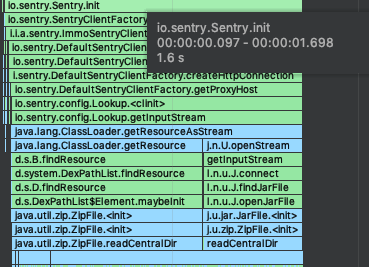
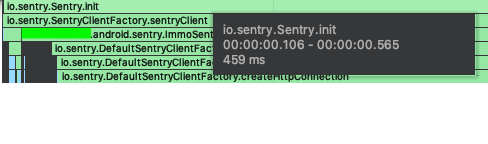
Of course, there is some bits of performance degradation when tracing is enabled, but comparison should be accurate. I think this really might be worth taking a look.
ninniuz
on 11 Jul 2019
As workaround for this problem I create an empty sentry.properties file and set path to it sentry.properties.file system property before Sentry initialization. It allows to prevent lookup sentry.properties in classpath.
danikula
on 17 Jul 2019
@danikula can you please elaborate a bit more? I am not sure I got it.
ninniuz
on 18 Jul 2019
You can set a ResourceLoader via Sentry.init now through options:
SentryOptions options = new SentryOptions();
options.ResourceLoader = new AndroidAssetsResourceLoader(ctx);
Sentry.init(options);
Feel free to reopen if there's any issue.
bruno-garcia
on 8 Aug 2019
Thanks for fixing this Bruno! Will be great to be able to remove my hacky workaround
angusholder
on 8 Aug 2019
It seems fix with manual setting resources loader doesn't work. Static initializer block in Lookup class runs before resources loader was applied in Sentry.init.
danikula
on 12 Aug 2019
@bruno-garcia Looks like it hasn't quite worked, I think you want to switch the order of operations in Sentry.init, currently it looks like:
SentryClient sentryClient = SentryClientFactory.sentryClient(
            sentryOptions.getDsn(),
            sentryOptions.getSentryClientFactory());
Sentry.resourceLoader = sentryOptions.getResourceLoader();
But initialization of the SentryClient instance invokes Lookup.lookup, causing us to perform a lookup without the custom resource loader, so the performance bug remains. Setting Sentry.resourceLoader beforehand ought to fix this
angusholder
on 19 Aug 2019
@angusholder yeah spot on. I'm fixing it on
bruno-garcia
on 19 Aug 2019
Fixed pointed out by @angusholder was shipped version 1.7.27
https://search.maven.org/search?q=g:io.sentry
bruno-garcia
on 20 Aug 2019
Related issues
bruno-garcia
·
3Comments
 altro3
·
6Comments
altro3
·
6Comments
 maks
·
5Comments
maks
·
5Comments
 mcomella
·
7Comments
mcomella
·
7Comments
 Xtizainy
·
5Comments
Xtizainy
·
5Comments
Most helpful comment
This article explains why Android's resources are so slow.
I'm working around this problem by overriding all the methods of
AndroidSentryClientFactorythat useLookup.lookupto instead just look in an instance ofPropertieswhich I store in my client factory class.A proper solution to this could be to add a
lookupmethod toSentryClientFactorywhichAndroidSentryClientFactorycould override to not try to find asentry.propertiesfile in resources, and instead access the properties through the assets mechanism. This is what the java.time backport for Android does to avoid the slow resources mechanism when loading its timezone database, so the properties would instead be accessed likecontext.getAssets().open("sentry.properties").For backwards compatibility, it could still look for the config in the resources folder if it doesn't find the config as an asset, and we print a warning about this happening to say they can get better startup performance if they put the properties file in the assets folder