Sentry-cli: File content are not uploaded even though the database says the file exists
Seems like the files upload command is not uploading the content of files ending in .map. But it does create entries in the database because I can see the file in the web UI under the artifacts tab of the release. But when I press the download button I get an Internal Error response.
Here are the commands I'm using:
export SENTRY_URL=https://sentry.mycompany.com/
export SENTRY_AUTH_TOKEN=XXX
export SENTRY_ORG=myorg
export SENTRY_PROJECT=myproj
sentry-cli releases new mytest
sentry-cli releases files mytest upload test1.js
sentry-cli releases files mytest upload app.js.map
sentry-cli releases files mytest upload test2.js
sentry-cli releases files mytest list
Here is the output:
Created release mytest.
A 5622ab31da120a7590f2f48f2dd9b6b204ed344f  (7 bytes)
A c5079d271beda5ac7a7715e54db90c653551c877  (8 bytes)
A c5cd57c16e5d1bdde54d9ba375d8dbb99e6fee19  (7 bytes)
+------------+--------------+------------+------+
| Name       | Distribution | Source Map | Size |
+------------+--------------+------------+------+
| app.js.map |              |            | 8B   |
| test1.js   |              |            | 7B   |
| test2.js   |              |            | 7B   |
+------------+--------------+------------+------+
Here is the web UI:
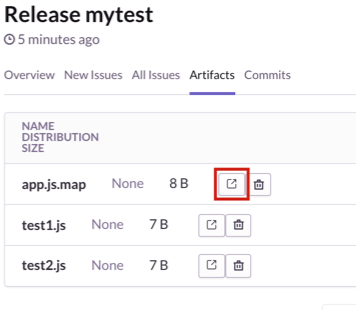
test1.js and test2.js downloads just fine but this happens when I try to download app.js.map:
{
  detail: "Internal Error",
  errorId: "31159f43fd614e66bda082a772f0752a"
}
Here is what happens in the sentry docker container during the upload:
03/11/2017 15:20:1010.42.31.237 - - [03/Nov/2017:14:20:09 +0000] "POST /api/0/projects/myorg/myproj/releases/ HTTP/1.1" 208 630 "-" "sentry-cli/1.22.0"
03/11/2017 15:20:1010.42.31.237 - - [03/Nov/2017:14:20:10 +0000] "POST /api/0/projects/myorg/myproj/releases/mytest/files/ HTTP/1.1" 201 462 "-" "sentry-cli/1.22.0"
03/11/2017 15:20:1010.42.31.237 - - [03/Nov/2017:14:20:10 +0000] "POST /api/0/projects/myorg/myproj/releases/mytest/files/ HTTP/1.1" 201 464 "-" "sentry-cli/1.22.0"
03/11/2017 15:20:1010.42.31.237 - - [03/Nov/2017:14:20:10 +0000] "POST /api/0/projects/myorg/myproj/releases/mytest/files/ HTTP/1.1" 201 462 "-" "sentry-cli/1.22.0"
03/11/2017 15:20:1010.42.31.237 - - [03/Nov/2017:14:20:10 +0000] "GET /api/0/projects/myorg/myproj/releases/mytest/files/ HTTP/1.1" 200 1179 "-" "sentry-cli/1.22.0"
03/11/2017 15:20:1110.42.31.237 - - [03/Nov/2017:14:20:11 +0000] "GET /api/0/broadcasts/ HTTP/1.1" 200 261 "https://sentry.mycompany.com/myorg/myproj/releases/9950/" "Mozilla/5.0 (Windows NT 10.0; Win64; x64) AppleWebKit/537.36 (KHTML, like Gecko) Chrome/61.0.3163.100 Safari/537.36"
And here is what happens in the docker container when I try to download the file:
03/11/2017 15:22:08Traceback (most recent call last):
03/11/2017 15:22:08  File "/usr/local/lib/python2.7/site-packages/sentry/api/base.py", line 82, in handle_exception
03/11/2017 15:22:08    return super(Endpoint, self).handle_exception(exc)
03/11/2017 15:22:08  File "/usr/local/lib/python2.7/site-packages/sentry/api/base.py", line 177, in dispatch
03/11/2017 15:22:08    response = handler(request, *args, **kwargs)
03/11/2017 15:22:08  File "/usr/local/lib/python2.7/site-packages/sentry/api/endpoints/project_release_file_details.py", line 123, in get
03/11/2017 15:22:08    return self.download(releasefile)
03/11/2017 15:22:08  File "/usr/local/lib/python2.7/site-packages/sentry/api/endpoints/project_release_file_details.py", line 75, in download
03/11/2017 15:22:08    fp = file.getfile()
03/11/2017 15:22:08  File "/usr/local/lib/python2.7/site-packages/sentry/models/file.py", line 169, in getfile
03/11/2017 15:22:08    mode=kwargs.get('mode'),
03/11/2017 15:22:08  File "/usr/local/lib/python2.7/site-packages/sentry/models/file.py", line 228, in __init__
03/11/2017 15:22:08    self.open()
03/11/2017 15:22:08  File "/usr/local/lib/python2.7/site-packages/sentry/models/file.py", line 250, in open
03/11/2017 15:22:08    self.seek(0)
03/11/2017 15:22:08  File "/usr/local/lib/python2.7/site-packages/sentry/models/file.py", line 268, in seek
03/11/2017 15:22:08    self._nextidx()
03/11/2017 15:22:08  File "/usr/local/lib/python2.7/site-packages/sentry/models/file.py", line 239, in _nextidx
03/11/2017 15:22:08    self._curfile = self._curidx.blob.getfile()
03/11/2017 15:22:08  File "/usr/local/lib/python2.7/site-packages/sentry/models/file.py", line 138, in getfile
03/11/2017 15:22:08    return storage.open(self.path)
03/11/2017 15:22:08  File "/usr/local/lib/python2.7/site-packages/django/core/files/storage.py", line 33, in open
03/11/2017 15:22:08    return self._open(name, mode)
03/11/2017 15:22:08  File "/usr/local/lib/python2.7/site-packages/django/core/files/storage.py", line 159, in _open
03/11/2017 15:22:08    return File(open(self.path(name), mode))
03/11/2017 15:22:08IOError: [Errno 2] No such file or directory: u'/var/lib/sentry/files/17473/47860/de6ea2e874f14698992840d55ed5cb68'
03/11/2017 15:22:0810.42.31.237 - - [03/Nov/2017:14:22:08 +0000] "GET /api/0/projects/myorg/myproj/releases/mytest/files/411/?download=1 HTTP/1.1" 500 347 "https://sentry.mycompany.se/myorg/myproj/releases/mytest/artifacts/" "Mozilla/5.0 (Macintosh; Intel Mac OS X 10_12_4) AppleWebKit/537.36 (KHTML, like Gecko) Chrome/61.0.3163.100 Safari/537.36"
03/11/2017 15:22:1310.42.31.237 - - [03/Nov/2017:14:22:13 +0000] "GET /api/0/broadcasts/ HTTP/1.1" 200 261 "https://sentry.mycompany.se/myorg/myproj/releases/9950/" "Mozilla/5.0 (Windows NT 10.0; Win64; x64) AppleWebKit/537.36 (KHTML, like Gecko) Chrome/61.0.3163.100 Safari/537.36"
 jonaskello
All 9 comments
I'm also having the same problem with upload-sourcemaps. It creates the entries in the database for all the files, but the contents are actually not uploaded (there is no file created under /var/lib/sentry/files). In that case the .map file is uploaded and can be downloaded, but the .js file is not uploaded, I get an error when I try to download it.
jonaskello
on 3 Nov 2017
Worth to mention also that the contents in the files in my first post is just dummy data. So it is not actual sourcemaps etc. But still I don't think sentry-cli should create the database entry but not upload the content.
Also worth to mention is that uploading with curl works just fine for the same files.
jonaskello
on 3 Nov 2017
Is this a new installation of Sentry or does it already contain production data? It is very likely that this is not a bug in sentry-cli, but rather in sentry. We could investigate this, but would need to wipe some data from the disk and database along the way.
Just one thing: How did curl work? Did you upload the exact same file(s) to the same project after trying it with sentry-cli?
 jan-auer
on 4 Nov 2017
jan-auer
on 4 Nov 2017
It is a fairly new on-premise installation. It has been running for a week and works well, but then I decided to add the source maps and ran into the above trouble. It is no problem to wipe data since we are not depending on it yet.
As far as I recall I tried the same files with curl. I will double check tomorrow.
jonaskello
on 5 Nov 2017
@jan-auer I think you are right about it being a problem with the sentry installation rather than with sentry-cli. I rebuilt or sentry installation from scratch and now the upload-sourcemaps command of sentry-cli works. Not sure why it did not work, could be some corrupt data in our previous sentry installation I guess. I'm closing this since it does not belong here anyway. Thanks for your help!
jonaskello
on 6 Nov 2017
Alright, thank you. Feel free to open this in getsentry/sentry if you experience issues again.
jan-auer
on 6 Nov 2017
@jan-auer I have the exact same issue. Raised it here with detailed logs - https://forum.sentry.io/t/cannot-find-source-maps-for-on-premise-sentry-9-0-0/4699.
The above suggestion regarding curl also resulted in the same problem. I have not tried to rebuild my sentry installation yet as it is quite disruptive.
Please help.
 geekyme
on 19 Sep 2018
geekyme
on 19 Sep 2018
The solution for me was this.
SQL
delete from sentry_releasefile;
delete from sentry_fileblobindex;
delete from sentry_fileblob;
delete from sentry_file;
 kamukondiwa
on 24 Apr 2019
kamukondiwa
on 24 Apr 2019
@kamukondiwa's solution worked here. We apparently messed up our Sentry instance
 tm1000
on 27 Aug 2019
tm1000
on 27 Aug 2019
Related issues
 tim-lucida
·
5Comments
tim-lucida
·
5Comments
 sameoldmadness
·
5Comments
sameoldmadness
·
5Comments
 liuaaaddxiaoer
·
5Comments
liuaaaddxiaoer
·
5Comments
 alexregier
·
4Comments
alexregier
·
4Comments
 ramyma
·
5Comments
ramyma
·
5Comments
Most helpful comment
The solution for me was this.
SQL
delete from sentry_releasefile;
delete from sentry_fileblobindex;
delete from sentry_fileblob;
delete from sentry_file;