Sensei: Install extensions from WooCommerce.com in setup wizard
Describe the solution you'd like
In the _Features_ step of the setup wizard, users can select extensions that they would like to install and activate on their site. These extensions are freely available on WordPress.org and currently include Course Progress, Certificates and Media Attachments.
We need to update this step to include WooCommerce Paid Courses and Content Drip:
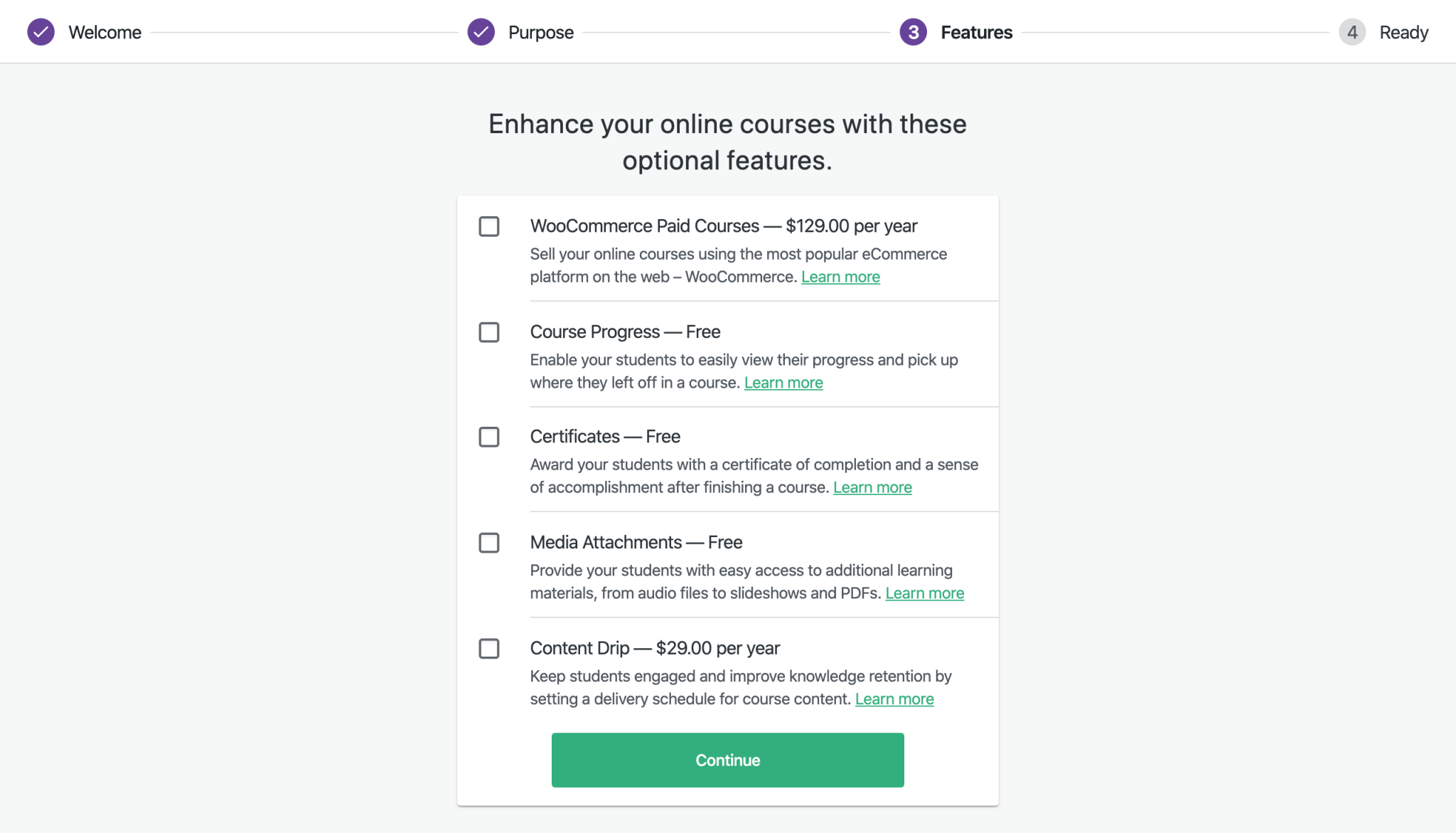
If either Content Drip or WCPC are selected, then WooCommerce is also displayed in the modal. The disclaimer below it should be tweaked to only mention the paid extensions that were selected:

Install Order
When the _Install Now_ button is clicked, the modal is closed. WooCommerce is now listed on the _Features_ step with the same disclaimer that appeared on the modal. Its installation process kicks off first. If there are any other free extensions selected, they _should not be installed at this time._
After WC is successfully installed, the user is taken to the checkout page on WooCommerce.com with the paid extensions already added to the cart:
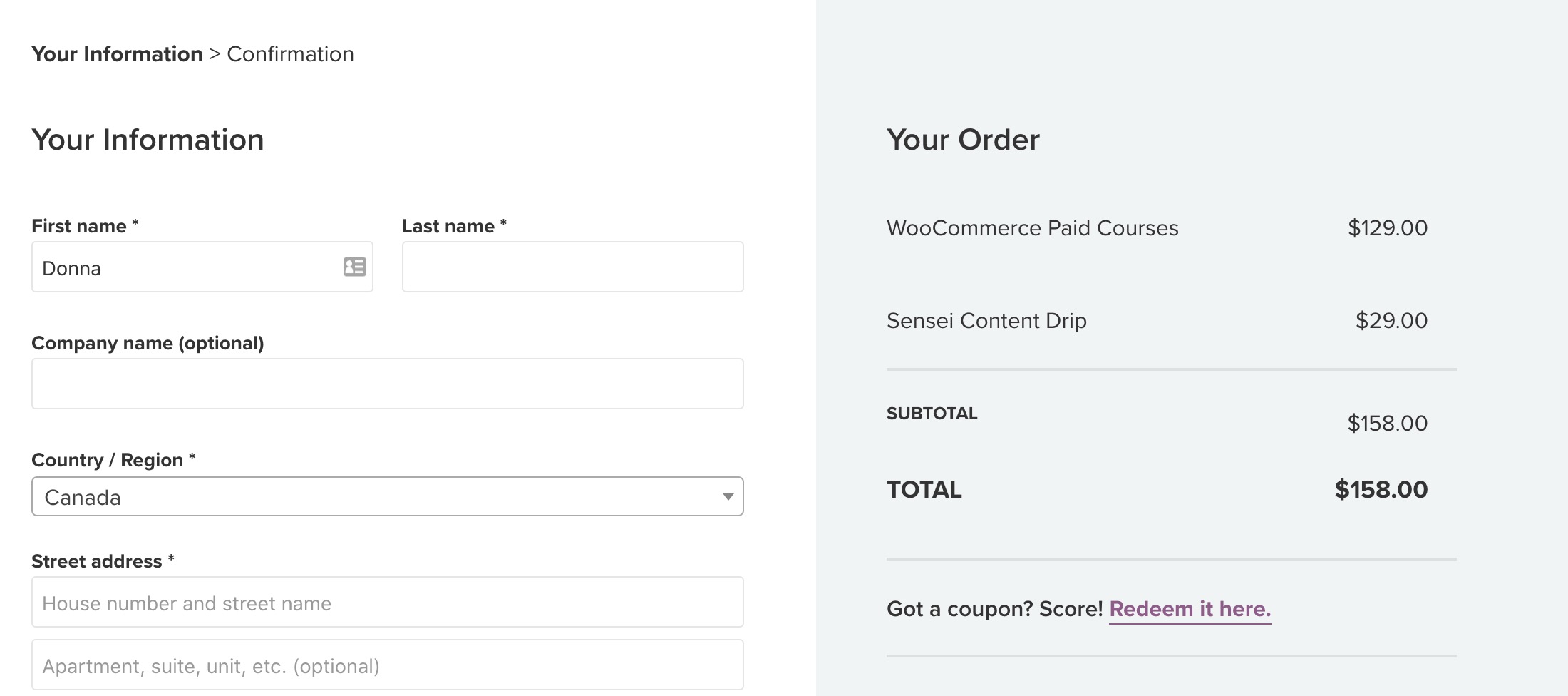
After purchasing the extensions and clicking the _Add to Site_ button on WC.com, the extensions are installed and the user is returned to the _Features_ step of the setup wizard, where any free extensions are installed next.
WooCommerce Install Error
If WooCommerce fails to install, the error message and a _Retry_ link are displayed. Content Drip/WCPC are also shown with errors:
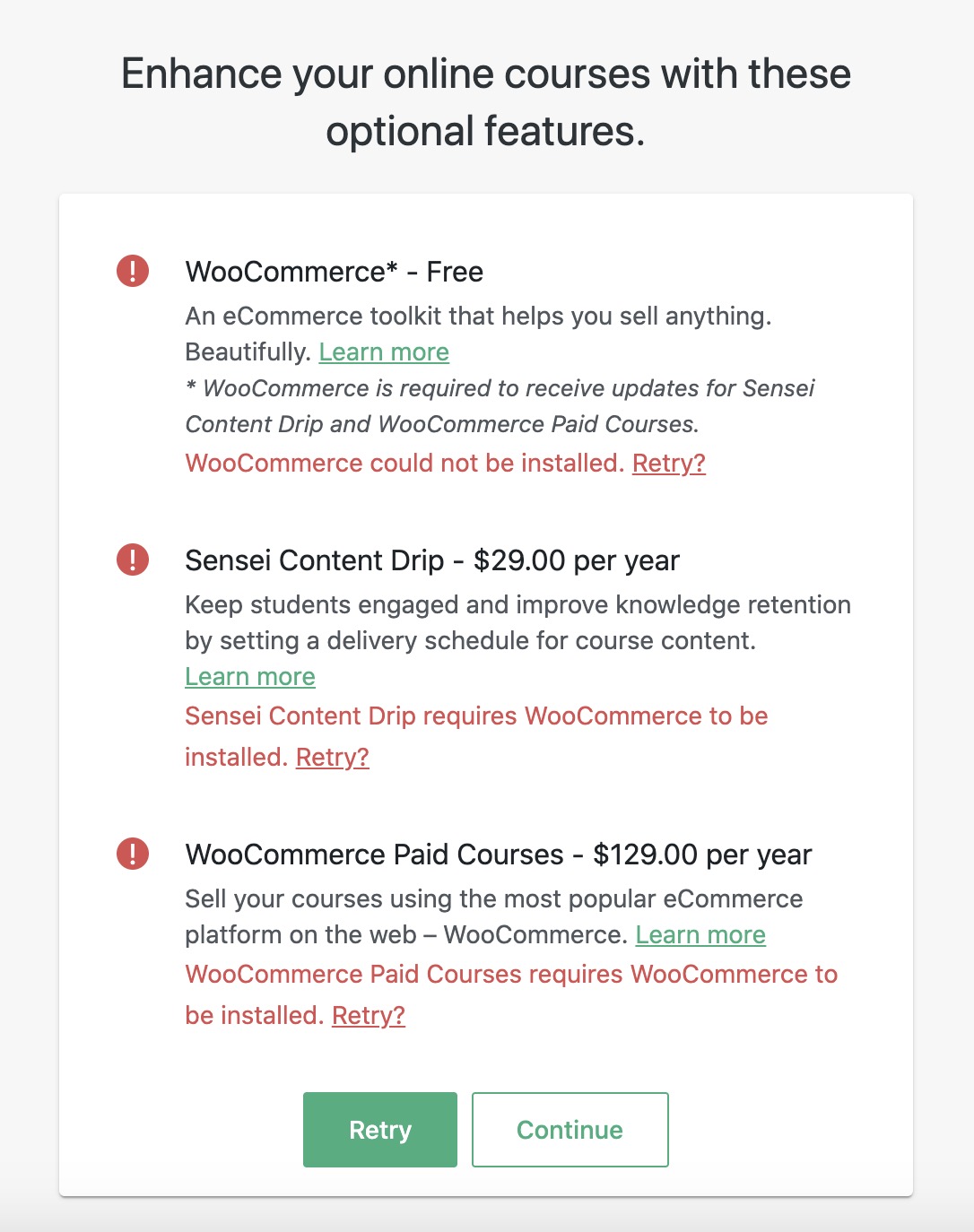
At this point, any free extensions are installed.
If the _Retry_ link for either Sensei Content Drip or WooCommerce Paid Courses is clicked:
- The WooCommerce install is retried first (if it failed).
- If WC is installed, but the user has not yet purchased the extension, they are taken to the WooCommerce.com checkout page, where both paid extensions (if applicable) are added to their cart. (In other words, the user shouldn't have to go through the checkout process twice for each paid extension that failed to install.)
- If WC is installed, and the extension was purchased but failed to install, then the install process is retried for that extension.
Text
_WooCommerce_
- An eCommerce toolkit that helps you sell anything. Beautifully. (Comes from https://github.com/woocommerce/woocommerce/blob/master/woocommerce.php#L5.)
- * WooCommerce is required to receive updates for Sensei Content Drip and WooCommerce Paid Courses. Once WooCommerce is installed, you will be taken to WooCommerce.com to complete the purchase process. (This message should be customized based on which of the extensions are selected.)
 donnapep
All 5 comments
@donnapep I started exploring how to do it and I think we have to change a little the approach because we need the WooCommerce plugin before to install the extensions. Maybe we could install first the free ones and after that, we install the WC extensions.
We could redirect to the WooCommerce installation when the user clicks on "Continue" (maybe in this case we could update the button label to "Install paid extensions", or something like that) in the installation feedback screen. And the return could send them to the ready step. WDYT?
 renatho
on 4 Jun 2020
renatho
on 4 Jun 2020
➤ donnapep commented:
I think it will depend on whether or not they already have WooCommerce installed AND whether or not they've already established a connection from their site to WC.com.
If they don't have WC, then we install the free extensions (including WC) and then come back and ask them to authorize a connection to WC.com.
If they already have WC AND have an existing connection to WC.com, then we should be able to install everything at once - free extensions (if applicable) and then WC.com extensions.
If they already have WC but haven't established a connection from their site to WC.com yet, then we may be able to ask to authorize the connection right away (maybe?). This is the trickiest case and will require a bit more thought as to what the flow will be.
Regardless, from a technical perspective, we'll need to figure out how to go about establishing the connection to WC.com if it doesn't exist.
I can take care of figuring out the changes to the UI / flow.
 matticbot
on 4 Jun 2020
matticbot
on 4 Jun 2020
@donnapep, about the WooCommerce text, I was checking the dynamic content coming from the function plugins_api.
And the text coming is WooCommerce is a flexible, open-source eCommerce solution built on WordPress. Sell anything, anywhere and make your way.. It is the text that is in the readme.
I didn't dig to check if there is another approach to get the information from the file header. But if you really want the text from there, I can dig to check it.
And I ask you about the "Learn more" link too. Do you want the link to the plugin in the WordPress directory or the homepage that comes from the plugin_api (it is https://woocommerce.com/)?
renatho
on 13 Jun 2020
And the text coming is
WooCommerce is a flexible, open-source eCommerce solution built on WordPress. Sell anything, anywhere and make your way.. It is the text that is in the readme.
That's fine. We can use that.
And I ask you about the "Learn more" link too.
It should go to https://wordpress.org/plugins/woocommerce/.
donnapep
on 13 Jun 2020
Finished in #3309
 yscik
on 25 Jun 2020
yscik
on 25 Jun 2020
Related issues
 danjjohnson
·
5Comments
danjjohnson
·
5Comments
 Protohominid
·
6Comments
Protohominid
·
6Comments
 richardmtl
·
5Comments
richardmtl
·
5Comments
donnapep
·
3Comments
richardmtl
·
5Comments
richardmtl
·
5Comments
donnapep
·
3Comments
Most helpful comment
Finished in #3309