Sendgrid-python: Updating footer Sender_Name, Sender_Address, etc for dynamic template
Issue Summary
I'm using a dynamic template created in the visual editor for a transactional email. I used the standard Footer module, which includes placeholders for [Sender_Name], [Sender_Address], etc. I can't figure out how to fill those placeholders with my information.
Steps to Reproduce
I'm using the following to send the email:
  data = {
    "personalizations": [
      {
        "to": [
          {
            "email": email
          }
        ],
        "dynamic_template_data": {
            "subscribe-link" : subscribeLink
        }
      }
    ],
    "from": {
      "email": "[email protected]",
      "name": "Bridger"
    },
    "template_id": template_id,
    "asm": {
      "group_id": subcription_management_group_id
    },
    "substitutions": {
      "[Sender_Name]": "Scribble LLC",
      "Sender_City": "New York, New York" # Also tried it without the brackets
    }
  }

  response = sg.client.mail.send.post(request_body=data)
I've also tried using "Sender_Name" in the dynamic_template_data object, but no luck.
There is a section that sort of addresses this issue at https://sendgrid.com/docs/ui/sending-email/how-to-send-an-email-with-dynamic-transactional-templates/, but I don't understand how to copy the dynamic unsubscribe link into a text module. The image it references as an example is missing.
Technical details:
- sendgrid-python Version: 5.6.0
- Python Version: 3.6.2
 bridger
All 35 comments
Hello @bridger,
Thanks for submitting a GitHub issue! We are very sorry that you are running into this problem. In order to better serve you, as this does not present itself as a library specific issue, we would like to ask that you reach out to our support team at https://support.sendgrid.com.
Thank you!
SendGrid DX Team
 thinkingserious
on 18 Nov 2018
thinkingserious
on 18 Nov 2018
For future people who might have the same issue I was able to workaround it.
- Download/export the template as html
- Replace the
[Sender_Name]with{{Sender_Name}}, etc. - Re-import the template
Now you can use the templates but they use the correct replacement tags. You can fill in the Sender_Name field with the dynamic_template_data parameters for sending mail.
bridger
on 30 Nov 2018
It seems like this should be reopened. This seems like a major bug in SendGrid templates - the "Unsubscribe Module" is mandatory, and yet, it doesn't work. It just keeps sending out unprofessional [Sender_Name] [Sender_Address], [Sender_City], [Sender_State] [Sender_Zip] Unsubscribe - Unsubscribe Preferences" as-is with nothing filled in and nothing linked.
The Unsubscribe Module is broken and needs to be fixed.
 b9chris
on 7 Mar 2019
b9chris
on 7 Mar 2019
It seems like this should be reopened. This seems like a major bug in SendGrid templates - the "Unsubscribe Module" is mandatory, and yet, it doesn't work. It just keeps sending out unprofessional [Sender_Name] [Sender_Address], [Sender_City], [Sender_State] [Sender_Zip] Unsubscribe - Unsubscribe Preferences" as-is with nothing filled in and nothing linked.
The Unsubscribe Module is broken and needs to be fixed.
Second!
This needs to be fixed. Exporting/Importing to workaround is not an acceptable solution.
 tysonholub
on 11 Mar 2019
tysonholub
on 11 Mar 2019
Hello @bridger,
Thanks for submitting a GitHub issue! We are very sorry that you are running into this problem. In order to better serve you, as this does not present itself as a library specific issue, we would like to ask that you reach out to our support team at https://support.sendgrid.com.
Thank you!
SendGrid DX Team
I don't particularly care for this response.
Regardless of whether the python helper classes are coded correctly or not this is an engineering issue at Sendgrid and as such we should not be tasked with passing this along to support to inform them API is not functioning correctly.
That is in fact the job of the Sendgrid employees maintaining this lib or those moderating these support issues.
Please pass this thread along to your colleagues as it's not the responsibility of paying customers to communicate issues between departments.
This thread alone probably documents the issue well enough to inform the Sendgrid engineers working on this where the problems exist in the codebase.
Also, this functionality is still broken at the time of writing this comment.
 HayesData
on 6 Apr 2019
HayesData
on 6 Apr 2019
Also having this issue which I believe it is based on a lack of documentation and possible bug. So the transactional template has the [Sender_Name] tags which are for the Marketing campaigns as seen here: https://sendgrid.com/docs/ui/sending-email/senders/#before-you-begin
I have tried using the same Sender email as the from in the transactional email in the API and still those are not replaced.
So either a new module is needed for the transactional emails or a new prop like senderId is needed in the object so we can choose the sender. I rather have the latter.
 sfratini
on 11 Apr 2019
sfratini
on 11 Apr 2019
Yeah. Total mess, and only made worse by a spaghetti bowl of confusing docs.
 simplecircle
on 5 May 2019
simplecircle
on 5 May 2019
That {{ }} instead of [] solved the issue. You guys should change this in the documentation and also in the default template creation. It is pain in the a$$
 dssagar93
on 7 May 2019
dssagar93
on 7 May 2019
+1 I don't think is so hard to change [] for {{}} for the sendGrid team. Having to export html, modify and import is not a good solution!
 jcatink
on 24 May 2019
jcatink
on 24 May 2019
Hi, as mentioned in #809 I vote for this issue to be progressed, including the definition of a footer 'Mail Helper Class' The current footer management steps are not clear. I'd also support for a better documentation of current workaround.
 Nicosan-K
on 12 Jun 2019
Nicosan-K
on 12 Jun 2019
I'm new to SendGrid and this was completely throwing me off so I'm glad I found this ticket. I was kind of expecting the [Sender_%] values within the unsubscribe widget to be pulled from the "Sender Management" section of the SendGrid interface, although from a programming perspective I'm guessing each sender listed in that section would need to have a "sender ID" generated much like the template IDs have so that we can reference the appropriate sender data within the JSON object. For now I'll be using the import/export hack but would much prefer a prettier solution; one that uses the actual sender information within SendGrid.
edit: having the [Sender_%] data default to a "default" sender if we don't specify a sender ID would be nice, too
 dustinfl
on 12 Jun 2019
dustinfl
on 12 Jun 2019
Thanks for taking the time to detail your thoughts and suggestions @dustinfl! Your comment adds to the priority of this issue, so thanks again!
thinkingserious
on 13 Jun 2019
The issue is compounded if you are using Design template instead of Code template. Since the workaround requires you to use the Code template editor (export/import).
 celwell
on 24 Jun 2019
celwell
on 24 Jun 2019
I'm deeply impressed by how any developer can think it's ok any feature to be that confusing and messed. Sometimes I just wonder, what the actual fuck. lol
 astutejoe
on 5 Jul 2019
astutejoe
on 5 Jul 2019
I am able to use the workaround to render the proper sender name into my emails. However, in order to use the unsubscribe module, I need to keep the version with the [] placeholder in, which looks ugly.
Is there a way to either fix it properly or just remove the [sender_name] entirely from the unsubscribe block and just keep the links there?
 taschik
on 7 Jul 2019
taschik
on 7 Jul 2019
Ran into this problem myself, and the way it's currently addressed in the Unsubscribe Plugin is via "Sender Management". As I have not seen this information on this thread but Google led me here, I will post the help document links here:
https://sendgrid.com/docs/ui/sending-email/senders/#adding-a-sender
Their idea is that you will add senders to the list here:
https://mc.sendgrid.com/senders/new
 twocs
on 8 Jul 2019
twocs
on 8 Jul 2019
@twocs Great ! and how do you configure this sender info in dynamic templates unsubscribe modules ? This is so confusing.
 kofronpi
on 17 Jul 2019
kofronpi
on 17 Jul 2019
@twocs Great ! and how do you configure this sender info in dynamic templates unsubscribe modules ? This is so confusing.
The way that is shown at https://github.com/sendgrid/sendgrid-python/issues/735#issuecomment-443089317 is to use the template
{{Sender_Name}}
Dynamic field data is passed as a parameter. If sending as json it is in a section such as:
"dynamic_template_data": {
            "Sender_Name" : "konfronpi"
   }
So basically, some anti-spam laws say that we must provide certain details with marketing emails. SendGrid intends that sender info is set for the account as [Sender_Name] via the Sender's list https://mc.sendgrid.com/senders/new.
We can also achieve this via dynamic templates by using {{Sender_Name}} if programmatically specifying this data at send time.
twocs
on 17 Jul 2019
@twocs thanks that's interesting ! Can you configure unsubscribe groups links as well ?
kofronpi
on 17 Jul 2019
On Wed, Jul 17, 2019 at 9:47 AM Tom Anderson notifications@github.com
wrote:
@twocs https://github.com/twocs Great ! and how do you configure this
sender info in dynamic templates unsubscribe modules ? This is so confusing.The way that is shown at #735 (comment)
https://github.com/sendgrid/sendgrid-python/issues/735#issuecomment-443089317
is to use the template{{Sender_Name}}
Dynamic field data is passed as a parameter. If sending as json it is in a
section such as:"dynamic_template_data": { "Sender_Name" : "konfronpi" }
So basically, some anti-spam laws say that we must provide certain details
with marketing emails. SendGrid intends that sender info is set for the
account as [Sender_Name] but we can also achieve this via dynamic templates
by using {{Sender_Name}} if we are programmatically specifying this data
This is a little misleading. What does not work, is this template, or any
template, as it was intended to work.
What also does not work is use of:
[Sender_Name]
In Dynamic Templates that's ignored, and emitted literally ("[Sender_Name]"
goes out in every email, to actual customers).
What does work is this complicated workaround:
1) Switch each of those to anything you like - {{Sender_Name}} if you want,
but you could also use {{Unsubscribe.senderName}} or even {{Jello}} if you
wanted, it doesn't matter because the framework has no actual support for
this section.
2) Emit the Unsubscribe field info in each of your JSON packets you send to
these Dynamic Templates. This is why I proposed {{Unsubscribe.senderName}}
above - you could include a .Unsubscribe property in each JSON you emit to
SendGrid.
Of course, if the JSON you're sending is used elsewhere in the system - for
example, info about an event that needs to be emitted over email - you've
now got a problem on your hands. Any other use in the system doesn't need
Unsubscribe info. So you'll have to put a SendGridWrapper of some sort
around the data, add that Unsubscribe property to it, and take it from
there.
In the end, this is all a lot of unnecessary complexity. This template
system is simply broken. The default Unsubscribe module should simply work,
taking its info from the central settings in SendGrid. There is no way to
get that info from those central settings today, and the default templates
new users start with lead them down this rabbit hole, probably to this
thread.
b9chris
on 17 Jul 2019
@b9chris Well said. Worse, I just learnt from the sendgrid support (which are actually good compared to the documentation) that putting unsubscribe links through the API is done with yet another substitution tag system (asm), not handlebars.
kofronpi
on 17 Jul 2019
I gotta stick with @b9chris. Those workarounds are cringing. Let's stop this and wait for a real f* fix.
astutejoe
on 17 Jul 2019
The workflow for the naive user is as follows. They create a dynamic template. They see [Sender_Name] at the bottom and assume that it's valid. At least stick a "?" on the Unsubscribe module to the Design module. That links you to the page where you enter the details, or at least to the documentation! The law does not say anyone can send a marketing email with [Sender_Name] instead of their real name, but SendGrid facilitates this occurrence.
Also, why can't we save the dynamic template with a minor error like a inside the handlebars, but we can save it without details set for [Sender_Name]? Fix!
twocs
on 18 Jul 2019
@twocs thanks that's interesting ! Can you configure unsubscribe groups links as well ?
This is an issue report for the SendGrid Python API. I think that Stackexchange or the SendGrid guide on how to find answers will be more suitable for these questions,
Maybe this will be useful: Sendgrid guide on Creating and Managing Unsubscribe Groups.
twocs
on 18 Jul 2019
I came here looking for how to fill these fields in as well, but not for Python - just in general. It seems as though they are variables and I have to send the same data with each email. I'm not sure why SendGrid would want this data sent with each email? Why would my company change? Shouldn't this come from my account, or possibly form fields in the module itself I could just edit?
I believe this is also responsible for sending our email to Spam.
 NHuebner1983
on 5 Aug 2019
NHuebner1983
on 5 Aug 2019
This has been open for almost a year now? Is import/export still the best way to handle this?
 clokk
on 6 Aug 2019
clokk
on 6 Aug 2019
How can I populate Address Line ([Sender_Name], [Sender_Address], [Sender_City], [Sender_State] [Sender_Zip]) in transactional template?
 UNDEADgtr
on 9 Aug 2019
UNDEADgtr
on 9 Aug 2019
How can I populate Address Line ([Sender_Name], [Sender_Address], [Sender_City], [Sender_State] [Sender_Zip]) in transactional template?
The best way is still what @bridger proposed. exporting/importing the html and changing from [Sender_Name] to {{Sender_Name}}. Then you can treat the values like any other dynamic parameters.
clokk
on 9 Aug 2019
How to populate data in "Unsubscribe Module" in "Design Editor"? Sender_Name, Sender_Address, Sender_City, Sender_State, Sender_Zip and Unsubscribe link.
 michal-wrzosek
on 12 Aug 2019
michal-wrzosek
on 12 Aug 2019
Not working, the templates use different tags it should be set to {{ }} why is it [], and how can I fix it? I know transactional templates don't require unsubscribe but why is this box there?
 federicosan
on 15 Aug 2019
federicosan
on 15 Aug 2019
How can I populate Address Line ([Sender_Name], [Sender_Address], [Sender_City], [Sender_State] [Sender_Zip]) in transactional template?
Since you mentioned it's a transactional template, I would just avoid the problem by making a new footer. It won't have the special Unsubscribe link, but those are only desirable in marketing emails. Transactional emails should not have the ability to unsubscribe.
celwell
on 15 Aug 2019
@thinkingserious it would be really nice if the documentation here: https://sendgrid.com/docs/for-developers/sending-email/getting-started-with-transactional-emails/ contained the information in this thread so sendgrid users didn't waste time trying to set senders for transactional emails.
 dylanbhughes
on 4 Oct 2019
dylanbhughes
on 4 Oct 2019
A solution that worked for me:
While you can't change the dynamic text or pass through standard fields, you can minimize the display to just be the 'Unsubscribe' and 'Unsubscribe Preferences' only.

using these settings for the field:
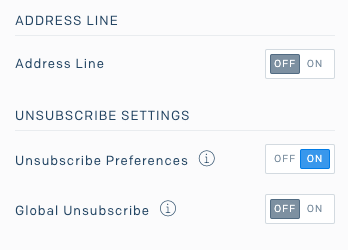
Then create a new Text field and hardcode the company name and address above with zero padding.
 justinshowplace
on 29 Oct 2019
justinshowplace
on 29 Oct 2019
I'm running into the same issue as many others. Very surprising that such simple but critical issue was posted over 18 months ago and there's still no practical solution without extensive workarounds? I contacted SendGrid's support yesterday but am still waiting for their answer. Did anyone get a response from SendGrid that included a real solution to this issue?
 niklas-b
on 3 Jun 2020
niklas-b
on 3 Jun 2020
Took a look into this just now.
Creating dynamic templates using the design editor just shows the unsubscribe links by default; no sender information. 👍
Creating a design in the design library using the design editor shows the unsubscribe links and the sender placeholders properly handledbar'ed. 👍
{{Sender_Name}}
{{Sender_Address}}, {{Sender_City}}, {{Sender_State}} {{Sender_Zip}}
Unsubscribe - Unsubscribe Preferences
I don't know _when_ this was fixed, but seeing as it's fixed now and is not directly related to this repo I'm closing this issue.
Let me know if I'm missing something. And please open a separate issue for anything else. Note that we're (slowly) working through old issues with a priority on new issues and issues with +1s on the _issue summary_ (not on comments).
 childish-sambino
on 9 Jul 2020
childish-sambino
on 9 Jul 2020
Related issues
 iamgollum
·
4Comments
iamgollum
·
4Comments
 inputjoker
·
4Comments
inputjoker
·
4Comments
 jeffoneill
·
4Comments
jeffoneill
·
4Comments
 c-w
·
4Comments
c-w
·
4Comments
 MadReal
·
4Comments
MadReal
·
4Comments
Most helpful comment
It seems like this should be reopened. This seems like a major bug in SendGrid templates - the "Unsubscribe Module" is mandatory, and yet, it doesn't work. It just keeps sending out unprofessional [Sender_Name] [Sender_Address], [Sender_City], [Sender_State] [Sender_Zip] Unsubscribe - Unsubscribe Preferences" as-is with nothing filled in and nothing linked.
The Unsubscribe Module is broken and needs to be fixed.