Sendgrid-php: To is empty when using addTo
We are sending emails via sendgrid/sendgrid php package. While this worked well until last week on Laravel 6, it seems like Sengrid does not receive receipients added via $email->addTo("[email protected]", "Foo Bar"); anymore. We upgraded vom laravel6 to laravel8 last week, however I doubt that this is really related.
        $email = new Mail();

        $email->setTemplateId('myTemplateId');
        $email->setFrom('[email protected]', 'Contact Form');
        $email->addTo('[email protected]', "Foo Bar");

        $email->addBcc('[email protected]', 'Blabla');
        $email->setReplyTo($request->email, $request->name);

        $email->setSubject("ZMy Subject");

        $email->addDynamicTemplateDatas([
            'name' => $request->name,
            'email' => $request->email,
            'subject' => $request->subject,
            'message' => $request->message,
            'company' => $company->company_name,
            'subscribe' => $request->subscribe ? 'ja' : 'nein'
        ]);

        //dd($email);

        $sendgrid = new SendGrid(getenv('SENDGRID_API_KEY'));

        try {
            $response = $sendgrid->send($email);
            if ($response->statusCode() != "202") {
                throw new \Exception('Email exception: ' . $response->body());
            }
            $emailSent = true;
        } catch (Throwable $e) {
            throw new \Exception('Email exception: ' . $e->getMessage());
            $emailSent = false;
        }
The content of the $email variable does look like this:

The API call does return status 202, so everything looks fine. However the activity feed in the sendgrid bakcend does not contain any receipient - and the mail is not sent.

Any ideas why this happens? Or does anyone experience the same?
Version:
"sendgrid/sendgrid": "7.8.3"
"laravel/framework": "^8.0"
 ValeSauer
All 5 comments
Payload looks like this
{
    "personalizations": [{
        "to": [{
            "name": "test",
            "email": "[email protected]"
        }],
        "bcc": [{
            "name": "Test",
            "email": "[email protected]"
        }],
        "dynamic_template_data": {
            "name": "test",
            "email": "[email protected]",
            "subject": "Test",
            "message": "asasdasd",
            "company": "Companyname",
            "subscribe": "nein"
        }
    }],
    "from": {
        "name": "Kontaktformular",
        "email": "[email protected]"
    },
    "reply_to": {
        "name": "Test",
        "email": "[email protected]"
    },
    "subject": "Social Media Kontaktformular",
    "template_id": "123123123"
}
Hello @ValeSauer,
Your code and payload look good to me. I was unable to reproduce any errors locally. Following is the code I used:
<?php
require 'vendor/autoload.php';
$email = new \SendGrid\Mail\Mail();
$email->setFrom("[email protected]", "Example User");
$email->setSubject("Sending with Twilio SendGrid is Fun");
$email->addTo("[email protected]", "Example User");
$email->addBcc("[email protected]", "Example User");
$email->addContent("text/plain", "and easy to do anywhere, even with PHP");
$email->addContent(
    "text/html", "<strong>and easy to do anywhere, even with PHP</strong>"
);
$sendgrid = new \SendGrid(getenv('SENDGRID_API_KEY'));
try {
    $response = $sendgrid->send($email);
    print $response->statusCode() . "\n";
    print_r($response->headers());
    print $response->body() . "\n";
} catch (Exception $e) {
    echo 'Caught exception: '. $e->getMessage() ."\n";
}
One thing to look out for is that the to and bcc emails must be unique.
Since your emails are showing up in the activity log and you are getting a 202 response, I suggest you reach out to the support team so that they can help you determine what happened to those particular emails.
With best regards,
Elmer
 thinkingserious
on 29 Sep 2020
thinkingserious
on 29 Sep 2020
Thanks for checking this. I will contact support.
ValeSauer
on 29 Sep 2020
I found out that the reason for aboves behaviour was a corrupted handlebars code in the template. The php-code above itself was correct.
Personally I find it confusing that the API accepts requests to send emails with corrupt templates and returns 202 and does actually try to send it to an empty recipient. Its also expensive for Sendgrid. Instead of adding the email with the corrupted template to the send queue where it will definitely fail, I would suggest that Sendgrid validates the templates and blocks send attempts for emails with corrupted emails, returning an error code.
ValeSauer
on 1 Oct 2020
Totally support @ValeSauer , I was sending a mail with a template ID that was deleted by others in the company. SendGrid just took the request, did not respond any error code after calling the API. And I was wasting time of looking at activities to guess what was the issue, while the UI it was simply showing Dropped: This email could not be sent., and leaving To blank.
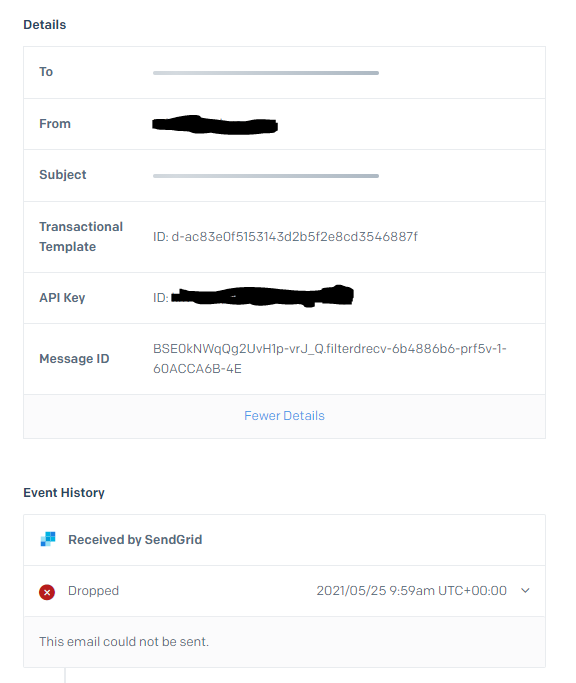
It would be nice if SendGrid can verify the input and tell users that their template ID does not exist be responsing 404 (or something similar), or at least explains the detail reason in the activity log.
 ire7715
on 25 May 2021
ire7715
on 25 May 2021
Related issues
 mwsasser
·
3Comments
mwsasser
·
3Comments
 jverlee
·
4Comments
jverlee
·
4Comments
 Theolodewijk
·
4Comments
Theolodewijk
·
4Comments
 rainman0607
·
4Comments
rainman0607
·
4Comments
 bjornmann
·
3Comments
bjornmann
·
3Comments
Most helpful comment
I found out that the reason for aboves behaviour was a corrupted handlebars code in the template. The php-code above itself was correct.
Personally I find it confusing that the API accepts requests to send emails with corrupt templates and returns
202and does actually try to send it to an empty recipient. Its also expensive for Sendgrid. Instead of adding the email with the corrupted template to the send queue where it will definitely fail, I would suggest that Sendgrid validates the templates and blocks send attempts for emails with corrupted emails, returning an error code.