Semanticmediawiki: Notices and warnings on PHP 7.4
Setup and configuration
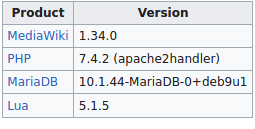

Issue
Okay so I installed SMW with composer. I added
"mediawiki/semantic-media-wiki": "~3.1"
and followed the installation instructions at https://www.semantic-mediawiki.org/wiki/Help:Installation/Quick_guide
Now if I go to random pages on my wiki, I get this error at the top and bottom of my pages:
Stack trace
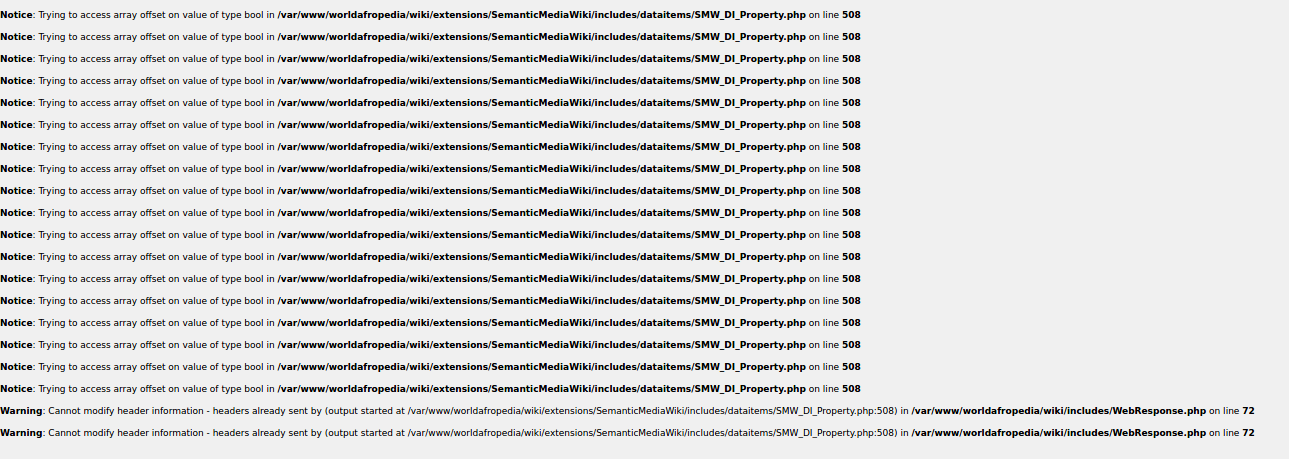
If I hit refresh (sometime a couple times) the errors go away. On the mage page of the wiki though, the error stays no matter what I do. I tried disabling all extensions. The errors stay. I tried rolling back and doing the install again ( a couple times) and the errors stay.
anyone with any clues on whats going on?
Notice: Trying to access array offset on value of type bool in /var/www/worldafropedia/wiki/extensions/SemanticMediaWiki/includes/dataitems/SMW_DI_Property.php on line 508

Notice: Trying to access array offset on value of type bool in /var/www/worldafropedia/wiki/extensions/SemanticMediaWiki/includes/dataitems/SMW_DI_Property.php on line 508

Notice: Trying to access array offset on value of type bool in /var/www/worldafropedia/wiki/extensions/SemanticMediaWiki/includes/dataitems/SMW_DI_Property.php on line 508

Notice: Trying to access array offset on value of type bool in /var/www/worldafropedia/wiki/extensions/SemanticMediaWiki/includes/dataitems/SMW_DI_Property.php on line 508

Notice: Trying to access array offset on value of type bool in /var/www/worldafropedia/wiki/extensions/SemanticMediaWiki/includes/dataitems/SMW_DI_Property.php on line 508

Notice: Trying to access array offset on value of type bool in /var/www/worldafropedia/wiki/extensions/SemanticMediaWiki/includes/dataitems/SMW_DI_Property.php on line 508
Steps to reproduce
If I go to any page while SMW is active, the pages load, but the errors are at the top and/or bottom of the content. If I disable SMW, the errors arent there.
 vapblack
All 14 comments
I can confirm this is a defect in SMW. Already noted it here on the issue tracker half a year back since I do not know the code causing it well enough to quickly tell how it should be fixed.
The issue is happening in DIProperty::getCanonicalDiWikiPage. It passes $dbkey to newDIWikiPage which expects a string. However when this variable is obtained via PropertyRegistry::getInstance()->findCanonicalPropertyLabelById it can be a boolean.
 JeroenDeDauw
on 14 Feb 2020
JeroenDeDauw
on 14 Feb 2020
Using 7.4 isn't supported as outlined in the compatibility document __and__ requirements section. I urge everyone here to read the document because I don't want to sound like a broken record (it is the second and third time now!).
I can confirm this is a defect in SMW. Already noted it here on the issue tracker half a year back since I do not know the code causing it well enough to quickly tell how it should be fixed.
No, it is not a "defect in SMW" as I noted in https://github.com/SemanticMediaWiki/SemanticMediaWiki/issues/4308#issuecomment-537064184 just because PHP 7.4 suddenly starts to evaluate certain conditions differently doesn't mean it is the fault of SMW or its implementation otherwise your line of argument would imply that anything before PHP 7.4 things in SMW working incorrectly.
This is not a bug but an enhancement to make it work with PHP 7.4.
 mwjames
on 15 Feb 2020
mwjames
on 15 Feb 2020
Using 7.4 isn't supported as outlined in the compatibility document and requirements section.
@kghbln I'm strongly starting to feel the need the introduce an upper boundary check as it seems relying on users to understand the compatibility document isn't sufficient and I don't have the time each week to make similar comments on tickets that violate the compatibility.
mwjames
on 15 Feb 2020
I'm strongly starting to feel the need the introduce an upper boundary check as it seems relying on users to understand the compatibility document isn't sufficient and I don't have the time each week to make similar comments on tickets that violate the compatibility.
Yes, we need this. The Quick Guide tells that PHP 7.3 is the max but in the heat of action information like this is easily being overlooked. We also need a check for MediaWiki while "we" are at it.
 kghbln
on 15 Feb 2020
kghbln
on 15 Feb 2020
Is this now identical to #4308 or not?
kghbln
on 15 Feb 2020
Refs: #4547
kghbln
on 15 Feb 2020
Ah, yea. Ya know, I did question it 7.4 was the reason, usually one needs to use at least the required version or above. @mwjames if you are repeating this every week, maybe others are missing it because its not explicitly stated that a higher version of PHP will cause errors.
Thanks for letting me know though,.
vapblack
on 15 Feb 2020
Both the readme and the compatibility document explicitly state the boundaries. Admittedly the page on mediawiki.org still stated 7.0+ which I now rectified. Anyways once we have the version check for the upper boundaries this will be a matter of history past.
kghbln
on 15 Feb 2020
Anyways once we have the version check for the upper boundaries this will be a matter of history past.
Not sure when I'll have time for this but we probably leave the composer.json/extension.json without upper bounds and implement that similar to ERROR_DB_REQUIREMENT_INCOMPATIBLE and the Setup::MINIMUM_DB_VERSION.
mwjames
on 15 Feb 2020
probably leave the composer.json/extension.json without upper bounds
This is a good idea. In the end this is one of the main things why have composer in the first place.
kghbln
on 15 Feb 2020
Not sure when I'll have time for this but
Actually, I don't have to do anything, see #4557 for more details.
mwjames
on 15 Feb 2020
Well, it could have just checked during install and report, couldn't it? Instead, you get multiple reports, because you missed this opportunity to notify users during install.
This is the first time I see something failing because PHP version is higher.
 nekromoff
on 14 Mar 2020
nekromoff
on 14 Mar 2020
Well, it could have just checked during install and report, couldn't it?
Indeed. Reading about the software prerequisites also helps. I guess this is a two way street.
This is the first time I see something failing because PHP version is higher.
Lucky you.
kghbln
on 14 Mar 2020
@nekromoff PRs welcome
JeroenDeDauw
on 15 Mar 2020
Related issues
 WolfgangFahl
·
3Comments
WolfgangFahl
·
3Comments
 SteveRMann
·
4Comments
SteveRMann
·
4Comments
 MvGulik
·
4Comments
JeroenDeDauw
·
3Comments
MvGulik
·
4Comments
JeroenDeDauw
·
3Comments
 seth2740
·
3Comments
seth2740
·
3Comments
Most helpful comment
I can confirm this is a defect in SMW. Already noted it here on the issue tracker half a year back since I do not know the code causing it well enough to quickly tell how it should be fixed.
The issue is happening in
DIProperty::getCanonicalDiWikiPage. It passes$dbkeytonewDIWikiPagewhich expects a string. However when this variable is obtained viaPropertyRegistry::getInstance()->findCanonicalPropertyLabelByIdit can be a boolean.