Semanticmediawiki: Filter function features on property pages are not easy accessible
Setup and configuration
- SMW version: 3.1.3
- MW version: 1.31.6
- PHP version: 7.2.24-0ubuntu0.18.04.2
- DB system (MySQL, Blazegraph, etc.) and version: 10.1.43-MariaDB-0ubuntu0.18.04.1
Issue
The filter function on property pages does not work correctly. If you type something in, no results are displayed. Only if you type in an existing value exactly (case sensitive) you get results.
Steps to reproduce
Go to any property page, for example https://sandbox.semantic-mediawiki.org/wiki/Attribut:Has_colour and try to filter. In this case, you don't get any results when filtering by e.g. "yello", but you do when filtering by "yellow".
Note that this is case sensitive, "Yellow" won't give any results, too.
 fbaeckmann
All 13 comments
Thanks for reporting. I agree that a case insensitive search will be much better here.
 kghbln
on 31 Jan 2020
kghbln
on 31 Jan 2020
Filter function on property pages does not work
The title is misleading, filtering distinct values without query expression works "... but you do when filtering by "yellow" ...", the title indicated that filtering wouldn't work at all.
Note that this is case sensitive, "Yellow" won't give any results, too.
It does work as outlined in #2878 and depending on the selected QueryEngine, case insensitivity is supported as well.
Examples
It should be noted that the sandbox uses the ElasticStore which comes with case insensitivity support out of the box for text.
Date type
Text type
not:yellowhttps://sandbox.semantic-mediawiki.org/w/index.php?title=Attribut%3AHas+colour&limit=20&offset=0&filter=not%3Ayellowin:yellhttps://sandbox.semantic-mediawiki.org/w/index.php?title=Attribut%3AHas+colour&limit=20&offset=0&filter=in%3Ayellin:YELLhttps://sandbox.semantic-mediawiki.org/w/index.php?title=Attribut%3AHas+colour&limit=20&offset=0&filter=in%3AYELL
 mwjames
on 1 Feb 2020
mwjames
on 1 Feb 2020
@kghbln Unless I have not misinterpret the ticket, this should be closed if there are no further questions.
mwjames
on 1 Feb 2020
The title is misleading,
Actually it is.
comes with case insensitivity support out of the box for text.
If I just type "Yellow" even when using Elasticsearch I will not get results, i.e. using a query expression, e.g. in is required.
It does work as outlined
It does, but I'd say that 99% of regular users will not be able to make use of the search. It is not intuitive for them. This is reality and I am part of that reality too, I'm afraid.
Two suggestions for improvement:
- Will it be possible to automatically prepend the
inquery expression is being added internally by default? If someone want to use another one it is up to that person. Alternative a placeholder text in the search fieldin:is a probable solution here, too. - Will it be possible to add a help tool tip next to the filter field informing about the option to use the query expressions?
I guess having suggestion 2 implemented will already be a big step forward here.
To be fair. This question is another example of me failing to provide documentation in time.
It should be noted that the sandbox uses the ElasticStore
Just tried this on s-mw.o (SMWSQLStore3) with the ìn query expression and it works there too.
kghbln
on 1 Feb 2020
If I just type "Yellow" even when using Elasticsearch I will not get results, i.e. using a query expression, e.g.
Of course not, because a distinct value match (without any expression) is used as-is. It makes use of the keyword field in ES and is not analyzed.
Will it be possible to automatically prepend the in query expression is being added internally by default? If someone want to use another one it is up to that person.
In general, I advise against such "automatically prepend" solution.
Alternative a placeholder text in the search field in: is a probable solution here, too.
Too much work, if someone wants to do that fine by me.
Will it be possible to add a help tool tip next to the filter field informing about the option to use the query expressions?
Shouldn't be much of a problem to add 🛈 and some context info. Again, not high on my list if someone wants to give it a try, feel free.
Just tried this on s-mw.o (SMWSQLStore3) with the ìn query expression and it works there too.
Yes, because the full-text is enabled. As I mentioned earlier "... depending on the selected QueryEngine ..." which includes the fact whether the full-text is enabled or not. As a reminder, the MySQL full-text has its quirks and is not nearly as powerful as the ES full-text.
mwjames
on 1 Feb 2020
Shouldn't be much of a problem to add 🛈 and some context info. Again, not high on my list if someone wants to give it a try, feel free.
Ok, so this is realistically spoken down to adding a tool tip which would indeed address the issue which triggered this.
Yes, because the full-text is enabled.
This makes sense. Did not think about this.
kghbln
on 1 Feb 2020
As a reminder, the MySQL full-text has its quirks and is not nearly as powerful as the ES full-text.
To make this a bit more clearer, in: as expression is syntactic sugar for ~*...*. Some examples, on the obvious differences:
- In ES you can actually match a prefix as for
in:lowbut that wouldn't work with MySQL (or MariaDB) because the index build doesn't include (this is a technical restriction) any prefix match [0] which meansin:yellwould work but notin:low.
- Also, MySQL needs at least 3 chars by default [1] to start a match against the full-text index.
[0] https://stackoverflow.com/questions/13857436/prefix-and-suffix-wildcards-in-mysql-full-text-search
[1] https://dev.mysql.com/doc/refman/8.0/en/fulltext-fine-tuning.html
mwjames
on 1 Feb 2020
Ok, so this is realistically spoken down to adding a tool tip which would indeed address the issue which triggered this.
A quick hack on the matter of the tooltip (untested):
@@ -3,10 +3,11 @@
 namespace SMW\Utils;

 use Html;
 use SMW\Localizer;
 use SMW\Message;
+use SMW\Highlighter;
 use Title;

 /**
  * @license GNU GPL v2+
  * @since 3.0
@@ -80,17 +81,26 @@ class Pager {
                    'placeholder' => '...'
                ]
            )
        );

+       $highlighter = Highlighter::factory( Highlighter::TYPE_NOTE );
+
+       $highlighter->setContent(
+           [
+               'content' => Message::get( 'smw-property-page-filter-note', Message::PARSE, Message::USER_LANGUAGE ),
+               'style' => 'margin-left:5px;vertical-align:-1px;'
+           ]
+       );
+
        return Html::rawElement(
            'div',
            [
                'class' => 'smw-ui-input-filter'
            ],
            $form
-       );
+       ) . $highlighter->getHtml();
    }
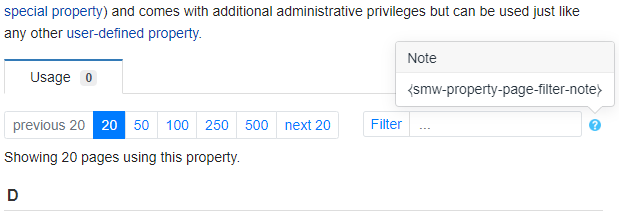
Which would create something like:
mwjames
on 1 Feb 2020
Awesome, very much indeed. Will do a pull soon after tea.
kghbln
on 1 Feb 2020
Oops, was not able to determine in which file this should go. Suspected "PropertyPage.php" but this does not seem right.
kghbln
on 1 Feb 2020
Oops, was not able to determine in which file this should go. Suspected "PropertyPage.php" but this does not seem right.
namespace SMW\Utils;
@@ -80,17 +81,26 @@ class Pager {
Ah, did not know that you can do a combined search. Ok, so it is "src/Utils/Pager.php"
kghbln
on 1 Feb 2020
Ok, so it is "src/Utils/Pager.php"
Yes, so normally (for all those in src as per PSR-4) namespace SMW\Utils; indicates the directory and of course the namespace.
mwjames
on 1 Feb 2020
Related issues
 JeroenDeDauw
·
3Comments
JeroenDeDauw
·
3Comments
 WolfgangFahl
·
3Comments
WolfgangFahl
·
3Comments
 akuckartz
·
3Comments
akuckartz
·
3Comments
 osnard
·
3Comments
osnard
·
3Comments
 MvGulik
·
4Comments
MvGulik
·
4Comments
Most helpful comment
Of course not, because a distinct value match (without any expression) is used as-is. It makes use of the keyword field in ES and is not analyzed.
In general, I advise against such "automatically prepend" solution.
Too much work, if someone wants to do that fine by me.
Shouldn't be much of a problem to add 🛈 and some context info. Again, not high on my list if someone wants to give it a try, feel free.
Yes, because the full-text is enabled. As I mentioned earlier "... depending on the selected QueryEngine ..." which includes the fact whether the full-text is enabled or not. As a reminder, the MySQL full-text has its quirks and is not nearly as powerful as the ES full-text.