Semantic-ui: Custom Templates for Search
It'd be great to be able to use custom templates for the search module. It might work well to spec a template like this:
$(".ui.search").search({
   ...
   template: "myTemplate"
});

<div class="template">
   <h1>{{title}}</h1>
</div>
If this already exists and I missed it, apologies. Didn't see anything like this in the docs, tho.
 jwd2a
jwd2a
All 6 comments
You can modify search templates by altering $.fn.search.settings.templates.
They are currently simple JS concatenated strings, but could also work with compiled handlebar templates, although i haven't tested
If you wanted to overwrite default template just overwrite $.fn.search.settings.template.standard
If you want to overwrite the message template modify $.fn.search.settings.templates.message
If you want to add your own template just specify a new template name as type on init.
For example
$.fn.search.settings.templates.special = function(response) {
 // do something with response
  return html;
};

$('.ui.search')
  .search({
    type: 'special'
  })
;
You can also specify on element init, but you'd have to do this each time.
$('.ui.search')
  .search({
    type: 'special'
    templates: {
      special: function(response){

      }
  })
;
 jlukic
on 21 Mar 2015
jlukic
on 21 Mar 2015
Awesome, thanks for that info. I'll go that route. Should I leave this open so it makes its way into the docs at some point?
jwd2a
on 21 Mar 2015
Yes
jlukic
on 22 Mar 2015
Added to 2.0 docs with explanation
jlukic
on 14 Apr 2015
Should not these settings be found on the settings page?
 zykadelic
on 13 Jun 2016
zykadelic
on 13 Jun 2016
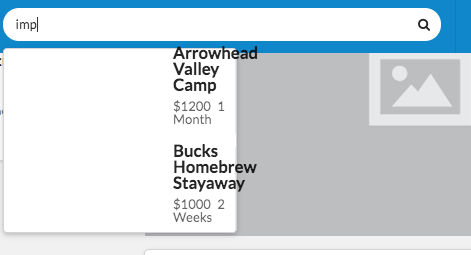
I tried to use custom template (using items). But I can't control dropdown size. How to solve this?
 stephannv
on 12 Nov 2017
stephannv
on 12 Nov 2017
Related issues
 kntmrkm
·
3Comments
kntmrkm
·
3Comments
 Morrolan
·
3Comments
Morrolan
·
3Comments
 mixerp
·
3Comments
mixerp
·
3Comments
 ghost
·
3Comments
ghost
·
3Comments
 sarbona
·
3Comments
sarbona
·
3Comments
Most helpful comment
You can modify search templates by altering
$.fn.search.settings.templates.They are currently simple JS concatenated strings, but could also work with compiled handlebar templates, although i haven't tested
If you wanted to overwrite default template just overwrite
$.fn.search.settings.template.standardIf you want to overwrite the message template modify
$.fn.search.settings.templates.messageIf you want to add your own template just specify a new template name as
typeon init.For example
You can also specify on element init, but you'd have to do this each time.