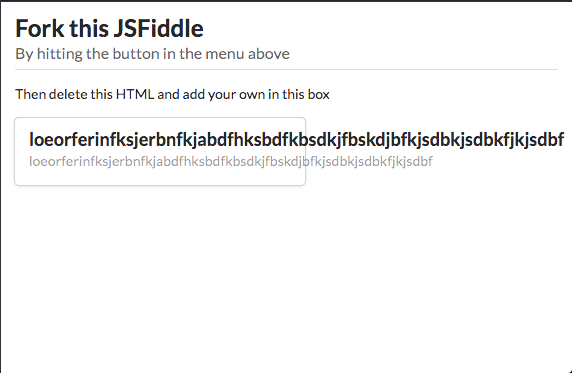
Semantic-ui: Card content overflows the container
All 7 comments
This is a pretty rare case for someone to have content with no spaces so I don't really see this being a problem. Unless you can provide an example of where this makes it an issue.
 hammy2899
on 21 Feb 2018
hammy2899
on 21 Feb 2018
Actually its easy to fix adding word-wrap CSS rule.
word-wrap: break-word
See fork on js fiddle: https://jsfiddle.net/kxvdb7Lx/3/
Would be nice to see it as a confirmed bug, because this behavior is unexpected.
 w96k
on 21 Feb 2018
w96k
on 21 Feb 2018
This issue has been automatically marked as stale because it has not had recent activity. It will be closed in 30 days if no further activity occurs. Thank you for your contributions.
![stale[bot] picture](https://avatars.githubusercontent.com/in/1724?v=4&s=40) stale[bot]
on 22 May 2018
stale[bot]
on 22 May 2018
This is a pretty rare case for someone to have content with no spaces so I don't really see this being a problem. Unless you can provide an example of where this makes it an issue.
I believe things should be working by default. But this is your call as maintainers
 haikyuu
on 22 May 2018
haikyuu
on 22 May 2018
@w96k thanks for the fix and PR.
haikyuu
on 22 May 2018
Prepared a PR for Fomantic-UI adopting the fix by @w96k here https://github.com/fomantic/Fomantic-UI/pull/703
 lubber-de
on 29 Apr 2019
lubber-de
on 29 Apr 2019
This is a pretty rare case for someone to have content with no spaces so I don't really see this being a problem. Unless you can provide an example of where this makes it an issue.
E.g. file names.
 coder8keyboard
on 18 Jul 2019
coder8keyboard
on 18 Jul 2019
Related issues
 mixerp
·
3Comments
mixerp
·
3Comments
 ghost
·
3Comments
ghost
·
3Comments
ghost
·
3Comments
ghost
·
3Comments
 kntmrkm
·
3Comments
kntmrkm
·
3Comments
 larsbo
·
3Comments
larsbo
·
3Comments
Most helpful comment
E.g. file names.