Semantic-ui: Semantic Modal does not "center" at the middle of the page
Hello All,
I'm working on a personal project using dummy data as the front end guy.
When using Semantic, i've experienced good times, but using MODAL stresses me out as it doesnt work.
Semantic Modal does not "center" at the middle of the page, instead, when it opens, a certain "top: 0px;" shows up in the CSS inspect section of the browser. When I uncheck the property, the modal returns to center like it should.
This is the view when loaded on the browser

This is the view when top: 0px; appears on the page
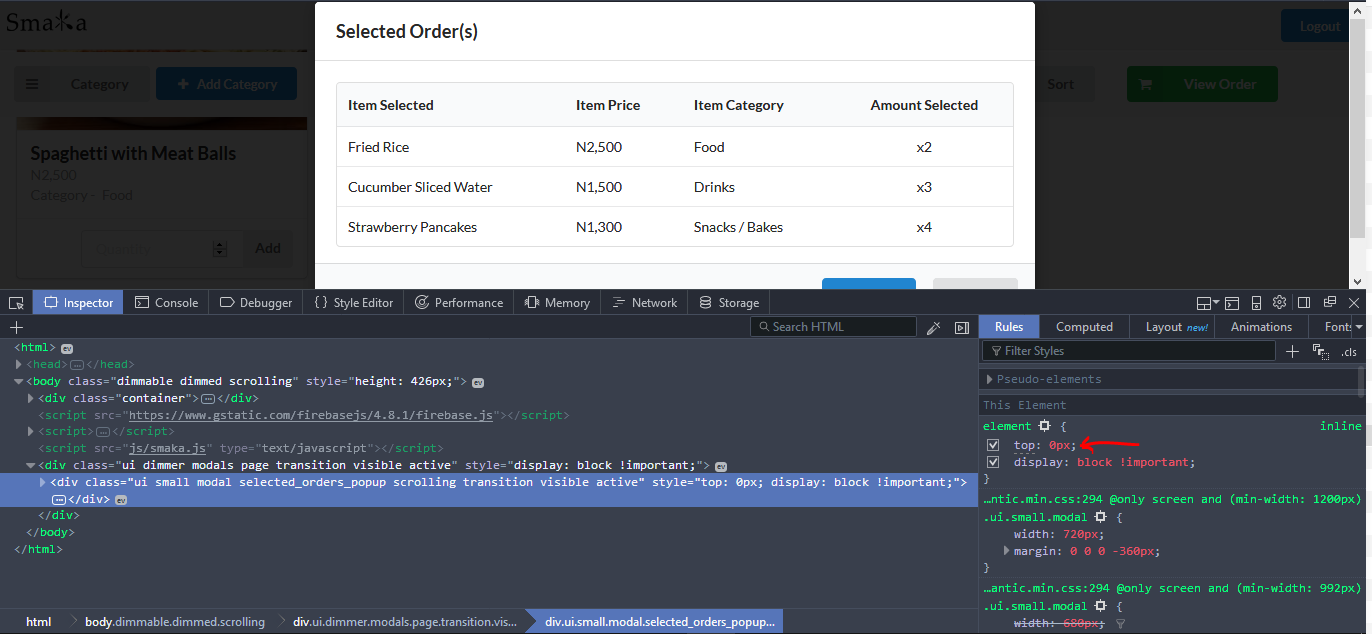
This is what i want to happen and it happens when top: 0px; is unchecked.

The issue with the top: 0px is that it seems to be a predefined style that comes with the modal...
Please any assistance is needed on this project!
Thanks
 georgeno1422
All 3 comments
The below css worked for me. Using flexbox positioning on the .dimmer and overriding built-in properties on the modal itself:
.dimmed.dimmable > .ui.animating.dimmer, .dimmed.dimmable > .ui.visible.dimmer, .ui.active.dimmer {
  display: flex;
  align-items: center;
  justify-content: center;
}
.ui.modal,
.ui.active.modal {
  margin: 0 auto!important;
  top: auto !important;
  left: auto !important;
  transform-origin: center !important;
  transition: all ease .5s;
}
 bholcombe
on 16 Mar 2018
bholcombe
on 16 Mar 2018
I had the same issue when I updated the package semantic-ui-css to 2.3.1.
And it looks like a bug that introduced in the new version. https://github.com/Semantic-Org/Semantic-UI/issues/6185#issuecomment-376725956
By downgrade semantic-ui-css to 2.2.14 the issue was solved.
npm i [email protected]
Hope this can help anyone have the same problem.
 kunwang0916
on 29 Mar 2018
kunwang0916
on 29 Mar 2018
I also had this same problem, both solutions worked, specifically with this issue when forking this repository:
 EliaMelfior
on 7 Dec 2018
EliaMelfior
on 7 Dec 2018
Related issues
 ghost
·
3Comments
ghost
·
3Comments
 mllamazares
·
3Comments
mllamazares
·
3Comments
 playgithub
·
3Comments
playgithub
·
3Comments
 guilhermeblanco
·
3Comments
guilhermeblanco
·
3Comments
 rdzidziguri
·
3Comments
rdzidziguri
·
3Comments
Most helpful comment
I had the same issue when I updated the package
semantic-ui-cssto2.3.1.And it looks like a bug that introduced in the new version. https://github.com/Semantic-Org/Semantic-UI/issues/6185#issuecomment-376725956
By downgrade
semantic-ui-cssto2.2.14the issue was solved.Hope this can help anyone have the same problem.