Semantic-ui: [Menu] - Dropdown items behaving inconsistently in text menus
Steps to Reproduce
This one is a bit odd so I have created a demo: https://jsfiddle.net/g0tn16j9/2/
Expected
Dropdown items should be full width (stretch across their container, with left alignment)
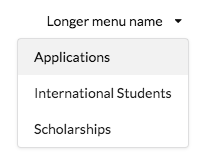
Result
Dropdown items are not full width when their Parent trigger is short text within a .ui.text.menu

Testcase
https://jsfiddle.net/g0tn16j9/2/
 kiwicopple
All 3 comments
Hi @kiwicopple, that’s when the transition component tries to determine the final display type of a menu, and settles on Flexbox, because there’s a CSS inheritance issue that we need to fix. I’ll propose a change as soon as I can, in the meantime, I don’t think the transition’s displayType property is exposed through the dropdown component, but you can use data-display to force it:
<div class="menu" data-display="block">
Or you could set it globally for all transitions, but you probably don’t want to do that:
$.fn.transition.settings.displayType = 'block'
 awgv
on 5 Sep 2017
awgv
on 5 Sep 2017
Thanks for the quick response @Banandrew . The data-display="block" attribute is working perfectly
kiwicopple
on 5 Sep 2017
There has been no activity in this thread for 90 days. While we care about every issue and we’d love to see this fixed, the core team’s time is limited so we have to focus our attention on the issues that are most pressing. Therefore, we will likely not be able to get to this one.
However, PRs for this issue will of course be accepted and welcome!
If there is no more activity in the next 90 days, this issue will be closed automatically for housekeeping. To prevent this, simply leave a reply here. Thanks!
![stale[bot] picture](https://avatars.githubusercontent.com/in/1724?v=4&s=40) stale[bot]
on 5 Jun 2018
stale[bot]
on 5 Jun 2018
Related issues
 zhaoyao91
·
3Comments
zhaoyao91
·
3Comments
 kntmrkm
·
3Comments
kntmrkm
·
3Comments
 miguelmota
·
3Comments
miguelmota
·
3Comments
 mixerp
·
3Comments
mixerp
·
3Comments
 davialexandre
·
3Comments
davialexandre
·
3Comments
Most helpful comment
Hi @kiwicopple, that’s when the transition component tries to determine the final display type of a menu, and settles on Flexbox, because there’s a CSS inheritance issue that we need to fix. I’ll propose a change as soon as I can, in the meantime, I don’t think the transition’s
displayTypeproperty is exposed through the dropdown component, but you can usedata-displayto force it:Or you could set it globally for all transitions, but you probably don’t want to do that: