Semantic-ui: [Sidebar] should preserve overlay behavior when its transition is set to "overlay"
Sidebar behaves correctly on my computer when its transition is set to overlay as
$('.ui.sidebar')
    .sidebar('setting', {
      transition: 'overlay'
    })
  ;
But while on internet explorer of windows mobile, it behaves according to "push" transition, i.e. does not slide over the content but pushes the content.
OS: Win Mobile
Device: Nokia Lumia 520
Browser: Default i.e. shipped with the phone. Sorry couldn't find its version etc anywhere...
Maybe it's irrelevant but the same issue repeats in Chrome's dev tools when device tool bar is active (Ctrl + Shift + M in windows while Dev tools is on)
Test case: https://semantic-ui.com/ the menu toggle item on top left of the page.
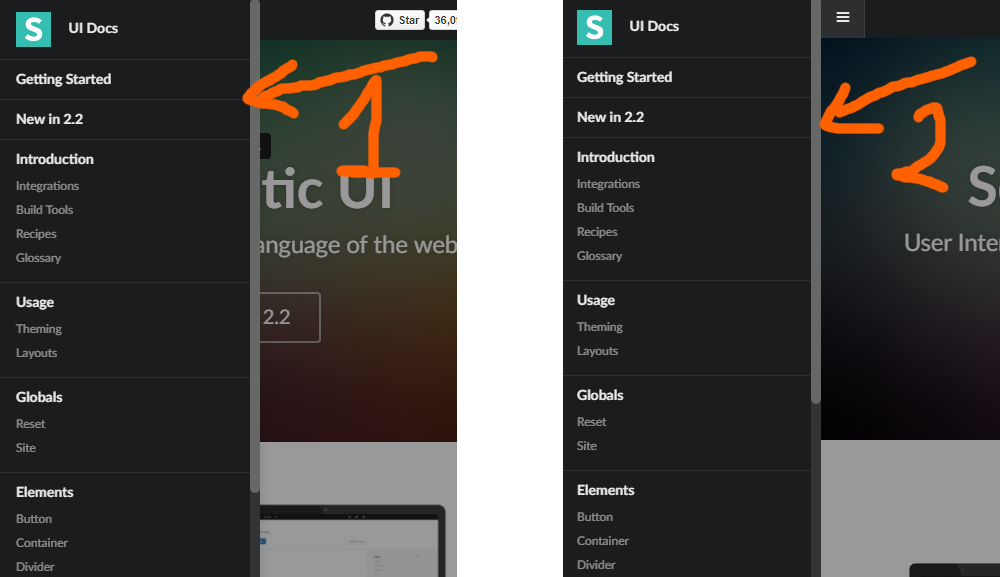
Attached an image showing the sidebar behavior in chrome (1) and mobile (2) mode. I think it should always behave as 1 when transition is set to overlay.
 ihpar
ihpar
All 4 comments
Hi @ihpar, is it 520 with Windows Phone 8 or 8.1?
 awgv
on 19 Jul 2017
awgv
on 19 Jul 2017
Hi @Banandrew, it's Windows Phone 8.1 having a 480x800 resolution.
ihpar
on 20 Jul 2017
@ihpar Sorry for the delay, the sidebar component uses a separate property mobileTransition for mobile, it defaults to uncover; set it to overlay, and it should do it.
awgv
on 31 Jul 2017
@Banandrew Thank you very much. That's awesome, mobileTransition: 'overlay' fixed my problem. Best!
ihpar
on 31 Jul 2017
Related issues
 batata004
·
3Comments
batata004
·
3Comments
 deneuxa
·
3Comments
deneuxa
·
3Comments
 ghost
·
3Comments
ghost
·
3Comments
 zhaoyao91
·
3Comments
ghost
·
3Comments
zhaoyao91
·
3Comments
ghost
·
3Comments
Most helpful comment
@ihpar Sorry for the delay, the sidebar component uses a separate property
mobileTransitionfor mobile, it defaults touncover; set it tooverlay, and it should do it.