Semantic-ui: [Dropdown] - Cannot press enter to go to links in dropdown list
I'm working on a keyboard-accessible top navigation bar using Semantic UI, but I can't use the Enter/Return key to access the links in the drop-down menus, even when the focus is on the link. I created a blank JS Fiddle here to demonstrate. I'm also using Chrome Vox as a screen reader, so that I know where the current focus is.
<div class="ui menu">
    <a class="item" href="https://www.google.com">Google 1</a>
    <div class="ui dropdown link item">
        <a href="#">
            <span>Google 2</span>
            <i class="dropdown icon"></i>
        </a>
        <div class="menu">
            <a class="item" href="https://www.google.com">Google 2.1</a>
            <a class="item" href="https://www.google.com">Google 2.2</a>
        </div>
    </div>
</div>
JavaScript initialization:
$(document).ready(function() {
    $('.ui.dropdown').dropdown();
});
 quantran13
All 13 comments
Hi @quantran13, sorry for the delay, after examining the source, I think you’ll have to initialize the dropdown with custom action:
$('.ui.dropdown')
  .dropdown({
    action: function (text, value, element) {
      element.click()
    }
  })
Please let me know if that fixes it.
 awgv
on 13 Jul 2017
awgv
on 13 Jul 2017
@Banandrew Nope, it doesn't work. The function wasn't triggered when I pressed Enter. The only thing I can do right now is add a .keyup() event handler and detect the Enter/Return key by keyCode being 13, but I hope there's a better way.
quantran13
on 13 Jul 2017
@quantran13 It works for me when I select dropdown’s options starting with 2.1. Maybe you pressed Enter when .ui.dropdown.link.item was focused?
awgv
on 13 Jul 2017
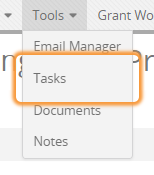
This is when I'm using ChromeVox to navigate. The _Tasks_ option is focused, the link to it is shown on the bottom left corner of Chrome. If I click on the option, Chrome will navigate to the link, but nothing happens when I press Enter.
quantran13
on 18 Jul 2017
@quantran13 I can’t seem to reproduce, and Enter key does click. Say, I’ll be using the markup from the original post, could you please tell the exact steps that I should follow to reproduce it?
awgv
on 19 Jul 2017
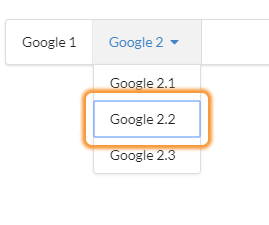
@Banandrew With ChromeVox enabled, I just navigate using the tab key until I arrive at the above position. Pressing Enter won't do anything. This is the JS Fiddle that I'm using.
quantran13
on 19 Jul 2017
@quantran13 What version of Chrome are you using? I can’t tab to select anything in the dropdown, it stops at <a href="#"> and starts over, never going deeper into the menu. That’s why I asked about it before, I thought that maybe you used tabindex somehow.
awgv
on 19 Jul 2017
@Banandrew That's weird. I should have included allowTab: false, but even then I can still go deeper into the menu. I updated the JS fiddle here. Now that I included allowTab: false, when you're on Google 2, pressing Enter should expand the menu, and pressing Tab will take you inside the menu. That's what I got.
I'm using Chrome version 59.0.3071.115 (Official Build) (64-bit), and Chrome says it's up to date.
quantran13
on 19 Jul 2017
@quantran13 Got it, thank you—I’ll post an update when I figure it out.
awgv
on 19 Jul 2017
@quantran13 Enter doesn’t work, because the component prevents the default behaviour, and relies on specific classes to understand if an item should be selected. So a better workaround, I think, is to attach focusin/focusout events to manupulate these classes instead, something like that:
$('.ui.dropdown > .menu > .item')
  .focusin(function (event) {
    $(this)
      .addClass('active selected')
  })
  .focusout(function (event) {
    $(this)
      .removeClass('active selected')
  })
There’re several possible changes to the core that we could do to fix the issue, but I’m not sure if the maintaner would agree on any of them, so it’s probably best to wait for his commentary.
awgv
on 19 Jul 2017
@Banandrew Got it, thanks! For now I'm just gonna use your workaround. I understand it would be hard to make changes to the core (even harder than the toggling sub-menu on click thing), so this should be good enough.
quantran13
on 19 Jul 2017
This issue has been automatically marked as stale because it has not had recent activity. It will be closed in 30 days if no further activity occurs. Thank you for your contributions.
![stale[bot] picture](https://avatars.githubusercontent.com/in/1724?v=4&s=40) stale[bot]
on 23 Feb 2018
stale[bot]
on 23 Feb 2018
Is this issue still being worked on? I'm coming across the same problem where the element gets selected when tabbing through but enter does not open the link. I will try to implement the workaround for now.
 micleners
on 18 Jul 2018
micleners
on 18 Jul 2018
Related issues
 ghost
·
3Comments
ghost
·
3Comments
 zhaoyao91
·
3Comments
zhaoyao91
·
3Comments
 iPaoo
·
3Comments
iPaoo
·
3Comments
 miguelmota
·
3Comments
miguelmota
·
3Comments
 playgithub
·
3Comments
playgithub
·
3Comments