Semantic-ui-react: Responsive: does not initialize correctly when used with Gatsby
Bug Report
Site generated with Gatsby produces a page that doesn't properly set the DOM on page load from Responsive. The page works fine when used with vanilla react and with Gatsby develop.
A test repo https://github.com/sveinse/gatsby-semantic-ui-bug has been created. Please see its README.md. The issue is related to DesktopContainer and MobileContainer in https://github.com/sveinse/gatsby-semantic-ui-bug/blob/master/src/components/layout.js
I'm not sure at this stage if this is a Gatsby issue or a semantic-ui-react issue. The issue has been filed with Gatsby at https://github.com/gatsbyjs/gatsby/issues/26060
As described in https://github.com/gatsbyjs/gatsby/issues/26060#issuecomment-664979848 this seems to be related to the default value of Responsive.getWidth when building the pages. When gatsby build is run, the page is rendered. The default getWidth will in this case return 0. The only combination that seems to work is when getWidth returns a value that puts both DesktopContainer and MobileContainer out of view. However, that results in a static page that doesn't contain anything and everything has to be loaded dynamically on page load.
If the page on build contains either DesktopContainer or the MobileContainer, the oposite view on page load does not work. I.e. if the static page contains the DesktopContainer, the mobile page load is incorrect. If the static page contains the MobileContainer, the desktop page load is incorrect.
Steps
- Clone https://github.com/sveinse/gatsby-semantic-ui-bug and
npm install - Run
gatsby build && gatsby serve
Expected Result
In mobile view (narrow browser):
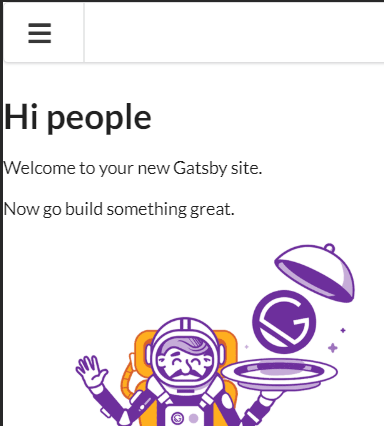
Actual Result
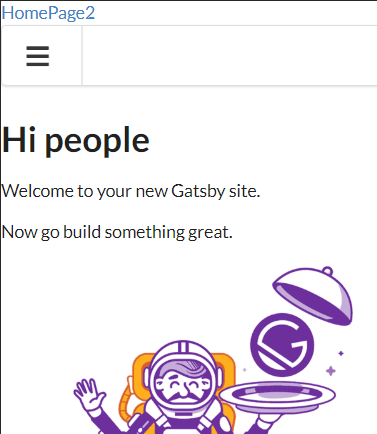
Version
1.0.0
 sveinse
All 12 comments
👋 Thanks for opening your first issue here! If you're reporting a 🐞 bug, please make sure you've completed all the fields in the issue template so we can best help.
We get a lot of issues on this repo, so please be patient and we will get back to you as soon as we can.
![welcome[bot] picture](https://avatars0.githubusercontent.com/in/4141?v=4&s=40) welcome[bot]
on 28 Jul 2020
welcome[bot]
on 28 Jul 2020
We have numerous issues related to SSR and Responsive component (#3361, #3948). Now it's obvious that we took a wrong decision with it 😨
I am going to deprecate Responsive component and remove it in v2 as it's impossible to properly fix it. The plan is to provide:
- [ ] Codesandboxes with NextJS, Gatsby with SSR compatible solution
- [ ] put deprecation notice on a component
BTW, thanks for detailed report. Really appreciate it ❤️
 layershifter
on 28 Jul 2020
layershifter
on 28 Jul 2020
@layershifter Thank you for the quick reply.
Do you have an issue where you'd like to further discuss the Resposive replacement methods for SSR? I tested the mobile-detect proposal as linked in https://github.com/Semantic-Org/Semantic-UI-React/issues/3361#issuecomment-453202401, but that does not resolve the issue. The mobile view still doesn't update the DOM as the Desktop view is stored in the static page.
I don't intend to be pushy, but this is actually a deal breaker for using Gatsby with this site. I was about to attempt react static, but I get the impression from these issues that this is a problem that applies to all SSRs. I thus will need to find a way to refactor the Responsive logic. ...or stick with a static site that use standard react CSR.
sveinse
on 28 Jul 2020
Do you have an issue where you'd like to further discuss the
Resposivereplacement methods for SSR?
I suggest to use this one.
Quick googling around the topic pointed me to: https://github.com/artsy/fresnel. I will give a try on it tomorrow.
layershifter
on 28 Jul 2020
To be clear, this is about Responsive only, right? There is no plans to do anything about Visibility?
sveinse
on 29 Jul 2020
@sveinse yep, it's only about Resposive. If you have issues with Visibility please open a separate issue.
layershifter
on 29 Jul 2020
Notes from today. @artsy/fresnel works like a 💎
Next.js
CodeSandbox: https://codesandbox.io/s/semantic-ui-react-gatsby-artsyfresnel-ws5g1
Deployed app: https://csb-26qe5-1a409ktxa.vercel.app/
Gatsby
CodeSandbox: https://codesandbox.io/s/semantic-ui-react-gatsby-artsyfreshnel-ws5g1
Deployed app: https://csb-ws5g1-5jlrmc3u3.vercel.app/
@sveinse I don't have experience with Gatsby so tried to do the simplest thing. Zero warnings in console 🤖 Can you please check?
layershifter
on 29 Jul 2020
@layershifter I have checked the Gatsby sandbox and it works. I checked the build output and it does contain both the mobile and the desktop variant in the SSR served page. The page will then use the variant the client needs on page load. Perfect.
The https://github.com/artsy/fresnel README has a great discussion about how to deal with SSR and pre-renderings for different viewports. It's discussing why its better to include all views and then select one rather than including one and re-render the other client-side.
If the objective for this issue is to provide user recommendations in the Semantic UI docs, I'm not so sure we should recommend setup like this (esp for SSR):
<Page>
    <Mobile>{everything}</Mobile>
    <Desktop>{everything}</Desktop>
</Page>
I know this is precisely where I started myself with this issue, which was based on some example code with Responsive. The reason is that {everything} is potentially rendered twice. Not that it necessarily is a problem with fully dynamic pages rendered at the client only, but it impacts SSRs. Which viewport do you serve? None? One? All? If you serve all, like @artsy/fresnel does, it'll double the page data in the served page because {everything} is included twice.
So as for my use case, I refactored my layout in such a way that the main page is only present once and keeping the specific mobile/desktop responsive changes minimal and separate.
<Page>
    <Mobile>{mobilelayout}</Mobile>
    <Desktop>{desktoplayout}</Desktop>
    {mainpage}
</Page>
If there is interest, I can share my implementation.
sveinse
on 30 Jul 2020
I know this is precisely where I started myself with this issue, which was based on some example code with
Responsive. The reason is that{everything}is potentially rendered twice. Not that it necessarily is a problem with fully dynamic pages rendered at the client only, but it impacts SSRs. Which viewport do you serve? None? One? All? If you serve all, like@artsy/fresneldoes, it'll double the page data in the served page because{everything}is included twice.So as for my use case, I refactored my layout in such a way that the main page is only present once and keeping the specific mobile/desktop responsive changes minimal and separate.
@sveinse that's a great call, thanks for pointing to this. Would you like to propose changes to #4008?
layershifter
on 30 Jul 2020
@layershifter my implementation goes along these lines: https://codesandbox.io/s/semantic-ui-react-gatsby-artsyfresnel-gn079
A couple of comments to it:
{children}ofResponsiveContaineris used only once, which is good- Having a combined
ResponsiveContainercreates a somewhat convoluted layout mixing mobile and desktop into one - The menu is repeated three times, so it is probably wise to make a component of it
@artsy/fresneldon't seem to have a good support for getting the media query programmatically. E.g. for setting inline styling from a prop. The example in the sandbox doesn't scale the banner div minHeight and the usage ofHomepageHeadingcould be improved.- For some unknown reason will not
Menucomponent in L136 update on screen when the state changes. It does not fix to the top. <Menu.Item>seems to be all or nothing. You cannot insert adivinside aMenublock.mediainserts a div. The above example would be simpler if you could insertdivs, but will render incorrectly due to thedivinterfering with the flexbox of the menu.
<Menu inverted pointing secondary size="large">
    <Media at="mobile">
        <Menu.Item onClick={this.handleToggle}>
            <Icon name="sidebar" size="large" />
        </Menu.Item>
    </Media>

    <Media greaterThan="mobile">
      <Menu.Item as="a" active>Home</Menu.Item>
      <Menu.Item as="a">Work</Menu.Item>
      <Menu.Item as="a">Company</Menu.Item>
      <Menu.Item as="a">Careers</Menu.Item>
    </Media>

    <Menu.Item position="right">
        <Button as="a" inverted>
          Log in
        </Button>
        <Button as="a" inverted style={{ marginLeft: "0.5em" }}>
          Sign Up
        </Button>
    </Menu.Item>
</Menu>
@layershifter In your sandbox, you mention the DOM isn't updating on prop changes, preventing the Menu from becoming fixed when the user scrolls past the visibility threshold.
The DOM is getting updated correctly. This is a CSS issue in which there is a transform: translate3d(0, 0, 0); on the <Sidebar.Pushable> element. Any transform on a parent element makes it impossible for a child element to be fixed.
Removing the transform on the <Sidebar.Pushable> resolves the issue and allows the menu to become fixed.
I solved this by adding:
import styled from 'styled-components'

const SidebarPushable = styled(Sidebar.Pushable)`
    &.ui.segment.pushable {
        transform: none;
    }
`
And then change:
<Sidebar.Pushable as={Segment}>
    // sidebar
</Sidebar.Pushable>
To:
<Segment as={ SidebarPushable }>
    // sidebar
</Segment>
 aminal
on 11 Aug 2020
aminal
on 11 Aug 2020
If you serve all, like
@artsy/fresneldoes, it'll double the page data in the served page because {everything} is included twice.
:ceiling-cat: At Artsy we only use Fresnel for those subsets of a page that are entirely different between breakpoints. Most regular responsiveness is achieved by using styled-system’s responsive props.
/cc @damassi
 alloy
on 18 Aug 2020
alloy
on 18 Aug 2020
Related issues
 wyemun
·
3Comments
wyemun
·
3Comments
 GautierT
·
3Comments
GautierT
·
3Comments
 eGust
·
3Comments
eGust
·
3Comments
 saikrishnadeep
·
3Comments
saikrishnadeep
·
3Comments
 laukaichung
·
3Comments
laukaichung
·
3Comments
Most helpful comment
I suggest to use this one.
Quick googling around the topic pointed me to: https://github.com/artsy/fresnel. I will give a try on it tomorrow.