Semantic-ui-react: Popup: wrong positioning when `mountNode` uses `position: fixed`
Bug Report
Steps
-add Popup control
-set mountNode property
Expected Result
Popup should be renderer in a set node and visually be placed there
Actual Result
Popup is rendered in a set node but visually is NOT placed there
It is placed far away outside
Wrong calculation of transform css value
Version
0.87.3
In the version 0.86.0 all is ok
 twens
twens
All 15 comments
👋 Thanks for opening your first issue here! If you're reporting a 🐞 bug, please make sure you've completed all the fields in the issue template so we can best help.
We get a lot of issues on this repo, so please be patient and we will get back to you as soon as we can.
![welcome[bot] picture](https://avatars0.githubusercontent.com/in/4141?v=4&s=40) welcome[bot]
on 25 Jul 2019
welcome[bot]
on 25 Jul 2019
I was having a problem as well with the popup - the position of the popup was showing up over top of my content instead of center left where the position prop I had set up was telling to go. The popup also didn't seem to "pop up" at the right time and place in response to the mouse hover. I backed off to 0.86.0 and the problem goes away. Hope this problem can be fixed - affects a lot of my components and UI - assume others would agree.
 petemahoney
on 30 Jul 2019
petemahoney
on 30 Jul 2019
I'll add that this seemed to only affect popups that were positioned to the left (center left was my use case). Those that were positioned to the right seemed to still work just fine.
petemahoney
on 30 Jul 2019
@twens @petemahoney please provide a minimal CodeSandbox with clear repro steps. I tried to reproduce the issue, but I failed 🤔 See my try: https://codesandbox.io/s/semantic-ui-react-example-ql988
I don't see visible reasons why it should fail because mountNode sets only place in DOM. Do you have specific styles on it?
 layershifter
on 4 Aug 2019
layershifter
on 4 Aug 2019
I don't know if this is the same issue, but I have some issues if the mountNode is a Node wich ist styled with position: fixed;
Here is my excample: https://codesandbox.io/s/semantic-ui-react-example-umbkj
 fxOne
on 15 Aug 2019
fxOne
on 15 Aug 2019
@fxOne you're are passing null to mountNode prop in your example. So it will be default.
<Popup
  mountNode={ref.current} // is `null`
0.86.0
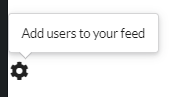
0.87.3
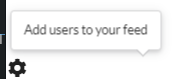
As I see, the issue is an arrow position. Are there other issues?
layershifter
on 21 Aug 2019
I don't think that ref.current is null because if i don't set it via <div ref={ref} I will get errors from ´
fxOne
on 21 Aug 2019
@fxOne it's null, refs are set in the commit phase of React, https://stackoverflow.com/a/55248699/6488546.
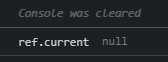 layershifter
on 21 Aug 2019
layershifter
on 21 Aug 2019
Of course it is null in the beginning, but after I clicked trigger it is no longer null.
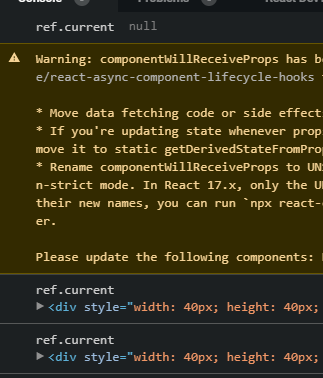
I'm sorry if I don't understand React good because I'm really new. If my example is wrong can you please tell how i can set the mountNode correct?
fxOne
on 21 Aug 2019
@fxOne Can you please explain what are you trying to do? 🤔
Why you need to use mountNode? It was designed to be used as an exceptional case as it changes where Popup's content will be mounted in DOM 📦
layershifter
on 21 Aug 2019
We have a system where we use multiple style systems. To separate them we prefix the css with an id selector and put all the html into a div with the same id.
An other use case should be native modal dialogs where the dialog will always be above the page content. So the only solution is to move the popup into the modal dialog.
I solved my issue by not using a position: fixed; node as a mountNode after finding this issue which works perfect. I only thought that I had the same issue and could provide a sample.
fxOne
on 22 Aug 2019
@fxOne got it, thank you.
I created a clean repro of the issue: https://codesandbox.io/s/semantic-ui-react-example-n07mv. Thank you for the patience 🐱
It looks like an issue with Popper.JS, as I was to reproduce it in plain usage: https://codesandbox.io/s/dazzling-tharp-rej7h. And it seems that it's related to https://github.com/FezVrasta/popper.js/issues/670.
However, positionFixed solved the issue: https://popper.js.org/popper-documentation.html#Popper.Defaults.positionFixed.
I tested it on https://codesandbox.io/s/semantic-ui-react-example-3sq5m, the arrow still has wrong position, but Popup itself is positioned properly. Can you please check?
layershifter
on 22 Aug 2019
@layershifter yes, this works. Thanks for your help!
fxOne
on 22 Aug 2019
Great, going to introduce positionFixed prop for Popup component to solve such issues 🐰
However, @fxOne may be you want to contribute? ⭐️ You can use eventsEnabled prop in Popup as reference...
layershifter
on 22 Aug 2019
@layershifter I'll try it this weekend.
fxOne
on 23 Aug 2019
Related issues
 dilizarov
·
3Comments
dilizarov
·
3Comments
 Ctesias
·
3Comments
Ctesias
·
3Comments
 levithomason
·
3Comments
levithomason
·
3Comments
 devsli
·
3Comments
devsli
·
3Comments
 wyemun
·
3Comments
wyemun
·
3Comments