Semantic-ui-react: Modal: not centered in IE11
The modal component opens down and to the right on IE. It is centered on firefox and chrome. Additionally I can't open https://react.semantic-ui.com/modules/modal/ in IE to see if the issue is present on your website. I have not yet found a css workaround for this and I am not sure why this issue is only present in IE. Any help would be greatly appreciated.
 MariaBamundo
All 7 comments
👋 Thanks for opening your first issue here! If you're reporting a 🐞 bug, please make sure you've completed all the fields in the issue template so we can best help.
We get a lot of issues on this repo, so please be patient and we will get back to you as soon as we can.
![welcome[bot] picture](https://avatars0.githubusercontent.com/in/4141?v=4&s=40) welcome[bot]
on 17 Jan 2019
welcome[bot]
on 17 Jan 2019
Tested in IE 18 - 15 on Windows 10 and this is working. Which version of IE is this not working for?
 levithomason
on 17 Jan 2019
levithomason
on 17 Jan 2019
Hi, Thankyou for getting back to me so quickly!
The modal component is not centered on IE 11.0.9600.18816 on Windows 7. I also can't access any of the documentation on IE except for the initial Introduction page. All of the links in the left hand menu render a blank page. If I open the console on the intro page (https://react.semantic-ui.com/) I get a console error: SCRIPT438: Object doesn't support property or method 'assign'

If I click on any of the items in the sidebar, I get a Babel error in the console

MariaBamundo
on 18 Jan 2019
Update: I added style={{ position: 'static' }} to the modal component and it resolved this issue.
MariaBamundo
on 18 Jan 2019
I have the same issue on the modal page: https://react.semantic-ui.com/modules/modal/. This page has errors and shows nothing.
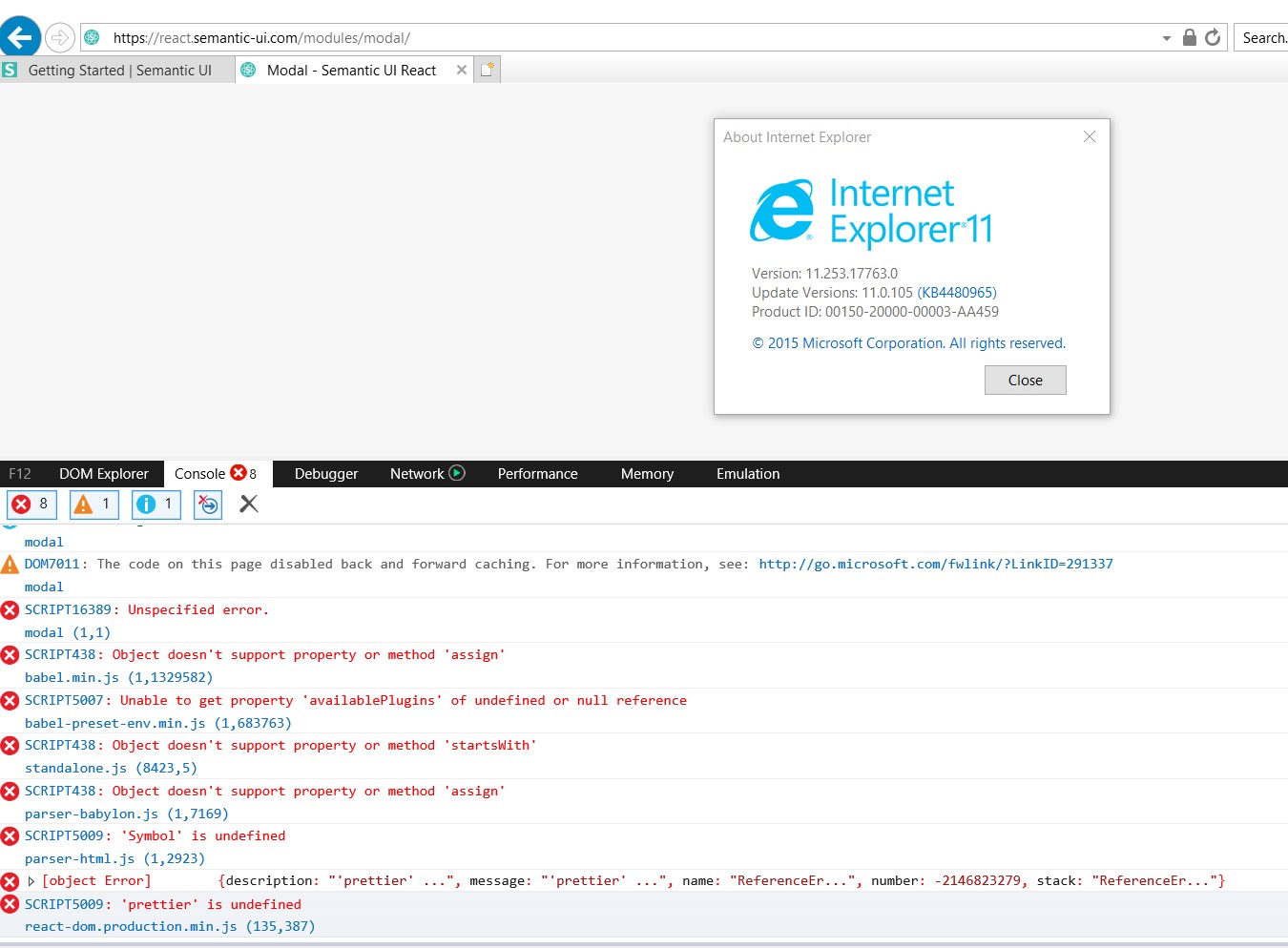
UPD: It is related, I have seen this late. https://github.com/Semantic-Org/Semantic-UI-React/issues/3369
 oolleegg55
on 21 Jan 2019
oolleegg55
on 21 Jan 2019
I can confirm that this is an issue in IE 11.0.105:

Oddly, it's not an issue for the non-React package:

As mentioned by @MariaBamundo, setting position: static fixes this. The parent dimmer aligns its children in the center, so we don't need position: absolute. Some initial cross-browser testing suggests that setting position: static doesn't break things in any browser. So it may make sense to just take out position: absolute from .ui.modal. This should probably be done in the semantic-ui package. I'll open an issue there.
 m1010j
on 13 Feb 2019
m1010j
on 13 Feb 2019
I provided a fix in #3679, please try it, feedback there is much appreciated 🙌
 layershifter
on 23 Jun 2019
layershifter
on 23 Jun 2019
Related issues
 mattmacpherson
·
3Comments
mattmacpherson
·
3Comments
 AlvMF1
·
3Comments
AlvMF1
·
3Comments
 laukaichung
·
3Comments
laukaichung
·
3Comments
 jayphelps
·
3Comments
jayphelps
·
3Comments
 ryanpcmcquen
·
3Comments
ryanpcmcquen
·
3Comments
Most helpful comment
Update: I added style={{ position: 'static' }} to the modal component and it resolved this issue.