Semantic-ui-react: Dropdown: searchInput onChange fires Dropdown onChange as well
Bug Report
Steps
- Create a
Dropdowncomponent - Override its
searchInputso that it provides a customonChangecallback.
Expected Result
Typing inside of Dropdown.SearchInput should only trigger its onChange.
Actual Result
Typing triggers input's onChange first and then dropdown's onChange callbacks.
Version
0.82.3
Testcase
 mic4ael
All 6 comments
👋 Thanks for opening your first issue here! If you're reporting a 🐞 bug, please make sure you've completed all the fields in the issue template so we can best help.
We get a lot of issues on this repo, so please be patient and we will get back to you as soon as we can.
![welcome[bot] picture](https://avatars0.githubusercontent.com/in/4141?v=4&s=40) welcome[bot]
on 4 Sep 2018
welcome[bot]
on 4 Sep 2018
Thanks, awesome report! PR is coming.
 layershifter
on 4 Sep 2018
layershifter
on 4 Sep 2018
Amazing work! You guys rock :guitar:
mic4ael
on 4 Sep 2018
Fixed in #3123, will come with the next release.
layershifter
on 4 Sep 2018
Just a question, you have overrided onSearchChange in your test, whereas I mentioned that it's
onChange that causes the problem. Is that correct?
wrapperShallow(
    <Dropdown
        onSearchChange={onSearchChange}
        options={options}
        search
        searchInput={{ onChange: onInputChange }}
    />,
)
Yes, it's a correct change.
  <Dropdown
    searchInput={{ onChange: (e, { value }) => console.log('input onChange: ' + value) }}
    onChange={(e, { value }) => console.log('dropdown onChange:' + value)}
    onSearchChange={(e, { searchQuery }) => console.log('dropdown onSearchChange: ' + searchQuery)}
    options={[
      { text: 'text1', value: '1' },
      { text: 'text2', value: '2' },
    ]}
    closeOnChange
    search
    multiple
    selection
  />
See result:
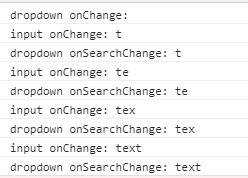
onChange will be called only when a value will be selected.
The same code on master:

layershifter
on 4 Sep 2018
Related issues
 AlvMF1
·
3Comments
AlvMF1
·
3Comments
 eGust
·
3Comments
eGust
·
3Comments
 GautierT
·
3Comments
GautierT
·
3Comments
 mattmacpherson
·
3Comments
mattmacpherson
·
3Comments
 saikrishnadeep
·
3Comments
saikrishnadeep
·
3Comments
Most helpful comment
Thanks, awesome report! PR is coming.