Semantic-ui-react: Dropdown: clicking outside vs. closing behavior
Issue 1
- Steps: Click on the dropdown then outside.
- Expected Result: No option selected. Works if we close instead of clicking outside.
- Actual Result: First option selected.
Issue 2
- Steps: Select
Item Bthen search forItem D(no results). Close dropdown (do not click outside). - Expected Result:
Item Bdisplayed. - Actual Result:
Item Ddisplayed.Item Bis displayed back if we click outside instead.
Issue 3
- Steps: Select
Item Bthen search forItem D(no results). Click outside, open the dropdown and click outside once more. - Expected Result:
Item Bselected. - Actual Result:
Item Aselected.
Version
0.73.0
Testcases
 AlvMF1
All 13 comments
Does selectOnBlur={false} do the trick?
 jducasse-console
on 18 Sep 2017
jducasse-console
on 18 Sep 2017
Cool, it does for items 1 and 3!
I wonder if that should be the default option...
AlvMF1
on 18 Sep 2017
First, thank you for the super awesome bug report. Makes it a joy to solve when people are so meticulous!
I wonder if that should be the default option...
It is not for parity with SUI core, which selects on blur by default as well. It makes it a little easier to quickly tab through forms.
Issue 2...
Yep, bug:
- Searching sets the
selectedIndex(highlighted item) to0, which isItem A - Blurring the Dropdown then makes the selected item (Item A) active
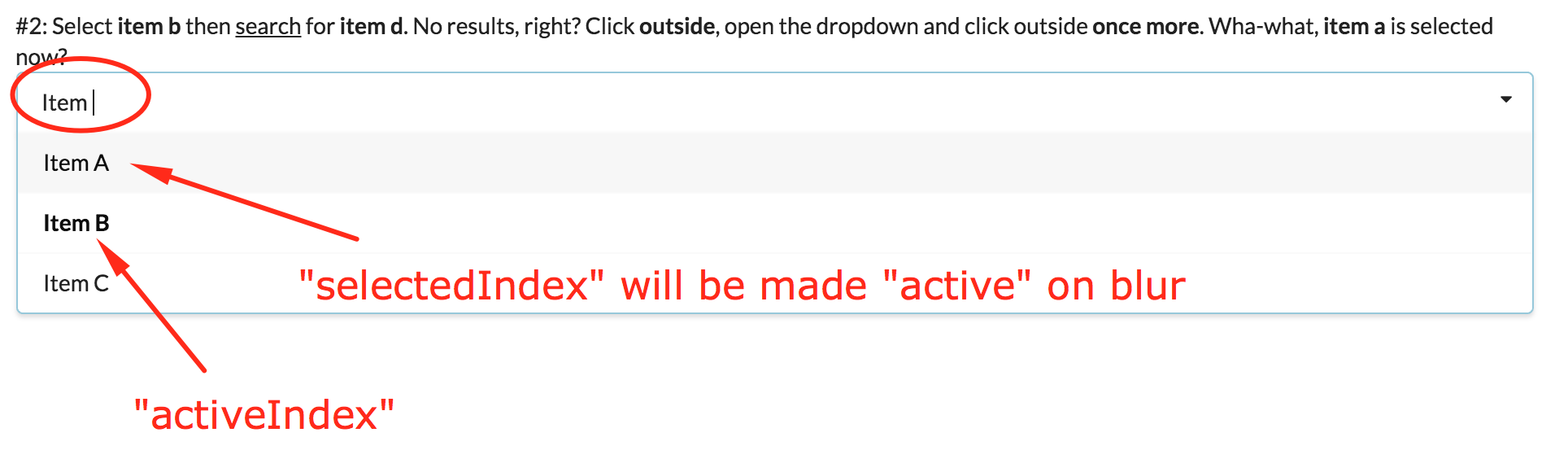
When searching for Item D, no values are shown _but the selectedIndex is still 0_. I think this is the issue. When there are no matching values, we should have a selectedIndex of -1.

I would start by looking at Dropdown.js setSelectedIndex(). This method may not be setting the correct selectedIndex in this case.
 levithomason
on 23 Sep 2017
levithomason
on 23 Sep 2017
This issue has been automatically marked as stale because it has not had recent activity. It will be closed in 30 days if no further activity occurs. Thank you for your contributions.
![stale[bot] picture](https://avatars3.githubusercontent.com/in/1724?v=4&s=40) stale[bot]
on 4 Feb 2018
stale[bot]
on 4 Feb 2018
Any update on the status of this? Seems like it would be a good thing to have fixed!
 clj2289
on 6 Feb 2018
clj2289
on 6 Feb 2018
PR up in https://github.com/Semantic-Org/Semantic-UI-React/pull/2375. It will be fixed when merged 🎉
levithomason
on 14 Feb 2018
There has been no activity in this thread for 90 days. While we care about every issue and we’d love to see this fixed, the core team’s time is limited so we have to focus our attention on the issues that are most pressing. Therefore, we will likely not be able to get to this one.
However, PRs for this issue will of course be accepted and welcome!
If there is no more activity in the next 90 days, this issue will be closed automatically for housekeeping. To prevent this, simply leave a reply here. Thanks!
stale[bot]
on 16 May 2018
Hi, I am interested in this bug fix. Currently I'm having similar behaviour, when clicked in "no results" a previous value is assigned. Any resolution?
Thanks!
 ignlopezperez
on 8 Jun 2018
ignlopezperez
on 8 Jun 2018
There has been no activity in this thread for 180 days. While we care about every issue and we’d love to see this fixed, the core team’s time is limited so we have to focus our attention on the issues that are most pressing. Therefore, we will likely not be able to get to this one.
However, PRs for this issue will of course be accepted and welcome!
If there is no more activity in the next 180 days, this issue will be closed automatically for housekeeping. To prevent this, simply leave a reply here. Thanks!
stale[bot]
on 5 Dec 2018
This issue will be closed due to lack of activity for 12 months. If you’d like this to be reopened, just leave a comment; we do monitor them!
stale[bot]
on 3 Jun 2019
There has been no activity in this thread for 180 days. While we care about every issue and we’d love to see this fixed, the core team’s time is limited so we have to focus our attention on the issues that are most pressing. Therefore, we will likely not be able to get to this one.
However, PRs for this issue will of course be accepted and welcome!
If there is no more activity in the next 180 days, this issue will be closed automatically for housekeeping. To prevent this, simply leave a reply here. Thanks!
stale[bot]
on 30 Nov 2019
Dependencies:
"semantic-ui-css": "^2.4.1",
"semantic-ui-react": "^0.87.3",
Solution of Issue 2
- Create a controlled
searchQuery.
const [dropdownSearchValue, setDropdownSearchValue] = useState('');
By using this 3 props:
searchQuery
Add the value of your seach query state.
<Dropdown
    searchQuery={
        dropdownSearchValue
    }
/>
onSearchChange
<Dropdown
    onSearchChange={
        ( _, { searchQuery } ) => setDropdownSearchValue(searchQuery)
    }
/>
onClose
<Dropdown
    onClose={
        () => setDropdownSearchValue('')
    }
/>
Complete version
const [dropdownSearchValue, setDropdownSearchValue] = useState('');

<Dropdown
    searchQuery={
        dropdownSearchValue
    }
    onSearchChange={
        ( _, { searchQuery } ) => setDropdownSearchValue(searchQuery)
    }
    onClose={
        () => setDropdownSearchValue('')
    }
/>
 michael-harley
on 5 Dec 2019
michael-harley
on 5 Dec 2019
Issue 2
- Steps: Select
Item Bthen search forItem D(no results). Close dropdown (do not click outside).- Expected Result:
Item Bdisplayed.- Actual Result:
Item Ddisplayed.Item Bis displayed back if we click outside instead.
This issue is still present the latest actual release.
0.73.0

1.2.0

 layershifter
on 18 Aug 2020
layershifter
on 18 Aug 2020
Related issues
 eXtreme
·
3Comments
eXtreme
·
3Comments
 KevinGorjan
·
3Comments
KevinGorjan
·
3Comments
 GautierT
·
3Comments
GautierT
·
3Comments
 saikrishnadeep
·
3Comments
saikrishnadeep
·
3Comments
 devsli
·
3Comments
devsli
·
3Comments
Most helpful comment
Does
selectOnBlur={false}do the trick?