Semantic-ui-react: eventStack: Multiple Popups do not behave correctly
I have some popups like this in my project (this is a simplified version with the important bits):
class SomePopup extends React.Component {
  constructor(props) {
    super(props);

    this.state = {
      open: false
    };

    this.close = this.close.bind(this);
    this.open = this.open.bind(this);
  }

  close() {
    this.setState({ open: false });
  }

  open() {
    this.setState({ open: true });
  }

  render() {
    const { /*Destructured props*/, ...rest } = this.props;
    return (
      <Popup
        {...rest}
        onClose={e => {
          this.close();
          // do something with a prop method
        }}
        onOpen={e => {
          this.open();
          // do something with a prop method
        }}
        trigger={
          <SomeButton
            onClick={e => {
              // do something  with a prop method
            }}
            active={this.state.open}
          />
        }
        on="click"
      >
        <div>Hello</div>
      </Popup>
    );
  }
}
Where SomeButton is a stateless button component.
As you can see the Popup is not controlled by its parent, it's left to its default behaviour (i.e. click outside to close) and when it opens or closes, the SomePopup's state will update accordingly in order to reflect the fact to the button that triggered the Popup, and have it stay in "active" state as long as its popup is open.
Now, I have noticed that Popups will close when you click outside, however they will not close when you click a button that opens another popup.
Am I doing something wrong with the Popups or is this some kind of bug?
Steps
Assume we have Popup A and Popup B that are implemented as shown above.
Do the following in this order:
- Click on Popup A's trigger button
- Click on Popup B's trigger button
Expected Result
I would expect that once I click on the trigger of Popup B then Popup A would close and Popup B would open
Actual Result
When the Popup A is open, and you click on the trigger component of Popup B the following will happen in this order:
- The
onClickhandler of the Popup B's trigger component will execute first - Then the
onOpenof Popup B will execute - Then immediately after, the
onClosehandler of Popup B will execute .
As a result it looks like as if Popup B did not open at all, when in reality, it opened and closed immediately. It makes no sense for Popup B's onClose to fire immediately after it was opened.
In contrast, when Popup A is open, and you click outside of it (not on the trigger of Popup B) the following will happen in this order:
- First the
onClickhandler on Popup A's trigger component will execute - Then Popup A's
onClosehandler will execute .
I have the feeling that the Portal component used, does not keep proper track of the Popups it has open, and while it's supposed to close the previous Popup it closes the new one
Version
0.72.0
Testcase
 mkarajohn
All 14 comments
I've made a simplified fork of codepen. @levithomason can you take a look and clarify about correct behaviour?
 layershifter
on 15 Sep 2017
layershifter
on 15 Sep 2017
If it helps, I am getting this error

Maybe Portal misbehaves because it is getting stateless components as triggers? In this screenshot Share is the stateless button that triggers the SocialPopup
EDIT: I updated the pen here https://codepen.io/mkarajohn/pen/xXbJYK?editors=0010
Indeed passing a stateless trigger vs a trigger that is a component instance has an effect. However the behaviour is still not correct, as I would expect that once I click on the trigger of Popup B, while Popup A is open, then Popup A would close and Popup B would open
mkarajohn
on 15 Sep 2017
Portal uses findDOMNode to find trigger's DOM element. There are something another in this case.
layershifter
on 15 Sep 2017
PortalusesfindDOMNodeto find trigger's DOM element
Well, whatever is the issue, I think we can agree the docs need an update to clarify that trigger should be a component instance 😄
mkarajohn
on 15 Sep 2017
Oh, shame :rabbit: You're right, I missed this because of work on #1879. I think that we can keep this as because I'll finish #1879. Seems I need to sleep :smile:
Glad that we found problem :+1:
Let's solve the asked problem. It comes from eventStack, Portal uses it to handle click on document.
Currently it fires only the last added event handler, that's why your Popup isn't closed. However, exactly this behaviour is needed by Modals and nested Popups.
My proposal is to add exclusive prop to Portal, that will handle how to deal with events handled by eventStack.
Portaldefaults totrueModaldefaults totruePopupdefaults tofalse
Also we will need more examples in docs about this and tests.
Portal.js
componentWillReceiveProps({ exclusive: next }) {
  const { exclusive: current } = this.props

  if(current === next) return
  this.removeListeners(current)
  this.addListeners(next)
}

addListeners = (exclusive) => {
  eventStack.sub('click', this.handleDocumentClick, exclusive && 'Portal')
  eventStack.sub('keydown', this.handleEscape, exclusive && 'Portal')
}

removeListeners = (exclusive) => {
  eventStack.unsub('click', this.handleDocumentClick, exclusive && 'Portal')
  eventStack.unsub('keydown', this.handleEscape, exclusive && 'Portal')
}
Cool, let me know if I can contribute to this, in any way (just keep in mind I am not familiar with the source and I will need to read the relevant files first)
mkarajohn
on 15 Sep 2017
@mkarajohn Contributions are welcome :+1:
layershifter
on 15 Sep 2017
@layershifter can you elaborate on your proposed solution? Looks like you are making changes to Portal but would you not also need to make changes to eventStack or is this sufficient? I can also open up another issue about this, but adding an array of enums for the “on” Popover prop is broken, at least when you use [‘focus’, ‘click’]. A click on the trigger briefly opens the popover and then immediately closes it. I have a feeling a change is also required to usage of eventStack to fix this bug.
 austinfox
on 21 Sep 2017
austinfox
on 21 Sep 2017
Also, what would it mean if I create one Popup with exclusive=true and then another Popup with exclusive=false? If I click on the first one, and then the next, do both stay open? What if I click on the second, and then the first, does the second one close? I don't believe the code above will work in its current state.
austinfox
on 21 Sep 2017
Lets more conversation to #2099.
layershifter
on 22 Sep 2017
I think this needs to be reopened.
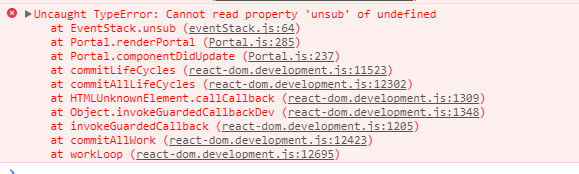
If you check out the Testcase from the 1st post, now there is an error thrown when you open a second Popup while another one is open.
With the "Stateless Triggers" it happens the moment you click the second button, while a popup is open
With the "Triggers with a class instance" it happens when, after you click the second button, you click the first button again.
mkarajohn
on 25 Sep 2017
As we discussed, "Stateless Triggers" will not work correctly because refs aren't supported on them.
There is problem in the design of eventStack, PR is coming.
layershifter
on 25 Sep 2017
Ok, but, thing is it throws on class based triggers too. Is that expected?
mkarajohn
on 25 Sep 2017
No, it's bug and it will be resolved by #2117.
layershifter
on 25 Sep 2017
Related issues
 wyemun
·
3Comments
wyemun
·
3Comments
 hankthewhale
·
3Comments
hankthewhale
·
3Comments
 devsli
·
3Comments
devsli
·
3Comments
 laukaichung
·
3Comments
laukaichung
·
3Comments
 GautierT
·
3Comments
GautierT
·
3Comments