Semantic-ui-react: in input field: iconPosition doesn't accept the value'Right'.
Warning: Failed prop type: Invalid prop iconPosition of value right supplied to Input, expected one of ["left"].
 riyagarg
All 8 comments
It doesn't accept right because it's right by default:
<Input /> // equals to <Input iconPosition='right' />
So, it's doesn't make sence. Also, SUI's css doesn't have class for right.
 layershifter
on 11 May 2017
layershifter
on 11 May 2017
but how to deal with the iconPosition in RTL?
As if we are giving the iconPosition = 'left' in the input then its moving to right in RTL.
if we are using the default position for icons in the rightside then its position is not changing in RTL, ideally it should move to left.
but if I am providing the iconPosition ='right', it works fine in the RTL but I am getting the above logged warning.
riyagarg
on 11 May 2017
I don't understand your problem. If you need icon on right, don't set iconPosition prop.
However, possible there is another behaviour in RTL SUI.
LTR
<Input icon='users' />

<Input icon='users' iconPosition='left' />

RTL
<Input icon='users' />

<Input icon='users' iconPosition='left' />

layershifter
on 11 May 2017
I want the same icon which has a default position (right) in LTR to shift to Left in RTL. which is not happening untill I provide the iconPosition = 'right' in LTR.
riyagarg
on 11 May 2017
I think there might be a valid issue here. Could you create a codepen that demonstrates the problem? Fork this to get started: codepen.io/levithomason/pen/ZpBaJX
 levithomason
on 15 May 2017
levithomason
on 15 May 2017
@levithomason made an example here: https://codepen.io/mcfoton/pen/wmLxeY?editors=0010 will that do?
 mcfoton
on 15 Apr 2018
mcfoton
on 15 Apr 2018
I also believe this is a valid issue. If I want to apply custom css to the input part of the input box, I have to split the input box like so:
<Input>
    <input className='custom'/>
    <Icon name='calendar'/>
</Input>
...which looks like:
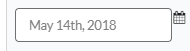
...but if I apply the iconPosition='right' flag like so:
<Input iconPosition='right'>
    <input className='custom'/>
    <Icon name='calendar'/>
</Input>
...it looks like:
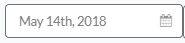
...but then I get a PropTypes exception.
 genehynson
on 14 May 2018
genehynson
on 14 May 2018
It's strange that this issue doesn't contain my reply. Correct usage for the children API:
<Input icon>
  <input className="custom" />
  <Icon name="calendar" />
</Input>
Related issues
 wyemun
·
3Comments
wyemun
·
3Comments
 Ctesias
·
3Comments
Ctesias
·
3Comments
 devsli
·
3Comments
devsli
·
3Comments
 nix1
·
3Comments
nix1
·
3Comments
 mattmacpherson
·
3Comments
mattmacpherson
·
3Comments
Most helpful comment
It doesn't accept
rightbecause it's right by default:So, it's doesn't make sence. Also, SUI's css doesn't have class for
right.