Selenium: Selenium clicks below elements when running on Apple Mac/Safari 13.0.1
🐛 Bug Report
When Selenium tests that click on elements are run, the clicking is visibly below the actual element. This happens for all elements tested and for all tests on which we tried this.
It only happens on Apple Mac/Safari 13.0.1. Was not tested on iOS devices. Same Apple Mac machine runs tests correctly on Chrome. Other Macs running Safari 12.x also run correctly. We tested this with Selenium 3.141.59 and 4.0.0 alpha-2 - bug reproduces identically on both versions, when browser is Safari 13.0.1.
To Reproduce
Detailed steps to reproduce the behavior:
- Use any Selenium test that involves clicking an element (button, etc) that is sufficiently narrow.
- Run on Apple Mac, Safari v13.0.1. selenium-standalone-server.jar v3.141.59 or v4.0.0 alpha-2.
- Clicking will visibly occur below the element. All clicking seems to be off expected location by a constant offset.
Expected behavior
When clicking an element, clicking should occur within that element, such that it is clicked.
Test script or set of commands reproducing this issue
Environment
OS:
Browser: Safari
Browser version: 13.0.1 (14608.2.11.1.11)
Browser Driver version: safaridriver 'Included with Safari 13.0.1' (same version as browser)
Selenium Grid version (if applicable): N/A
 RonKalian
All 38 comments
Hi Ron,
We are also witnessing something similar. We have found some issues with extracting text from labels and that's also not working as expected.
Thanks,
Ash
 asharma84
on 4 Oct 2019
asharma84
on 4 Oct 2019
Yes, we know already that Safari 13 fails ~20% of the regression test suite that Safari 12 passed well. I'll merge into this issue all the complains related to Safari 13 blackout.
 barancev
on 5 Oct 2019
barancev
on 5 Oct 2019
Hi @barancev
Who will be fixing these issues? Apple Safari team or the Selenium devs/contributors?
Thanks,
Ash
asharma84
on 5 Oct 2019
It should be fixed by Apple.
barancev
on 5 Oct 2019
Thank you everybody for your replies. Any information about which Apple components specifically may be at fault, and links to issues you raised with Apple would be much appreciated :)
RonKalian
on 7 Oct 2019
safaridriver maintainer here.
Please include the operating system version on which you are seeing these results. As far as I know, the only reports I've seen are from Mojave users who upgraded to Safari 13. Haven't seen any reports on Catalina yet.
 burg
on 9 Oct 2019
burg
on 9 Oct 2019
Hi @burg ,
I can confirm that its happening on Mojave for me. But I guess safari got updated with the OS and that's why it's happening.
-Ash
asharma84
on 9 Oct 2019
@burg I am experiencing this issue on Mojave 10.14.6 as well. Clicking buttons was working with Safari version 13.0. When I upgraded to 13.0.1 it stopped working. The issue persists with Safari 13.0.2.
 rmedina6
on 10 Oct 2019
rmedina6
on 10 Oct 2019
Hi @burg I am experiencing this issue on Catalina with Safari 13.0.2
 jetjuan
on 10 Oct 2019
jetjuan
on 10 Oct 2019
Does there is any work around to solve this issue ??
 Revathi2910
on 15 Oct 2019
Revathi2910
on 15 Oct 2019
I note that there is little movement on the 2 related WebKit issues (see links below). This is a blocking defect for Selenium/Appium on MacOS/iOS and the community needs a fix or workaround ASAP. Even if WebKit/Apple take their time with a fix, perhaps adjust x,y location of click (x is correct, y needs adjustment) in Selenium/Appium such that it works until WebKit/Apple have fixed it?
https://bugs.webkit.org/show_bug.cgi?id=202589
https://bugs.webkit.org/show_bug.cgi?id=202802
RonKalian
on 15 Oct 2019
Just tested with STP 94 - defect still reproduces. Are there any plans to fix this or provide a workaround?
RonKalian
on 29 Oct 2019
It is being investigated.
On Oct 29, 2019, at 04:33, Ron notifications@github.com wrote:
Just tested with STP 94 - defect still reproduces. Are there any plans to fix this or provide a workaround?—
You are receiving this because you were mentioned.
Reply to this email directly, view it on GitHub, or unsubscribe.
burg
on 29 Oct 2019
@burg Kindly let us know if there is any update?
I am using macOS 10.14.6
My Safari got updated to 13.0.2
There are a few Web Applications that are working fine. But in a few Web Applications (like salesforce) I am facing major issues. Sometimes Selenium has issues in finding an element also.
 climbwithme
on 20 Nov 2019
climbwithme
on 20 Nov 2019
This issue still reproduces on Safari Technology Preview (STP) release 96.
RonKalian
on 22 Nov 2019
It is being investigated.
…
On Oct 29, 2019, at 04:33, Ron @.*> wrote: Just tested with STP 94 - defect still reproduces. Are there any plans to fix this or provide a workaround? — You are receiving this because you were mentioned. Reply to this email directly, view it on GitHub, or unsubscribe.
Hi @burg
One observation. SafariDriver is not able to interact with an element which has a custom HTML tag in it's hierarchy.
Can you kindly advise why this might be the case? Is it a known issue in SafariDriver?
climbwithme
on 27 Nov 2019
In the meantime, if anyone needs a workaround...
For tags, you can get the href attribute using elem.getAttribute('href'); and then visit that location
For buttons you can click using executeScript:
webdriver.executeScript('arguments[0].click();', elem);
This works in Safari 13.0.3.
 nataliemona
on 5 Dec 2019
nataliemona
on 5 Dec 2019
webdriver.executeScript('arguments[0].click();', elem);
This is what I started doing. However, if someone has the time to figure this out, a nicer workaround might be to find some way to automatically translate clicks to "executeScript" calls. The idea is to do something like this but the main problem is figuring out how to translate the parameters for a "clickElement" command to an equivalent "executeScript":
new SafariDriver() {
    @Override
    protected Response execute(String driverCommand, Map<String, ?> parameters) {
        if (DriverCommand.CLICK_ELEMENT.equals(driverCommand)) {
            // return super.executeScript(...)
        }
        return super.execute(driverCommand, parameters);
    }
}
 benken-parasoft
on 5 Dec 2019
benken-parasoft
on 5 Dec 2019
We actually wrote it into the click function in our node package that wraps selenium.
https://www.npmjs.com/package/dce-selenium
nataliemona
on 5 Dec 2019
This is still being investigated. A fix that was expected for STP 96 was not included for various reasons. I'm sorry for the trouble and will ping All The Threads when it's really fixed.
burg
on 6 Dec 2019
In the meantime, if anyone needs a workaround...
For tags, you can get the href attribute using
elem.getAttribute('href');and then visit that locationFor buttons you can click using
executeScript:
webdriver.executeScript('arguments[0].click();', elem);This works in Safari 13.0.3.
Worked for me! Thank you @nataliemona
RonKalian
on 10 Dec 2019
Just commenting so I can get an update notification when this is fixed
 jacattau
on 10 Dec 2019
jacattau
on 10 Dec 2019
usage of java script executor click solved the issue for me , how ever waiting for selenium click to be fixed as i have already written some of the codes using selenium click without a proper framework
 riswanriz
on 11 Dec 2019
riswanriz
on 11 Dec 2019
I am seeing this issue on automated tests written in Python under Catalina and Safari 13.0.4. Button clicks are not working, web text elements are not being found. My tests are common that work across Chrome and Firefox with no issues, but fail under Safari. To implement the executeScript would require a lot of re-work that doesn't seem right to do. Can the SafariDriver be fixed to work correctly to click buttons/links correctly and to find other elements (like text)?
 steeples-sans
on 19 Dec 2019
steeples-sans
on 19 Dec 2019
Hello folks, this set of issues is resolved in safaridriver included with Safari Technology Preview 97 and later, and will eventually make its way to an OS update. In the meantime, I suggest to use executeScript as a click workaround, or updating to latest Safari Technology Preview.
burg
on 19 Dec 2019
Hurrah! Marking this as closed. Thank you @burg!
 shs96c
on 19 Dec 2019
shs96c
on 19 Dec 2019
Where can I access Safari Technology Preview 97 or later?
steeples-sans
on 19 Dec 2019
@steeples-sans STP 97 already available. When I opened STP this morning, it asked me whether I'd like to upgrade to STP 97. Still need to see whether it fixes this issue...
RonKalian
on 20 Dec 2019
I can confirm that it's fixed in TP 97
barancev
on 20 Dec 2019
Hi, I recently upgrade my OS from Mojave to Catalina. And my safari is 13.01. Now my selenium test code which was running perfectly is not working anymore. Unable to click on any button. See the attachment.
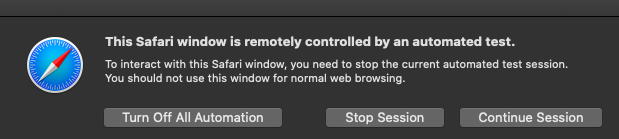
Can some one help?
 pabitra-itobuz
on 13 Jan 2020
pabitra-itobuz
on 13 Jan 2020
Hi, I recently upgrade my OS from Mojave to Catalina. And my safari is 13.01. Now my selenium test code which was running perfectly is not working anymore. Unable to click on any button. See the attachment.
Can some one help?
This one only shows when you try to interrupt the execution. During the automated execution in safaridriver , it wont allow you to do manual intervention (hope this is a feature of safari driver)
riswanriz
on 13 Jan 2020
Are you using selenium click method or any other custom methods likes
clicks using robot?
On Mon, Jan 13, 2020, 7:13 PM pabitra-itobuz notifications@github.com
wrote:
No, when my automation code tries to click on a button then this message
pop-ups and unable to click on the button. I didn't try to interrupt
manually.—
You are receiving this because you commented.
Reply to this email directly, view it on GitHub
https://github.com/SeleniumHQ/selenium/issues/7649?email_source=notifications&email_token=AGHAFKEYJKV3PANIIOYFX43Q5RVXHA5CNFSM4I5SGWL2YY3PNVWWK3TUL52HS4DFVREXG43VMVBW63LNMVXHJKTDN5WW2ZLOORPWSZGOEIYX5WQ#issuecomment-573669082,
or unsubscribe
https://github.com/notifications/unsubscribe-auth/AGHAFKDZVRKA32U7N5J5SG3Q5RVXHANCNFSM4I5SGWLQ
.
riswanriz
on 13 Jan 2020
I am still getting this issue in Safari TP 98 :(
Edit: I spoke too soon. Selenium server was just not starting the correct webdriver. And from what I can tell selenium 4 (which has a configurable safari path) does not yet have available bindings for python.
 Emiluren
on 15 Jan 2020
Emiluren
on 15 Jan 2020
Folks, reminder that this issue is closed and verified by multiple people. Please create a new issue if you believe that there is a bug in the latest Selenium or safaridriver from Safari Technology Preview.
If you'd like to file a safaridriver bug, here's my blurb:
Please file safaridriver-specific bugs by logging in to https://feedbackassistant.apple.com/, create a bug report, and upload information there. Do not upload private/confidential information to Bugzilla or Github, which are public. If you want to follow up on the issue, please provide the feedback ID and title.
The more work you do to create a reduced test case with the test code + page content, the more likely it is that your issue will be resolved. If you need an example of a really helpful bug report in the desired level of detail, this repository is a great starting point.
https://github.com/npeceniak/Safari_Iframe_Bug
Thanks, Brian and the WebKit team @ Apple
burg
on 15 Jan 2020
Hi @burg
Any latest issue logged for this issue. As I'm still seeing the issue safari 13.0.5 and Selenium 3.141.59 version. Click action is not working.
Tried with JavaScript click and selenium click.
Please help me on this.
 venkateshseerapu
on 4 Feb 2020
venkateshseerapu
on 4 Feb 2020
Hello,
I' m also facing the issue reported by @venkateshseerapu . What should I do next?
Please advice.
Thanks
 Manuela-Sousa
on 5 Feb 2020
Manuela-Sousa
on 5 Feb 2020
@ManuelaMariaSousa @venkateshseerapu https://github.com/SeleniumHQ/selenium/issues/7649#issuecomment-574846927
 okyrylenko
on 6 Feb 2020
okyrylenko
on 6 Feb 2020
This thread has been automatically locked since there has not been any recent activity after it was closed. Please open a new issue for related bugs.
![lock[bot] picture](https://avatars.githubusercontent.com/in/6672?v=4&s=40) lock[bot]
on 10 Mar 2020
lock[bot]
on 10 Mar 2020
Related issues
 jrochkind
·
3Comments
jrochkind
·
3Comments
 VishnuAtDevopStation
·
3Comments
VishnuAtDevopStation
·
3Comments
 gauntface
·
3Comments
gauntface
·
3Comments
 giacgbj
·
4Comments
giacgbj
·
4Comments
 Toilal
·
4Comments
Toilal
·
4Comments
Most helpful comment
Folks, reminder that this issue is closed and verified by multiple people. Please create a new issue if you believe that there is a bug in the latest Selenium or safaridriver from Safari Technology Preview.
If you'd like to file a safaridriver bug, here's my blurb:
Please file safaridriver-specific bugs by logging in to https://feedbackassistant.apple.com/, create a bug report, and upload information there. Do not upload private/confidential information to Bugzilla or Github, which are public. If you want to follow up on the issue, please provide the feedback ID and title.
The more work you do to create a reduced test case with the test code + page content, the more likely it is that your issue will be resolved. If you need an example of a really helpful bug report in the desired level of detail, this repository is a great starting point.
https://github.com/npeceniak/Safari_Iframe_Bug
Thanks, Brian and the WebKit team @ Apple