Selenium: Firefox profile not applying
Meta -
OS: Win 10 64
Selenium Version: 3.8.0, WebDriver, C#, GeckoDriver
Browser: Firefox
Visual Studio 2017 Pro
npm installed in project:
Selenium.Support
Selenium.WebDriver
Selenium.WebDriver.ChromeDriver
Selenium.WebDriver.GeckoDriver.Win64
Selenium.WebDriver.IEDriver
Selenium.WebDriverBackedSelenium
Browser Version:
Name: Firefox Version.: 57.0.3 Build-ID: 20171226083017 (64-bit) User-Agent:Mozilla/5.0 (Windows NT 10.0; Win64; x64; rv:57.0) Gecko/20100101 Firefox/57.0
Expected Behavior -
Firefox should use the provided profile
Actual Behavior -
Firefox is not using the provided profile
Steps to reproduce -
Code to reproduce:
private IWebDriver _driver;

private void button1_Click(object sender, EventArgs e) {
var profileManager = new FirefoxProfileManager();
FirefoxProfile profileF = profileManager.GetProfile("Selenium");
FirefoxOptions opt= new FirefoxOptions();
opt.Profile = profileF;
_driver = new FirefoxDriver(opt);
}
Same result for:
private IWebDriver _driver;

private void button1_Click(object sender, EventArgs e) {
var profileManager = new FirefoxProfileManager();
FirefoxProfile profileF = profileManager.GetProfile("Selenium");
_driver = new FirefoxDriver(profileF);
}
For creating this profile use in windows run command: "firefox.exe -P" while no instance of firefox is open. There is a menu for creating a profile with name like above.
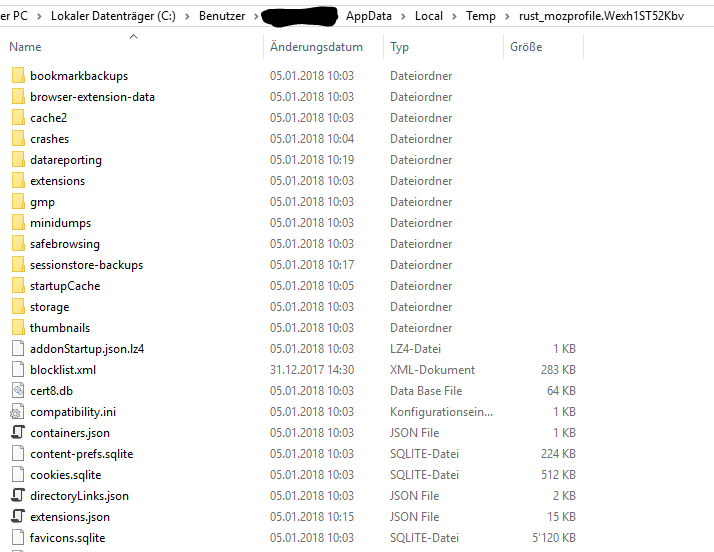
Geckodriver will open an instance of cmd, in this cmd you will already see there will be "-profile" "something\rust_mozprofile.randomnumber" instead of the profile you have chosen.

This can also be seen when looking inside browser: Help -> Troubleshooting Information -> Profile Folder - Show Folder
This will lead to the random profile instead of the chosen one.
In Debug it is visible that the correct profile is in the options. Or chosen by firefoxprofile.
AddArguments could solve this issue, but when doing it the same way as in cmd (see above) by "-profile" "%absolute_path%" you will get the error that arguments need to begin with "--" two minus. So you cannot write the arguments as they should be written.
 HthSolid
All 17 comments
Any updates on this? I am struggling with the same issue for 3 days..
 brnbs
on 27 Jan 2018
brnbs
on 27 Jan 2018
@brnbs Considering that the maintainer of the .NET bindings (me) has just returned from a much-needed extended holiday, no, there are no updates on this yet.
Ordinarily, I wouldn’t comment like this, but your characterization of things as “completely useless” in your comment in #5298 is unproductive. The lack of understanding that the Selenium project is staffed with (unpaid) volunteers who have lives, families, and other professional commitments (i.e., jobs) is staggering, because your comment implies that we are allowed none of those things. I get that there is frustration when things don’t work as they should. But to be demanding, insulting, and rude to those who provide the time and effort to produce software that costs you nothing monetarily to use is distinctly unhelpful.
 jimevans
on 27 Jan 2018
jimevans
on 27 Jan 2018
@jimevans I think you misunderstood my comment. I am aware how open source projects work and that you have other priorities as well. “Completely useless” was meant for the if condition in the source code checking the double dashes. By the way to get around this check I have tried to create a small “proxy” between geckodriver and the firefox binary which replaces the “-profile” parameter with my own directory, this seems to work but now for some reason I cannot change any preference/setting in the profile. If you have any idea how can I set a custom profile path and set the preferences in the profile I am happy to test it and create a patch.
brnbs
on 27 Jan 2018
So using a pejorative phrase like “completely useless,” which is insulting, is still okay? And to have someone come back after being away and be attacked that way is fine? And the .NET bindings code is not, in fact “completely useless;” it’s to prevent invalid input from being forwarded to geckodriver in the first place. I’m not sure the lack of understanding is entirely on my part.
As for the behavior of using the Profile property of the FirefoxOptions object, the options object directly translates into capabilities for geckodriver. According to the geckodriver documentation, specifying a profile via capabilities will always create a copy of the profile in the temp directory, by design. The correct way to use the exact profile in place is, in fact, to use arguments to Firefox. This is, as you note, a result of the requirements of command line arguments changing in geckodriver, and the .NET bindings not keeping up. It’s a mistake. Mea culpa.
jimevans
on 27 Jan 2018
@jimevans thanks for your update.
@brnbs can you please post your proxy solution? This may help others.
HthSolid
on 27 Jan 2018
Hi-
Is there any update on this? I can possibly take a look at tackling it myself if @jimevans is swamped. Alternatively, @brnbs, could you share the details of your proxy solution?
 alex-slover
on 22 Mar 2018
alex-slover
on 22 Mar 2018
@alex-slover Does adding arguments to the command line for Firefox not resolve the issue? The "double-dash" check in the AddArguments method has been gone for some time.
FirefoxOptions options = new FirefoxOptions();
options.AddArguments("-profile", @"C:\Path\To\Existing\Profile");
IWebDriver driver = new FirefoxDriver(options);
@jimevans Ah, I did not realize that, thanks!
But when I do that, even though the command-line argument now looks correct (as in, it is identical to the previous command line except that the temporary profile location has been replaced by the one I specified), it seems to create a new problem: Firefox launches successfully, but then times out when attempting to create the driver object:
Unhandled Exception: OpenQA.Selenium.WebDriverException: The HTTP request to the remote WebDriver server for URL http://localhost:60873/session timed out after 60 seconds. ---> System.Net.WebException: The request was aborted: The operation has timed out.
   at System.Net.HttpWebRequest.GetResponse()
   at OpenQA.Selenium.Remote.HttpCommandExecutor.MakeHttpRequest(HttpRequestInfo requestInfo)
   --- End of inner exception stack trace ---
   at OpenQA.Selenium.Remote.HttpCommandExecutor.MakeHttpRequest(HttpRequestInfo requestInfo)
   at OpenQA.Selenium.Remote.HttpCommandExecutor.Execute(Command commandToExecute)
   at OpenQA.Selenium.Remote.DriverServiceCommandExecutor.Execute(Command commandToExecute)
   at OpenQA.Selenium.Remote.RemoteWebDriver.Execute(String driverCommandToExecute, Dictionary`2 parameters)
   at OpenQA.Selenium.Remote.RemoteWebDriver.StartSession(ICapabilities desiredCapabilities)
   at OpenQA.Selenium.Remote.RemoteWebDriver..ctor(ICommandExecutor commandExecutor, ICapabilities desiredCapabilities)
   at OpenQA.Selenium.Firefox.FirefoxDriver..ctor(FirefoxOptions options)
while the browser itself is stuck at the starting screen. Do you know if this is a related problem, or an entirely separate thing? It reproduces consistently when I specify the profile manually, then disappears as soon as I go back to using the temporary one. If it helps, I am trying to use the default profile, like this:
````
private static RemoteWebDriver CreateFirefoxDriver()
{
FirefoxOptions options = new FirefoxOptions();
string profileDir = GetDefaultFirefoxProfileLocation();
options.AddArguments("-profile", profileDir);
return new FirefoxDriver(options);
}
// Get the default profile location. I have verified that the path this returns is correct
private static string GetDefaultFirefoxProfileLocation()
{
string profilesDir = $@"{Environment.ExpandEnvironmentVariables("%appdata%")}MozillaFirefoxProfiles";
return Directory.GetDirectories(profilesDir).First(dir => dir.EndsWith(".default"));
}
````
(Edit: In previous versions of Selenium, before this issue surfaced, I was able to use the default profile successfully with just profileManager.GetProfile("default"))
alex-slover
on 23 Mar 2018
@alex-slover I think the problem is when you specify a profile with the command line argument, the geckodriver (or the C# binding, I don't know) somehow unable to set the marionette port in the profile and the connection times out, but it's just my idea. The proxy I made did not solved my issue, so I don't have it anymore, but I've updated the NuGet package to 3.10.0 (with geckodriver 0.19.1) and using the following code to load an existing profile:
var options = new FirefoxOptions();

var path = "path/to/profile/folder";
if (!Utilities.IsDirectoryEmpty(path))
{
    // Workaround for error "Failed to set preferences: Unable to read profile preferences file" in geckodriver
    File.Delete(Path.Combine(path, "user.js"));

    options.Profile = new FirefoxProfile(path, false);
}
@brnbs - Very strange: I replicated your code exactly, with the same versions, and it still used the temporary profile. But the Selenium commands worked.
As before, if I use options.AddArguments("-profile", path), the command-line argument looks correct but the browser opens just to blank page and the constructor for the Selenium driver times out.
alex-slover
on 27 Mar 2018
@alex-slover
i face the same problem. browser starts with the customized profile but leads to blank page
Is there any possibility to fix this
 revathi-sadanand
on 5 Apr 2018
revathi-sadanand
on 5 Apr 2018
Wow, sorry to hear other people are having the same issue as I am.
But it is great to hear, that I am not the only one having this issue.
I would love to get more details on any work arounds any body has found !!! Thanks !!
 javierlopez111
on 13 Apr 2018
javierlopez111
on 13 Apr 2018
I found that in firefox_profile.py, if profile_directory is not None, the driver creates a new temp directory for me! This is the problem. I'll try to fix this.
AND the github comment editor also has bug!
Line 75
self.tempfolder = tempfile.mkdtemp()
`
class FirefoxProfile(object):
def __init__(self, profile_directory=None):
"""
Initialises a new instance of a Firefox Profile
    :args:
     - profile_directory: Directory of profile that you want to use.
       This defaults to None and will create a new
       directory when object is created.
    """
    if not FirefoxProfile.DEFAULT_PREFERENCES:
        with open(os.path.join(os.path.dirname(__file__),
                               WEBDRIVER_PREFERENCES)) as default_prefs:
            FirefoxProfile.DEFAULT_PREFERENCES = json.load(default_prefs)

    self.default_preferences = copy.deepcopy(
        FirefoxProfile.DEFAULT_PREFERENCES['mutable'])
    self.native_events_enabled = True
    self.profile_dir = profile_directory
    self.tempfolder = None
    if self.profile_dir is None:
        self.profile_dir = self._create_tempfolder()
    else:
        self.tempfolder = tempfile.mkdtemp()
        newprof = os.path.join(self.tempfolder, "webdriver-py-profilecopy")
        shutil.copytree(self.profile_dir, newprof,
                        ignore=shutil.ignore_patterns("parent.lock", "lock", ".parentlock"))
        self.profile_dir = newprof
        os.chmod(self.profile_dir, 0o755)
        self._read_existing_userjs(os.path.join(self.profile_dir, "user.js"))
    self.extensionsDir = os.path.join(self.profile_dir, "extensions")
    self.userPrefs = os.path.join(self.profile_dir, "user.js")
    if os.path.isfile(self.userPrefs):
        os.chmod(self.userPrefs, 0o644)`
 jjuu
on 12 May 2018
jjuu
on 12 May 2018
I started using Chrome. This functionality does work with Chrome. That's my workaround...stopped using Firefox and the gecko driver.
javierlopez111
on 14 May 2018
Which version of gecko driver you are using and firefox version?
revathi-sadanand
on 14 May 2018
its better to use firefox 59 with gecko driver 20.. it works
revathi-sadanand
on 14 May 2018
Let's sum up.
1) If you call FirefoxProfile constructor, Selenium will create a new temp profile. It can be either a blank profile, or a copy of an existing profile. And then it will start Firfox with this new temp profile. It's working as intended, to prevent corruption of an existing profile.
2) If you want to reuse existing profile without copying it, you have to pass -profile argument. And, yes, it hangs. I could reproduce this issue in Java too. It's not a client issue, but a geckodriver one: https://github.com/mozilla/geckodriver/issues/1058
So I'll close this issue, please follow https://github.com/mozilla/geckodriver/issues/1058 for workarounds and updates.
 barancev
on 12 Jun 2018
barancev
on 12 Jun 2018
Related issues
 fdeamicis
·
3Comments
fdeamicis
·
3Comments
 appunikki
·
3Comments
appunikki
·
3Comments
 VishnuAtDevopStation
·
3Comments
VishnuAtDevopStation
·
3Comments
 gchr
·
3Comments
gchr
·
3Comments
 ghost
·
4Comments
ghost
·
4Comments
Most helpful comment
I started using Chrome. This functionality does work with Chrome. That's my workaround...stopped using Firefox and the gecko driver.