Selenium: Sending Emojis with send_keys
Expected Behavior -
selenium sends the emoji (or the emoji unicode) to the browser and inserts an emoji in the text filed
Actual Behavior -
Errors:
- only support bmp characters
- can't decode ordinal at position x
Steps to reproduce -
sending any emoji (or high range unicode character) with selenium
 timgrossmann
All 22 comments
For issues please provide a concise reproducible test case and describe what results you are seeing and what results you expect.
See CONTRIBUTING.md
 barancev
on 18 Dec 2016
barancev
on 18 Dec 2016
@barancev Thank you for your comment.
I don't think there is the need for a test case. The given error is defined in the selenium code.
It's more a question than an error...
I found out, that i can send Emojis which have a unicode of only 4 characters as Unicode.
The question would be if it's possible to send unicode symbols with more than 4 characters -> out of the BMP-Spectrum.
Thank you
Best Regards
Tim
timgrossmann
on 19 Dec 2016
Hi @barancev , I have hit a similar issue when trying to enter Chinese characters. The symptoms are the same - bascially when using the sendKeys() method on the character '𠀀 ("\uD840\uDC00").
Using code like:
browser.findElement(by.id('username')).sendKeys('𠀀');
When entering the following Chinese character '𠀀' the result is two corrupted characters in the UI.
Node Version: 6.8.1
Browser(s): Chrome
Operating System and Version Windows 7 Enterprise, English
Steps to reproduce:
Create a simple test case that passes '𠀀' to SendKeys.
Run the test.
Outcome: the character becomes two corrupted characters.
Attached is a running test case that shows the results. It will append two corrupt characters to the 'username' field in the protractor test site.
Originally found this issue in Protractor but am trying to see if this is actually a Selenium issue.
Cheers,
Mike
 MikeMacDougall
on 3 Feb 2017
MikeMacDougall
on 3 Feb 2017
I'm pretty sure it is...
But with your problem @MikeMacDougall, it's probably just that you have to use your string as a unicode String, like that:
u"\uD840\uDC00"
The specification says, that BMP-Spectrum (4 Character Unicode) Symbols can be used, so yours shouldn't be a problem of selenium... Just try using an unicode String
timgrossmann
on 3 Feb 2017
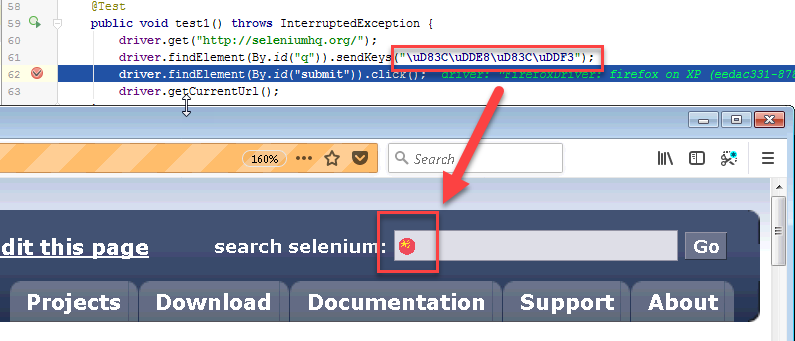
I'm not sure my understanding is correct, but I tried to enter a "more than 4 chars" unicode symbol
https://apps.timwhitlock.info/unicode/inspect/hex/1F1E8/1F1F3
and it seems so be all right:
barancev
on 26 Aug 2017
Closing the issue as "implemented", feel free to reopen it if it's not what you expected.
barancev
on 26 Aug 2017
is it now taken cared by specific teams owning drivers? I don't find the support yet on chromeDriver
[open issue here]
 shahp00ja
on 2 Nov 2017
shahp00ja
on 2 Nov 2017
@barancev Your screen only shows examples with the, what I mentioned above, 4 char unicode emojis.
Try sending one that has more than 4 digits, that still won't work (as mentioned by @shahp00ja )
timgrossmann
on 2 Nov 2017
@timgrossmann @shahp00ja Can anyone provide a sample of code that does not work as expected?
barancev
on 2 Nov 2017
@barancev try 1F602 which should be 😂
or every other emoji from that page https://unicode.org/emoji/charts/full-emoji-list.html
which unicode is longer than 4 digits
timgrossmann
on 2 Nov 2017
Is there any update to this?
 MrDirtyPixels
on 9 Apr 2018
MrDirtyPixels
on 9 Apr 2018
This still does not work for whatsapp
I'm using python, selenium, whatsapp for web
 eykiriku
on 11 Apr 2018
eykiriku
on 11 Apr 2018
Looking for an update to this. Cant send emojis from https://unicode.org/emoji/charts/full-emoji-list.html.
 arivanbastos
on 1 Aug 2018
arivanbastos
on 1 Aug 2018
As it happens, the W3C Web Platform Tests project’s WebDriver tests have tests for exactly this case. Looking at the latest results as posted to the WebDriver Herald shows that test passing for IE, Firefox, and Edge, and failing for Chrome and Safari among desktop implementations. I suspect the Safari driver will have this test passing soon. The status of Chrome is unknown, as the Chromium team has shown a reluctance to complete their spec-compliant driver implementation.
 jimevans
on 1 Aug 2018
jimevans
on 1 Aug 2018
I try send_key with ⭐🔸️🔹️▪💃🕺🎧🥂 🍹🍕🌯🍖🚗🔆 icons (for facebook), but browser crash with error : "ChromeDriver only supports characters in the BMP "
what solution?
 Argorate
on 24 Aug 2018
Argorate
on 24 Aug 2018
I try send_key with ⭐🔸️🔹️▪💃🕺🎧🥂 🍹🍕🌯🍖🚗🔆 icons (for facebook), but browser crash with error : "ChromeDriver only supports characters in the BMP "
what solution?
JavaScript!
driver.execute_script('''
    document.evaluate(
        '//label[text()="Subject Icons"]/following-sibling::div/input',  // your selector/expression here
        document
    ).iterateNext().value = '{}';
'''.format('⭐🔸️🔹️▪💃🎧 🍹🍕🌯🍖🚗🔆'))
I am surprised the community leaves this issue unresolved for 2 years Boo!
 Congee
on 25 Sep 2018
Congee
on 25 Sep 2018
Relevant chromedriver bug report: http://crbug.com/chromedriver/2269
 Herst
on 25 Sep 2018
Herst
on 25 Sep 2018
Middle of 2019 and it's still not fixed!
 snoopyjc
on 20 Jul 2019
snoopyjc
on 20 Jul 2019
@snoopyjc The bug/limitation is in chromedriver, which the Selenium team neither produces nor maintains. I get that there’s frustration this functionality doesn’t work, but since the actual issue is in code that the Selenium project does not have any control over, what, exactly, would you have the Selenium maintainers do, and, more importantly, what’s the point in pointing out the length of time the issue has been open in this tracker?
jimevans
on 20 Jul 2019
Interesting - I didn’t know the bug was elsewhere - can you link me to their bug tracker? I had to switch to Firefox driver to avoid this issue.
snoopyjc
on 21 Jul 2019
@snoopyjc the comment exactly above the one you sent.
Relevant chromedriver bug report: http://crbug.com/chromedriver/2269
 lmtierney
on 21 Jul 2019
lmtierney
on 21 Jul 2019
Thanks!
snoopyjc
on 21 Jul 2019
Related issues
 spyoungtech
·
3Comments
spyoungtech
·
3Comments
 appunikki
·
3Comments
appunikki
·
3Comments
 jrochkind
·
3Comments
jrochkind
·
3Comments
 polku
·
3Comments
polku
·
3Comments
 jasonfb
·
3Comments
jasonfb
·
3Comments
Most helpful comment
Hi @barancev , I have hit a similar issue when trying to enter Chinese characters. The symptoms are the same - bascially when using the sendKeys() method on the character '𠀀 ("\uD840\uDC00").
Using code like:
browser.findElement(by.id('username')).sendKeys('𠀀');
When entering the following Chinese character '𠀀' the result is two corrupted characters in the UI.
Node Version: 6.8.1
Browser(s): Chrome
Operating System and Version Windows 7 Enterprise, English
Steps to reproduce:
Create a simple test case that passes '𠀀' to SendKeys.
Run the test.
Outcome: the character becomes two corrupted characters.
Attached is a running test case that shows the results. It will append two corrupt characters to the 'username' field in the protractor test site.
Originally found this issue in Protractor but am trying to see if this is actually a Selenium issue.
Cheers,
Mike