Selectrum: Dired 'move' shouldn't default to first filename found in directory
When I select files to move into a directory, selectrum will default to a file inside the directory. My intention is not to move/rename my file(s) to that filename, but rather move the files into that directory.
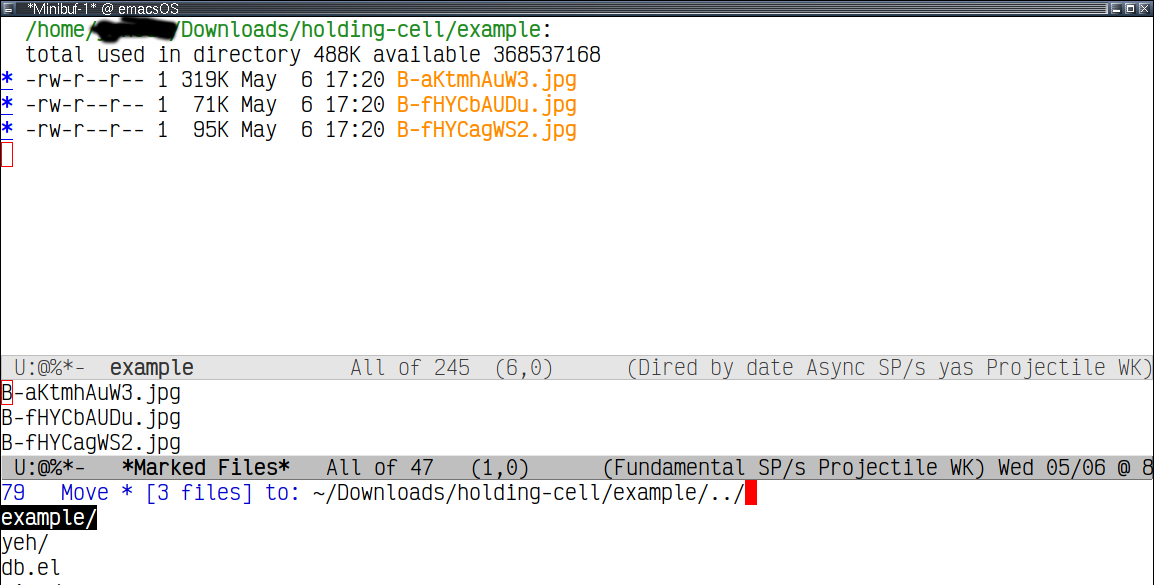
If the directory is empty or I don't (sometimes) complete the path with a /, it will work properly I think. Otherwise, i'm not sure how to move files into a directory that already has files in it.
I'm using version 20200504.1619 from melpa.
 tinglycraniumplacidly
All 13 comments
Why do you type .. instead of DEL?
 raxod502
on 10 May 2020
raxod502
on 10 May 2020
I see. I can't remember why I had started using ... I guess I'm fine with hitting del/M-del.
But behavior should be the same, no?
tinglycraniumplacidly
on 24 May 2020
I tried it and for me it works to select the directory you want the files to move in and press RET. Note that you can also select the prompt and you can use backward-kill-sexp to go exactly one path up (@raxod502 maybe that could be mentioned in the README) . What do you expect or where do go things wrong for you?
 clemera
on 24 May 2020
clemera
on 24 May 2020
When you type ../ you are supposedly 1 directory up, so you should be able to copy files directly there. You should not have to go up 1 more directory to select the directory that is one up.
ie. if you have files in
/home/name/hi/
and you attempt a copy/move with dired to /home/name/hi/../ you are given options within name, but you can't actually copy files into name. You have to go up again to /home/name/hi/../../ to be given name as an option.
I find that unintuitive, as ../ should be equivalent to deleting hi/ in the minibuffer.
Edit: Actually I'm just now seeing that deleting hi/ also does not give me the option to drop my files into name. This seems like different behavior from other packages I've used: ido and counsel.
tinglycraniumplacidly
on 25 May 2020
Thanks for the explanation,
but you can't actually copy files into name. You have to go up again to /home/name/hi/../../ to be given name as an option.
You can copy file into name by selecting the prompt (using C-p). That is how selectrums UI works otherwise you would have to include ./ as a candidate. But for reading directory names it might make sense to include ./ as default or maybe make that a configurable option.
clemera
on 25 May 2020
Gotcha, I see.
Yeah, I would love for it to be default or configurable. C-p reminds me of the Counsel-find-file workaround I was having to use (in order to do things like edits with multiple cursors), which is actually what prompted me to leave the counsel, ivy, swiper suite.
ty
tinglycraniumplacidly
on 25 May 2020
It's an extra binding in this case, in other cases you would have an extra binding to skip the ./. The dired file movement commands don't seem to use read-directory-name. You probably don't want ./ included in regular find-file and friends?
clemera
on 25 May 2020
I just had an idea for an alternative way to support your use case: There could be an option to select the prompt by default for file navigation (when there is no input) that would give you the same behaviour without needing the ./ as a candidate.
clemera
on 25 May 2020
Okay, so the way I'd been using normal find-file a lot would be to hit C-x C-f C-f to get ./. But yeah, it looks like ./ would normally be excluded.
tinglycraniumplacidly
on 25 May 2020
I just had an idea for an alternative way to support your use case: There could be an option to select the prompt by default for file navigation (when there is no input) that would give you the same behaviour without needing the
./as a candidate.
That sounds awesome
tinglycraniumplacidly
on 25 May 2020
I just had an idea for an alternative way to support your use case: There could be an option to select the prompt by default for file navigation (when there is no input) that would give you the same behaviour without needing the ./ as a candidate.
I have to think how that would have to be integrated with #70. But I'm afraid #70 causes more trouble than its worth already. What do you think @raxod502?
clemera
on 25 May 2020
The way that Selectrum encourages you to select a directory is by removing the trailing slash. Is that acceptable for you, @tinglycraniumplacidly? I understand that it may be less intuitive, but I am hesitant to complicate the interface when simplicity is a design goal and there is a straightforward way to achieve the desired behavior already.
raxod502
on 3 Jun 2020
Cool, I think that's the best overall solution for what I'm looking for.
I will say I think it's not that intuitive to know to delete the trailing slash. (Maybe just me, but I think I've been burned in the past with other methods when deleting the trailing slash, where the file would overwrite a symlinked dir instead of placing the file in the dir? But that doesn't seem to be the case with selectrum).
Thanks!
tinglycraniumplacidly
on 3 Jun 2020
Related issues
 minad
·
13Comments
minad
·
13Comments
 gcv
·
9Comments
gcv
·
9Comments
 mohkale
·
11Comments
mohkale
·
11Comments
 Compro-Prasad
·
7Comments
clemera
·
4Comments
Compro-Prasad
·
7Comments
clemera
·
4Comments
Most helpful comment
The way that Selectrum encourages you to select a directory is by removing the trailing slash. Is that acceptable for you, @tinglycraniumplacidly? I understand that it may be less intuitive, but I am hesitant to complicate the interface when simplicity is a design goal and there is a straightforward way to achieve the desired behavior already.