Select2: Need an additional custom class to select2-container
We need an additional custom class to select2-container container to easily override the inner classes styles.
Like
$("#e2").select2({
customClass: "Myselectbox",
});
So that corresponding container will formed as
<div class="Myselectbox select2-container select2-container-multi">
So that I can override an inner classes like .Myselectbox .select2-choices in CSS.
Generally this will help to override the textbox(ul.select2-choices) style.
 justin-johnn
All 18 comments
there were already options to do this, but they were undocumented. i just added the missing docs. see containerCss containerCssClass dropdownCss dropdownCssClass optons in the docs. containerCssClass is what you want.
 ivaynberg
on 1 Aug 2012
ivaynberg
on 1 Aug 2012
The Version 3.0 only holds these options. Please upgrade who uses lesser versions ...
justin-johnn
on 2 Aug 2012
I am using version 4.0.2. And on using containerCssClass it adds class to select2-selection. I guess the class is supposed to be added to the main wrapper select2-container.
Or, Is there any other way to add class to the main wrapper select2-container?
 imlunek
on 10 Mar 2016
imlunek
on 10 Mar 2016
The issue @imlunek mentioned still persists in 4.0.3. Is it intentional?
 Bartkowski
on 30 Sep 2016
Bartkowski
on 30 Sep 2016
@Wilwarin. The containerCssClass thing seems to work properly with stable version.
imlunek
on 1 Oct 2016
@imlunek is there a way to add css class to the select2-container element? the containerCssClass adds the class to select2-selection
Bartkowski
on 2 Oct 2016
If you're using data attributes:
        $('[data-container-css-class]').each(function() {
           var className = $(this).attr('data-container-css-class');
           var container = $(this).next('.select2-container');
           container.addClass(className);
           container.find('.select2-selection').removeClass(className);
        });
 berkandirim
on 21 Nov 2016
berkandirim
on 21 Nov 2016
Facing the same problem; using containerCssClass adds the class to select2-selection, not select2-container .
 pranavk
on 4 Aug 2017
pranavk
on 4 Aug 2017
This will do the trick:
$('select').select2().data('select2').$dropdown.addClass('my-container');
 andrejpavlovic
on 10 Aug 2017
andrejpavlovic
on 10 Aug 2017
add class to the main wrapper select2-container
Since this appears to be a fairly common request, I'm going to reopen this as a feature/documentation request.
 alexweissman
on 29 Oct 2017
alexweissman
on 29 Oct 2017
For future readers, do not call $('select').select2() before chaining it with .data('select2').$dropdown in an event handler as this causes issues with default select2 events.
Use the following instead :
$('select').on('change', function(e) {
    $(e.currentTarget).data('select2').$dropdown.addClass('my-container');
});
 ojathelonius
on 26 Jul 2018
ojathelonius
on 26 Jul 2018
@imlunek is there a way to add css class to the select2-container element? the containerCssClass adds the class to select2-selection
In case anyone was wondering, there's a hacky approach to do this, and requires using the theme option.
$('my-select').select2({
    theme: 'default your-container-class'
});
 yongzhenlow
on 11 Sep 2018
yongzhenlow
on 11 Sep 2018
We don't have immediate plans to provide this. We are focused to fix some major UI bugs (that are majority of issues and PR's). But if you open a PR with unit tests, I will be glad to review and approve if everything is ok :+1:
 pedrofurtado
on 18 Sep 2018
pedrofurtado
on 18 Sep 2018
@pedrofurtado – this is clearly a bug, please re-open it.
How can you set something named containerCssClass, and have it affect the selection element and not the container element?
You can add another option named selectionCssClass to handle current use cases.
 glen-84
on 5 Oct 2018
glen-84
on 5 Oct 2018
I understand the requirement in principle, however it did end up working better on the selection than on the container, at least for me.
I got weird behaviour when styling the container, e.g. giving it button styles and clicking on it would highlight the internal selection element instead of the whole button.
Whereas if I styled the selection as a button the behaviour was as expected.
 yourtallness
on 30 Mar 2020
yourtallness
on 30 Mar 2020
Hi everyone i need help
Currently search in dropdown textbox is based on name , i want tomake it search based on id nad name both:
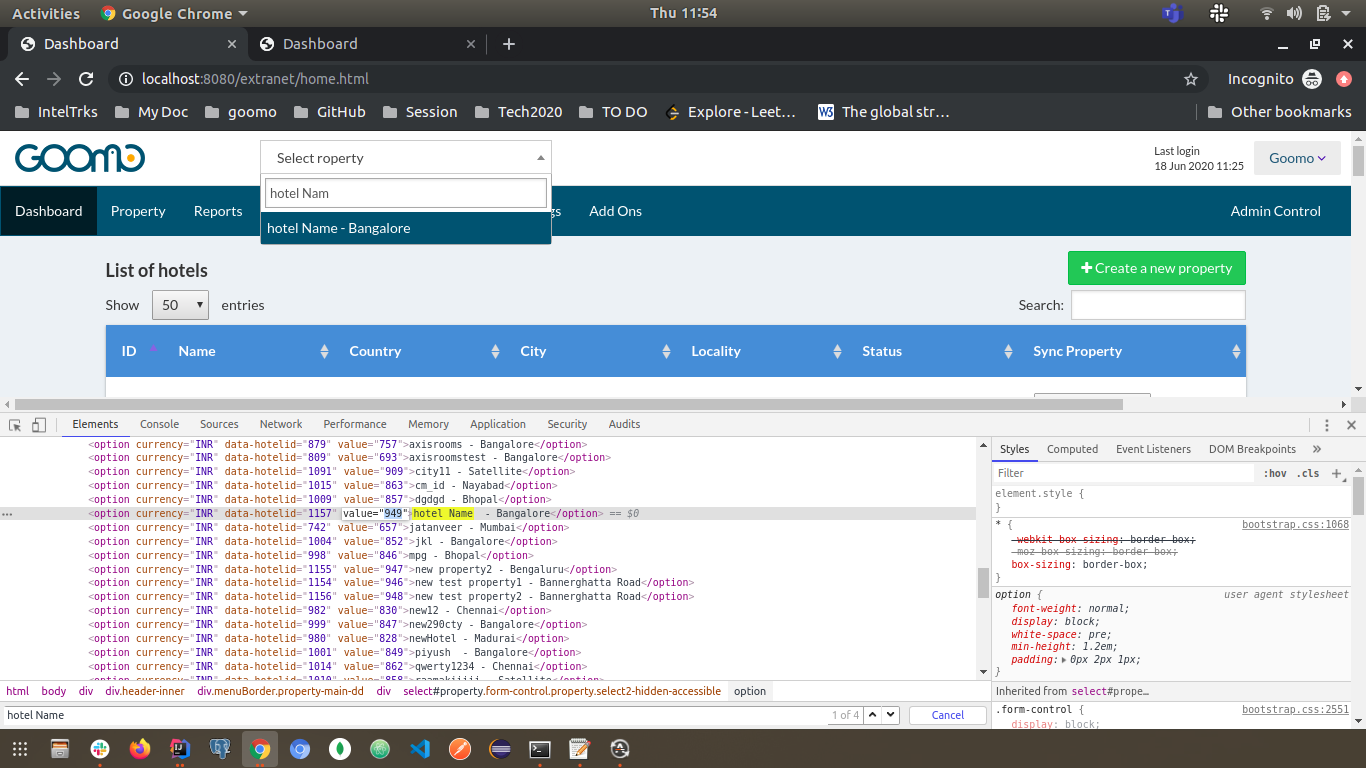
Backend Code:
Search.prototype.render = function (decorated) {
var $rendered = decorated.call(this);
var $search = $(
  '<span class="select2-search select2-search--dropdown">' +
    '<input class="select2-search__field" type="search" tabindex="-1"' +
    ' autocomplete="off" autocorrect="off" autocapitalize="off"' +
    ' spellcheck="false" role="textbox" />' +
  '</span>'
);
Search.prototype.render = function (decorated) {
var $search = $(
'
' ' autocomplete="off" autocorrect="off" autocapitalize="off"' +
' spellcheck="false" role="textbox" aria-autocomplete="list" />' +
'
);
Tokenizer.prototype.bind = function (decorated, container, $container) {
decorated.call(this, container, $container);
this.$search =  container.dropdown.$search || container.selection.$search ||
  $container.find('.select2-search__field')||$container.find('.select2-property-result');
};
 pankajkrravi
on 18 Jun 2020
pankajkrravi
on 18 Jun 2020
@pedrofurtado This issue should be reopened -- like others above, I'm having to do all sorts of horrible tacky css workarounds due to an inability to style the base container. I've put in a PR for adding a class to the container.
 ialarmedalien
on 23 Oct 2020
ialarmedalien
on 23 Oct 2020
Locking this as resolved, not because we added a new option to Select2 to support this but because the current official stance is that we will not be adding a native option for this. We have started to remove some of these extra options because they start to add up over time, so we're continuing to not add this one since it's an edge case that people have managed to work around as-needed.
 kevin-brown
on 28 Nov 2020
kevin-brown
on 28 Nov 2020
Related issues
 JuanWilde
·
3Comments
JuanWilde
·
3Comments
 fabienheureux
·
3Comments
fabienheureux
·
3Comments
 actricom
·
3Comments
actricom
·
3Comments
 efusionsoft
·
3Comments
efusionsoft
·
3Comments
 dereuromark
·
3Comments
dereuromark
·
3Comments
Most helpful comment
I am using
version 4.0.2. And on usingcontainerCssClassit adds class toselect2-selection. I guess the class is supposed to be added to the main wrapperselect2-container.Or, Is there any other way to add class to the main wrapper
select2-container?