Securedrop: Source Interface instructions contain broken/bad URL
When a Source follows the instructions to bump up the Security Slider settings in Tor Browser, we provide rationale for why, and include two links:
- https://www.wired.com/threatlevel/2013/09/freedom-hosting-fbi
- https://www.theguardian.com/world/interactive/2013/oct/04/egotistical-giraffe-nsa-tor-document
The second link is broken. It returns an HTTP 200, but the document it's linking to is not displayed. At first glance it appears to be a mixed content/CSP error, in which case we could contact TG folks to correct it. Maybe it's simpler to find different coverage and link to that.
 conorsch
All 5 comments
See also https://github.com/freedomofpress/securedrop/issues/1475 (read the follow-up comments too).
 psivesely
on 26 May 2017
psivesely
on 26 May 2017
Looking into this a bit deeper, it appears that /howto-disable-js is dead code and as such we should just remove the entire page. An explanation follows.
Source uses Tor Browser with JS enabled
Currently the user flow on the source interface as follows:
- Source is using Tor Browser but does not have the Tor security slider set to high. They see this page indicating how to set it to high:
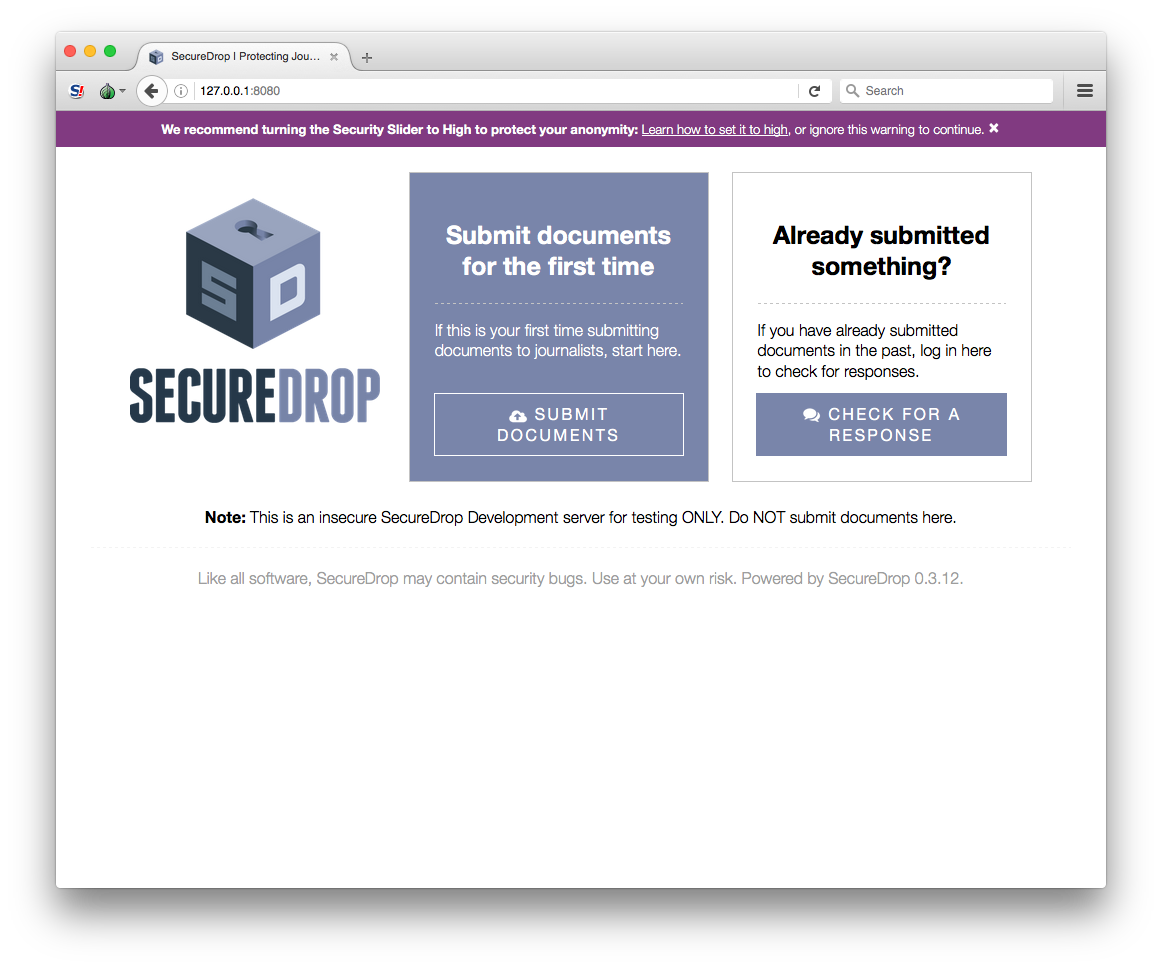
- Source clicks "Learn how to set it to high"
- If a source is using Tor Browser, then
is_likely_tor_browser()insource.jsis True, and following the logic insource.jsthe default browser behavior of following that link will not occur (due to thereturn falseon line 42). - Instead, a bubble will appear providing easy instructions on how to turn the security slider to high:
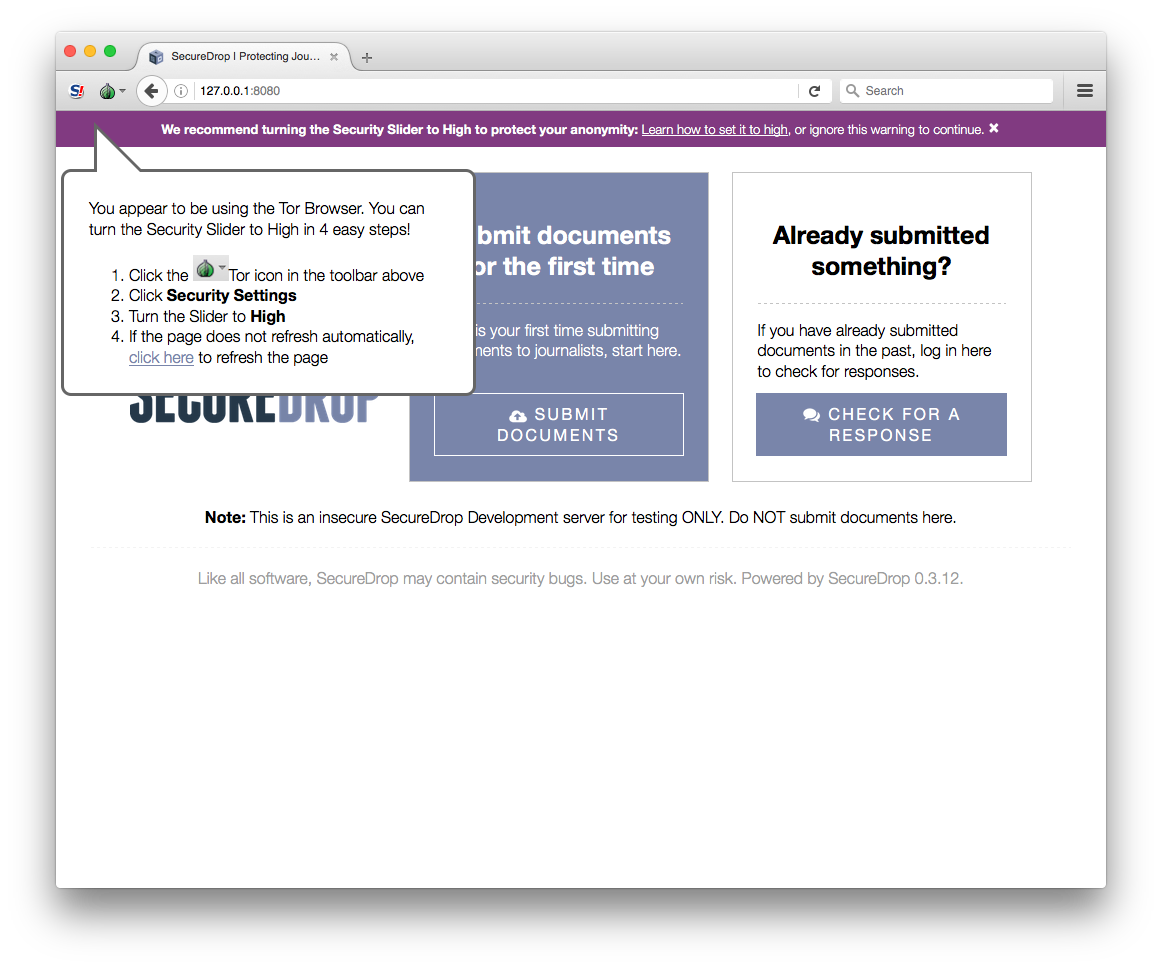
Source uses Tor Browser with JS disabled
If a source has JS disabled, then the purple bar will not be shown, as the top code stanza in source.js that displays the bar will not execute.
Source is not using Tor Browser
If a source is not using Tor Browser, they cannot access the hidden service. If they use Tor2Web to access it anyway, we flash a warning telling them they are not anonymous. Asking them to disable JS or turn the security slider to high is irrelevant at this stage.
tl;dr
The source never sees /howto-disable-js, a search through the SecureDrop document tree indicates that it is not linked to anywhere, and we should remove this dead code.
 redshiftzero
on 6 Jun 2017
redshiftzero
on 6 Jun 2017
@redshiftzero Great call! I saw the message because while testing locally I was lazily using Firefox ESR proxied over Tor, rather than Tor Browser. Assuming JS is enabled, it still displays:

While we assume the use of Tor Browser by sources, this edge case might be a reasonable place to add a warning like "You should be using Tor Browser!" I'm OK with not doing so, given how Tor Browser is an important part of the threat model.
conorsch
on 6 Jun 2017
I've opened #1778 to remove, but I take your point. If there's an even somewhat realistic situation where a source would be able to access the source interface without using Tor Browser or Tor2Web, I agree it would be better to add a warning for that.
redshiftzero
on 6 Jun 2017
OK upon further thought, given the number of people that might be using proxies with regular browsers, I'll remove this /howto-disable-js view and add a /use-tor view to explicitly warn anyone not using Tor Browser.
redshiftzero
on 6 Jun 2017
Related issues
redshiftzero
·
6Comments
redshiftzero
·
4Comments
 ninavizz
·
6Comments
ninavizz
·
6Comments
 diracdeltas
·
5Comments
diracdeltas
·
5Comments
 Hainish
·
6Comments
Hainish
·
6Comments
Most helpful comment
I've opened #1778 to remove, but I take your point. If there's an even somewhat realistic situation where a source would be able to access the source interface without using Tor Browser or Tor2Web, I agree it would be better to add a warning for that.