Securedrop: Update recommended hardware (NUC models)
The time has come again to refresh the hardware recommendations. Right now the Hardware docs link out to a D54250WYK listing on Amazon that shows no available items.
It's going to be tricky business to find an alternative that meets the following requirements:
- x86 architecture
- no onboard wireless
- reasonably small
- reasonably cheap
Let's start digging again and see what we can come up with. We may need to revise expectations about the features above.
 conorsch
All 20 comments
For context, the x64 requirement is due to the fact that we only compile custom grsecurity-patched kernels for x86 architectures. Longer term we may be able to cross-compile and leverage alternative architectures such as ARM.
conorsch
on 27 Oct 2016
Two potential solutions: MinnowBoard MAX (looks to be currently unavailable) or its successor, MinnowBoard Turbot (available here / ~$170 w/ case).
From what I can tell, they satisfy the requirements of x64 support, no on-board wireless, and pretty small + cheap. Worth exploring more. If anyone has experience with them, I'd love to hear about it.
 justintroutman
on 27 Oct 2016
justintroutman
on 27 Oct 2016
@justintroutman I can confirm that the MinnowBoard Turbot works with the SecureDrop ansible playbook.
There was a small problem with the EFI. When the Turbot reboots during the install and post-install, it drops to an EFI Shell. Typing these commands gets things booting:
fs0:
EFI\ubuntu\grubx64.efi
So I created a startup.nsh file in /boot/efi/ and that has it booting without user input. Is that the best solution?
 sighmon
on 8 Dec 2016
sighmon
on 8 Dec 2016
How commercially available is this board? Given this threat model it might be better to go with something commercially available that a person could walk into a store and buy with cash. (Which is why the intel NUCs where so great)
 b-meson
on 16 Dec 2016
b-meson
on 16 Dec 2016
@freddymartinez9 do any of the currently available NUCs come without wifi/ble? What's your threat model of the Turbot? Small number of suppliers so possibility of modification prior to delivery?
sighmon
on 17 Dec 2016
Well from the chart you yourself @sighmon linked it appears like the commercial NUCs do not include wifi/bt cards, though they have wired antennas and a M.2 slot ready to accept such a card. I'm not sure what the off-the-shelf availability of these commercial NUCs is like.
 psivesely
on 19 Dec 2016
psivesely
on 19 Dec 2016
Also, I notice there are some AMD boards that are NUC-like with (the one I linked has WiFi and BT but those seem to be removable). The obvious question then becomes if they are compatible with grsecurity in the kernel.
b-meson
on 19 Dec 2016
FYI It looks like the NUC5PGYH has a removable wireless + bluetooth card. It uses the AC-3165 M.2 PCIe card for wireless. Excerpt from the technical manual of this model NUC :

 msheiny
on 17 Jan 2017
msheiny
on 17 Jan 2017
@fowlslegs my experience with their availability (how many brick and mortar shops still exist where you live?), is that even if shops mark them as available, they're somewhere in storage and you'd have to come back the next day to pick them up.
@msheiny the one you mentioned is from 2015,what about availability? I must also notice that Intels documentation isn't always correct, for example the NUC5i3MYHE came without WiFi (no M2-slot filled), but on their current website it lists as installed. Could be changed on newer models or region of course, but I'd be cautious to blindly trust it.
@freddymartinez9 your link doesn't work (anymore). Recall a model/make?
 KwadroNaut
on 30 Jun 2017
KwadroNaut
on 30 Jun 2017
Another recommendation for hardware to investigate:
- http://www.fit-pc.com/web/products/fitlet/
- Available via Amazon https://smile.amazon.com/s/ref=nb_sb_noss_2?url=search-alias=aps&field-keywords=fitlet
Worth noting from the product page:
For those familiar with the Intel® NUC – fitlet is somewhat similar. Just much smaller, fanless, with more features, and more powerful than NUCs in its price range.
We'd likely have to remove wifi from these models. Hat-tip to an Admin for pointing us to them.
conorsch
on 23 Aug 2017
So it turns out if you go to SimplyNUC website you can build a NUC there and before they ship it, you can call and ask them to remove the wifi card. But of course this is not ideal as it might raise a lot of flags and you'd have to use a vanilla phone to call them. The struggle [of clean purchase] is real. You don't want your custom built NUC to be too special.
 mrphs
on 24 Aug 2017
mrphs
on 24 Aug 2017
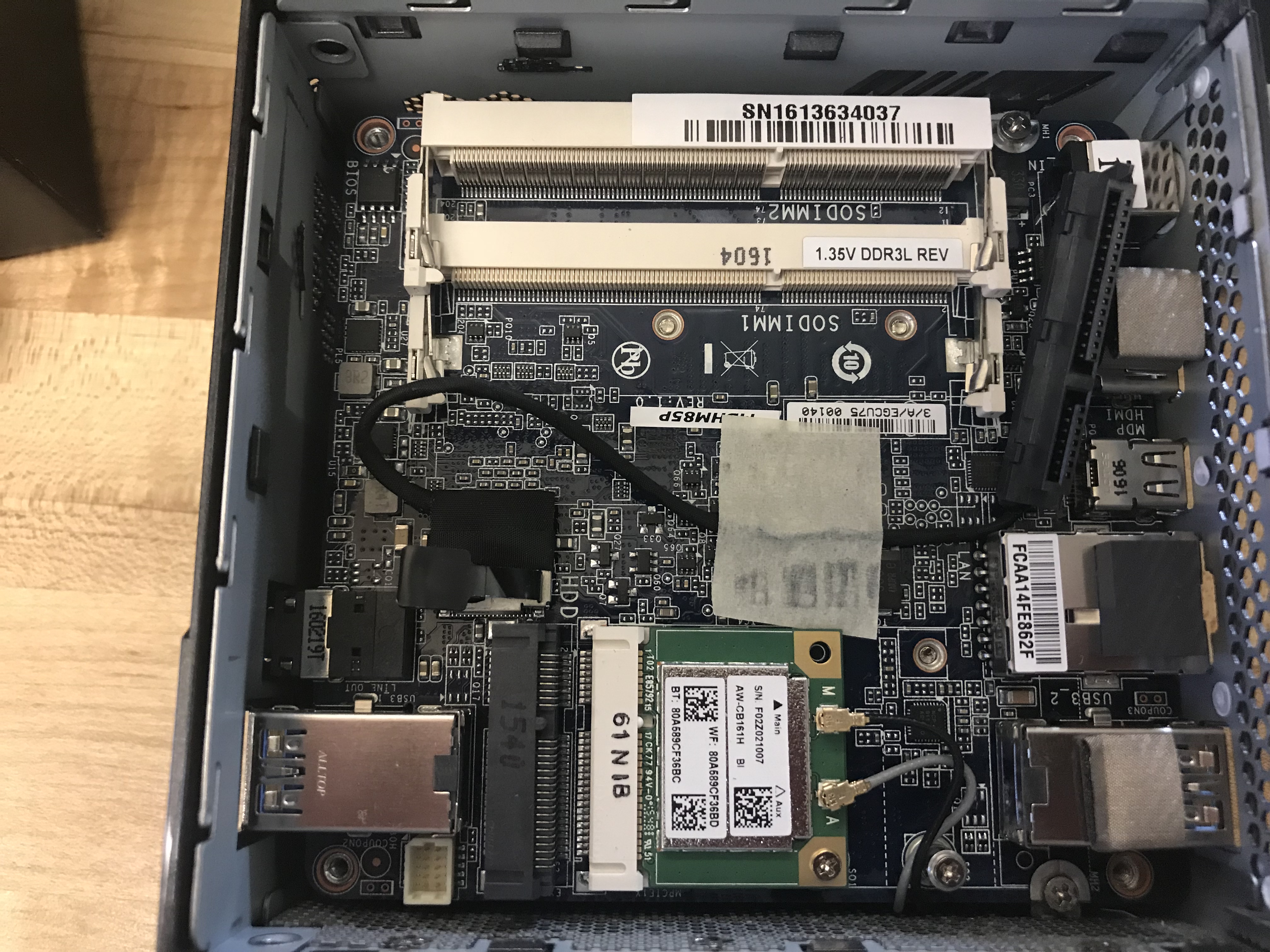
More thoughts after writing the last comment... does it make sense to have a high quality picture of an opened NUC (or any other recommended hardware) on the documentation website in case admins want to open their box and compare the chips and everything else to make sure they look exactly the same? Hoping this would make tampering with hardware more difficult.
mrphs
on 24 Aug 2017
Great idea @mrphs: a high quality picture of the interior of any of our recommended hardware indicating clearly what to remove would be excellent.
 redshiftzero
on 24 Aug 2017
redshiftzero
on 24 Aug 2017
Just noting that as of right now, our docs have been updated to recommend the NUC5i5MYHE, which was recommended to me by Intel, based on our "no soldered-on wireless" criterion. It still an easily configurable option at SimplyNUC. We'll continue to explore, and, where we can, test, other suitable options.
justintroutman
on 13 Sep 2017
Alright so the Freedom of the Press Foundation went out to physical retailers (Fry's Electronics, BestBuy) and we acquired the following hardware for testing. In particular, the NUC7s are Intel's 7th Gen (as of a few months ago) offering which look the most promising. I suspect the NUC7i5BNH would also work nicely, I noticed it was available on NewEgg but not in the physical store. I'll run through a few installs of SD on these and see how they perform.
- NUC7i3BNH
- NUC7i7BNH
- GB-BXi5-5575
- Mac Minis
Some thoughts that will eventually make it into the hardware recommendation:
- By far the
NUC7i7BNHis the most expensive. Do we really need an i7? What is the bottleneck for the speed of the webapp? (Tor) - It's unclear to me when the GB-BXi5-5575 was released.
- Mac Minis are available in multiple locations (i.e. places like BestBuy in the U.S. which might be a good candidate if Intel NUC's are unavailable.
- We make multiple recommendations for hardware for new installs.
b-meson
on 21 Sep 2017
The GB-BXi5-5575 uses a 5th gen i5 which seems to be released in early 2015 which I think means we _might_ want exclude it from official recommendation. However, if it is available in retail locations, it is still worth testing and running it through its paces, because an older model that is commercially available beats a newer model that isn't available. Thoughts?
b-meson
on 21 Sep 2017
Do we really need an i7? What is the bottleneck for the speed of the webapp? (Tor)
No we definitely don't. Haven't tested bottlenecks, but I would also expect Tor to be the one. Usually the viewing station/workstations is the most cumbersome one, when someone uses an USB-stick.
KwadroNaut
on 26 Sep 2017
@KwadroNaut actually I think there are bigger issues with the 7th gen NUCs, most notably the network drivers do not seem to be picked up by the 14.04 Ubuntu server we are using (possibly due to the age of the kernel). I am moving on to testing the GB-BXi5-5575s while we discuss internally a way to move forward in an engineering meeting. However there is more testing that needs to be done.
b-meson
on 4 Oct 2017
I pushed a branch that describes how to setup Mac Mini's as SecureDrop hardware and made a pull request https://github.com/freedomofpress/securedrop/pull/2458. However I have found some hardware that I think we should also recomment: the Gigabyte Brix line seems to fit our needs. I'll work on a branch that recommends specific model numbers and try to send a PR on that this week or next week.
b-meson
on 24 Oct 2017
The Gigabyte BRIX can be included for recommended Hardware. It is commercially available in major cities, has a removable wireless / Bluetooth card (see image), and is low cost ~450 $USD per server.
b-meson
on 4 Nov 2017
Related issues
 kushaldas
·
4Comments
kushaldas
·
4Comments
 diracdeltas
·
5Comments
diracdeltas
·
5Comments
 aydwi
·
3Comments
aydwi
·
3Comments
 heartsucker
·
4Comments
heartsucker
·
3Comments
heartsucker
·
4Comments
heartsucker
·
3Comments
Most helpful comment
How commercially available is this board? Given this threat model it might be better to go with something commercially available that a person could walk into a store and buy with cash. (Which is why the intel NUCs where so great)