Sdwebimage: Question: SDWebImage appears to be using http GET method with .refreshcached instead of a HEAD method first
Platform Name iOS
Platform Version iOS 12+
SDWebImage Version 5.0.0
Integration Method Carthage/cocoapods
Xcode Version 11
Repro rate 100%
Repro with our demo prj unsure
Demo project link n/a
Issue Description and Steps
I filed a stack overflow question like the guide suggested but I didn't get a response.
Basically I'm wondering if I can configure SDWebImage to use a head method with .refreshCached enabled to prevent unnecessary download bandwidth usage on our backend.
Copy/pasted the text from the stack overflow question here:
I'm using SDWebImage for caching images in a Swift/iOS app, and we are using it in some places with .refreshCached option enabled.
We're using Amazon s3 for images which has support for the "Last-Modified" header on the request.
My understanding is that with .refreshCached enabled SDWebImage should check the http header with a HEAD method to check to see the last modified date in the header, THEN if the Last-Modified date has changed, it can perform a GET method on the URL to get the image data, saving bandwidth.
However when I inspect the calls that the app is making (using CocoaDebug), I only see the GET methods in the log, meaning even when the image is cached we're still fetching all the image data.
On subsequent views where the images are visible, I see that images load instantly, implying the cache is working, but I still see the full GET methods and no HEAD method in the log.
Does SDWebImage support this HEAD followed by GET flow or am I doing something wrong or otherwise misunderstanding?
 matthewweldon
All 27 comments
This is not used for prevent unnecessary download bandwidth usage on our backend
This is used for always ensure when server image changed, client ignore the local cache...Not the meaning you want.
It use URLSession's NSURLRequestUseProtocolCachePolicy.
This NSURLRequestUseProtocolCachePolicy behavior, it's that we actually do download with GET at the first time (then store the response with E-tag and cache expiration date). When next time query, URLSession trigger HEAD request. This is previous behavior I found.
If you found that it always request GET method, maybe this total solution need to be re-written, or the URLSession have something new configuration which we can use.
 dreampiggy
on 10 Dec 2019
dreampiggy
on 10 Dec 2019
We are experiencing the exact same issue. We have a CollectionView at the bottom of our TableView cell that holds users account images (URLs from Facebook, Twitter, LinkedIn)
Here is a video showing how it downloads as we scroll up and down.
let url = URL(string: account.avitarLocation)
profileImageView.sd_imageIndicator = SDWebImageActivityIndicator.gray
profileImageView.sd_setImage(with: url, placeholderImage: nil, options: SDWebImageOptions.refreshCached, completed: nil)
Here is a video showing it not downloading as we scroll up and down.
let url = URL(string: account.avitarLocation)
profileImageView.sd_imageIndicator = SDWebImageActivityIndicator.gray
profileImageView.sd_setImage(with: url, placeholderImage: nil, /*options: SDWebImageOptions.refreshCached,*/ completed: nil)
Version of SDWebImage
SDWebImage (5.4.0):
SDWebImage/Core (= 5.4.0)
 mikemike396
on 10 Dec 2019
mikemike396
on 10 Dec 2019
This issue has been automatically marked as stale because it has not had recent activity. It will be closed if no further activity occurs. If this is still an issue, please make sure it is up to date and if so, add a comment that this is still an issue to keep it open. Thank you for your contributions.
![stale[bot] picture](https://avatars.githubusercontent.com/in/1724?v=4&s=40) stale[bot]
on 9 Feb 2020
stale[bot]
on 9 Feb 2020
This issue has been automatically marked as stale because it has not had recent activity. It will be closed if no further activity occurs. If this is still an issue, please make sure it is up to date and if so, add a comment that this is still an issue to keep it open. Thank you for your contributions.
stale[bot]
on 9 Apr 2020
Still open
mikemike396
on 10 Apr 2020
Need some more works for this. The worst, re-implements the HTTP Cache Control all details, like E-tag, Expire-Date, etc.
All of this is because of that NSURLCache can not been used for customization, which means, the HTTP cache is different from image cache :)
dreampiggy
on 10 Apr 2020
This issue has been automatically marked as stale because it has not had recent activity. It will be closed if no further activity occurs. If this is still an issue, please make sure it is up to date and if so, add a comment that this is still an issue to keep it open. Thank you for your contributions.
stale[bot]
on 29 Jun 2020
Still a issue, need more and feasibility solution for this task. Help wanted
dreampiggy
on 29 Jun 2020
This issue has been automatically marked as stale because it has not had recent activity. It will be closed if no further activity occurs. If this is still an issue, please make sure it is up to date and if so, add a comment that this is still an issue to keep it open. Thank you for your contributions.
stale[bot]
on 29 Aug 2020
Still an issue
mikemike396
on 29 Aug 2020
Even I am facing similar issue . do we have a workaround for it ?
 surajrautela
on 4 Sep 2020
surajrautela
on 4 Sep 2020
I think this is URLSession's bug or wrong behavior.
When use NSURLRequestUseProtocolCachePolicy, it should use HEAD and use E-tag to determine the cache expiration.
It this does not work, we need rewrite this. But no one here provide a suitable MR or proposal for this problem :(
dreampiggy
on 6 Sep 2020
@dreampiggy I was trying to set up requestPolicy for NSUrlCache but seems like it is not allowing to do that on shared downloader. maybe setting up the right policy on NSUrlCache can help ??
surajrautela
on 7 Sep 2020
@surajrautela Use requestModifier: https://sdwebimage.github.io/SDWebImage/Classes/SDWebImageDownloader.html#/c:objc(cs)SDWebImageDownloader(py)requestModifier
Change the NSURLRequest.cachePolicy
dreampiggy
on 8 Sep 2020
I did that but it still didn't worked . However when I simply used NSUrlCache without using SDWebImage everything worked fine !. Seems like some issue with SDWebImageDownloader
surajrautela
on 8 Sep 2020
Sounds strange.
You can debug the code. SDWebImage by default will override the cache policy to NSURLRequestReloadIgnoringLocalCacheData, because we have SDImageCache.
Howevr, you can still modify the cache policy by your own using SDWebImageRefreshCached options, or requestModifier I talked above.
Source code (where we set the cache policy) https://github.com/SDWebImage/SDWebImage/blob/master/SDWebImage/Core/SDWebImageDownloader.m#L270
Source code (where you can use request modifier) https://github.com/SDWebImage/SDWebImage/blob/master/SDWebImage/Core/SDWebImageDownloader.m#L286
dreampiggy
on 9 Sep 2020
@dreampiggy +1 for this issue, I'm running into this as well. The proposed workarounds do not work.
- When setting .refreshCached the image is re-downloaded every time by a GET request, even though the server response contains a Last-Modified header.
- Same when using requestModifier to set cachePolicy to NSURLRequestUseProtocolCachePolicy.
 hoogendam
on 9 Sep 2020
hoogendam
on 9 Sep 2020
@dreampiggy I tried to debug the code . The policy is getting set correctly
surajrautela
on 9 Sep 2020
I think this is URLSession's bug or wrong behavior.
When use NSURLRequestUseProtocolCachePolicy, it should use HEAD and use E-tag to determine the cache expiration.
Already talked about this.
dreampiggy
on 10 Sep 2020
Did you pass SDWebImageDownloaderUseNSURLCache options to SDWebImageDownloader (Which is automatically applied when use SDWebImageRefreshCached) ?
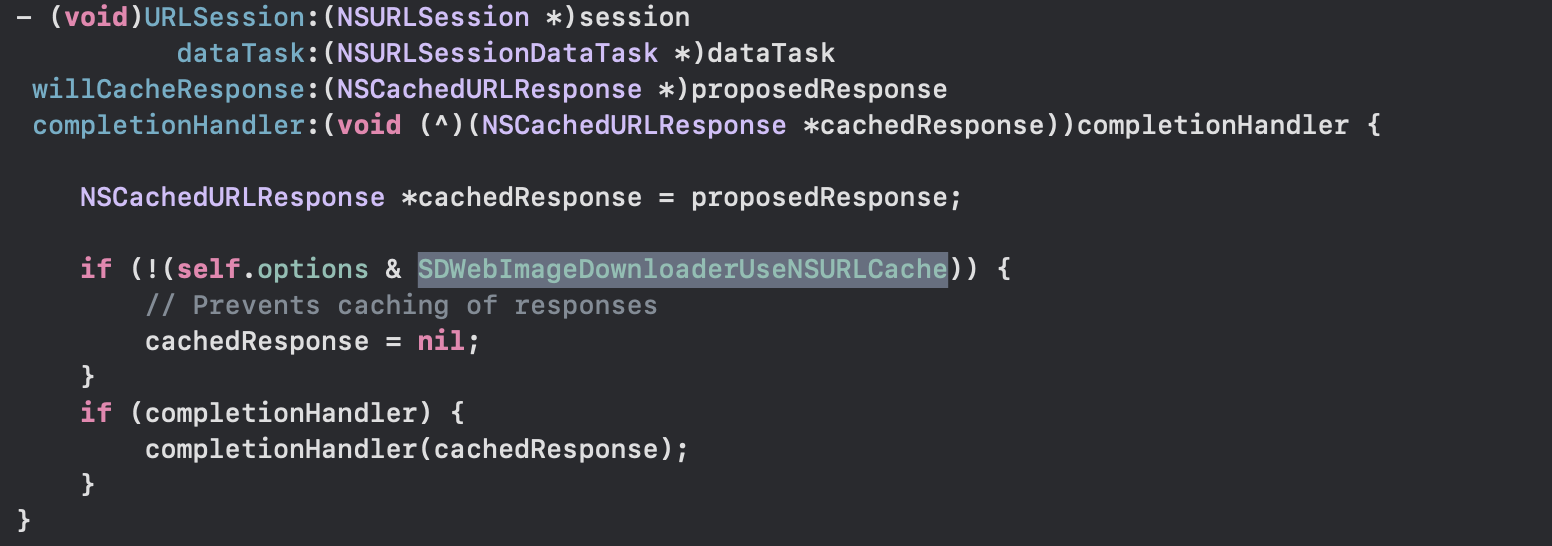
dreampiggy
on 10 Sep 2020
Did you pass
SDWebImageDownloaderUseNSURLCacheoptions toSDWebImageDownloader(Which is automatically applied when useSDWebImageRefreshCached) ?
no , I didn't .
surajrautela
on 10 Sep 2020
any update on this ??
surajrautela
on 15 Sep 2020
Any update?
mikemike396
on 1 Nov 2020
If NSURLSession does not do something magic, the last idea, is to Implments HTTP Cache control from stratch, drop NSURLSession's NSURLRequestUseProtocolCachePolicy
Although I still think this is something mistake between SDWebImage's usage, or Apple's documentation: https://developer.apple.com/documentation/foundation/nsurlrequestcachepolicy/nsurlrequestuseprotocolcachepolicy
dreampiggy
on 2 Nov 2020
Maybe is that SDWebImage override this delegate method, cause the issues ?
willCacheResponse: https://developer.apple.com/documentation/foundation/nsurlsessiondatadelegate/1411612-urlsession
Code: https://github.com/SDWebImage/SDWebImage/blob/master/SDWebImage/Core/SDWebImageDownloader.m#L449
dreampiggy
on 2 Nov 2020
This issue has been automatically marked as stale because it has not had recent activity. It will be closed if no further activity occurs. If this is still an issue, please make sure it is up to date and if so, add a comment that this is still an issue to keep it open. Thank you for your contributions.
stale[bot]
on 3 Jan 2021
Still an issue
mikemike396
on 3 Jan 2021
Related issues
 ToLengSon
·
3Comments
ToLengSon
·
3Comments
 ku8ar
·
4Comments
ku8ar
·
4Comments
 MagLiC
·
3Comments
MagLiC
·
3Comments
 bembem1011
·
6Comments
bembem1011
·
6Comments
 ankit-betterbutter
·
4Comments
ankit-betterbutter
·
4Comments
Most helpful comment
@dreampiggy +1 for this issue, I'm running into this as well. The proposed workarounds do not work.