SDWebImage from LPLinkMetadata in UICollectionViewCell
New Issue Checklist
- [X ] I have read and understood the CONTRIBUTING guide
- [X ] I have read the Documentation
- [X ] I have searched for a similar issue in the project and found none
Issue Info
Info | Value |
-------------------------|-------------------------------------|
Platform Name| ios
Platform Version| 13.2.1
SDWebImage Version| 5.0.0
Integration Method| carthage
Xcode Version| Xcode 11
Repro rate| n/a
Repro with our demo prj| n/a
Demo project link| n/a
Issue Description and Steps
This is more of a question than an issue. Can LPLinkMetaData be used with SDWebImage when loading data into a UICollectionViewCell, if one does not choose to use LPLinkView?
 inPhilly
All 134 comments
I don't check what these class is. But actually, SDWebImage can load Any Resource with custom loader, render Any Target(View) with custom Image Class and Animated Player. No limit to UIView/NSURL concreate class. You can check our wiki about this design
Or, tomorrow I'll have a check for your described third party integration.
 dreampiggy
on 19 Nov 2019
dreampiggy
on 19 Nov 2019
Here is a link to describe LPLinkMetaData - it is new in iOS 13 from Apple:
https://developer.apple.com/documentation/linkpresentation/lplinkmetadata?language=objc
It uses NSItemProvider, so I need to load and cache image from NSItemProvider.
I am pretty new at this. If you have any suggestion of how I could load into a UICollectionViewCell UIImageView using SDWebImage, I would really appreciate it!
inPhilly
on 19 Nov 2019
See exist custom loader for Photos PHAsset: https://github.com/SDWebImage/SDWebImagePhotosPlugin
Exist custom View like FLAnimatedImageView: https://github.com/SDWebImage/SDWebImageFLPlugin
Since we use protocol based API design, it's always possible to build the block. See wiki page for detail usage, and with the documentation site about the API.
Or maybe I can just create one SDWebImageLinkPresentationPlugin (sounds verbose, SDWebImageLinkPlugin ?) demo show case if you can provide simple usage code.
dreampiggy
on 19 Nov 2019
//UICollectionViewCell Subclass
- (void)configureWithLinkMetadata:(LPLinkMetadata*)linkMetadata  API_AVAILABLE(ios(13.0)){

    NSString *linkURLString = linkMetadata.originalURL.absoluteString;

    NSString *linkTitle = linkMetadata.title;
    if (!(linkTitle.length > 0)) {
        linkTitle = linkURLString;
    }
    self.linkTitleLabel.text = linkTitle;

    [self.linkImageView sd_setImageWithNSItemProvider:linkMetadata.imageProvider
    placeholderImage:[UIImage imageNamed:@"transparentSquare"]
           completed:nil];
}
- (void)prepareForReuse {

    [super prepareForReuse];
    self.linkTitleLabel.text = nil;
    [self.linkImageView sd_cancelCurrentImageLoad];
    self.linkImageView.image = nil;
}
I saw LPLinkView already have one initializer init(url:). Which just what you need ?
It seems already have one nice setImageWith(url:) method, isn't it ? Or it's just a placeholder which have limitation or traps ? Sorry I don't have a try for this yet.
dreampiggy
on 19 Nov 2019
I don't want to use LPLinkView. I want to get the UIImage from the LPLinkMetadata and use that.
inPhilly
on 19 Nov 2019
LPLinkMetadata gives NSItemProvider. We can get UIImage asynchronously from that.
inPhilly
on 19 Nov 2019
From the API design, I think that
A URL -> Async Query with LPMetadataProvider -> Get LPMetadata -> Contains Image NSItemProvider -> So, what's in the item provider ? That it's a abstract object, it's that NSData already ? UIImage ? Anything reason you want to use with SDWebImage's components ?
SDWebImage have a success decoding system (NSData -> UIImage), URL Loading system (Network request), and Cache System (Memory/Disk Cache for Image and its Data). Tell me what this plugin support for LinkPresentation can be ?
dreampiggy
on 19 Nov 2019
If the NSItemProvider's object is:
- Image HTTP URL, good, already supported via SDWebImageManager.
- Image NSData representation. good, already supported via UIImage+MultiFormat or decoder.
- Image with UIImage object, so it's end.
- Some strange internal Apple subclass, we can not do much for this, actually, until there are exist API to generate one
Image Representation(can be any CGImage, UIImage, CVPixelBuffer, IOSurface, etc. Bitmap form of Image in logic idea)
dreampiggy
on 19 Nov 2019
I want to use SDWebImage because the image is loaded from NSItemProvider asyncronously. I want to be able to cancel the loading of the image in prepareForReuse to avoid cell reuse issues. I would also like to utilize the Cache System in the same way as for loading UIImage from NSURL.
inPhilly
on 19 Nov 2019
because the image is loaded from NSItemProvider asyncronously
So, my little question, How ? Or, any API ? This NSItemProvider is a abstract class, which use id<NSCoding>. How do I check or know it representation Image, but not text, video, audio, any other things ?
dreampiggy
on 19 Nov 2019
- (void)processLinkImageProvider:(NSItemProvider*)linkImageProvider withCompletion:(void (^) (UIImage *linkImage))completionBlock API_AVAILABLE(ios(13.0)) {

    if ([linkImageProvider hasItemConformingToTypeIdentifier:(NSString *)kUTTypeJPEG]) {
        [linkImageProvider loadDataRepresentationForTypeIdentifier:(NSString *)kUTTypeJPEG completionHandler:^(NSData * _Nullable linkImageData, NSError * _Nullable error) {

            [self processLinkImageData:linkImageData withCompletion:completionBlock];
        }];
    }
    else if ([linkImageProvider hasItemConformingToTypeIdentifier:(NSString *)kUTTypePNG]) {
        [linkImageProvider loadDataRepresentationForTypeIdentifier:(NSString *)kUTTypePNG completionHandler:^(NSData * _Nullable linkImageData, NSError * _Nullable error) {

            [self processLinkImageData:linkImageData withCompletion:completionBlock];
        }];
    }
    else if ([linkImageProvider hasItemConformingToTypeIdentifier:(NSString *)kUTTypeBMP]) {
        [linkImageProvider loadDataRepresentationForTypeIdentifier:(NSString *)kUTTypeBMP completionHandler:^(NSData * _Nullable linkImageData, NSError * _Nullable error) {

            [self processLinkImageData:linkImageData withCompletion:completionBlock];
        }];
    }
    else if ([linkImageProvider hasItemConformingToTypeIdentifier:(NSString *)kUTTypeGIF]) {
        [linkImageProvider loadDataRepresentationForTypeIdentifier:(NSString *)kUTTypeGIF completionHandler:^(NSData * _Nullable linkImageData, NSError * _Nullable error) {

            [self processLinkImageData:linkImageData withCompletion:completionBlock];
        }];
    }
    else if ([linkImageProvider hasItemConformingToTypeIdentifier:(NSString *)kUTTypeTIFF]) {
        [linkImageProvider loadDataRepresentationForTypeIdentifier:(NSString *)kUTTypeTIFF completionHandler:^(NSData * _Nullable linkImageData, NSError * _Nullable error) {

            [self processLinkImageData:linkImageData withCompletion:completionBlock];
        }];
    }
    else {
        [self processLinkImageData:nil withCompletion:completionBlock];
    }
}
From your code, seems the NSItemProvider generated by LPMetadata, can only be one of compressed Data format, right ? Like JPEG/GIF/BMP/HEIF...
So, maybe we just need 2 method call, one is a huge switch case to check UTI type, another is call to generate NSData and pass to
[UIImage sd_imageWthData:data]
Sounds not hard. And you don' need any repeat code, just check if UTI in our coder supported array, they call same method is OK
dreampiggy
on 19 Nov 2019
Not sure if it could be other things, but those are the only ones I would be interested in. Ultimately, I want to be able to pass NSItemProvider and a placeholder image to set a cell's UIImageView, and also be able to cancel that load in prepareForReuse. I'm not sure how this can be done.
inPhilly
on 19 Nov 2019
I'm writing on iPad. Tomorrow I'll hav a detail demo app test for its behavior. Sounds really strange for this API design. If all the LPMetadata image item provider is a NSData, why not just use a NSURL here ? Apple's API design is strange.
dreampiggy
on 19 Nov 2019
NSURL isn't an image url. It's just a regular NSURL.
inPhilly
on 19 Nov 2019
But NSItemProvider can load Any id<NSCoding>, even a UIView, CALayer, right ? That API design is more generatic, there may be some reason (for example, that image may not even a URL), need to investigate and test on real device.
dreampiggy
on 19 Nov 2019
Apple does not want the image URL exposed to the public or stored. Link URLs can change often. This is for link previews. NSItemProvider from LPLinkMetadata should probably be an image.
inPhilly
on 19 Nov 2019
imageProvider: An object that retrieves data corresponding to a representative image for the URL.
inPhilly
on 19 Nov 2019
LPLinkMetadata imageProvider is what we are looking at.
inPhilly
on 19 Nov 2019
imageProvider: An object that retrieves data corresponding to a representative image for the URL.
If so, maybe you don't need any UTI type check, right ? It's guaranteed to be a compressed NSData of image. Can you try if this API works ?
https://developer.apple.com/documentation/foundation/nsitemprovider/2888336-loadobject
Provide the Class of UIImage, since UIImage conforms to NSItemProviderReading protocol as well...
Or, can we use the common UTI like kUTTypeImage to grab data ( you don't need to care what format it is, right ? Just need Data). And then feed the Data to our decoder (Or UIImage sd_imageWithData API)
dreampiggy
on 19 Nov 2019
That would probably work. I am not the most advanced coder.
inPhilly
on 19 Nov 2019
Or just wait me tomorrow. I'll watch WWDC about this and test for demos. This may need some time ;)
dreampiggy
on 19 Nov 2019
If that works, I still would need a custom loader for SDWebImage, correct?
inPhilly
on 19 Nov 2019
Thanks. I have an iOS 13 update that is way overdue and extremely time sensitive at this point, and I am desperate to get this to work. Thank you. I will let you know if your suggestions above work to at least get the NSData.
inPhilly
on 19 Nov 2019
The LPLinkMetadata is fetched separately and stored in NSUserDefaults (or shared defaults), by the way. That is a whole other issue. I am approaching this as though we already have LPLinkMetadata by the time we load (or reload) the UICollectionViewCell.
inPhilly
on 19 Nov 2019
If that works, I still would need a custom loader for SDWebImage, correct?
If that works, we can just create a simple convenient API wrapper. This is simple, compared to figure out How to generate Data.
And YES. We can provide a official Pod for this task. You can wrap your own as well if you can't wait. custom loader is designed to be public (we don't hard-coded logic related to SDWebImageDownloader) for user's use case.
dreampiggy
on 19 Nov 2019
The LPLinkMetadata is fetched separately and stored in NSUserDefaults (or shared defaults), by the way. That is a whole other issue. I am approaching this as though we already have LPLinkMetadata by the time we load (or reload) the UICollectionViewCell.
See Photos Plugin that API design, we supports to provide a local identifier (we query PHAsset), or exist PHAsset (user queried by themselves). They both works. I don't think this is hard to support both (we query URL to get LPMetadata and then go on, or you provide exist LPMetadata and let me fetch image). Just API wrapper, take it easy ;)
dreampiggy
on 19 Nov 2019
Great. I use Carthage by the way. Ultimately, I am hoping to have these two methods available to use for UIImageView:
- (void)sd_setImageWithNSItemProvider:(nullable NSItemProvider *)itemProvider placeholderImage:(nullable UIImage *)placeholder completed:(nullable SDExternalCompletionBlock)completedBlock
- (void)sd_cancelCurrentImageLoad
inPhilly
on 19 Nov 2019
kUTTypeImage worked perfectly.
inPhilly
on 19 Nov 2019
Hello. You probably didn't get a chance to work on this, which I completely understand. I was just checking in to see. If I understood how to customize the custom loader I would do it in a heartbeat, I just don't understand quite how to do it.
inPhilly
on 21 Nov 2019
@inPhilly Sorry for this. I'm busy in my job yesterday, and for open source work, doing something related to SwiftUI.
For custom loader, here is our wiki: https://github.com/SDWebImage/SDWebImage/wiki/Advanced-Usage#custom-loader-50
You just need to implements 3 methods:
- canRequestURL (check if the URL contains the
LPMetadata, or anything you want) - requestURL (call
LPMetadataProvider startFetchingMetadataForURLto grabLPMetadataif available. Then another async method to callNSItemProvider loadDataRepresentationForTypeIdentifier:. After you load the data, call our decoding logicSDImageLoaderDecodeImageDatain a global queue) - shouldBlockFailedURL: Whether or not to block failed URL, if it's indeed invalid. For example, 404 for HTTP; Or something internal Error (un-recoverable) for LinkPresentation. If nothing, just return.
You can also have a check to see how our SDWebImagePhotosPlugin works for this. Not hard logic.
dreampiggy
on 21 Nov 2019
So instead of
PHImageRequestID requestID;
I would have a property for
LPMetadataProvider *linkMetadataProvider;
and a property for
NSProgress *itemProviderImageLoader;
right?
Hold onto each of these so that they can be canceled during this cancel method before being set to nil? (because each of these has their own cancel method)
inPhilly
on 22 Nov 2019
@inPhilly If you want to support cancel, you must bridge the Apple's API, to SDWebImage protocol.
PHImageRequestID is used for PHImageManager to cancel.
LPMetadataProvider's API design, does not have anything like this (a token or something for cancelling). If you want to support cancel (or not, if you want it still load). You can bind each URL, a standalone LPMetadataProvider (not shared, each URL, each Provider). And just call cancel.
Today I have some time to figure this out. Please give me some times.
dreampiggy
on 22 Nov 2019
I test that you don't need image data. Using the API to get UIImage from system, just simple:

After my local test, these two APIs:
loadDataRepresentationForTypeIdentifier:loadObjectOfClass:
The loadObjectOfClass can be 5x~10x, faster than the Data representation one. Which means, Apple internally, already have a UIImage object, but not a NSData object. So, by default we will prefer to use loadObjectOfClass instead.
loadDataRepresentationForTypeIdentifier benchmark

loadObjectOfClass benchmark

dreampiggy
on 22 Nov 2019
A unique LPMetadataProvider is used for each request. This provider's cancel method "invokes the completion handler with the error code LPErrorMetadataFetchCancelled if the request hasn’t already completed."
NSItemProvider's loadDataRepresentationForTypeIdentifier method returns an NSProgress object. The cancel method can also be called on this object.
inPhilly
on 22 Nov 2019
Great work on loadObjectOfClass!
inPhilly
on 22 Nov 2019
So it seems from my comment above that I have two processes that I can cancel. Now I just need to figure it all out with object ownership (weakself/strongself) and main/background threading, since I have found that LPMetadataProvider's methods need to be called on the main queue.
inPhilly
on 22 Nov 2019
I’m already been working on one implementation. You can have a check at SDWebImageLinkPlugin
dreampiggy
on 22 Nov 2019
At first glance that looks great. The only thing I can see so far that might need change is that a LPMetadataProvider should be allocated then assigned as a property. The cancel method is called directly on the LPMetadataProvider itself. Each LPMetadataProvider should only have one request.
inPhilly
on 22 Nov 2019
Also looks at first glance like startFetchingMetadataForURL is running on the main queue, which is correct.
inPhilly
on 22 Nov 2019
Note that we can also set timeout for LPMetadataProvider to less than default 30.0. Should it be left at default or set specifically?
LPMetadataProvider *lpMetadataProvider = [[LPMetadataProvider alloc] init];
lpMetadataProvider.timeout = 10;
I really do think the option to cancel is extremely important. In my particular use case this will be used to set the image on a UICollectionViewCell's UIImageView, and there are major cell reuse issues if this can't be cancelled in UICollectionViewCell's prepareForReuse.
inPhilly
on 22 Nov 2019
At first glance that looks great. The only thing I can see so far that might need change is that a
LPMetadataProvidershould be allocated then assigned as a property. Thecancelmethod is called directly on theLPMetadataProvideritself. EachLPMetadataProvidershould only have one request.
Emm. This is what it works. Have anything different between current code and this one below (using a wrapper instead ?)
// All the `id<SDWebImageOperation>` is retained by UIView, until finished. See `UIView+WebCacheOperation`
@interface SDWebImageMyOperation  : NSObject <SDWebImageOperation>
@proeprty (strong) LPMetadataProvider *provider;
@end
I'm not saying it doesn't work - I haven't tried it yet. Still working on reviewing everything.
My thought was, with the current code - will it call cancel on LPMetadataProvider when I call sd_cancelCurrentImageLoad on my UIImageView?
That is why I suggested. But I really am a novice developer, much below your level. So I may easily be wrong.
inPhilly
on 22 Nov 2019
I'm now a little curious about the Usage from Apple's WWDC 262. My aim of that SDWebImageLinkPlugin supports features including:
- Query image (or fallback to icon) on rich link URL, even it's not a image URL (like Apple's official site)
- View Category to support UIImageView/LPLinkView to automaically request URL
- Query exist
LPLinkMetadataas well, from user's exist code - (How to ??) Allow user to simply specified activityViewControllerLinkMetadata to Prefetch Metadata for iOS 13 share activity ? Did that means, I need to write the image onto disk, and using the NSItemProvider.contentsOf API ? (Like stupid usage, I've already have one UIImage in memory)
dreampiggy
on 22 Nov 2019
I'm not saying it doesn't work - I haven't tried it yet. Still working on reviewing everything.
My thought was, with the current code - will it call
cancelonLPMetadataProviderwhen I call sd_cancelCurrentImageLoad on my UIImageView?That is why I suggested. But I really am a novice developer, much below your level. So I may easily be wrong.
Don't worry. Anything that have a cancel method can be retruned from that requestImageWithURL API. And it's works on cancellable from your exist SDWebImage behavior (cell-refresh and cancel previous, worked)
Actually user don't need to care about the type is. SDWebImageDownloader, return a SDWebImageDownloadToken to usage, because user may use token to check URLResponse. For link representation, currently I can not find anything reasion to create a new internal class, but actually this is small problem...
dreampiggy
on 22 Nov 2019
I'm now a little curious about the Usage from Apple's WWDC 262. My aim of that SDWebImageLinkPlugin supports features including:
- Query image (or fallback to icon) on rich link URL, even it's not a image URL (like Apple's official site)
- View Category to support UIImageView/LPLinkView to automaically request URL
- Query exist
LPLinkMetadataas well, from user's exist code- (How to ??) Allow user to simply specified activityViewControllerLinkMetadata to Prefetch Metadata for iOS 13 share activity ? Did that means, I need to write the image onto disk, and using the NSItemProvider.contentsOf API ? (Like stupid usage, I've already have one UIImage in memory)
Sounds fantastic. Also, I personally need the title from the LPLinkMetadata; so somewhere in the process, it might be a good idea to store it to NSUserDefaults because that is what was suggested by Apple (conforms to NSCoding).
+ (void)storeMetadata:(LPLinkMetadata*)linkMetadata forURLString:(NSString*)urlString synchronize:(BOOL)synchronize  API_AVAILABLE(ios(13.0)) {

    NSData *linkMetadataArchived = [NSKeyedArchiver archivedDataWithRootObject:linkMetadata requiringSecureCoding:YES error:nil];
    NSMutableDictionary *linkMetadatas = [[LINK_PRESENTATION_METADATA_DEFAULTS objectForKey:LINK_PRESENTATION_METADATA_DICT_NAME] mutableCopy];
    if (linkMetadatas == nil) {
        linkMetadatas = [[NSMutableDictionary alloc] init];
    }

    linkMetadatas[urlString] = linkMetadataArchived;
    [LINK_PRESENTATION_METADATA_DEFAULTS setObject:linkMetadatas forKey:LINK_PRESENTATION_METADATA_DICT_NAME];
    if (synchronize) {
        [LINK_PRESENTATION_METADATA_DEFAULTS synchronize];
    }
}
+ (LPLinkMetadata *)metadataForURLString:(NSString*)urlString  API_AVAILABLE(ios(13.0)) {

    LPLinkMetadata *linkMetadata = nil;
    NSMutableDictionary *linkMetadatas = [[LINK_PRESENTATION_METADATA_DEFAULTS objectForKey:LINK_PRESENTATION_METADATA_DICT_NAME] mutableCopy];
    if (linkMetadatas != nil) {
        NSData *linkMetadataArchived = linkMetadatas[urlString];
        if (linkMetadataArchived != nil) {
            linkMetadata = [NSKeyedUnarchiver unarchivedObjectOfClass:LPLinkMetadata.class fromData:linkMetadataArchived error:nil];
        }
    }
    return linkMetadata;
}
+ (void)removeMetadataForURLString:(NSString*)urlString synchronize:(BOOL)synchronize API_AVAILABLE(ios(13.0)) {

    NSMutableDictionary *linkMetadatas = [[LINK_PRESENTATION_METADATA_DEFAULTS objectForKey:LINK_PRESENTATION_METADATA_DICT_NAME] mutableCopy];
    if (linkMetadatas != nil) {
        if ([linkMetadatas objectForKey:urlString] != nil) {
            [linkMetadatas removeObjectForKey:urlString];
            if (synchronize) {
                [LINK_PRESENTATION_METADATA_DEFAULTS synchronize];
            }
        }
    }
}
Another interesting behavior during my test about LinkPresentation. This API:
// Above is a LPLinkView
NSURL *url1 = [NSURL URLWithString:@"https://www.apple.com/iphone/"];
NSURL *url2 = [NSURL URLWithString:@"https://webkit.org/"];
self.linkView = [[LPLinkView alloc] initWithURL:url1];
self.linkView.frame = CGRectMake(0, 0, self.view.bounds.size.width, self.view.bounds.size.height / 2);
[self.view addSubview:self.linkView];

// Below is a UIImageView
self.imageView = [[UIImageView alloc] init];
self.imageView.frame = CGRectMake(0, self.view.bounds.size.height / 2, self.view.bounds.size.width, self.view.bounds.size.height / 2);
[self.view addSubview:self.imageView];
[self.imageView sd_setImageWithURL:url2 completed:^(UIImage * _Nullable image, NSError * _Nullable error, SDImageCacheType cacheType, NSURL * _Nullable imageURL) {
    NSLog(@"%@", @"LPMetadata image load success");
}];
Seems this does not works as my expected. Because LPLinkView does not query the image URL (such as call to startFetchingMetadataForURL). It just show a empty placeholder... 😢

dreampiggy
on 22 Nov 2019
Don't worry. Anything that have a
cancelmethod can be retruned from thatrequestImageWithURLAPI. And it's works on cancellable from your exist SDWebImage behavior (cell-refresh and cancel previous, worked)
So, even though you don't call cancel on LPMetadataProvider directly in your code, it's request will still be canceled when I call sd_cancelCurrentImageLoad on my UIImageView?
inPhilly
on 22 Nov 2019
Seems this does not works as my expected. Because
LPLinkViewdoes not query the image URL (such as call tostartFetchingMetadataForURL). It just show a empty placeholder... 😢
That's right - you have to get the metadata first and pass it on to the LPLinkView.
inPhilly
on 22 Nov 2019
Also, to my above comment on storing the LPLinkMetadata in NSUserDefaults:
- This could be an option that the user sets
- Location, such as shared defaults, and dictionary name could also be supplied in options
- This could be queried first so that
startFetchingMetadataForURLdoesn't have to be called if this cached data is found. I believe Apple is suggesting this. Not sure how to limit size/number stored though, or if we would need to.
And again, in case you missed it in this jumble of a conversation:
Don't worry. Anything that have a
cancelmethod can be retruned from thatrequestImageWithURLAPI. And it's works on cancellable from your exist SDWebImage behavior (cell-refresh and cancel previous, worked)
So, even though SDWebImage doesn't call cancel on LPMetadataProvider directly in its code, its request will still be canceled when I call sd_cancelCurrentImageLoad on my UIImageView?
inPhilly
on 22 Nov 2019
SDWebImage's cache system is not bind to NSUserDefaults from its design. Which use the NSCache on memory, and the Disk Data using NSFileManager.
I don't think LPLinkMetada should be Serialized by our framework. Instead, user have their own serialization solution (NSUserDefault is one).
We can receive a LPLinkMetadata object, and do the NSItermProvider query. If you don't want to serialize it, just provide us a NSURL object, we query the LPLinkMetadata. This is the consistant behavior with all the other loaders
dreampiggy
on 22 Nov 2019
So, even though SDWebImage doesn't call cancel on LPMetadataProvider directly in its code
Called by everytime you call sd_setImageWithURL:. If you're curious about the implementation, see our code:
dreampiggy
on 22 Nov 2019
Called by everytime you call
sd_setImageWithURL:
Okay. I just know how important sd_cancelCurrentImageLoad in prepareForReuse has been. I will test and see.
I don't think
LPLinkMetadashould beSerializedby our framework. Instead, user have their own serialization solution (NSUserDefault is one).
Gotcha. Makes sense. So then - can LPLinkMetadata be returned in completion block from call to sd_setImageWithURL?
Also - it would make sense to query existing LPLinkMetadata as well, from user's existing code, as you mentioned above; and then pass that to SDWebImage instead of the site URL. This is what we had originally planned to do, and this option would be very helpful!
So pass URL at first, then have UIImage and LPLinkMetadata returned in completion. Save LPLinkMetadata. Next time, pass LPLinkMetadata only!
inPhilly
on 22 Nov 2019
@inPhilly I'm working on it...Give me just 1 hour to write up all the things I've already done ;)
Just see the video for current usage. Or wait for me to fully write things up.
dreampiggy
on 22 Nov 2019
Awesome! I did have one more question for when you have a minute:
My app is backwards compatible to before iOS 13. When I call sd_setImageWithURL for iOS 13, the url supplied is a non-image URL and I want the method to get the image from the LPLinkMetadata. When I call for iOS 12 and earlier, the url supplied is an image URL and I want the method to get the image directly from the supplied NSURL. But - the method has the same name for both! And I have to include the files for both. How can I specify the difference for pre-iOS 13/iOS 13?
Maybe you call it sd_setImageWithNonImageURL ?
Update - I see now how to do this with the options. Sorry.
inPhilly
on 22 Nov 2019
the method has the same name for both!
We have Loaders Manager. It behave just like our decoders manager, caches manager. Which allows you to combine different loaders at the same time. Both of them supports multiple components. You can read that wiki again (need some time, but can help you understand how SDWebImage works)
So, just simple:
if (@available(iOS 13, *)) {
    [SDImageLoadersManager.sharedManager addLoader:SDImageLinkLoader.sharedLoader];
    SDWebImageManager.defaultImageLoader = SDImageLoadersManager.sharedManager;
} else {
    SDWebImageManager.defaultImageLoader = SDImageLoadersManager.sharedManager;
}
But, I've not test how a CocoaPods framework to be used with different platform version. Because that SDWebImageLinkPlugin is designed to be availabe on iOS 13 (it use iOS 13+ only class from LinkPresenation framework). Maybe you need some CocoaPods trick to make it works...
Or, you can integrate the SDWebImageLinkPlugin with prebuilt framework via Carthage. Drag it to Xcode project, select the framework type as a optional framework. (called weak linked framework in previous Xcode, see: https://developer.apple.com/library/archive/documentation/MacOSX/Conceptual/BPFrameworks/Concepts/WeakLinking.html)
dreampiggy
on 22 Nov 2019
Looks GREAT!
Just tried in Carthage. Got this error:
No tagged versions found for github "SDWebImage/SDWebImageLinkPlugin"
inPhilly
on 22 Nov 2019
Just it says, no tagged now. It's not producation ready for now. (First version). There are still things to do until v0.1.0 version. I'll finish it tomorrow (It's 2:00 AM in my local timezone)
You can use carthage to add a Commit hash dependency, or branch dependency.
github "SDWebImage/SDWebImageLinkPlugin", "master"
Let's say I was planning on shipping an app within with this within the next two days. What should I do?
inPhilly
on 22 Nov 2019
* Checking out SDWebImage at "5.3.2"
Checking out SDWebImageLinkPlugin at "0831167d6c1690812bcd53d218b38cfed5a60ac5"
** Checking out SDWebImage at "5.3.2"
A shell task (/usr/bin/env git checkout --quiet --force 5.3.2 (launched in /Users/home/Library/Caches/org.carthage.CarthageKit/dependencies/SDWebImage)) failed with exit code 128:
fatal: Unable to create '/Users/home/Library/Caches/org.carthage.CarthageKit/dependencies/SDWebImage/./index.lock': File exists.Another git process seems to be running in this repository, e.g.
an editor opened by 'git commit'. Please make sure all processes
are terminated then try again. If it still fails, a git process
may have crashed in this repository earlier:
remove the file manually to continue.
inPhilly
on 22 Nov 2019
You don't by any chance have the option to provide loading from LPLinkMetadata instead of a URL, do you? Otherwise, if I load from cached LPLinkMetadata, I still have the issue of async loading.
Have integrated manually for now and looking forward to testing soon, but wanted to double-check on loading from LPLinkMetadata first.
inPhilly
on 22 Nov 2019
I see it now. I will set NSURL's sd_linkMetadata to the existing metadata first.
inPhilly
on 22 Nov 2019
I think there is some sort of problem with the imageURL.sd_linkMetadata in sd_setImageWithURL's completion block;
        __weak typeof(self) weakSelf = self;

        [SDImageLoadersManager.sharedManager addLoader:SDImageLinkLoader.sharedLoader];
        SDWebImageManager.defaultImageLoader = SDImageLoadersManager.sharedManager;

        [self.imageView
            sd_setImageWithURL:linkURL
            placeholderImage:nil
            options:SDWebImageFromLoaderOnly
            completed:^(UIImage *sdImage, NSError *error, SDImageCacheType cacheType, NSURL *imageURL) {

                __strong typeof(self) strongSelf = weakSelf;
                if (strongSelf != nil) {
                    LPLinkMetadata *fetchedLinkMetadata = imageURL.sd_linkMetadata;
                       if (fetchedLinkMetadata != nil) {
                           [Link storeMetadata:fetchedLinkMetadata forURLString:strongSelf.linkDefaultFollowURL synchronize:YES];
                     }
                }
        }];
+ (void)storeMetadata:(LPLinkMetadata*)linkMetadata forURLString:(NSString*)urlString synchronize:(BOOL)synchronize  API_AVAILABLE(ios(13.0)) {

    NSData *linkMetadataArchived = [NSKeyedArchiver archivedDataWithRootObject:linkMetadata requiringSecureCoding:YES error:nil];
    NSMutableDictionary *linkMetadatas = [[LINK_PRESENTATION_METADATA_DEFAULTS objectForKey:LINK_PRESENTATION_METADATA_DICT_NAME] mutableCopy];
    if (linkMetadatas == nil) {
        linkMetadatas = [[NSMutableDictionary alloc] init];
    }

    linkMetadatas[urlString] = linkMetadataArchived;
    [LINK_PRESENTATION_METADATA_DEFAULTS setObject:linkMetadatas forKey:LINK_PRESENTATION_METADATA_DICT_NAME];
    if (synchronize) {
        [LINK_PRESENTATION_METADATA_DEFAULTS synchronize];
    }
}
Get this error:
+[Link storeMetadata:forURLString:synchronize:] (Line 721) - linkMetadatas[urlString]:{length = 41875, bytes = 0x62706c69 73743030 d4010203 04050607 ... 00000000 0000a285 }
2019-11-22 15:02:42.954465-0500 MyActionExtension[49857:5092204] [User Defaults] CFPrefsPlistSource<0x2804adc00> (Domain: group.com.mycompany.myapp, User: kCFPreferencesCurrentUser, ByHost: No, Container: (null), Contents Need Refresh: No): Attempting to store >= 4194304 bytes of data in CFPreferences/NSUserDefaults on this platform is invalid. This is a bug in MyActionExtension or a library it uses
Previously, I haven't had a problem using this method when I have valid LPLinkMetadata.
inPhilly
on 22 Nov 2019
I decided to remove the LPLinkMetadata NSUserDefaults storage for now, and I noticed another possible issue. Usually when I use SDWebImage, the results are automatically cached. Using SDWebImageLinkPlugin, I loaded the items onto a view controller, exited, came back, and everything had to reload from the beginning. Nothing was retrieved from the image cache. Is this the expected behavior?
inPhilly
on 22 Nov 2019
SDWebImageFromLoaderOnly
Just as it naming, does not cache.
dreampiggy
on 23 Nov 2019
I can't save the LPLinkMetaData to NSUserDefaults consistently without crashing. I can't cache the images using this loader. I think cell reuse might also be messed up. So each controller takes forever to load and then reloads cells as I scroll up and down. It is slow and choppy. I am at my wit's end at this point.
inPhilly
on 23 Nov 2019
I'm considerate one thing: How to cache something extra outside the image data ? Because for now:
SD disk cache, only cache the Image Data, which means, if we have something extra related to image, it lost. Such as our usage case: LPMetadata's, a metadata that binding to image data.
See that code here: https://github.com/SDWebImage/SDWebImageLinkPlugin/blob/master/SDWebImageLinkPlugin/Classes/LPLinkView%2BWebCache.m#L59-L67
I want to have a You specify URL, we query both cached image data, as well as cached metadata in disk. But currently, there are no API in Core lib.
A possible solution, it's to polish our SDDiskCache to allow metadata for key to be stored and queried. We can use the Extended File Attribute: https://nshipster.com/extended-file-attributes/
Anyway, I think this thing is much more than I expected, which may take more few days.
If you don't bother to use it currently, I can just release first beta version now. But note that when you use cache and NSURL(don't serilize metadata yourself), LPLinkMetadata title will not been recovered.
dreampiggy
on 23 Nov 2019
Also, when I try to use plugin on one controller and the default loader on another controller, the other controller is crashing because it is getting notifications from this plugin.
inPhilly
on 23 Nov 2019
Also, when I try to use plugin on one controller and the default loader on another controller, the other controller is crashing because it is getting notifications from this plugin.
What does means, the Crash ?
Did you register the loader multiple times . All the loaders/caches/coders, should setup once, in AppDelegate. Don't put it on ViewController....That just a sample code because the demo have one VC.
If this cause misunderstanding, I update all wiki again, mentioned that loaders/caches/coders should be a One-Time-Setup-After-App-Launch.
dreampiggy
on 23 Nov 2019
Okay, I think I give up. I just can't make this work no matter how hard I try. All I want is to load cells in a UICollectionView from LPLinkMetadata the same way I load them from image NSURLs. Smooth scrolling, cells that stay loaded once they are loaded. I shouldn't have expected you to be able to do this quickly. I certainly can't do it at all. Thank you so much for trying. I'm sure you will eventually have something very nice that works for collection views.
inPhilly
on 23 Nov 2019
@inPhilly You can show me your desired UI result, I can update the demo in LinkPLugin there. A demo or usage-driven develop can make it clear what does not work, what to do. Actually.
Because I actually new to Rich Link presentation as well. So there must be something need to do.
dreampiggy
on 23 Nov 2019
I just have a basic collection view of cells where each cell shows the image and title from a NSURL. I can't use LPLinkView because I have some other custom info. It is basically my own custom LPLinkView. It was too much for me to take on. You have been great, but I need to publish an update, so I just need to roll everything back to old code at this point.
inPhilly
on 23 Nov 2019
@inPhilly I can ensure I encounter a BUG, that prevent me to complete this plugin.
The LPLinkView is buggy on the TableView/CollectionView cell reusing. It does not render what I've provided LPMetadata, instead, it use async internally, and suck at previous state.
See this View Debug result. Current LPLinkView.medata.URL == "https://www.apple.com", however, it shows a Label text as another cell https://webkit.org/
This strange behavior only exist when quickly scroll the Table/CollectionView, but I don't think this is acceptable. The only solution to make it works, it's to Cache and Serialize/Deserialize the LPLinkMetadata object.
Once you want to store the all the same information (I cache URL, title, imageProvider and create a new LPMetadata object to set to the LinkView) , it will behave strange like this.
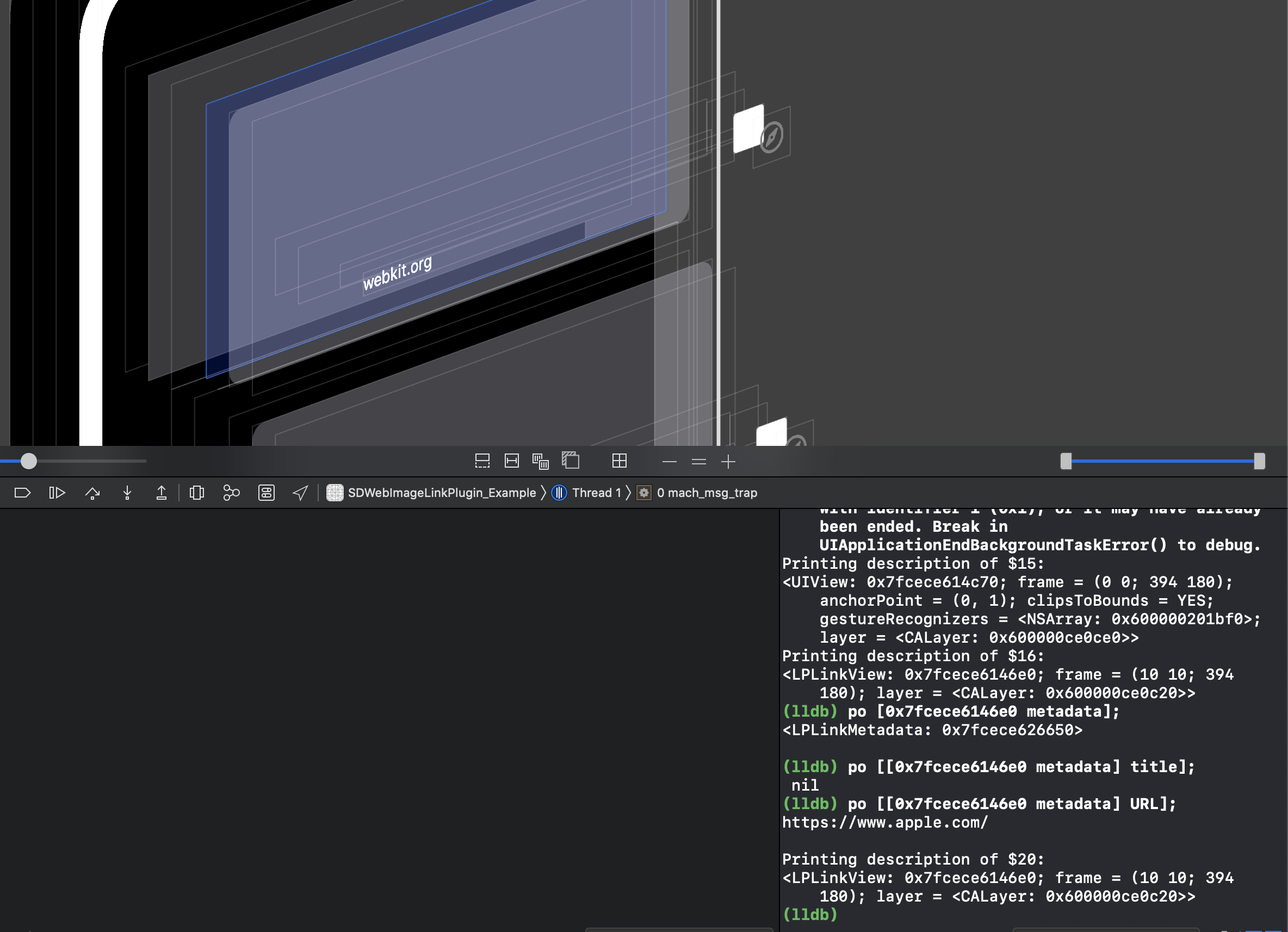
Maybe a Radar is need, until Apple fix the problem. Current architecture of SDWebImage can not help with you. You can not cache image as well (The reason above).
You have to using NSKeyedArchiver/UserDefaults to encode the LPLinkMetadata with image, no workaround at all
dreampiggy
on 23 Nov 2019
Fired Radar: FB7462933

dreampiggy
on 23 Nov 2019
@inPhilly Or, I found a Private API which can achieve this, and works perfectly. But I don't know whether there are any other ways to do this thing.
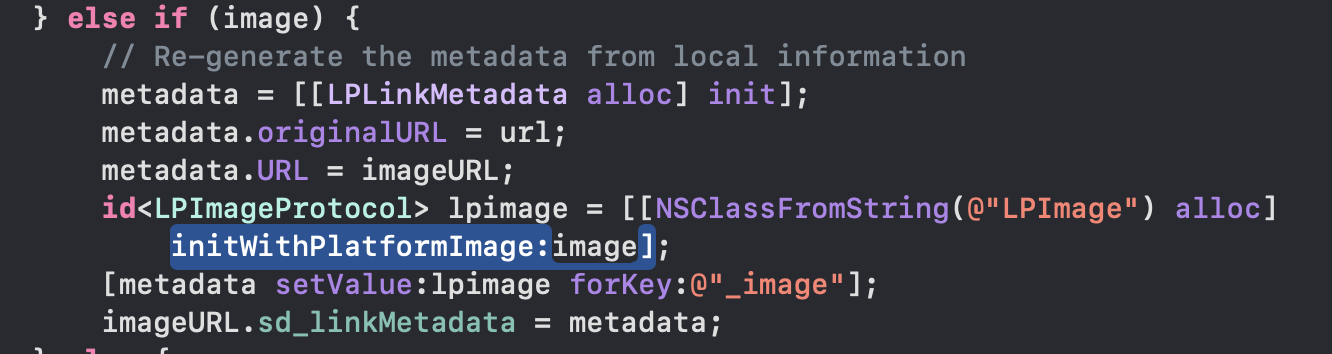
See the video to load URL on LPLinkView and UIImageView, cache works perfectly without network.
dreampiggy
on 23 Nov 2019
I am not using LPLinkView at all. The issue is with UICollectionView and SDWebImageLinkPlugin.
inPhilly
on 23 Nov 2019
UICollectionView. Each UICollectionViewCell has UIImageView and UILabel. The data object for each cell is a NSURL. That NSURL has corresponding LPLinkMetadata that must be fetched to get UIImage (for the UIImageView) and NSString "title" (for the UILabel).
inPhilly
on 23 Nov 2019
For your use case, you can just forget LPLinkMetadata, use the NSURL with sd_setImageWithURL:. Checkout the demo on iOS. That's maybe just what you need:
@interface ImageTableViewCell : UITableViewCell

@property (nonatomic, strong) UILabel *customTextLabel;
@property (nonatomic, strong) UIImageView *customImageView;

@end
The whole issue is that it is not an image NSURL. It is a non-image NSURL. I need to fetch the LPLinkMetadata for the non-image NSURL to be able to get to the image. This is what the plugin was doing - I wasn't doing it directly. But I was trying to store the LPLinkMetaData afterwards.
inPhilly
on 23 Nov 2019
When I used the plugin I was just supplying the non-image URL.
inPhilly
on 23 Nov 2019
As far as the demo, it uses LPLinkView. I am NOT using LPLinkView in my app. At all, ever. No LPLinkView.
inPhilly
on 23 Nov 2019
I also don't use Cocoapods, so I can't even play with the sample.
inPhilly
on 23 Nov 2019
I used the plugin I was just supplying the non-image URL.
Why do you think that the demo here is fetching Image URL ? Did you actually run or see the demo code ?
Clone the repo and run the demo. It fetch the Rich Link:
    self.objects = [NSArray arrayWithObjects:
                    @"https://www.apple.com/",
                    @"https://www.apple.com/music/",
                    @"https://www.apple.com/apple-news/",
                    @"https://www.icloud.com/",
                    @"https://developer.apple.com/xcode/",
                    @"https://developer.apple.com/swift/",
                    @"https://developer.apple.com/testflight/",
                    @"https://www.mozilla.org/en-US/firefox/",
                    @"https://bing.com/",
                    @"https://webkit.org/",
                    nil];
As far as the demo, it uses LPLinkView. I am NOT using LPLinkView in my app. At all, ever. No LPLinkView.
And the demo provide two view, you can switch between the UIImageView+UILabel or LPLinkView. You can click Switch View to switch between them.
dreampiggy
on 23 Nov 2019
I also don't use Cocoapods, so I can't even play with the sample.
If you don't use CocoaPods, you can modify that Demo to use Carthage, or Swift Package Manager. It's easy as well. Just the integration way, this does not impact the demo's function.
But, I don't think install a ruby command line is a hard thing, than wasting time to modify the exist project...
dreampiggy
on 23 Nov 2019
Okay. Sorry if I have been testy - I am so exhausted and overwhelmed.
I moved the call to sd_setImageWithURL: from the cell itself and the to the collectionView's datasource/delegate.
I removed options:SDWebImageFromLoaderOnly.
I was able to get the image to load - smoothly and cached. Perfect.
The only problem is:
In this case, the imageURL.sd_linkMetadata returned from the completion block is nil; so I cannot get the title from the NSURL. The title is also important to get, and it is stored in the LPLinkMetadata.
inPhilly
on 23 Nov 2019
Okay - SOMETIMES the imageURL.sd_linkMetadata is returned - but only if there is NOT a cached image.
inPhilly
on 23 Nov 2019
The title is also important to get, and it is stored in the LPLinkMetadata.
This is what I'm doing. See #2898.
But I want to point it out. After 24 hours invesigate and study the link presentation and its currrent archivetecture (and usage API). I don't think integrate to our cache system is a good idea.
Reasons are complicated, including many API design part (If you're not a framework author, just skip these):
- SDWebImage cache system care about
Image, but not any other things. All the metadata which can not be represented byImagewill be ignored somehow. (Some information likecolor profile,exif orientationis related to Image and JPEG/PNG format support to store them, so it will keep, but this is IEEE standard what we can not control) - However, the
LPLinkMetadatais nothing related to image. So I create that #2898 PR. Which allow to bind a extra data to Image. - Your usage case, actually is: I want to cache a object like this, which can replace all the exist
UIImagearg in SDWebImage framework...But we don't have this design from the stratch.
@interface MyImage
@property UIImage *image;
@property NSString *title;
@end
- So, after that #2898 is merged and release (maybe a week or longer). You can use this code, but, it's not always work as you may expected. Because we have many many code which may strip the extended data, like the Image Transformer. So always take care of it.
[imageView sd_setImageWithURL:url completed:^(UIImage * _Nullable image, NSError * _Nullable error, SDImageCacheType cacheType, NSURL * _Nullable imageURL) {
    if (image) {
                 // If you add the LinkLoader, the extended data is written by us, which is a `LPLinkMetadata` encoding data.
        NSData *extendedData = image.sd_extendedData;
        LPLinkMetadata *metadata = [NSKeyedUnarchiver unarchivedObjectOfClass:LPLinkMetadata.class fromData:extendedData error:nil];
            NSString *title = metadata.title;
    }
}];
Okay - I am a little confused. What does that mean for the new plugin?
Will the plugin still go forward? Or is the plugin itself a bad idea? I can wait on the sd_extendedData and find a workaround in the meantime, but I do hope you will keep the plugin.
Is the plugin available via Carthage right now, if you are keeping it? (without the sd_extendedData of course)
inPhilly
on 23 Nov 2019
Will the plugin still go forward? Or is the plugin itself a bad idea?
At first (before 24 hour), I think it's a good idea. Because it seems There is something new, and it load the image from network. SDWebImage's cache and loading system may help for this
However, after 24 hours, I learn something current design of LPLinkMetadata. The truth of that is:
The Link Presentation framework author, actually want you, to take LPLinkMetadata as a logic data model (Source of truth). You should serialze the metadata (using UserDefault/File/CoreData, anyway), and query the exist metadata on LPLinkView. They produce the cache and async load as well, and don't need another cache/load system.
Because, I found, LPLinkMetadata already encode the image data, inline-video data, right in the class's NSCoding archive. For example, if you load the https://www.apple.com/iphone-11-pro/, the NSCoding archived LPLinkMetadata size is 560KB. With 700Bytes metadata objects and 559KB image data buffer.
LPLinkMetadata is written to seamless used with LPLinkView, because it internally, cache the image/video memory representation (A LPImage/LPVideo class). You can not get that through the public API imageProvider, which will load async with some extra cost. Only LPLinkView can use that. So your custom view's performance is always worse than LPLinkView.
Since they already provide the cache system (using the NSCoding). If you want to use SDWebImage with that, currently, I write a strip solution, and a little hack, to make it possible:
We keep(serialize) the
LPLinkMetadatawithout image (avoid double cache), and bind it with the image cached inSDImageCache. This sounds tricky, but this is the only thing I get after I investigate the detail behavior of LinkPresentation.
Whether or not, this is a experiment project, I can not say it's always best solution to solve anything, but I'll still try to make this plugin production-ready, which need more time.
dreampiggy
on 23 Nov 2019
I was originally planning on storing the LPLinkMetadata in my shared NSUserDefaults, and then using SDWebImage to set a UIImageView's image from the LPLinkMetaData's imageProvider/iconProvider. I wanted to use SDWebImage because of the cache.
Here is a link to describe LPLinkMetaData - it is new in iOS 13 from Apple:
https://developer.apple.com/documentation/linkpresentation/lplinkmetadata?language=objcIt uses NSItemProvider, so I need to load and cache image from NSItemProvider.
Do we go back to this? I would like to use SDWebImage in any case because it is an asynchronous loader and it caches the image.
inPhilly
on 23 Nov 2019
The Link Presentation framework author, actually want you, to take LPLinkMetadata as a logic data model (Source of truth). You should serialze the metadata (using UserDefault/File/CoreData, anyway), and query the exist metadata on LPLinkView. They produce the cache and async load as well, and don't need another cache/load system.
Are you saying that if we use LPLinkView we still need to cache the LPLinkMetadata (using NSUserDefaults, etc.?)
Or are you saying the LPLinkView caches the LPLinkMetadata and we don't need to do it manually?
If LPLinkView caches the LPLinkMetadata, does that cache remain after the LPLinkView is gone?
inPhilly
on 23 Nov 2019
Since I am getting so many errors from Apple when I try to cache the LPLinkMetadata, I would still love the option to use the plugin and have it fetch the LPLinkMetadata, even if it doesn't cache or return the LPLinkMetadata, but the UIImage only, for the NSURL.
inPhilly
on 23 Nov 2019
LPLinkMetadata is a component with:
- Model, including WebSite's meta information of that og:title og:image URL
- Loader, which load the image and video async (when using with LPLinkView)
- Cache, the NSCoding method will store all video/image data, not simple URL, it archive everything (output NSData size may large because it contains image/video data)
So, I think the best way to use that, just cache the LPLinkMetadata, keep it in memory and disk. You don't need whatever UIImage, NSURL, NSData, they are one thing.
dreampiggy
on 24 Nov 2019
And, actually, LPLinkMetadata have property called image and video, which hold the memory representation of loaded image and video, to render immediately (not async) on the view.
However, I don't know why they make this private, and prefer you to use the strange NSItemProvider, which is always async. LPLinkView itself totally ignore that NSItemProvider property, they directly use the already loaded one.
dreampiggy
on 24 Nov 2019
So, from the behavior above, this framework actually, don't really work seamless with view outside LPLinkView. If you really want to do so, that SDWebImageLinkPlugin may help.
We provide the public UIImage representation, and with the metadata by removing the image part (to avoid the double cache, because they already have a image in memory or disk). You can use that to do your custom rending.
dreampiggy
on 24 Nov 2019
I appreciate all of your help and work on this. I am reminded that if Apple "suggests" you do something, you should probably do it. I still hate the idea of incorporating LPLinkView. I have other information associated with links that I would like to incorporate into the view and the context menu, and this is not possible with LPLinkView. However, it seems as if this is the only way to go. Thank you for leading me to this conclusion.
I hope that I don't continue to encounter that error when caching the LPLinkMetadata in NSUserDefaults. More so, I hope that I can figure out why it was happening. It has only happened a few times - both using your plugin and not using it. I can't reproduce it on demand. But I feel like it is still there. I would hate to think that everything is okay and then ship the app and have it crash while storing metadata. A crashing app is the last thing I need right now, so if you have any ideas why this might have crashed, I would love to hear them!
These are the caching methods I am using:
+ (void)storeMetadata:(LPLinkMetadata*)linkMetadata forURLString:(NSString*)urlString synchronize:(BOOL)synchronize  API_AVAILABLE(ios(13.0)) {

    NSData *linkMetadataArchived = [NSKeyedArchiver archivedDataWithRootObject:linkMetadata requiringSecureCoding:YES error:nil];
    NSMutableDictionary *linkMetadatas = [[LINK_PRESENTATION_METADATA_DEFAULTS objectForKey:LINK_PRESENTATION_METADATA_DICT_NAME] mutableCopy];
    if (linkMetadatas == nil) {
        linkMetadatas = [[NSMutableDictionary alloc] init];
    }

    linkMetadatas[urlString] = linkMetadataArchived;
    [LINK_PRESENTATION_METADATA_DEFAULTS setObject:linkMetadatas forKey:LINK_PRESENTATION_METADATA_DICT_NAME];
    if (synchronize) {
        [LINK_PRESENTATION_METADATA_DEFAULTS synchronize];
    }
}
+ (LPLinkMetadata *)metadataForURLString:(NSString*)urlString  API_AVAILABLE(ios(13.0)) {

    LPLinkMetadata *linkMetadata = nil;
    NSMutableDictionary *linkMetadatas = [[LINK_PRESENTATION_METADATA_DEFAULTS objectForKey:LINK_PRESENTATION_METADATA_DICT_NAME] mutableCopy];
    if (linkMetadatas != nil) {
        NSData *linkMetadataArchived = linkMetadatas[urlString];
        if (linkMetadataArchived != nil) {
            linkMetadata = [NSKeyedUnarchiver unarchivedObjectOfClass:LPLinkMetadata.class fromData:linkMetadataArchived error:nil];
        }
    }
    return linkMetadata;
}
+ (void)removeMetadataForURLString:(NSString*)urlString synchronize:(BOOL)synchronize API_AVAILABLE(ios(13.0)) {

    NSMutableDictionary *linkMetadatas = [[LINK_PRESENTATION_METADATA_DEFAULTS objectForKey:LINK_PRESENTATION_METADATA_DICT_NAME] mutableCopy];
    if (linkMetadatas != nil) {
        if ([linkMetadatas objectForKey:urlString] != nil) {
            [linkMetadatas removeObjectForKey:urlString];
            if (synchronize) {
                [LINK_PRESENTATION_METADATA_DEFAULTS synchronize];
            }
        }
    }
}
This is the error I have gotten:
+[Link storeMetadata:forURLString:synchronize:] (Line 721) - linkMetadatas[urlString]:{length = 41875, bytes = 0x62706c69 73743030 d4010203 04050607 ... 00000000 0000a285 }
2019-11-22 15:02:42.954465-0500 MyActionExtension[49857:5092204] [User Defaults] CFPrefsPlistSource<0x2804adc00> (Domain: group.com.mycompany.myapp, User: kCFPreferencesCurrentUser, ByHost: No, Container: (null), Contents Need Refresh: No): Attempting to store >= 4194304 bytes of data in CFPreferences/NSUserDefaults on this platform is invalid. This is a bug in MyActionExtension or a library it uses
Thanks again for all of your help.
inPhilly
on 24 Nov 2019
This just whay it says. You store too much of data on user defaults (4MB).
Remember what I says, the LPLinkMetada contains the raw image data and video data, which may be really large.
Instea of userdefaults, you’d better store them in disk, using NSKeyesArchiver.
Or, you can strip the image/video data, to only encode the image metadata, which should be small (1KB per Web Site)
dreampiggy
on 24 Nov 2019
That was happening when I had nothing else stored and the image wasn't very large. Later on, it let me store that image and many more. The error is actually an error several people have encountered. If you Google it, you can see that people have been having problems.
When you say 'disk', can you specify what you mean? Any recommendation as to what file type you would use for writing and where you would store it for this would be greatly appreciated!
inPhilly
on 24 Nov 2019
@inPhilly Updated the code and design of that LinkPlugin. Which use the #2898.
I test it works for all of current expected result. If you want to have a try, re-read the readme in that branch.
If you want to have a try, using branch or commit dependency of both SDWebImage and the plugin, like so:
pod 'SDWebImageLinkPlugin', :git => 'https://github.com/SDWebImage/SDWebImageLinkPlugin.git', :branch => 'feature_cache_metadata'
pod 'SDWebImage', :git => 'https://github.com/dreampiggy/SDWebImage.git', :branch => 'feature_extended_metadata_disk_cache'
See the demo result, which cache the metadata and image, ready for both LPLinkView or UIImageView+UILabel use case.
dreampiggy
on 25 Nov 2019
I've actually removed it from the project because I thought you were saying that using this plugin might be more of a hack, and I saw your point. Do you now think this plugin can be useful?
Also, would love suggestions on format and location to store cached LPLinkMetadata for NSKeyedArchiver. I can't figure out if I should save the data in a file that holds an NSArray of small NSDictionarys (with "urlString" as literal key and NSData as object) , a file that holds one large NSDictionary (with specific url strings as keys, and corresponding NSData as objects), or multiple small files whose names correspond to the url and that each hold one NSData. And I'm thinking the application support directory would probably be the right place to do it.
inPhilly
on 25 Nov 2019
Just a thought - if I make sure that the size of the stored object is small, do you think using try/catch I could safely use NSUserDefaults to save the metadata? Then, if it failed, the app would not crash, and it would not be a big deal to refetch the metadata later.
inPhilly
on 25 Nov 2019
Or, you can strip the image/video data, to only encode the image metadata, which should be small (1KB per Web Site)
Also, how would it be possible to do this?
inPhilly
on 25 Nov 2019
I've actually removed it from the project because I thought you were saying that using this plugin might be more of a hack, and I saw your point. Do you now think this plugin can be useful?
Also, would love suggestions on format and location to store cached LPLinkMetadata for NSKeyedArchiver. I can't figure out if I should save the data in a file that holds an
NSArrayof smallNSDictionarys (with "urlString" as literal key andNSDataas object) , a file that holds one largeNSDictionary(with specific url strings as keys, and correspondingNSDataas objects), or multiple small files whose names correspond to the url and that each hold oneNSData. And I'm thinking the application support directory would probably be the right place to do it.
If the data is important to you, just put it on the ~/Library/Application Support/XXX/YYY, it's right place. If not (like this use case), because the WebSite metadata can be re-attrive anytime, and can be changed (if the WebSite modify the HTML og title). So maybe using ~/Library/Cache/XXX/YYY is a better choice. It depends on your use case, I can just point out the general idea.
dreampiggy
on 26 Nov 2019
Or, you can strip the image/video data, to only encode the image metadata, which should be small (1KB per Web Site)
Also, how would it be possible to do this?
See the code in LinkPlugin: https://github.com/SDWebImage/SDWebImageLinkPlugin/blob/feature_cache_metadata/SDWebImageLinkPlugin/Classes/SDImageLinkLoader.m#L227-L235
dreampiggy
on 26 Nov 2019
Wonderful. I have gotten everything up and running. I did decide to use the Library/Caches directory - caches are pretty new to me so I had forgotten about that! That was my missing piece.
I ended up using LPLinkView and it wasn't nearly as bad as I had originally thought. It handles everything quite well and does almost all of the heavy lifting, now that I have my caching system in place.
Thank you again for everything and I'm sorry that I can't test the plugin right now. Once I get this update published and I have a couple of hours I will try to come back and take a look and give you some feedback. Your help has been incredibly valuable - thank you!
inPhilly
on 26 Nov 2019
The only issue I am having (just now) is that I named the last path component of the directory to the metadata's URL.absoluteString - but it is itself a path and is therefore not a great key! It does seem to work, but I think it will fail at some point. I've heard of hashing - I wonder if I should hash the URL.absoluteString and then use that as the key?
inPhilly
on 26 Nov 2019
The hash worked great.
inPhilly
on 26 Nov 2019
You know, I think that one of the main issues I have found with this API is that the startFetchingMetadataForURL method for LPMetadataProvider supposedly runs on a background thread, but it can't be called on a background thread (must be called on main) and even a basic call to it, with no completion block, interrupts the UI of the main thread.
This article helped me to understand why this is happening.
https://weiran.co/blog/2019/7/thumbnails-ios/
inPhilly
on 26 Nov 2019
So yeah, even though everything is up and running with LPLinkView, I realized it only works well for cells that can grab a cached LPLinkMetdata. Otherwise, if there are several LPLinkMetaData's to grab, scrolling can come to a complete halt. So the first time each user opens the new app update they will basically open to a screen that will be slow at the best and freeze up at the worst. From what I can tell, this wouldn't change by using the SDWebImageLinkPlugin, right?
inPhilly
on 26 Nov 2019
@inPhilly If you're confused about something, check our code. Code does not tell the lie. https://github.com/SDWebImage/SDWebImageLinkPlugin/blob/master/SDWebImageLinkPlugin/Classes/SDImageLinkLoader.m
LinkPlugin, call LPMetadataProvider in the main queue (because all requestImageWithURL: protocol method is called on main queue, our documentation and guarantee). Then it callback on a background queue.
Then, we call NSItemProvider's loadObjectOfClass method on the background queue above, and it callback on above background queue as well.
Finally, we dispatch the completionBlock from user, to the main queue.
This works for cell reusing on LinkPlugin. If you find anything issus, maybe need something other workaround ?
dreampiggy
on 27 Nov 2019
I'm not saying that something is wrong with the plugin... I'm referencing an issue with the LPLinkPresentation framework. You note above that
This strange behavior only exist when quickly scroll the Table/CollectionView, but I don't think this is acceptable. The only solution to make it works, it's to Cache and Serialize/Deserialize the LPLinkMetadata object.
I think this behavior is probably related to the startFetchingMetadataForURL method blocking the main UI thread.
inPhilly
on 27 Nov 2019
It's not blocking UI thread, it async on global queue. That Radar is not talking about anything with the LPMetadataProvider, it talking about
LPLinkView *linkview;
linkview.metadata = data1;
linkview.metadata = data2;
linkview.metadata = data3;
linkview.metadata = data4;
// ...
linkview.metadata = data99;
data1~data99, all contains a imageProvider object, which may use async loading from the LinkPresentation framework. However, when all 99 query finished, however, the linkView's render image is not the 99th image, may become any image in 99 datas. Which means, this View is Not compatible for UITableViewCell/UICollectionViewCell reusing algorithm
This is why I have to use the trick to provide the image, but not using the public imageProvider property
dreampiggy
on 27 Nov 2019
startFetchingMetadataForURL is always called on the main queue, isn't it?
inPhilly
on 27 Nov 2019
startFetchingMetadataForURLis always called on the main queue, isn't it?
I don't know your use case and why you want to call this in a background queue. But for most cases, you call sd_setImageWithURL: on main queue, right ? Because this is a UI method, we does not always guarantee this is safe to use on background queus Though, in the implementation now, we allows and keep thread-safe to call it on background queue, but this is a Undocumented behavior, we may change it in the future.
So, since you call sd_setImageWithURL: on main queue, SDWebImage call SDImageLinkCoder in main queue, and then call startFetchingMetadataForURL in the main queue. Does this cause issues ?
If you find LPMetadataProvider will not work if I call it from background queue, this is a BUG!. You comment here does not help for anythinng. The only way to do and fix this in the future, it's to fire radar to Apple team, not me :(
dreampiggy
on 27 Nov 2019
I'm talking about the scrolling issue. When you are dealing with UITableView or UICollectionView scrolling issues, you have to start to look at what is done in the background, and what is done on the main thread. When things get slow and buggy, you want to make sure that you are only updating the UI on the main thread, and not doing any of the heavy lifting on the main thread. If you have a UITableView/UICollectionView with many links that have no cached data, and you are trying to quickly scroll through those links, then you will be calling startFetchingMetadataForURL somewhere in there - either in SDWebImageLinkPlugin, or in your own app's implementation. This will affect the scrolling.
I will file a radar with Apple. I was only commenting here because I knew you were working on the plugin and I thought this could be helpful information when debugging.
inPhilly
on 27 Nov 2019
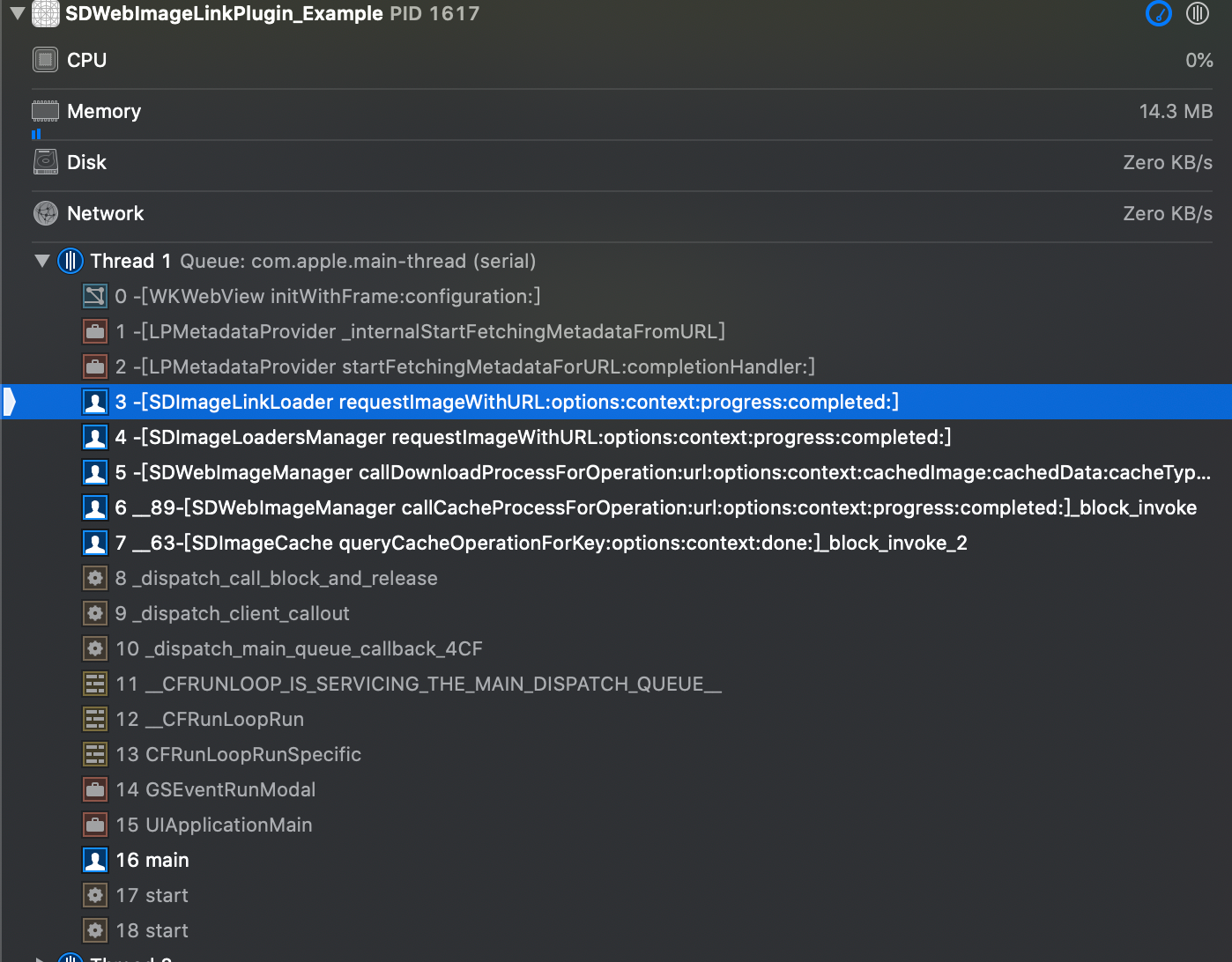
I try to get your idea you're talking about. You means.
init a
WKWebViewon main queue will block main queue
So, how do you write your common UI code when you want to showing a Web page, does that block main queue ?
Even LPMetadataProvider create WKWebView internally, this does not cause any blocking issue. I don't understand what your use cases and faced issues, actually...
And YES, the LPMetadataProvider do use WKWebView, but this is implementation details, which may not effect user's code usage.
dreampiggy
on 28 Nov 2019
And, I don't hit the scrolling FPS drop down issue in the demo. 100 website URLs, Running on iPhone X works with 60FPS.
Maybe you should using Instruments to profile your layout code, to check which cause the issue.
dreampiggy
on 28 Nov 2019
Are you using displaying cached LPLinkMetadata or fetching new metadata for new URLs? I understand how the plugin works, but can you clear your cache and make sure you are fetching the metadata for all 100 urls within a few seconds as you quickly scroll down the view?
inPhilly
on 28 Nov 2019
@inPhilly It load asynchronized, don't need to render or display them immediatelly. And don't effect the main queue rendering process of other components.
If you use case is I want to display image, just after user see the cell (or prefetch them), no any placeholder or loading indicator, sadly SDWebImage is not designed to do that, we're a framework to aim to solve the problem of:
Asynchronous image downloader with cache support as a UIImageView category
But maybe you can have a try to use SDWebImagePrefetcher with SDWebImageLinkPlugin, which will prefetch the metadata and bind it to the memory cache's image object. Which can accelerate this task.
dreampiggy
on 28 Nov 2019
Okay. Sorry, I am still learning. When do you think the plugin will be ready to install via Carthage?
inPhilly
on 28 Nov 2019
The 0.1.0 beta version already here.
The 0.2.0 version (supports cache the LPLinkMetadata) depends on #2898 . Until SDWebImage released 5.4.0, it can not store the metadata.
dreampiggy
on 28 Nov 2019
Great. I will look out for that. Any idea of how long? Weeks?
inPhilly
on 28 Nov 2019
@inPhilly If your care the performance, here I download the All Apple store product website URL (1400+ URLs). See my demo showing it.
URL Source: https://www.apple.com.cn/shop/sitemaps/sitemap-product.xml
Video: https://drive.google.com/open?id=1O3CHHZ64fgjrtgLF4J-n4pRJqXNtQcZW
dreampiggy
on 28 Nov 2019
Thanks. Don't see the video... ah, see it now. Thanks.
inPhilly
on 28 Nov 2019
170MB video. Too large and I have to upload to Google Drive
dreampiggy
on 28 Nov 2019
Actually, if I am caching the metadata myself, do I need 0.2.0? I am storing the metadata myself in the file system (Cache directory).
inPhilly
on 28 Nov 2019
Also, in the video do you use LPLinkView? (I am using LPLinkView now).
And, when you display cached data for a link at first, do you then go back and reload current data for the link afterwards? When I cached some LPLinkMetadata the other day, I came back the next day and it was outdated and needed to be refreshed with new LPLinkMetadata. So, I am asking, does the cached metadata act as a 'placeholder'; or is it the source of truth for as long as it remains cached?
inPhilly
on 28 Nov 2019
All your question, why not just see the example code, really clear what they are 😅
That Switch Button switch to use LPLinkView and custom UIImageView+UILabel
The image and metadata is cacehd via SDWebImage, not LinkPresentation.
The refresh does not handle, you can just pass SDWebImageRefreshCached option to make it always query network and works for HTTP Cache Control W3C standard.
It's not a placeholder, it hit the cache, and that's. But you can use it as a placeholder, depends on you.
dreampiggy
on 28 Nov 2019
I'm sorry, I am so new to caching, and your code is hard for me to wrap my mind around right now (especially because it is 3AM here). I will try to look at this again after some sleep.
inPhilly
on 28 Nov 2019
Closed and moved future discussion in https://github.com/SDWebImage/SDWebImageLinkPlugin
dreampiggy
on 16 Jan 2020
Related issues
dreampiggy
·
3Comments
 ToLengSon
·
3Comments
ToLengSon
·
3Comments
 onato
·
3Comments
onato
·
3Comments
 Binusz
·
4Comments
Binusz
·
4Comments
 bembem1011
·
6Comments
bembem1011
·
6Comments