Sdkman-cli: Bug: parse error near `-a' from 'source..' command during new install on fresh OS X 10.15.7 Catalina
Bug report
To reproduce
- Open a new Terminal window
- Run curl -s "https://get.sdkman.io" | bash
- Run source "$HOME/.sdkman/bin/sdkman-init.sh"
Expected behavior:
The sdkman-init.sh script is executed and the sdk command is available
Actual behavior:
danbitter@Dans-MBP ~ % source "/Users/danbitter/.sdkman/bin/sdkman-init.sh"
find: -type: open: unknown type
/Users/danbitter/.sdkman/bin/sdkman-init.sh:83: parse error near `-a'
System info
- OS and version: Mac OS X 10.15.7 Catalina
- Shell and version (e.g.
bash --version/zsh --version): zsh 5.7.1 (x86_64-apple-darwin19.0) - The output of
sdk version: zsh: command not found: sdk
 BitterDone
All 16 comments

Screenshot of my Terminal window
BitterDone
on 29 Sep 2020
Hi @BitterDone, can you confirm that zsh has in fact been initialised in your shell? What is the console output for echo $SHELL and echo $ZSH_VERSION?
The fact that find is not working properly makes me think that your current shell is not fully featured. The code is thoroughly tested and runs perfectly on both bash and zsh.
 marc0der
on 29 Sep 2020
marc0der
on 29 Sep 2020
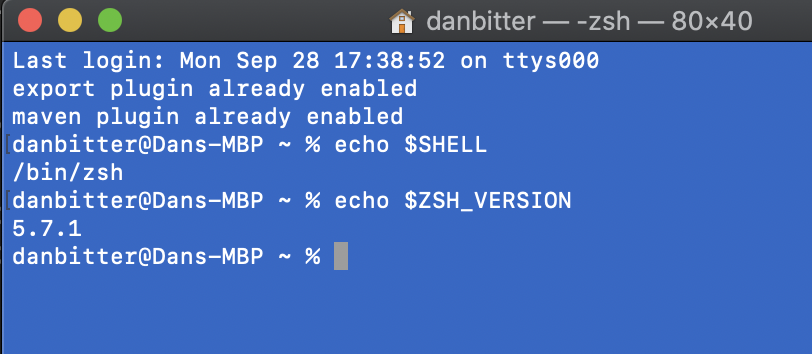
echo $SHELL produces /bin/zsh
echo $ZSH_VERSION produces 5.7.1
I agree, something feels weird, but my work provided this brand new MBP, unmodified by them. I recently upgraded to OS X 10.15.7 Catalina, and I've used the laptop for maybe 10 or 15 hours so far.
BitterDone
on 29 Sep 2020
@BitterDone let's get to the bottom of this :smile:
Next, I want to ask you to please run the following and paste the console dump:
find "${SDKMAN_DIR}/src" "${SDKMAN_DIR}/ext" -type f -name 'sdkman-*'
Also, if you could paste the output of find --version please.
marc0der
on 30 Sep 2020

I appreciate your willingness to help :-) I've used sdkman religiously the past couple years and I'd love to have it working again.
danbitter@Dans-MBP spring-boot-app % find "${SDKMAN_DIR}/src" "${SDKMAN_DIR}/ext" -type f -name 'sdkman-*'
find: -type: open: unknown type
danbitter@Dans-MBP spring-boot-app % find --version
find: illegal option -- -
usage: find [-H | -L | -P] [-EXdsx] [-f path] path ... [expression]
find [-H | -L | -P] [-EXdsx] -f path [path ...] [expression]
BitterDone
on 1 Oct 2020
find -version (single dash) should give you the correct version.
This is very strange, as both GNU and BSD find supports the -type parameter.
A brew install findutils would probably fix the problem but it would alsbe interesting to get to the root of the problem.
 helpermethod
on 1 Oct 2020
helpermethod
on 1 Oct 2020
Could you also run which find?
helpermethod
on 1 Oct 2020
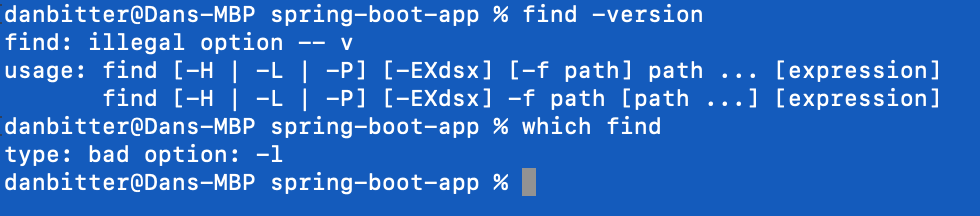
Neither appears to be cooperating ¯_(ツ)_/¯
danbitter@Dans-MBP spring-boot-app % find -version
find: illegal option -- v
usage: find [-H | -L | -P] [-EXdsx] [-f path] path ... [expression]
find [-H | -L | -P] [-EXdsx] -f path [path ...] [expression]
danbitter@Dans-MBP spring-boot-app % which find
type: bad option: -l
BitterDone
on 1 Oct 2020
I feel we are getting closer :). What happens when you open Bash and run source "$HOME/.sdkman/bin/sdkman-init.sh?
helpermethod
on 1 Oct 2020

The default Terminal is zsh (a change Apple made starting with OS X Catalina), so the output is the same as what we've seen:
danbitter@Dans-MBP ~ % source "$HOME/.sdkman/bin/sdkman-init.sh"
find: -type: open: unknown type
/Users/danbitter/.sdkman/bin/sdkman-init.sh:83: parse error near `-a'
However, I changed from zsh to bash via chsh -s /bin/bash and sdkman appears to work as expected:

When I run that source .. command in bash, it returns nothing (appears to work)
BitterDone
on 1 Oct 2020
Are you using iterm 2? If yes, what happens when you run the same commands in MacOS's default terminal?
helpermethod
on 2 Oct 2020
Sounds similar to your case
https://stackoverflow.com/questions/44493812/macosx-terminal-which-git-return-error-zsh-bad-option-l
Do you have any alias defined for find or which?
helpermethod
on 2 Oct 2020
@marc0der @helpermethod Thank you guys so much, you're both what's great about the development community 👍
I disabled everything in my .zshrc, .bashrc, and .bash_profile and reran source "/Users/danbitter/.sdkman/bin/sdkman-init.sh" and it works in the zsh shell.
I'd taken this guy's .bash_profile and made a couple changes, so the issue was totally on my end:
https://natelandau.com/my-mac-osx-bash_profile/
BitterDone
on 2 Oct 2020
Looks like this was the offender:
alias -g f='open -a Finder ./' # f: Opens current directory in MacOS Finder
This is super weird because disabling that line in the .zshrc file allows sdkman to function in the zsh shell.
But, I can then paste the actual command open -a Finder ./ in that same zsh shell and it opens a Finder in the working directory? Color me confused ¯_(ツ)_/¯
BitterDone
on 2 Oct 2020
I changed it from an alias -g to a function and now my .zshrc works happily alongside sdkman :-)
f() {open .;}
BitterDone
on 2 Oct 2020
alias -g defines a global alias, which contrary to a normal alias replaces every occurrence of the alias with its value.
So if you have a global alias like
alias -g f=foo
And you type
echo f
the output will be foo.
helpermethod
on 2 Oct 2020
Related issues
 EarthCitizen
·
3Comments
EarthCitizen
·
3Comments
 aadrian
·
7Comments
aadrian
·
7Comments
 edmondo1984
·
6Comments
helpermethod
·
5Comments
edmondo1984
·
6Comments
helpermethod
·
5Comments
 blueglyph
·
7Comments
blueglyph
·
7Comments
Most helpful comment
I changed it from an
alias -gto a function and now my .zshrc works happily alongside sdkman :-)f() {open .;}