Sdkman-cli: Intellij does not succeed JAVA_HOME
Hello, I need some help!
I install sdkman successfully and install Java and gradle with sdkman!
java -version
openjdk version "1.8.0_131"
OpenJDK Runtime Environment (Zulu 8.21.0.1-linux64) (build 1.8.0_131-b11)
OpenJDK 64-Bit Server VM (Zulu 8.21.0.1-linux64) (build 25.131-b11, mixed mode)
gradle --version

------------------------------------------------------------
Gradle 3.5
------------------------------------------------------------

Build time:   2017-04-10 13:37:25 UTC
Revision:     b762622a185d59ce0cfc9cbc6ab5dd22469e18a6

Groovy:       2.4.10
Ant:          Apache Ant(TM) version 1.9.6 compiled on June 29 2015
JVM:          1.8.0_131 (Azul Systems, Inc. 25.131-b11)
OS:           Linux 4.9.0-2-amd64 amd64
all good!
now I download IntelliJ ce
I decompress the file on /opt/Idea and run bin/idea.sh all fine but when run intellij from the icon menu i have this

modified my .bashrc
#THIS MUST BE AT THE END OF THE FILE FOR SDKMAN TO WORK!!!
export SDKMAN_DIR="/home/juanib/.sdkman"
[[ -s "/home/juanib/.sdkman/bin/sdkman-init.sh" ]] && source "/home/juanib/.sdkman/bin/sdkman-init.sh"

export JAVA_HOME="/home/juanib/.sdkman/candidates/java/current"
export GRADLE_HOME="/home/juanib/.sdkman/candidates/gradle/current"
close the sesion and login but not found!
some tips!
 J-Ibarra
All 12 comments
Not sure why this is happening, it could be because the JDK you installed is not an Oracle JDK. Please do not add these export statements to the end of your .bashrc, as these are generated dynamically by SDKMAN. Not the text right above: #THIS MUST BE AT THE END OF THE FILE FOR SDKMAN TO WORK!!!.
In future, please consider trying our Gitter user-issues channel before opening an Issue here.
 marc0der
on 31 May 2017
marc0der
on 31 May 2017
Same here, but still no love.
 pstephenwille
on 12 Feb 2018
pstephenwille
on 12 Feb 2018
Did you find the solution?
 blling
on 13 Feb 2018
blling
on 13 Feb 2018
I have the same problem.
IntelliJ IDEA 2018.2.4
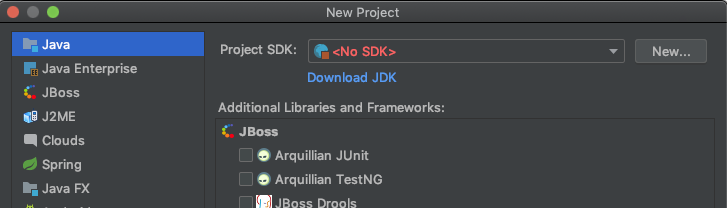
here my .bash_profile
# THIS MUST BE AT THE END OF THE FILE FOR SDKMAN TO WORK!!!
export SDKMAN_DIR="/Users/stefan/.sdkman"
[[ -s "/Users/stefan/.sdkman/bin/sdkman-init.sh" ]] && source "/Users/stefan/.sdkman/bin/sdkman-init.sh"

export JAVA_HOME="~/.sdkman/candidates/java/current"
$ java -version
openjdk version "11" 2018-09-25
OpenJDK Runtime Environment 18.9 (build 11+28)
OpenJDK 64-Bit Server VM 18.9 (build 11+28, mixed mode)
Did someone figure it out?
 stevo-knievo
on 14 Oct 2018
stevo-knievo
on 14 Oct 2018
This is because sdkman gets sourced in the shell and you are starting
IntelliJ outside of the shell. Try running IntelliJ from the shell using
the idea.sh and IntelliJ will pick it up.
On Sun, 14 Oct 2018 at 06:51, stevo notifications@github.com wrote:
I have the same problem.
IntelliJ IDEA 2018.2.4
[image: screen shot 2018-10-13 at 10 40 04 pm]
https://user-images.githubusercontent.com/2980220/46913019-009ad500-cf3a-11e8-8323-2169205d7d85.pnghere my .bash_profile
THIS MUST BE AT THE END OF THE FILE FOR SDKMAN TO WORK!!!
export SDKMAN_DIR="/Users/stefan/.sdkman"
[[ -s "/Users/stefan/.sdkman/bin/sdkman-init.sh" ]] && source "/Users/stefan/.sdkman/bin/sdkman-init.sh"export JAVA_HOME="~/.sdkman/candidates/java/current"
$ java -version
openjdk version "11" 2018-09-25
OpenJDK Runtime Environment 18.9 (build 11+28)
OpenJDK 64-Bit Server VM 18.9 (build 11+28, mixed mode)Did someone figure it out?
—
You are receiving this because you modified the open/close state.
Reply to this email directly, view it on GitHub
https://github.com/sdkman/sdkman-cli/issues/584#issuecomment-429598835,
or mute the thread
https://github.com/notifications/unsubscribe-auth/AAI0Buny6sh2J2pus1e1YjoUgFUyTVRCks5uktD1gaJpZM4NqwUf
.
--
Marco Vermeulen
+44 7757 510 608
marc0der
on 14 Oct 2018
@marc0der did it exactly that way, unfortunately I have exactly the same problem: IntelliJ Idea does not show any SDK. A pitty :(
 pygospa
on 20 Oct 2018
pygospa
on 20 Oct 2018
Right, we are talking about two different things here. The first is that
intellij does not pick up Java and can thus not start up.
The second is that IDEA does not pick up installed JDKs for use in your
projects. The solution for this is to simply add it manually. All your JDKs
are stored under ~/.sdkman/candidates/java.
We have an open ticket on IDEA's youtrack for this very issue so please
vote for it:
https://youtrack.jetbrains.com/v2/issue/IDEA-193914
On Sat, 20 Oct 2018, 02:44 Kannan Thambiah, notifications@github.com
wrote:
@marc0der https://github.com/marc0der did it exactly that way,
unfortunately I have exactly the same problem: IntelliJ Idea does not show
any SDK. A pitty :(—
You are receiving this because you were mentioned.Reply to this email directly, view it on GitHub
https://github.com/sdkman/sdkman-cli/issues/584#issuecomment-431538859,
or mute the thread
https://github.com/notifications/unsubscribe-auth/AAI0BiF1QVCMpg08ClChbFTMPH1q6_S3ks5umoAYgaJpZM4NqwUf
.
marc0der
on 20 Oct 2018
I know this is closed, but you can set JAVA_HOME globally on MAC OS with launchctl
launchctl setenv JAVA_HOME $(/usr/libexec/java_home -v 1.8)
or
launchctl setenv JAVA_HOME ~/.sdkman/candidates/java/current
 Vad1mo
on 12 Dec 2018
Vad1mo
on 12 Dec 2018
Not the best practice, but fix this error globally on any Linux
Please ensure JAVA_HOME points to JDK rather than JRE.
Put something like this:
JAVA_HOME=/home/agilob/.sdkman/candidates/java/current
to /etc/environment just change your username
 agilob
on 2 Dec 2019
agilob
on 2 Dec 2019
It's definitely not good practice to place anything pointing to your home directory in /etc/environment or /etc/profile. Please do not do this.
marc0der
on 2 Dec 2019
If you guys still struggling with this, maybe one solution (the one that worked with me) is creating a symbolic link to some visible folder from the .sdkman/candidates/java/current/
 magalhaes-andre
on 12 Feb 2020
magalhaes-andre
on 12 Feb 2020
For those still looking to fix this / those arriving from search engines. The steps below worked for me.
First create a symlink to the ~/.sdkman folder.
ln -s ~/.sdkman ~/sdkman
Your desired JDK version can be selected afterwards by navigating to the output of the command below in the IntelliJ UI
echo "/Users/$(whoami)/.sdkman/candidates/"
 retornam
on 30 Mar 2020
retornam
on 30 Mar 2020
Related issues
 edmondo1984
·
6Comments
edmondo1984
·
6Comments
 WizardMerlin
·
3Comments
WizardMerlin
·
3Comments
 hho
·
4Comments
hho
·
4Comments
 hacpai
·
5Comments
hacpai
·
5Comments
 ilopmar
·
5Comments
ilopmar
·
5Comments
Most helpful comment
I know this is closed, but you can set JAVA_HOME globally on MAC OS with launchctl
or