Sdk: java.lang.OutOfMemoryError: Java heap space in android-studio
Thank you for taking the time to file an issue!
This tracker is for issues related to:
- Dart Plugin
2020-09-05 21:40:48,993 [ 372643]  ERROR - llij.ide.plugins.PluginManager - Java heap space
java.lang.OutOfMemoryError: Java heap space
    at java.util.Arrays.copyOf(Arrays.java:3332)
    at java.lang.AbstractStringBuilder.ensureCapacityInternal(AbstractStringBuilder.java:124)
    at java.lang.AbstractStringBuilder.append(AbstractStringBuilder.java:596)
    at java.lang.StringBuffer.append(StringBuffer.java:367)
    at java.io.BufferedReader.readLine(BufferedReader.java:370)
    at java.io.BufferedReader.readLine(BufferedReader.java:389)
    at com.google.dart.server.internal.remote.ByteResponseStream$LinesReaderThread.run(ByteResponseStream.java:43)
2020-09-05 21:40:48,994 [ 372644]  ERROR - llij.ide.plugins.PluginManager - Android Studio 4.0.1  Build #AI-193.6911.18.40.6626763
2020-09-05 21:40:48,995 [ 372645]  ERROR - llij.ide.plugins.PluginManager - JDK: 1.8.0_242-release; VM: OpenJDK 64-Bit Server VM; Vendor: JetBrains s.r.o
2020-09-05 21:40:48,995 [ 372645]  ERROR - llij.ide.plugins.PluginManager - OS: Linux
2020-09-05 21:40:49,007 [ 372657]  ERROR - llij.ide.plugins.PluginManager - Plugin to blame: Dart version: 193.7547
2020-09-05 21:40:49,007 [ 372657]  ERROR - llij.ide.plugins.PluginManager - Last Action: EditorDeleteToWordStart
Steps to reproduce:
I am following the tutorial at https://bloclibrary.dev/#/flutterlogintutorial?id=authentication_blocdart
At the step where I am writing the following code:
class AuthenticationBloc extends Bloc<AuthenticationEvent, AuthenticationState> {
  AuthenticationRepository _authRepo;
  UserRepository _userRepo;
  AuthenticationBloc() : super(const AuthenticationState.unknown());
If I comment out everything, my computer calms down. If I uncomment the last 3 lines, the fan starts blowing like it wants to take off.
 AlbertDavid94
All 5 comments
@devoncarew would this relate to analyzer?
 kevmoo
on 10 Sep 2020
kevmoo
on 10 Sep 2020
@kevmoo it's likely the analyzer. For a time of 10 minutes, I've done nothing but commenting and uncommenting those lines in intervals of 30 seconds. This resulted in the fan going from crazy to calm to crazy during those 10 minutes.
AlbertDavid94
on 10 Sep 2020
It looks like there are two separate issues here - the IntelliJ / Java process running out of heap space, and smaller edits to dart files using more CPU than is desired?
@AlbertDavid94 - can you include the versions of Flutter/Dart that you're using? I see that you're on linux, running the Dart IntelliJ plugin 193.7547, and using Android Studio 4.0.1.
There are some android studio settings to give the IDE more heap space. Dart's analysis server runs as a separate process, so wouldn't be able to case an OOM for android studio, unless is was exhausted all available memory on a machine.
Can you include some information about the analysis server process? You should see a 'dart' process running - the command line args to it would include an analysis_server.dart.snapshot file. It would be good to know the memory usage, the cpu usage, what that goes up to when it's analyzing - how long it stays there - and some rough details about your project (number of files, ...). Thanks!
 devoncarew
on 10 Sep 2020
devoncarew
on 10 Sep 2020
I believe I'm observing the same or very similar issue while developing with the newest stable flutter version.
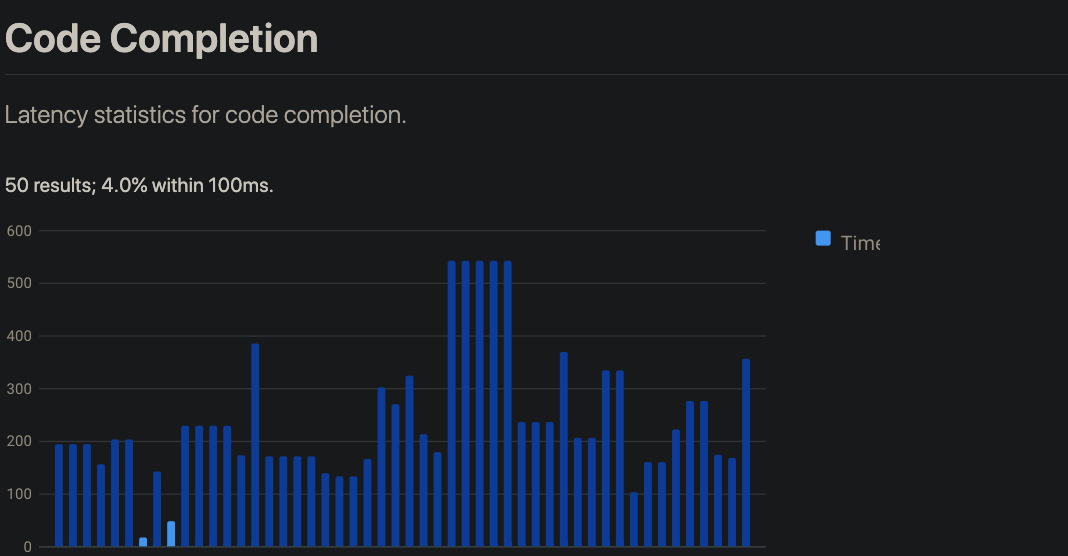
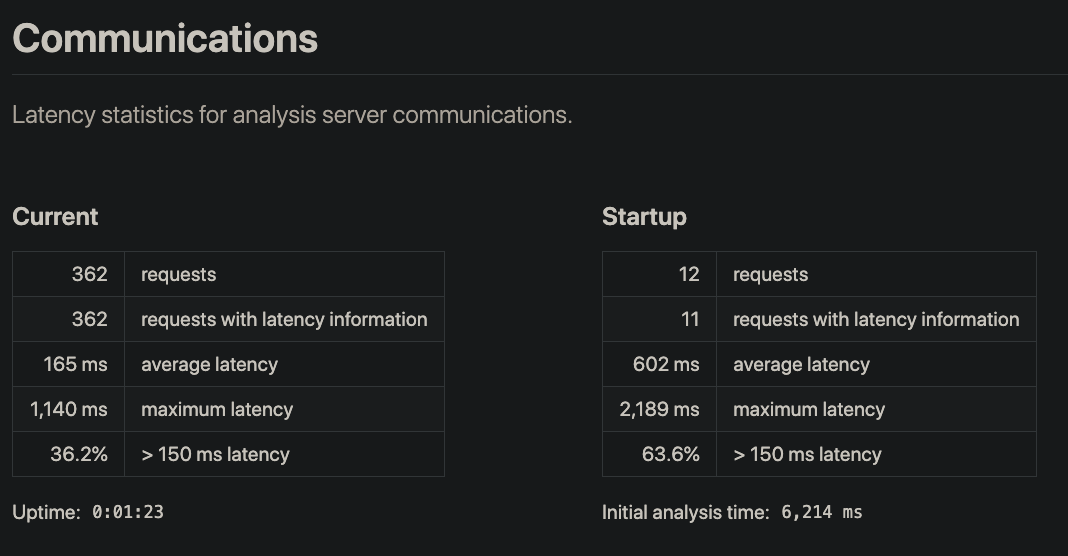
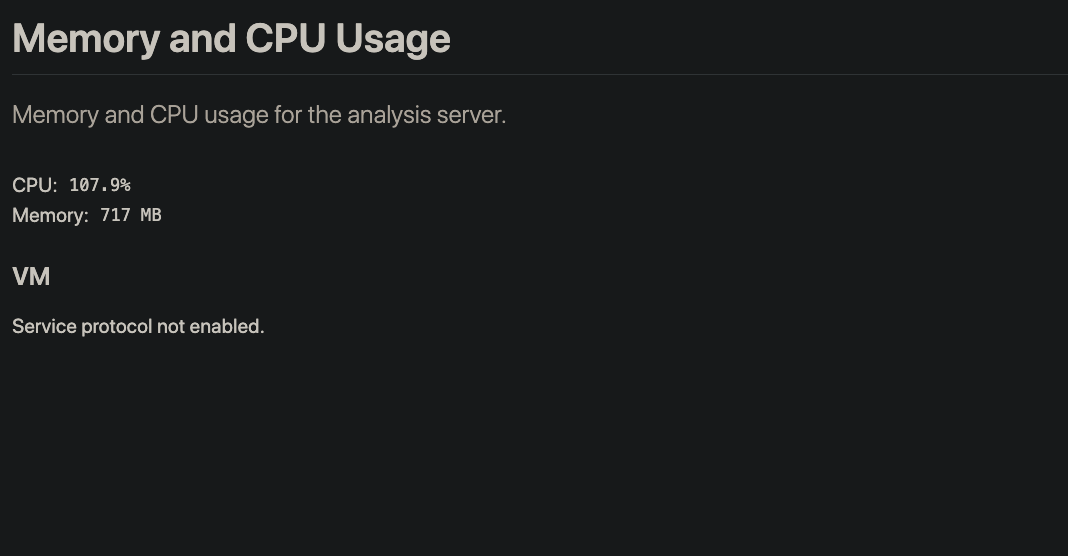
On the latest stable flutter version (Flutter 1.22.0 / Dart 2.10.0) I'm observing huge jumps in memory usage inside Android Studio. I also reached the max heap, so I increased the IDE's heap size to 4GB and still observe memory spikes up to 3GB (seen with Android Studio's Memory Indicator) while waiting for code completion, which also takes a lot longer (>1 second and progressively more).
Tried with Android Studio stable 4.0.2 as well as 4.1 RC3, could not observe different behaviour between the two versions. Flutter plugin version: 50.0.2.
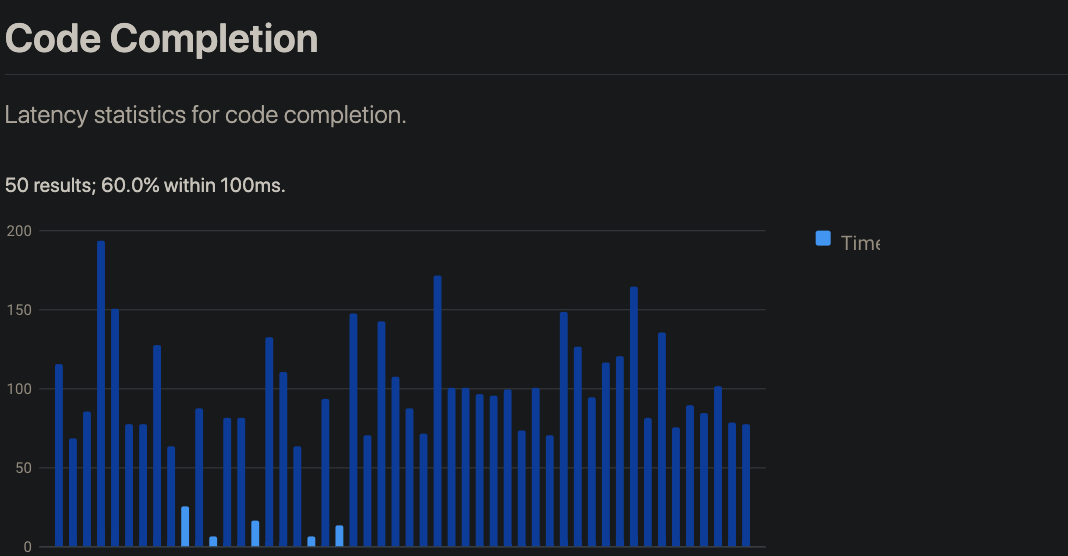
What's important to note: This issue does not occur after downgrading Flutter, i.e. with version Flutter 1.20.4 / Dart 2.9.2
Here's a comparison between the statistics of the analyzer diagnostics (I manually wrote the same 5 lines of code in the project I'm working on; screenshots taken a few seconds after I was done writing the lines):
Flutter 1.22.0 / Dart 2.10.0:
Flutter 1.20.4 / Dart 2.9.2:
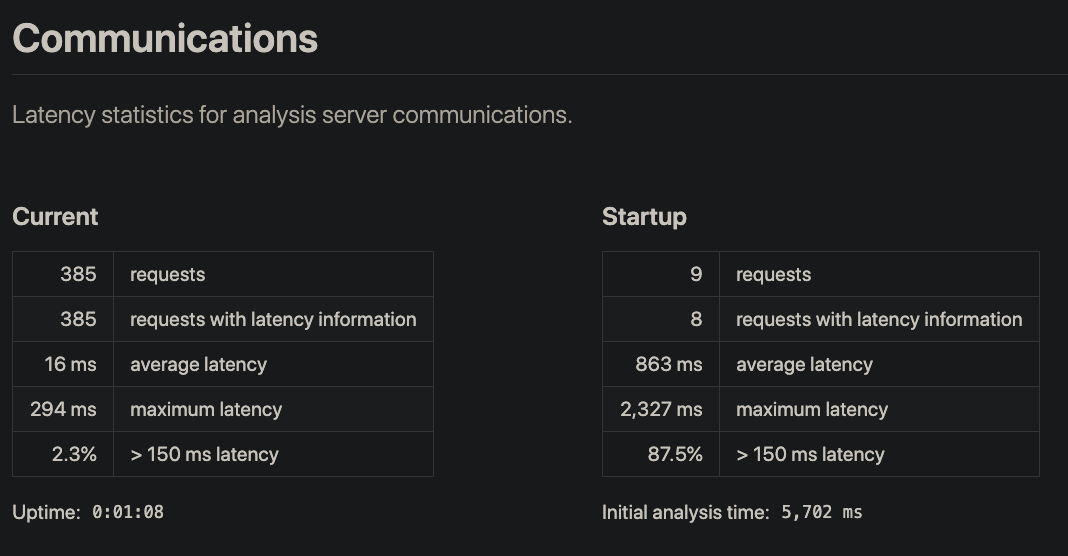
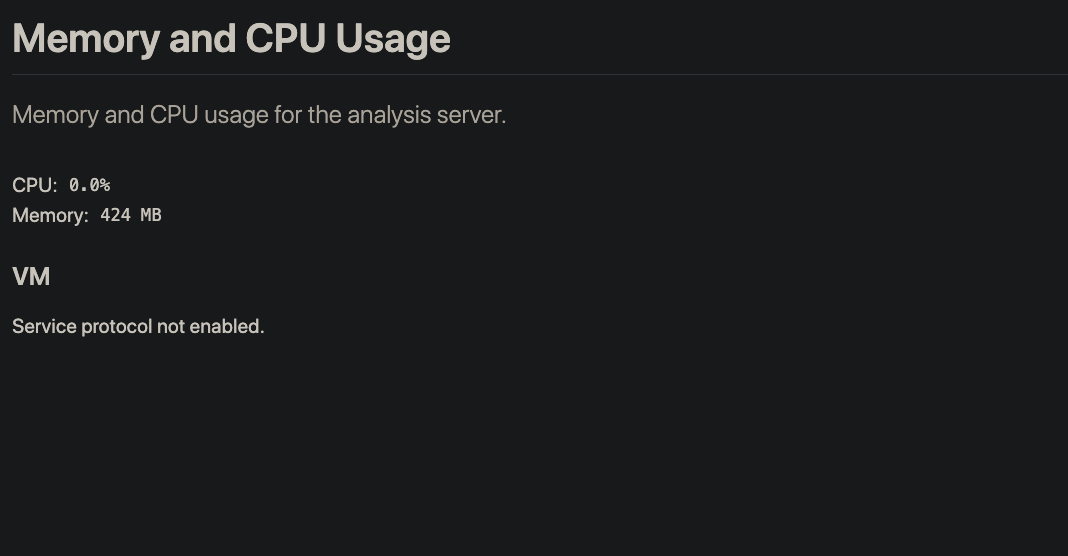
My machine is a MacBook Pro 13 2017 with macOS 10.15.7.
This honestly makes development with the new Flutter/Dart version unbearable, but I'm glad I was able to resolve it with downgrading.
Let me know if there's more information I can provide.
 Endebert
on 8 Oct 2020
Endebert
on 8 Oct 2020
If I comment out everything, my computer calms down. If I uncomment the last 3 lines, the fan starts blowing like it wants to take off.
@AlbertDavid94 You might want to strap that thing down. 🎁
 ThinkDigitalSoftware
on 11 Nov 2020
ThinkDigitalSoftware
on 11 Nov 2020
Related issues
 xster
·
3Comments
xster
·
3Comments
 matanlurey
·
3Comments
matanlurey
·
3Comments
 DartBot
·
3Comments
DartBot
·
3Comments
DartBot
·
3Comments
DartBot
·
3Comments
 ranquild
·
3Comments
ranquild
·
3Comments