Scully: Build never completes in a Bitbucket Pipeline
🐞 Bug report
Description
I am running into some issues with the scully build inside a Bitbucket Pipeline. npm run scully never finishes; gets stuck, here are the logs:
[email protected] scully /opt/atlassian/pipelines/agent/build
> scully "--host=0.0.0.0" "--scanRoutes"
 ☺   new Angular build imported
 ☺   Started servers in background
Finding all routes in application.
traversing app for routes
Pull in data to create additional routes.
Route list created in files:
  "./dist/static/assets/scully-routes.json",
  "/opt/atlassian/pipelines/agent/build/dist/mtna-scully-seed-ui/assets/scully-routes.json",
  "/opt/atlassian/pipelines/agent/build/src/assets/scully-routes.json"
I have tried with no argument, with host & scanRoutes with no effect. I have also tried using the regular ng build instead of prod, also no difference.
Thanks for the help, love the project!
🔬 Minimal Reproduction
I have created an open BB repo to demonstrate: https://bitbucket.org/wallace41290/scully-pipeline-test
If you want to take a look at the existing pipelines there is one in there that I stopped, because I didn't want it to eat through all my minutes. Or fork the repo and give it a try yourself.
💻Your Environment
Angular Version:
Your global Angular CLI version (10.0.2) is greater than your local
version (9.1.12). The local Angular CLI version is used.

To disable this warning use "ng config -g cli.warnings.versionMismatch false".

     _                      _                 ____ _     ___
    / \   _ __   __ _ _   _| | __ _ _ __     / ___| |   |_ _|
   / △ \ | '_ \ / _` | | | | |/ _` | '__|   | |   | |    | |
  / ___ \| | | | (_| | |_| | | (_| | |      | |___| |___ | |
 /_/   \_\_| |_|\__, |\__,_|_|\__,_|_|       \____|_____|___|
                |___/


Angular CLI: 9.1.12
Node: 12.16.1
OS: darwin x64

Angular: 9.1.12
... animations, cli, common, compiler, compiler-cli, core, forms
... platform-browser, platform-browser-dynamic, router
Ivy Workspace: Yes

Package                           Version
-----------------------------------------------------------
@angular-devkit/architect         0.901.12
@angular-devkit/build-angular     0.901.12
@angular-devkit/build-optimizer   0.901.12
@angular-devkit/build-webpack     0.901.12
@angular-devkit/core              9.1.12
@angular-devkit/schematics        9.1.12
@ngtools/webpack                  9.1.12
@schematics/angular               9.1.12
@schematics/update                0.901.12
rxjs                              6.5.5
typescript                        3.8.3
webpack                           4.42.0
Scully Version:
{
  "name": "scully-pipeline-test",
  "version": "0.0.0",
  "scripts": {
    "ng": "ng",
    "start": "ng serve",
    "build": "ng build",
    "build:prod": "ng build --prod --base-href / && npm run scully",
    "test": "ng test",
    "lint": "ng lint",
    "e2e": "ng e2e",
    "scully": "scully",
    "scully:serve": "scully serve"
  },
  "private": true,
  "dependencies": {
    "@angular/animations": "~9.1.12",
    "@angular/common": "~9.1.12",
    "@angular/compiler": "~9.1.12",
    "@angular/core": "~9.1.12",
    "@angular/forms": "~9.1.12",
    "@angular/platform-browser": "~9.1.12",
    "@angular/platform-browser-dynamic": "~9.1.12",
    "@angular/router": "~9.1.12",
    "@scullyio/init": "^1.0.0-beta.0",
    "@scullyio/ng-lib": "^1.0.0-beta.0",
    "@scullyio/scully": "^1.0.0-beta.0",
    "rxjs": "~6.5.4",
    "tslib": "^1.10.0",
    "zone.js": "~0.10.2"
  },
  "devDependencies": {
    "@angular-devkit/build-angular": "~0.901.12",
    "@angular/cli": "~9.1.12",
    "@angular/compiler-cli": "~9.1.12",
    "@types/node": "^12.11.1",
    "@types/jasmine": "~3.5.0",
    "@types/jasminewd2": "~2.0.3",
    "codelyzer": "^5.1.2",
    "jasmine-core": "~3.5.0",
    "jasmine-spec-reporter": "~4.2.1",
    "karma": "~5.0.0",
    "karma-chrome-launcher": "~3.1.0",
    "karma-coverage-istanbul-reporter": "~2.1.0",
    "karma-jasmine": "~3.0.1",
    "karma-jasmine-html-reporter": "^1.4.2",
    "protractor": "~7.0.0",
    "ts-node": "~8.3.0",
    "tslint": "~6.1.0",
    "typescript": "~3.8.3"
  }
}
🔥 Exception or Error
 wallace41290
All 14 comments
I have the same problem.
Tried uploading my project with sully but the pipeline hangs on "Route list created" forever.
@wallace41290 did you fix this somehow?
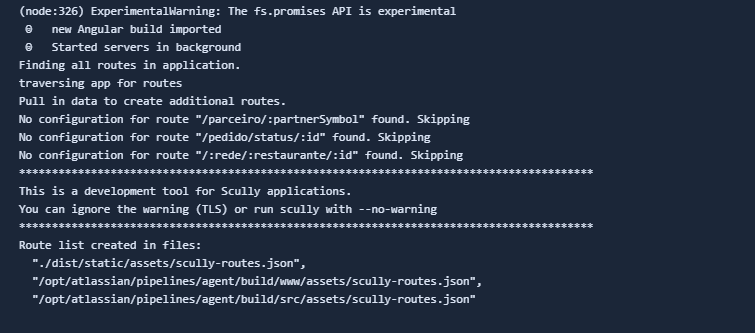
 gabmascheroni
on 26 Aug 2020
gabmascheroni
on 26 Aug 2020
@gabmascheroni Negative, I tried getting some help in the Gitter channel, but it seems to have gotten lost, so I filed a ticket here. I realize the team is probably swamped, but right now I am manually doing my builds...
wallace41290
on 26 Aug 2020
I've experienced the same problem today, trying to deploy Scully-based blog with Vercel.
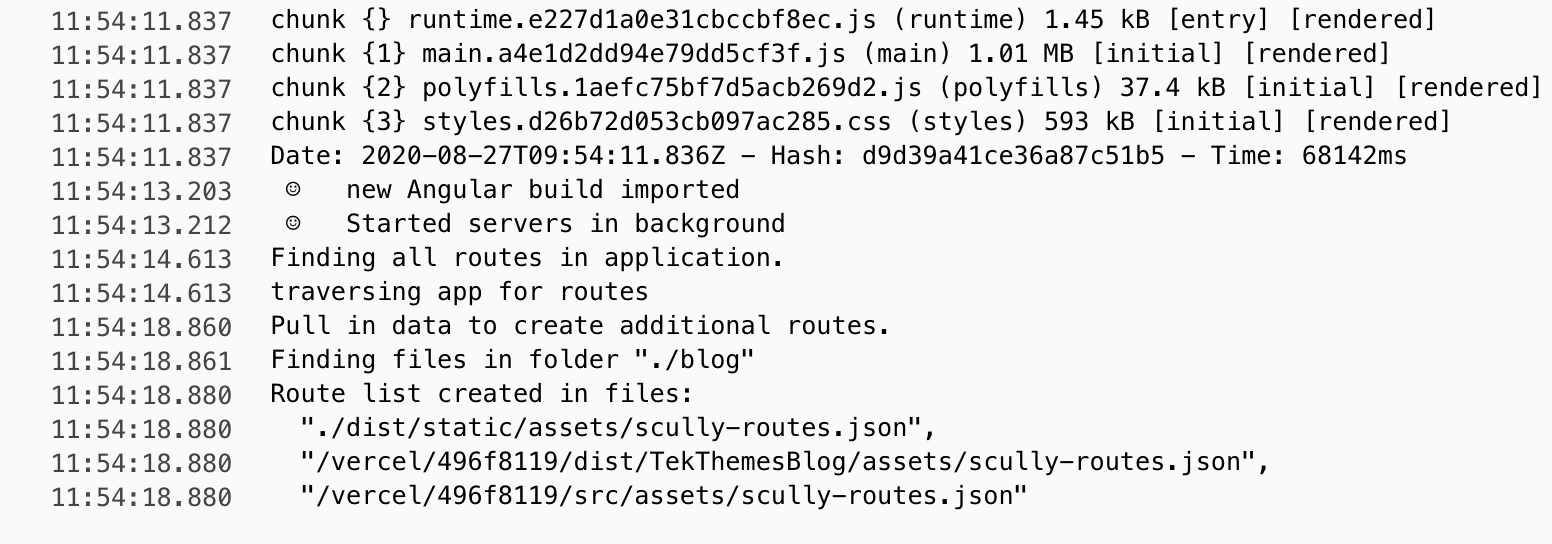
It's strange, because Vercel has provided the Guide with Scully preset https://vercel.com/guides/deploying-scully-with-vercel, where they somehow could deploy Scully-based project from https://github.com/vercel/vercel/blob/master/examples/scully/package.json
My package.json in regards to Scully deps
"@scullyio/init": "^1.0.0-beta.0",
"@scullyio/ng-lib": "^1.0.0-beta.0",
"@scullyio/scully": "^1.0.0-beta.0",
I have also tried to upgrade the dependencies and re-deploy to Vercel as follows, but the build is still hanging...
"@scullyio/init": "^1.0.0-beta.3",
"@scullyio/ng-lib": "^1.0.0-beta.2",
"@scullyio/scully": "^1.0.0-beta.3",
Any ideas?
 tekmi
on 27 Aug 2020
tekmi
on 27 Aug 2020
Getting the same issue over here.
 nmrichards
on 27 Aug 2020
nmrichards
on 27 Aug 2020
Just leaving a message here to let you know @jorgeucano is actively working on this issue. (He has access to a bitbucket pipeline, and is on a windows machine which somehow seems related).
We do have a hard time reproducing the issue tho.
 SanderElias
on 29 Aug 2020
SanderElias
on 29 Aug 2020
@SanderElias i am getting the same issue on gitlab pipeline..
 adityakoushikr11
on 17 Sep 2020
adityakoushikr11
on 17 Sep 2020
This issue is also discussed in #924. This happens when chrome is not (correctly/completely) installed
We are adding an improved error message for this, but its not an issue with scully itself.
I'm going to close this, as it's answered in #924
SanderElias
on 17 Sep 2020
Same for me on Vercel :( but does not happen on Netflify works fine there
 asotog
on 22 Sep 2020
asotog
on 22 Sep 2020
@asotog see the puppeteer troubleshooting docs for more information on that.
As soon as puppeteer works the problem is gone.
SanderElias
on 23 Sep 2020
thank you, also what I'm wondered is their Scully sample works for them https://vercel.com/guides/deploying-scully-with-vercel, does not seem any difference
asotog
on 23 Sep 2020
Still can't deploy vercel nowday
 jordankkk
on 7 Feb 2021
jordankkk
on 7 Feb 2021
This took me nearly two hours to figure out, so I hope someone else benefits from this too. I have kept on wondering why Vercel's example repository for Scully worked while mine did not with the following error:
15:57:22.702 | =================================================================================================
15:57:22.702 | Puppeteer cannot find or launch the browser. (by default chrome)
15:57:22.702 | Try adding 'puppeteerLaunchOptions: {executablePath: CHROMIUM_PATH}'
15:57:22.703 | to your scully.*.config.ts file.
15:57:22.703 | Also, this might happen because the default timeout (60 seconds) is to short on this system
15:57:22.703 | this can be fixed by adding the --serverTimeout=x cmd line option.
15:57:22.703 | (where x = the new timeout in milliseconds)
15:57:22.703 | When this happens in CI/CD you can find some additional information here:
15:57:22.703 | https://github.com/puppeteer/puppeteer/blob/main/docs/troubleshooting.md
15:57:22.703 | =================================================================================================
I downgraded Scully in my repository (mine is 1.1.4 while the example repository uses 1.1.1), installed puppeteer manually with npm i -D puppeteer and even tried alixaxel/chrome-aws-lambda without any luck. (Just in case you think about going down these paths too.) In the end, what caused the build process to succeed were the following changes:
diff --git a/scully.fuw.config.ts b/scully.fuw.config.ts
index 9f41e82..3f18f97 100644
--- a/scully.fuw.config.ts
+++ b/scully.fuw.config.ts
@@ -1,8 +1,10 @@
 import { ScullyConfig } from '@scullyio/scully';
 export const config: ScullyConfig = {
-  projectRoot: "./src",
-  projectName: "fuw",
+  projectRoot: './src',
+  projectName: 'fuw',
   outDir: './dist/static',
-  routes: {
-  }
-};
\ No newline at end of file
+  routes: {},
+  puppeteerLaunchOptions: {
+    args: ['--no-sandbox', '--disable-setuid--sandbox'],
+  },
+};
So it turns out adding --no-sandbox and --disable-setuid-sandbox does the trick. This is also mentioned in https://github.com/scullyio/scully/issues/924#issuecomment-693383520 but just to make it clear here too.
 niklaas
on 8 May 2021
niklaas
on 8 May 2021
@niklaas I'll add the puppeteer options to the faq page in #1379
Thanks for letting us know
SanderElias
on 31 May 2021
@niklaas I'll add the puppeteer options to the faq page in #1379
Thanks for letting us know
Of course! Thank you!
niklaas
on 31 May 2021
Related issues
 pierresigwalt
·
4Comments
pierresigwalt
·
4Comments
 Splaktar
·
6Comments
Splaktar
·
6Comments
 beeman
·
3Comments
beeman
·
3Comments
 Gyrosh
·
5Comments
Gyrosh
·
5Comments
 BlindDespair
·
5Comments
BlindDespair
·
5Comments
Most helpful comment
Getting the same issue over here.