🐞 Bug report
Description
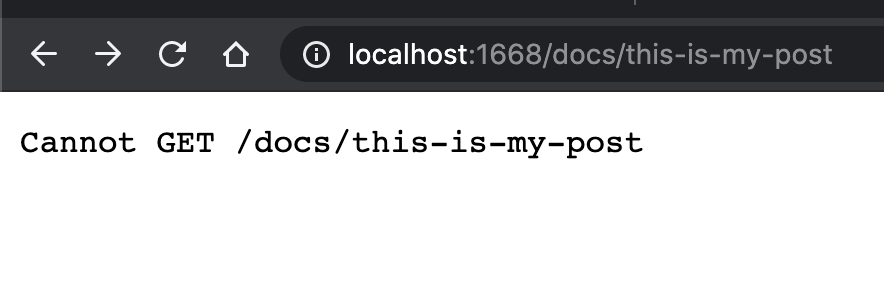
Cannot generate a blog using any route other than blog.
ng generate @scullyio/init:markdown works fine when the path is blog, but doesn't when path is anything else, like docs for example.
🔬 Minimal Reproduction
ng new scully-testng add @scullyio/initng generate @scullyio/init:markdown
? What name do you want to use for the module? docs
? What slug do you want for the markdown file? slug
? Where do you want to store your markdown files? docs
? Under which route do you want your files to be requested? docsng generate @scullyio/init:post --name="This is my post"
? What's the target folder for this post? docs- Edit the new post to be published
true:
---
title: This is my post
description: blog description
published: true
---

# This is my post
- Remove all the content in the
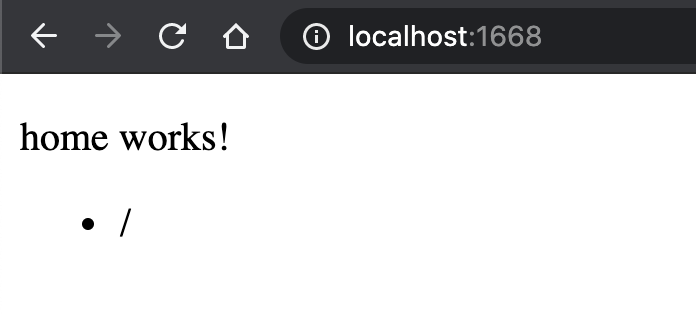
app.component.htmlfile, and add only the router outlet tag<router-outlet></router-outlet> - Generate a route entry point module:
ng generate module home --route=home --module=app-routing - Set the empty path attribute for the home route in
app-routing.module.ts
const routes: Routes = [
  {
    path: 'docs',
    loadChildren: () => import('./docs/docs.module').then(m => m.DocsModule)
  },
  {
    path: '',
    loadChildren: () => import('./home/home.module').then(m => m.HomeModule)
  }
];
- Inject the route service in the app component
tsandhtmlfiles:
import { Component, OnInit } from '@angular/core';
import { ScullyRoutesService } from '@scullyio/ng-lib';
import { Observable } from 'rxjs';

@Component({
  selector: 'app-home',
  templateUrl: './home.component.html',
  styleUrls: ['./home.component.css']
})
export class HomeComponent implements OnInit {
  links$: Observable<any> = this.scully.available$;

  constructor(private scully: ScullyRoutesService) {}

  ngOnInit() {
    // debug current pages
    this.links$.subscribe(links => {
      console.log(links);
    });
  }
}
md5-a03a7283ad72eb45e0e2f4f1120386ce


md5-c9cccdcc8e7019d559082412e3ea44c7
- Build, run, and serve:
ng build && npm run scully && npm run scully serve
💻Your Environment
Angular Version:
9.1.7
Scully Version:
"@scullyio/init": "0.0.28",
"@scullyio/ng-lib": "latest",
"@scullyio/scully": "latest",
question
 jtcrowson
All 2 comments
Fixed by running npm run scully -- --scanRoutes before step 10. Might be worth adding to the markdown documentation. Would you like me to add it?
jtcrowson
on 21 May 2020
👍2
I'm going to close this, as there is no further action needed.
@jtcrowson You did change the routes in your angular app. Do you feel this message in the console isn't sufficient enough?

But feel free to add something to our documentation, we still need to improve/extend!
 SanderElias
on 1 Jun 2020
SanderElias
on 1 Jun 2020
Was this page helpful?
0 / 5 - 0 ratings
Related issues
 spencerb02
·
5Comments
spencerb02
·
5Comments
 jorgeucano
·
4Comments
jorgeucano
·
4Comments
 pierresigwalt
·
4Comments
pierresigwalt
·
4Comments
 montella1507
·
5Comments
spencerb02
·
3Comments
montella1507
·
5Comments
spencerb02
·
3Comments
Most helpful comment
Fixed by running
npm run scully -- --scanRoutesbefore step 10. Might be worth adding to the markdown documentation. Would you like me to add it?