Scully: Scully Doesn't work with Github Actions {Tried with --host as well}
🐞 Bug report
Description
There's some issue with scully, it doesn't build up while running inside github actions.
🔬 Minimal Reproduction
.github/workflows/build.yml
name: Angular Build Test

on:
  pull_request:
    branches:
      - develop

jobs:
  build:
    runs-on: ubuntu-latest

    strategy:
      matrix:
        node-version: [12.x]

    steps:
      - uses: actions/checkout@v1

      - name: Cache node modules
        uses: actions/cache@v1
        with:
          path: ~/.npm
          key: ${{ runner.os }}-node-${{ hashFiles('**/package-lock.json') }}
          restore-keys: |
            ${{ runner.os }}-node-

      - name: Use Node.js ${{ matrix.node-version }}
        uses: actions/setup-node@v1
        with:
          node-version: ${{ matrix.node-version }}

      - name: Install
        run: npm ci

      - name: Build
        run: npm run build:prod --if-present

      - name: Scully
        run: npm run scully -- --host='0.0.0.0'
💻Your Environment
Angular Version:
9.1.0
Scully Version:
6.13.4
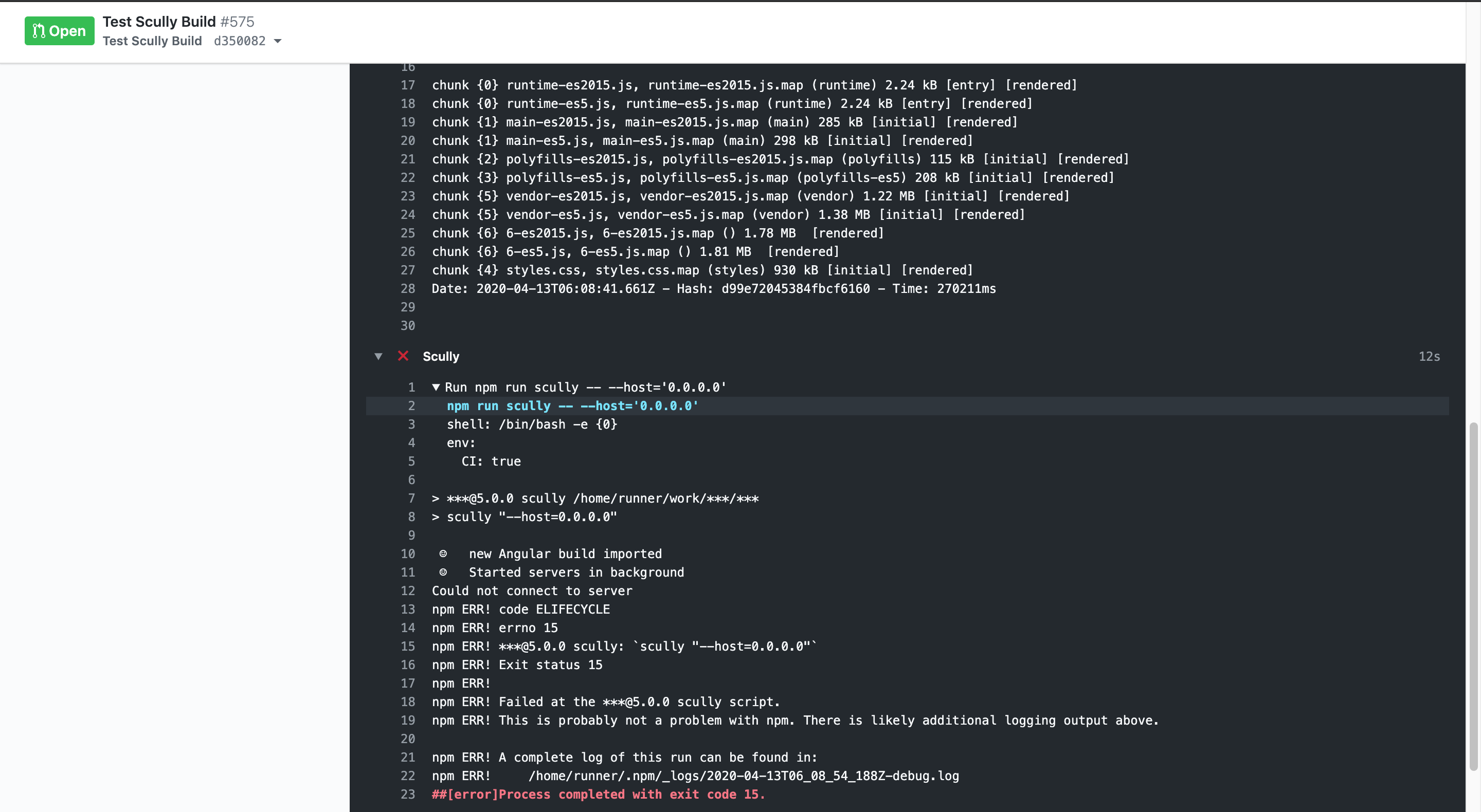
🔥 Exception or Error
> ***@5.0.0 scully /home/runner/work/***/***
> scully "--host=0.0.0.0"

 ☺   new Angular build imported
 ☺   Started servers in background
Could not connect to server
npm ERR! code ELIFECYCLE
npm ERR! errno 15
npm ERR! ***@5.0.0 scully: `scully "--host=0.0.0.0"`
npm ERR! Exit status 15
npm ERR!
npm ERR! Failed at the ***@5.0.0 scully script.
npm ERR! This is probably not a problem with npm. There is likely additional logging output above.

npm ERR! A complete log of this run can be found in:
npm ERR!     /home/runner/.npm/_logs/2020-04-13T06_08_54_188Z-debug.log
##[error]Process completed with exit code 15.
🔥 Screenshots
 dr5hn
dr5hn
All 31 comments
@jorgeucano @phodal --host='0.0.0.0' doesn't solve the issue.
dr5hn
on 13 Apr 2020
The issue is still present, here is my build, https://github.com/phodal/ledge/runs/581943553?check_suite_focus=true, see in "Build Scully" step, I use continues with error
also, --showGuessError is not working.
 phodal
on 13 Apr 2020
phodal
on 13 Apr 2020
We are using GA in our own project, We can't merge a single PR when it fails.
So, we need to determine why it isn't working for you.
The --showGuessError has nothing to do with the issue you are seeing. It seems that it is unable to start the server. Also, you are using NPX to start the task, which is different from our setup.
What you can do is do an npx scully serve to see if/what error there is when you start the server soly
 SanderElias
on 13 Apr 2020
SanderElias
on 13 Apr 2020
@SanderElias I tried serve. It looks like this :
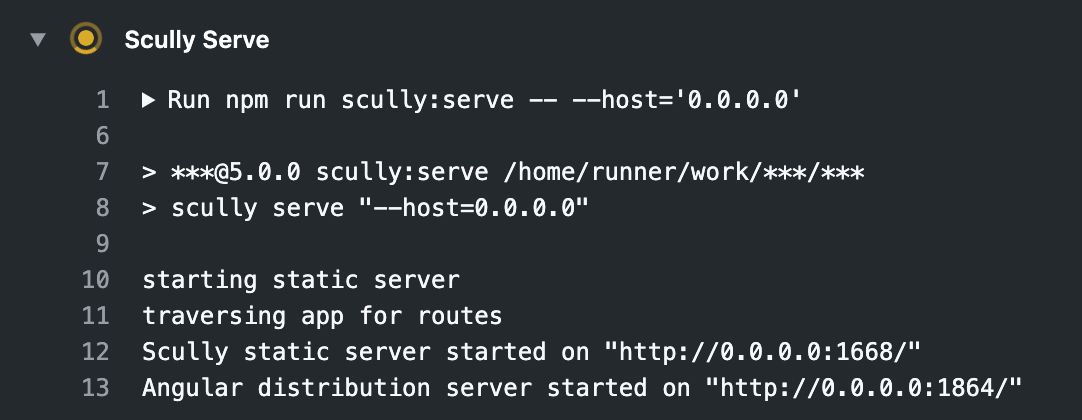
So serve is working but build not working.
Won't be able to share link, Since repo is private.
dr5hn
on 13 Apr 2020
Ok, can you now try npm run scully -- --host='0.0.0.0' --scanRoutes ?
SanderElias
on 13 Apr 2020
here is my results, and I had cancal it.
Run npm run scully scully serve
  npm run scully scully serve
  npm run scully -- --host='0.0.0.0' --scanRoutes
  shell: /bin/bash -e {0}

> [email protected] scully /home/runner/work/ledge/ledge
> scully --scanRoutes "scully" "serve"

starting static server
traversing app for routes
Scully static server started on "http://localhost:1668/"
Angular distribution server started on "http://localhost:1864/"
##[error]The operation was canceled.
@phodal ..
I think @SanderElias Wants build command with those options to be tested. Wait let me do it.
dr5hn
on 13 Apr 2020
@SanderElias Same Error... No Luck...

dr5hn
on 13 Apr 2020
Hmm, @jorgeucano do you have any additional insights?
SanderElias
on 13 Apr 2020
@dr5hn If you run this local, work?
 jorgeucano
on 13 Apr 2020
jorgeucano
on 13 Apr 2020
@jorgeucano I can run this job in local, it works.
here is my projects in GitHub: https://github.com/phodal/ledge
WARNING in budgets: Exceeded maximum budget for initial-es2015. Budget 2 MB was not met by 553 kB with a total of 2.54 MB.
WARNING in budgets: Exceeded maximum budget for initial-es5. Budget 2 MB was not met by 713 kB with a total of 2.7 MB.
$ scully --scanRoutes
(node:4073) ExperimentalWarning: The fs.promises API is experimental
☺ new Angular build imported
☺ Started servers in background
Finding all routes in application.
traversing app for routes
Pull in data to create additional routes.
No configuration for route "/solution/:case" found. Skipping
Route list created in files:
"/Users/fdhuang/consultant/devops/ledge/src/assets/scully-routes.json",
"/Users/fdhuang/consultant/devops/ledge/dist/static/assets/scully-routes.json",
"/Users/fdhuang/consultant/devops/ledge/dist/ledge/assets/scully-routes.json"
Route "/maturity" rendered into file: "/Users/fdhuang/consultant/devops/ledge/dist/static/maturity/index.html"
Wrote 1 route to sitemap.xml
Route "/resources" rendered into file: "/Users/fdhuang/consultant/devops/ledge/dist/static/resources/index.html"
Wrote 2 routes to sitemap.xml
Route "/mobile" rendered into file: "/Users/fdhuang/consultant/devops/ledge/dist/static/mobile/index.html"
Wrote 3 routes to sitemap.xml
Route "/report" rendered into file: "/Users/fdhuang/consultant/devops/ledge/dist/static/report/index.html"
Wrote 4 routes to sitemap.xml
Route "/case-study/meituan" rendered into file: "/Users/fdhuang/consultant/devops/ledge/dist/static/case-study/meituan/index.html"
Wrote 5 routes to sitemap.xml
Route "/think-tank" rendered into file: "/Users/fdhuang/consultant/devops/ledge/dist/static/think-tank/index.html"
Wrote 6 routes to sitemap.xml
Route "/case-study/ledge" rendered into file: "/Users/fdhuang/consultant/devops/ledge/dist/static/case-study/ledge/index.html"
Wrote 7 routes to sitemap.xml
Route "/pattern" rendered into file: "/Users/fdhuang/consultant/devops/ledge/dist/static/pattern/index.html"
Wrote 8 routes to sitemap.xml
Route "/manual" rendered into file: "/Users/fdhuang/consultant/devops/ledge/dist/static/manual/index.html"
Wrote 9 routes to sitemap.xml
Route "/practise" rendered into file: "/Users/fdhuang/consultant/devops/ledge/dist/static/practise/index.html"
Wrote 10 routes to sitemap.xml
Route "/tool" rendered into file: "/Users/fdhuang/consultant/devops/ledge/dist/static/tool/index.html"
Wrote 11 routes to sitemap.xml
Route "/case-study/tw-banks" rendered into file: "/Users/fdhuang/consultant/devops/ledge/dist/static/case-study/tw-banks/index.html"
Wrote 12 routes to sitemap.xml
Route "/case-study/daocloud" rendered into file: "/Users/fdhuang/consultant/devops/ledge/dist/static/case-study/daocloud/index.html"
Wrote 13 routes to sitemap.xml
Route "/case-study/etsy" rendered into file: "/Users/fdhuang/consultant/devops/ledge/dist/static/case-study/etsy/index.html"
Wrote 14 routes to sitemap.xml
Route "/case-study/cmb" rendered into file: "/Users/fdhuang/consultant/devops/ledge/dist/static/case-study/cmb/index.html"
Wrote 15 routes to sitemap.xml
Route "/case-study/hp" rendered into file: "/Users/fdhuang/consultant/devops/ledge/dist/static/case-study/hp/index.html"
Wrote 16 routes to sitemap.xml
Route "/case-study/china-bank" rendered into file: "/Users/fdhuang/consultant/devops/ledge/dist/static/case-study/china-bank/index.html"
Wrote 17 routes to sitemap.xml
Route "/case-study/huawei" rendered into file: "/Users/fdhuang/consultant/devops/ledge/dist/static/case-study/huawei/index.html"
Wrote 18 routes to sitemap.xml
Route "/case-study/nonghang" rendered into file: "/Users/fdhuang/consultant/devops/ledge/dist/static/case-study/nonghang/index.html"
Wrote 19 routes to sitemap.xml
Route "/case-study/alibaba" rendered into file: "/Users/fdhuang/consultant/devops/ledge/dist/static/case-study/alibaba/index.html"
Wrote 20 routes to sitemap.xml
Route "/case-study/baidu" rendered into file: "/Users/fdhuang/consultant/devops/ledge/dist/static/case-study/baidu/index.html"
Wrote 21 routes to sitemap.xml
Route "/case-study/xuecheng" rendered into file: "/Users/fdhuang/consultant/devops/ledge/dist/static/case-study/xuecheng/index.html"
Wrote 22 routes to sitemap.xml
Route "/case-study/tencent" rendered into file: "/Users/fdhuang/consultant/devops/ledge/dist/static/case-study/tencent/index.html"
Wrote 23 routes to sitemap.xml
Route "/case-study/bocloud" rendered into file: "/Users/fdhuang/consultant/devops/ledge/dist/static/case-study/bocloud/index.html"
Wrote 24 routes to sitemap.xml
Route "/case-study/atlassian" rendered into file: "/Users/fdhuang/consultant/devops/ledge/dist/static/case-study/atlassian/index.html"
Wrote 25 routes to sitemap.xml
Route "/case-study/dasouche" rendered into file: "/Users/fdhuang/consultant/devops/ledge/dist/static/case-study/dasouche/index.html"
Wrote 26 routes to sitemap.xml
Route "/design" rendered into file: "/Users/fdhuang/consultant/devops/ledge/dist/static/design/index.html"
Wrote 27 routes to sitemap.xml
Route "/case-study/zhengcaiyun" rendered into file: "/Users/fdhuang/consultant/devops/ledge/dist/static/case-study/zhengcaiyun/index.html"
Wrote 28 routes to sitemap.xml
Route "/case-study/xiaomi" rendered into file: "/Users/fdhuang/consultant/devops/ledge/dist/static/case-study/xiaomi/index.html"
Wrote 29 routes to sitemap.xml
Route "/case-study/weibo" rendered into file: "/Users/fdhuang/consultant/devops/ledge/dist/static/case-study/weibo/index.html"
Wrote 30 routes to sitemap.xml
Route "/case-study/youku" rendered into file: "/Users/fdhuang/consultant/devops/ledge/dist/static/case-study/youku/index.html"
Wrote 31 routes to sitemap.xml
Route "/case-study/bilibili" rendered into file: "/Users/fdhuang/consultant/devops/ledge/dist/static/case-study/bilibili/index.html"
Wrote 32 routes to sitemap.xml
Route "/home" rendered into file: "/Users/fdhuang/consultant/devops/ledge/dist/static/home/index.html"
Wrote 33 routes to sitemap.xml
Route "/" rendered into file: "/Users/fdhuang/consultant/devops/ledge/dist/static/index.html"
Wrote 34 routes to sitemap.xml
Route "/helper" rendered into file: "/Users/fdhuang/consultant/devops/ledge/dist/static/helper/index.html"
send reload
Generating took 29 seconds for 35 pages:
That is 1.21 pages per second,
or 829 milliseconds for each page.
Finding routes in the angular app took 8.1 seconds
Pulling in route-data took 1 milliseconds
Rendering the pages took 19.65 seconds
Wrote 35 routes to sitemap.xml
CNAME file created
👨🚀 Uploading via git, please wait...
I will download today the repo and test
jorgeucano
on 13 Apr 2020
@jorgeucano It works fine on local !! Only issue with Github Actions.
dr5hn
on 13 Apr 2020
Having same issue on GitLab CI. Up till now I've been using a runner installed on my machine and everything worked fine. But today I installed runner on my remote server so that I can run jobs even when my machine is shut down, e.g. when I am not home etc. But I get this same error:
 > scully --nw
(node:77) ExperimentalWarning: The fs.promises API is experimental
 ☺   new Angular build imported
 ☺   Started servers in background
Could not connect to server
npm ERR! code ELIFECYCLE
npm ERR! errno 15
npm ERR! [email protected] scully: `scully --nw`
npm ERR! Exit status 15
npm ERR!
npm ERR! Failed at the [email protected] scully script.
npm ERR! This is probably not a problem with npm. There is likely additional logging output above.
npm ERR! A complete log of this run can be found in:
npm ERR!     /root/.npm/_logs/2020-04-13T16_29_49_346Z-debug.log
But one thing I noticed when I checked my server charts is that the server machine basically reached the cap for CPU and memory, so I believe it couldn't connect to server because it just couldn't start due to not enough memory...
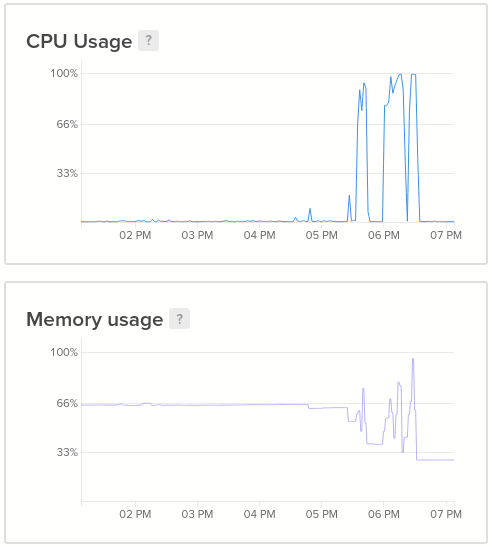
My own machine has 16GB RAM, while my server has only 2GB and up to 60% of it used all the time. I am using single server to save on the maintenance costs. I don't want to use public GitLab runners because the caches are not properly transferred between them and thus my jobs often failed when I used them...
 BlindDespair
on 13 Apr 2020
BlindDespair
on 13 Apr 2020
@BlindDespair We use puppeteer, and that is memory hungry, but also, even not loaded at that point.
Also, we are using GithubActions by ourselves. Although it is a bit slow, it doesn't fail Like it does for @dr5hn
I'm going to look into the memory thing, and report back here.
SanderElias
on 14 Apr 2020
It seems make senses.In my projects, a lot of DOM need to be render, it will need more memory. Did scully run parallels?
phodal
on 14 Apr 2020
It does render the pages in parallel yes. If you mean a package named like that, no. By default, Scully will run a render process on every core available. There is a setting that allows you to change that however you see fit.
However, the place where it breaks is way before that happens.
SanderElias
on 14 Apr 2020
@SanderElias Exactly.
It breaks before rendering process. It breaks at this point.
https://github.com/scullyio/scully/blob/10950b5771fd4d82b5b4b2c31df7737523dad044/scully/scully.ts#L75-L78
-- We're not using e. The error thrown by function. Otherwise we should've known the exact issue.
and this file is spitting out exact error... https://github.com/scullyio/scully/blob/master/scully/utils/serverstuff/waitForServerToBeAvailable.ts
dr5hn
on 15 Apr 2020
Hey I check with a project and work
https://github.com/jorgeucano/ngConf-2020/runs/588934765
Its just take a Scully project and add the actions.
You can see here https://github.com/jorgeucano/ngConf-2020/blob/master/.github/workflows/nodejs.yml
I'm using the last version from scully...
jorgeucano
on 15 Apr 2020
@dr5hn it times out on the server, Tomorrow I'll add some extra code so you can debug this a bit more. It works for us in multiple projects on GitHub actions. We need to dig in a bit more.
Also I will make an option to expand the waiting period a bit longer (although the 80 iterations is already a timeout of 10 seconds, but this might be an issue on a really slow CI)
SanderElias
on 15 Apr 2020
@jorgeucano //cc @SanderElias //cc @phodal //cc @BlindDespair
Jorge, I've tried following exact steps as you did in your workflow.
- Works with
ng build - Doesn't Works with
ng build --prod
It seems to be working with ng build.. See this..
> ***@5.0.0 build /home/runner/work/***/***
> ng build && scully

Generating ES5 bundles for differential loading...
ES5 bundle generation complete.

chunk {runtime} runtime-es2015.js, runtime-es2015.js.map (runtime) 9.02 kB [entry] [rendered]
chunk {runtime} runtime-es5.js, runtime-es5.js.map (runtime) 9.02 kB [entry] [rendered]
chunk {admin-admin-module} admin-admin-module-es2015.js, admin-admin-module-es2015.js.map (admin-admin-module) 6.25 MB  [rendered]
chunk {admin-admin-module} admin-admin-module-es5.js, admin-admin-module-es5.js.map (admin-admin-module) 6.87 MB  [rendered]
chunk {main} main-es2015.js, main-es2015.js.map (main) 2.06 MB [initial] [rendered]
chunk {main} main-es5.js, main-es5.js.map (main) 2.11 MB [initial] [rendered]
chunk {polyfills} polyfills-es2015.js, polyfills-es2015.js.map (polyfills) 509 kB [initial] [rendered]
chunk {polyfills-es5} polyfills-es5.js, polyfills-es5.js.map (polyfills-es5) 1.06 MB [initial] [rendered]
chunk {styles} styles-es2015.js, styles-es2015.js.map (styles) 4.36 MB [initial] [rendered]
chunk {styles} styles-es5.js, styles-es5.js.map (styles) 4.36 MB [initial] [rendered]
chunk {vendor} vendor-es2015.js, vendor-es2015.js.map (vendor) 10.7 MB [initial] [rendered]
chunk {vendor} vendor-es5.js, vendor-es5.js.map (vendor) 12.2 MB [initial] [rendered]
- Hash: dd3cae67f6a63d59334b - Time: 115410ms
 ☺   new Angular build imported
Background servers already running.
Finding all routes in application.

----------------------------------
Using stored unhandled routes!.
   To discover new routes in the angular app use "npm run scully -- --scanRoutes"
----------------------------------
Pull in data to create additional routes.
No configuration for route "/register-using-code/:reg_code" found. Skipping
Route list created in files:
  "/home/runner/work/***/***/src/assets/scully-routes.json",
  "/home/runner/work/***/***/dist/static/assets/scully-routes.json",
  "/home/runner/work/***/***/dist/***/assets/scully-routes.json"

Route "/logout" rendered into file: "/home/runner/work/***/***/dist/static/logout/index.html"
Route "/login" rendered into file: "/home/runner/work/***/***/dist/static/login/index.html"
Route "/google" rendered into file: "/home/runner/work/***/***/dist/static/google/index.html"
Route "/register" rendered into file: "/home/runner/work/***/***/dist/static/register/index.html"
Route "/request-password" rendered into file: "/home/runner/work/***/***/dist/static/request-password/index.html"
Route "/callback" rendered into file: "/home/runner/work/***/***/dist/static/callback/index.html"
Route "/reset-password" rendered into file: "/home/runner/work/***/***/dist/static/reset-password/index.html"
send reload

Generating took 10.52 seconds for 6 pages:
  That is 0.51 pages per second,
  or 1980 milliseconds for each page.

  Finding routes in the angular app took 0 milliseconds
  Pulling in route-data took 0 milliseconds
  Rendering the pages took 9.17 seconds
But not with ng build --prod.. See this..
> ***@5.0.0 build:prod /home/runner/work/***/***
> npm run nghm -- build --prod && scully


> ***@5.0.0 nghm /home/runner/work/***/***
> node --max_old_space_size=4096 ./node_modules/@angular/cli/bin/ng "build" "--prod"

Generating ES5 bundles for differential loading...
ES5 bundle generation complete.

chunk {0} runtime-es2015.js, runtime-es2015.js.map (runtime) 2.24 kB [entry] [rendered]
chunk {0} runtime-es5.js, runtime-es5.js.map (runtime) 2.24 kB [entry] [rendered]
chunk {1} main-es2015.js, main-es2015.js.map (main) 285 kB [initial] [rendered]
chunk {1} main-es5.js, main-es5.js.map (main) 298 kB [initial] [rendered]
chunk {2} polyfills-es2015.js, polyfills-es2015.js.map (polyfills) 115 kB [initial] [rendered]
chunk {3} polyfills-es5.js, polyfills-es5.js.map (polyfills-es5) 208 kB [initial] [rendered]
chunk {5} vendor-es2015.js, vendor-es2015.js.map (vendor) 1.22 MB [initial] [rendered]
chunk {5} vendor-es5.js, vendor-es5.js.map (vendor) 1.38 MB [initial] [rendered]
chunk {6} 6-es2015.js, 6-es2015.js.map () 1.78 MB  [rendered]
chunk {6} 6-es5.js, 6-es5.js.map () 1.81 MB  [rendered]
chunk {4} styles.css, styles.css.map (styles) 930 kB [initial] [rendered]
Date: 2020-04-16T05:48:22.985Z - Hash: d99e72045384fbcf6160 - Time: 257631ms


 ☺   new Angular build imported
 ☺   Started servers in background
Could not connect to server
npm ERR! code ELIFECYCLE
npm ERR! errno 15
npm ERR! ***@5.0.0 build:prod: `npm run nghm -- build --prod && scully`
npm ERR! Exit status 15
npm ERR!
npm ERR! Failed at the ***@5.0.0 build:prod script.
npm ERR! This is probably not a problem with npm. There is likely additional logging output above.

npm ERR! A complete log of this run can be found in:
npm ERR!     /home/runner/.npm/_logs/2020-04-16T05_48_35_068Z-debug.log
##[error]Process completed with exit code 15.
@dr5hn We just tried, we moved it to prod mode, and it works there too.
As the production build is smaller as the normal build, the opposite of what you are seeing would be more logical.
I wished we had a way to reproduce this, as we can't fix something that is working for us.
SanderElias
on 17 Apr 2020
I just noticed those are kind of big projects. I suspect the issue is that the route-finding code is taking too long, and the timeout hits too soon. I'll update the timeout and push out a new version, lets see what that does.
SanderElias
on 17 Apr 2020
I just pushed Scully v0.0.87 to npm.
@phodal , @BlindDespair , @dr5hn, can you try updating your CI with this flag:
scully --serverTimeout 30000
(and add the existing flags if needed.) This will use a 30 seconds timeout instead of the 10 that is the default, you can go even longer
on large projects the guess-parser sometimes needs more time, this way, you can give it. Perhaps you even need to go longer as the minute I put in above
SanderElias
on 17 Apr 2020
@SanderElias It works, but 30s wasn't working in my job, and I change to 60s in GitHub Action.
npm run scully -- --host='0.0.0.0' --scanRoutes --serverTimeout=60000
here is log action result
49s
Wrote 5 routes to sitemap.xml
Run npm run scully -- --host='0.0.0.0' --scanRoutes --serverTimeout=60000
  npm run scully -- --host='0.0.0.0' --scanRoutes --serverTimeout=60000
  shell: /bin/bash -e {0}

> [email protected] scully /home/runner/work/ledge/ledge
> scully --scanRoutes "--host=0.0.0.0" "--scanRoutes" "--serverTimeout=60000"

/home/runner/work/ledge/ledge /home/runner/work/ledge/ledge
 ☺   new Angular build imported
 ☺   Started servers in background
Finding all routes in application.
traversing app for routes
Pull in data to create additional routes.
No configuration for route "/think-tank/:tank" found. Skipping
Route list created in files:
  "/home/runner/work/ledge/ledge/src/assets/scully-routes.json",
  "/home/runner/work/ledge/ledge/dist/static/assets/scully-routes.json",
  "/home/runner/work/ledge/ledge/dist/ledge/assets/scully-routes.json"

 Route "/pattern" rendered into file: "/home/runner/work/ledge/ledge/dist/static/pattern/index.html"
Wrote 1 route to sitemap.xml
Route "/practise" rendered into file: "/home/runner/work/ledge/ledge/dist/static/practise/index.html"
Wrote 2 routes to sitemap.xml
Route "/manual" rendered into file: "/home/runner/work/ledge/ledge/dist/static/manual/index.html"
Wrote 3 routes to sitemap.xml
Route "/maturity" rendered into file: "/home
……
@SanderElias Thank you so much. It worked with 30s of Timeout.
Hence Closing.
dr5hn
on 20 Apr 2020
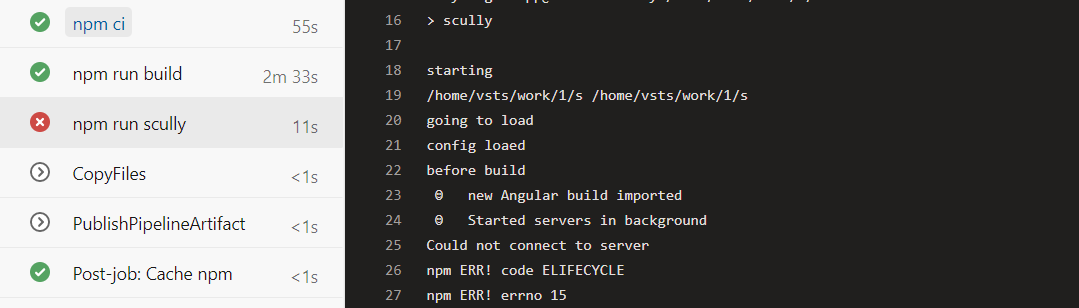
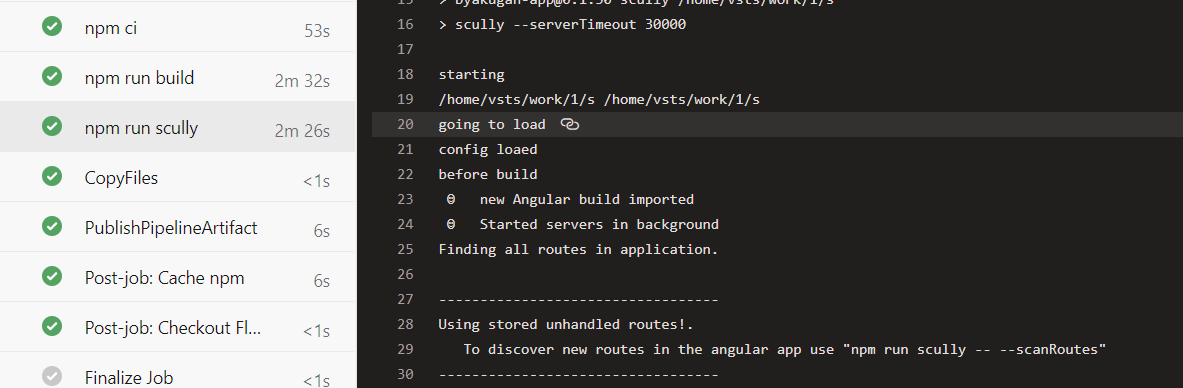
I wanted to add a note that
    "scully": "scully --serverTimeout 30000",
    "scully:serve": "scully serve"
Has also worked for me in Azure DevOps Pipelines, which previously also timed out. @SanderElias I think this would be a really good topic to be on the main Scully Docs under continuous integration. I had to dig into the issues to find this gem.
 johnnliu
on 16 May 2020
johnnliu
on 16 May 2020
@GuzmanPI
SanderElias
on 16 May 2020
$ scully --host='0.0.0.0' --scanRoutes --serverTimeout=60000
☺ new Angular build imported
☺ Started servers in background
Finding all routes in application.
traversing app for routes
Pull in data to create additional routes.
Route list created in files:
"./dist/static/assets/scully-routes.json",
"/builds/XXXX/portal/dist/portal/assets/scully-routes.json",
"/builds/XXXX/portal/src/assets/scully-routes.json"
Puppeteer launch error.
 montella1507
on 18 Jun 2020
montella1507
on 18 Jun 2020
It would be great to see the docs include a mention of an off-the-shelf, maintained Docker image to CI build-test in, in which Scully + CLI 'just works'.
 kylecordes
on 23 Jun 2020
kylecordes
on 23 Jun 2020
For the moment the following Docker hub image, made by the fine people at BuiltKite, does the job well:
buildkite/puppeteer
You have to use the puppeteer arguments to make it tolerate running inside docker., these are shown in a comment in the source code.
kylecordes
on 23 Jun 2020
Related issues
 dbubenheim
·
4Comments
dbubenheim
·
4Comments
 msprogramando
·
5Comments
msprogramando
·
5Comments
 spencerb02
·
5Comments
spencerb02
·
5Comments
 beeman
·
3Comments
beeman
·
3Comments
 ghost
·
4Comments
ghost
·
4Comments
Most helpful comment
It would be great to see the docs include a mention of an off-the-shelf, maintained Docker image to CI build-test in, in which Scully + CLI 'just works'.