Scully: Not able to generate routes that have multiple parameters in the router path definition
🐞 Bug report
Description
My and other news/blog implementations depend on the id in the parameter as unique identifier, but for obvious SEO reasons the slug is added after id. For example:
http://localhost:4200/news/1/newsitem-with-a-title
Basically the slug can be anything, it's the id that is used to fetch the data in the database. But the risk of the slug being potentially anything is mitigated by setting a canonical url and redirecting if really required. That all aside, as it is not part of the problem described here.
The route definition is as follows
{
    path: ':id/:slug',
    component: DetailComponent,
}
and is part of the news module lazyloaded in the app-routing.module.ts
{
    path: 'news',
    loadChildren: () => import('./modules/news/news.module').then(m => m.NewsModule),
}
My scully config contains some configuration for this news detail page implementation, as follows:
'/news/:id/:slug': {
      type: 'json',
      postRenderers: postRenderers,
      id: {
        url: 'http://localhost:4200/assets/news.json',
        property: 'id',
      },
      slug: {
        url: 'http://localhost:4200/assets/news/${id}.json',
        property: 'slug',
      },
},
I based this configuration on the config defined in https://github.com/scullyio/scully/blob/master/scully.config.js. Perhaps I misinterpreted something wrong? The only difference I can think about is that my use-case has 2 variable params in the route path definition, hence the title.
Things I've checked:
- The http://localhost:4200/assets/news.json is loadable ( see min. reproduction )
- The http://localhost:4200/assets/news/{1,2,5,99}.json is loadable ( see min. reproduction )
The output I get in dist is really weird and something I don't really understand. Also see error at the end of the issue.
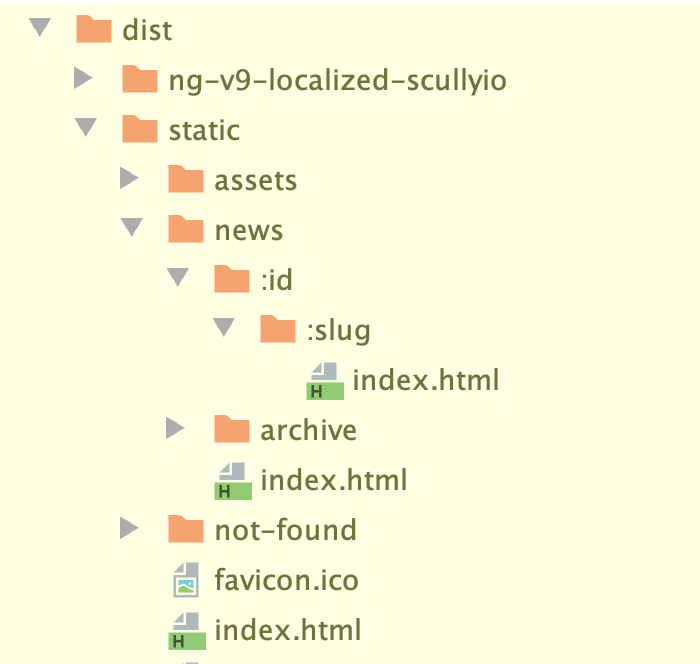
🔬 Minimal Reproduction
https://github.com/samvloeberghs/ng-v9-localized-scullyio
Be sure to run npm start in an extra terminal session. As the application requires the static assets to be present and served on http://localhost:4200.
Terminal 1:
npm start
Terminal 2:
npm run build --prod
npm run scully
💻Your Environment
Angular Version:
Angular CLI: 9.0.0-rc.8
Node: 12.14.0
OS: darwin x64

Angular: 9.0.0-rc.8
... animations, cli, common, compiler, compiler-cli, core, forms
... language-service, platform-browser, platform-browser-dynamic
... router
Ivy Workspace: Yes

Package                           Version
-----------------------------------------------------------
@angular-devkit/architect         0.900.0-rc.8
@angular-devkit/build-angular     0.900.0-rc.8
@angular-devkit/build-optimizer   0.900.0-rc.8
@angular-devkit/build-webpack     0.900.0-rc.8
@angular-devkit/core              9.0.0-rc.8
@angular-devkit/schematics        9.0.0-rc.8
@ngtools/webpack                  9.0.0-rc.8
@schematics/angular               9.0.0-rc.8
@schematics/update                0.803.22
rxjs                              6.5.4
typescript                        3.6.4
webpack                           4.41.2
Scully Version:
"@scullyio/init": "0.0.11",
"@scullyio/ng-lib": "latest",
"@scullyio/scully": "latest",
🔥 Exception or Error
 ☺   new Angular build imported
Background servers already running.
servers available
Finding all routes in application.
Pull in data to create additional routes.
Could not fetch data for route "/news/:id/:slug" samvloeberghs
All 6 comments
Is there a way to define multiple properties based on the result of the fetch of the json plugin?
I assume that
id: {
url: 'http://localhost:4200/assets/news.json',
property: 'id',
},
iterates over the array returned of news and uses the id of each object. Is there a way to also use the slug of each object in the array?
samvloeberghs
on 11 Jan 2020
So I changed how my data was build up. The newsdetail data, for example assets/news/5.json, was an object like this:
{
"id": 5,
"slug": "newsitem-5",
"title": "Newsitem #5",
"short": "Lorem ipsum dolor .."
}
I've changed it to an array of only one object, like this, and now it works.
[{
"id": 5,
"slug": "newsitem-5",
"title": "Newsitem #5",
"short": "Lorem ipsum dolor .."
}]
But this should not be a hard requirement, right?
samvloeberghs
on 11 Jan 2020
I think this is somewhat explaining the issue and what is expected of the JSON object returned in the data, hope it helps somehow:
https://github.com/samvloeberghs/scully/commit/71d7ee3ebceaffe9dd6832a38a47470bd0a5b803
samvloeberghs
on 11 Jan 2020
@samvloeberghs. The JSON plugin expects an array indeed. As we know that this isn't alway's the case there is also a resultsHandler you can use. Wich is basically a function that can do whatever
'/news/:id/:slug': {
      type: 'json',
      postRenderers: postRenderers,
      id: {
        url: 'http://localhost:4200/assets/news.json',
        resultsHandler: (raw) => raw.id
      },
      slug: {
        url: 'http://localhost:4200/assets/news/${id}.json',
        resultsHandler: (raw) => raw.slug
      },
},
Our plugin is designed for separate queries for each parameter, so you have to do 2 requests.
We know this is not alway's the optimal situation. I think for your use-case a custom routerPlugin would do.
const {routeSplit, registerPlugin, httpGet} = require('../dist/scully');

const newsSamplePlugin = async (route, config) => {
  const {createPath} = routeSplit(route);
  const list = await httpGet('http://localhost:4200/assets/news.json');
  const handledRoutes = [];
  for (item of list) {
    const blogData = await httpget(`http://localhost:4200/assets/news/${item.id}.json`);
    handledRoutes.push({
      route: createPath(item.id, blogdata.slug),
      title: blogData.title,
      description: blogData.short,
    });
  }
};

registerPlugin('router', 'myBlog', newsSamplePlugin);

const config = {
  '/news/:id/:slug': {
    type: 'myBlog',
    postRenderers: postRenderers,
  },
};
That is an idea to get started. Didn't test the code.
If you have all data available in a single list, you don't even need to do 2 requests.
Does this answer your question enough to close the issue?
 SanderElias
on 12 Jan 2020
SanderElias
on 12 Jan 2020
@SanderElias thanks a lot! Checking it out asap
samvloeberghs
on 12 Jan 2020
Works: https://github.com/samvloeberghs/ng-v9-localized-scullyio/blob/master/plugins/newsPlugin.js
I will be writing about all this stuff and my findings soon!
samvloeberghs
on 12 Jan 2020
Related issues
 puku0x
·
4Comments
puku0x
·
4Comments
 valonymeri
·
5Comments
valonymeri
·
5Comments
 montella1507
·
5Comments
montella1507
·
5Comments
 msprogramando
·
5Comments
msprogramando
·
5Comments
 pierresigwalt
·
4Comments
pierresigwalt
·
4Comments
Most helpful comment
@samvloeberghs. The JSON plugin expects an array indeed. As we know that this isn't alway's the case there is also a
resultsHandleryou can use. Wich is basically a function that can do whateverOur plugin is designed for separate queries for each parameter, so you have to do 2 requests.
We know this is not alway's the optimal situation. I think for your use-case a custom routerPlugin would do.
That is an idea to get started. Didn't test the code.
If you have all data available in a single list, you don't even need to do 2 requests.
Does this answer your question enough to close the issue?