scully-content doesn't work when served over https from CloudFlare
🐞 Bug report
Description
🔬 Minimal Reproduction
https://scully-demo.stewan.io/
Then press the link “this is a blog post”
it works on non-secure urls, though.
Here is the repo
https://github.com/stewwan/scully-demo
💻Your Environment
Angular Version:
Scully Version:
🔥 Exception or Error
 stewones
All 17 comments
Hmm, this is strange. Scully-content uses location.href to get the URL. That gives back the https link. I have no clue why it is trying to get the content using HTTP
Scully should be completely agnostic to HTTP vs https this needs a bit more investigation.
@aaronfrost Can you take a look too?
 SanderElias
on 3 Jan 2020
SanderElias
on 3 Jan 2020
@stewwan Your server does a redirect to the HTTP resource that is causing this issue:
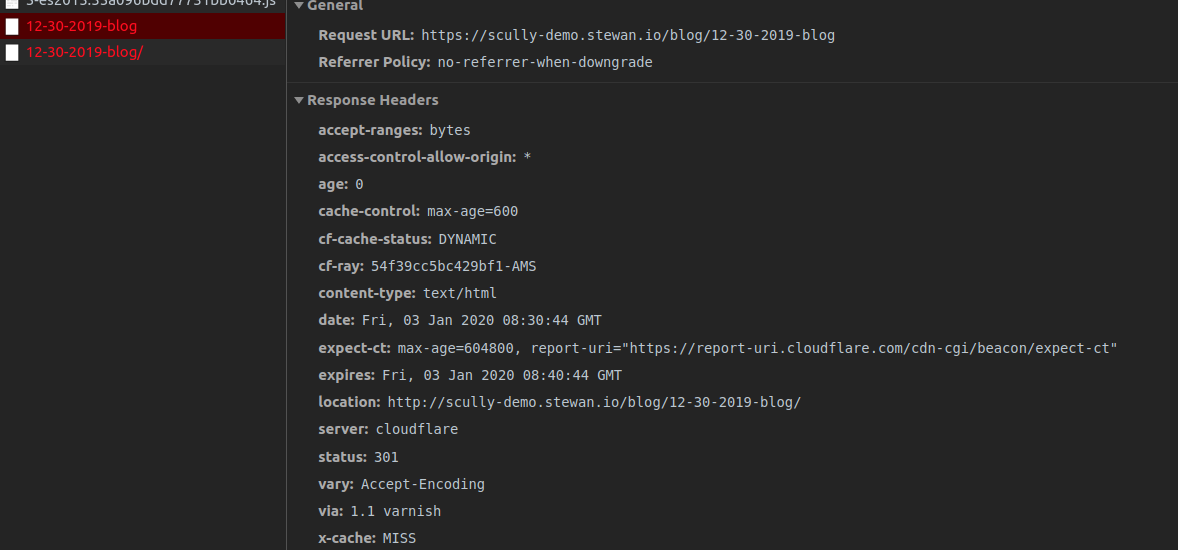
So your server forwards and returns an HTTP request when asked for an https.
I don't think there is anything here that Scully can do to fix this? Therefore I'm closing this issue. When you think Scully can help somehow to fix this, please open a new issue
SanderElias
on 3 Jan 2020
But it’s cloudflare + github pages 🤷♂️
Any idea on how to fix it?
stewones
on 3 Jan 2020
Nope, sorry, no clue,
SanderElias
on 3 Jan 2020
Why issue is closed then?
stewones
on 3 Jan 2020
I closed it because the cause of the issue is not Scully. It is probably something in the Cloudflare settings. We can't possibly provide a solution for every hosting issue out there.
Scully works well on https.
SanderElias
on 3 Jan 2020
@stewwan I am looking into this. I am sorry that we've frustrated you with closing this issue so fast. I want to spend some additional time looking into this issue for you. If I find something (fingers crossed) we can reopen it. It appears, though, that @SanderElias is probably right that this is some weird host thing that we can't control.
I will let you know what I find. And THANK YOU for helping us out, and trying out Scully, and submitting issues you run into. I hope that we can help you solve this issue, and help you be successful in your efforts to better understand SSG around Angular.
 aaronfrost
on 3 Jan 2020
aaronfrost
on 3 Jan 2020
@d-koppenhagen have you deployed your stuff and gotten it working? Did you experience this?
aaronfrost
on 3 Jan 2020
Hey, I published my site https://d-koppenhagen.de using scully.
In my case I am using not cloud flare and gh-pages.
A few days ago the site was not redirecting directly to https when calling the url with http but I had no issues with this. I have also no issues with the redirect (using apache as web server).
I assume also it could be a server configuration thing. Have never had a similiar issue with scully so far.
 d-koppenhagen
on 3 Jan 2020
d-koppenhagen
on 3 Jan 2020
Could it be a problem when the web server is configured in such a way that it will all routes redirect to the root (baseUrl) in order to get the routing handled by the Angular router?
This shouldn't be done in case of using Scully I think as the static routes (directories with index.html) do exist.
d-koppenhagen
on 3 Jan 2020
So I think the redirect always to /index.html as described in the Angular Docs isn't necessary when using the static sites result of _Scully_ isn't it? Maybe this causes some kind of error? Can you check your Cloudflare config for it?
d-koppenhagen
on 3 Jan 2020
at this point I can see problem isn't with Scully. Thanks y'all
will share if I discover anything.
stewones
on 3 Jan 2020
@stewwan others will have this same issue. Please share your finding.
aaronfrost
on 3 Jan 2020
okay I managed to fix this. I didnt know github pages already supports https out of box so the solution is letting cloudflare be only the dns server by disabling proxy

stewones
on 4 Jan 2020
I know this is an older (non-Scully) issue but this issue shows up in search results for 'Scully Cloudflare' so I'll leave my findings here.
I was getting a weird obscure result where my Scully Content was rendering to this:

It renders to ')[1].split(' for some reason (I'm not going to guess why!).
The solution for me right now is to turn my Cloudflare caching 'Development Mode' to ON. It's not a long term solution but it allows my content to render.

I'll try to post a conclusion if I can get it working without removing Cloudflare's caching feature.
 BrendanSluke
on 24 May 2021
BrendanSluke
on 24 May 2021
@BrendanSluke I suspect there is some HTML modification going on that breaks The way Scully injects the comments it needs.
We had the same exact issue with an HTML minifier.
You might need to do a setting so that the script we inline in the pages does opt out of "optimization". You opt out of a 7 bytes optimization now. I did manually optimize that piece of code, and the bytes they remove will break it.
The script has an id (id="ScullyIO-transfer-state") so it should not be that hard to exclude that from the optimizer
SanderElias
on 24 May 2021
@SanderElias Thank you for the quick and excellent feedback!
I was able to fix my issue based on your insight, I am now able to use Cloudflare's caching functionality with Scully.
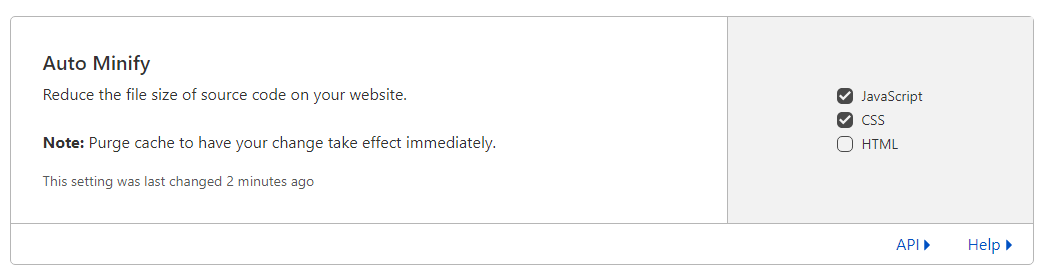
The solution was to go into the Speed/Optimization settings area and turn off Auto Minify for HTML files:
BrendanSluke
on 24 May 2021
Related issues
 nishimura-yuji
·
4Comments
nishimura-yuji
·
4Comments
 Gyrosh
·
5Comments
Gyrosh
·
5Comments
 beeman
·
3Comments
beeman
·
3Comments
 ghost
·
4Comments
ghost
·
4Comments
 jorgeucano
·
4Comments
jorgeucano
·
4Comments
Most helpful comment
@stewwan I am looking into this. I am sorry that we've frustrated you with closing this issue so fast. I want to spend some additional time looking into this issue for you. If I find something (fingers crossed) we can reopen it. It appears, though, that @SanderElias is probably right that this is some weird host thing that we can't control.
I will let you know what I find. And THANK YOU for helping us out, and trying out Scully, and submitting issues you run into. I hope that we can help you solve this issue, and help you be successful in your efforts to better understand SSG around Angular.