Scrollmagic: Working example with webpack
I was able to finally get this working with webpack if anyone else is trying to do the same:
package.json
"devDependencies": {
  "webpack": "^2.2.0",
  "imports-loader": "^0.7.0"
},
"dependencies": {
  "gsap": "^1.19.1",
  "jquery": "1.12.4 - 3",
  "scrollmagic": "^2.0.5",
}
then to import
import { TimelineMax, TweenMax, Linear } from 'gsap';
import ScrollMagic from 'scrollmagic';
import 'imports?define=>false!scrollmagic/scrollmagic/uncompressed/plugins/animation.gsap';
 of6
of6
All 30 comments
Where would you import that? Do you have a project example/template that I could take a look at?
 crutchcorn
on 4 Apr 2017
crutchcorn
on 4 Apr 2017
Thanks for this, you saved the day! Using angular-cli I had to add the imports-loader: https://github.com/webpack-contrib/imports-loader and use
import 'imports-loader?define=>false!scrollmagic/scrollmagic/uncompressed/plugins/animation.gsap.js';
 staccked
on 28 Apr 2017
staccked
on 28 Apr 2017
I got it working with webpack 2 by providing aliases.
  resolve: {
    alias: {
      "TweenLite": path.resolve('node_modules', 'gsap/src/uncompressed/TweenLite.js'),
      "TweenMax": path.resolve('node_modules', 'gsap/src/uncompressed/TweenMax.js'),
      "TimelineLite": path.resolve('node_modules', 'gsap/src/uncompressed/TimelineLite.js'),
      "TimelineMax": path.resolve('node_modules', 'gsap/src/uncompressed/TimelineMax.js'),
      "ScrollMagic": path.resolve('node_modules', 'scrollmagic/scrollmagic/uncompressed/ScrollMagic.js'),
      "animation.gsap": path.resolve('node_modules', 'scrollmagic/scrollmagic/uncompressed/plugins/animation.gsap.js'),
      "debug.addIndicators": path.resolve('node_modules', 'scrollmagic/scrollmagic/uncompressed/plugins/debug.addIndicators.js')
    }
  },
Then simply import the module like you normally would.
import 'animation.gsap'
import 'debug.addIndicators'
or
require('animation.gsap');
require('debug.addIndicators');
 tomshaw
on 6 May 2017
tomshaw
on 6 May 2017
OK OK, that was a headache.
See https://github.com/janpaepke/ScrollMagic/issues/665#issuecomment-298036818
In webpack 3, inside of resolve.alias (https://webpack.js.org/configuration/resolve/#resolve-alias)
{
test: require.resolve('scrollmagic/scrollmagic/uncompressed/plugins/jquery.ScrollMagic.js'),
loader: 'imports-loader?define=>false'
}, {
test: require.resolve('scrollmagic/scrollmagic/uncompressed/plugins/debug.addIndicators.js'),
loader: 'imports-loader?define=>false'
}
More info: https://github.com/webpack-contrib/imports-loader#disable-amd
Using define=>false will work around issues introduced by these packages being loaded as AMD's (since it's using the UMD format from a few years ago).
Also note I use require.resolve since I have:
resolve: {
modules: [
path.resolve(__dirname), path.resolve(__dirname, "node_modules")
]
}
 tony
on 18 Aug 2017
tony
on 18 Aug 2017
@tony,
Any luck with the animation.gsap plugin? Using webpack 3 I got everything to work but the plugin automatically includes TweenMax and TimelineMax when all I need are the lite versions. I think it may be related to how the plugin was originally written. Just curious if you encountered that or if you have an example in a repo somewhere of your implementation.
Thanks,
Ryan
 ryanwiemer
on 31 Aug 2017
ryanwiemer
on 31 Aug 2017
@tomshaw Maybe webpack 3 specific, but needed to change path to Path, else your solution worked fine with webpack 3.5.6! :)
 Sandstedt
on 20 Sep 2017
Sandstedt
on 20 Sep 2017
@ryanwiemer If you loock in animation.gsap.js:31 you will see it defines 'ScrollMagic', 'TweenMax', 'TimelineMax'. So I guess it needs the max versions. The lite versions is quite limited.
Sandstedt
on 20 Sep 2017
@Sandstedt gotcha. Thanks for the help. Yeah I realized for what I was doing I needed the "max" versions anyways. Not a big deal.
I'm no webpack expert but here is the link to my repo in case anyone wanted to see how I implemented it: https://github.com/ryanwiemer/doggo
Also the link to the website if interested: https://www.doggoforhire.com/
Thanks,
Ryan
ryanwiemer
on 20 Sep 2017
Anyone succesfully imported only what he needs with webpack (and typescript) ?
I can import only what I need from GSAP with :
import '../node_modules/gsap/src/minified/TweenLite.min.js';
declare var TweenLite: any; // needed for typescript
Now how to import ScrollMagic + animation.gsap without having TweenMax.js comes into the bundle (just go away TweenMax) ?
I did this without webpack (vanilla js / scripts imports in html), and TweenMax was not required at all..
 jscti
on 16 Mar 2018
jscti
on 16 Mar 2018
Finally got it working with resolve alias and :
import 'CSSPlugin';
import 'ScrollToPlugin';
import 'TimelineLite';
import 'TweenLite';
import 'script-loader!ScrollMagic';
import 'script-loader!animation.gsap';
What a pain that was, but I got rid of TweenMax.js
jscti
on 16 Mar 2018
I made it work in local using @tomshaw's solution but every time I want to build it I have this error:
Failed to compile.
Module not found: Error: Can't resolve 'animation.gsap' in '/Users/myusername/Documents/GitHub/myproject/src'
If I use @of6's solution, it doesn't work locally. I have this error:
Line 9: Unexpected '!' in 'imports?define=>false!scrollmagic/scrollmagic/uncompressed/plugins/animation.gsap'. Do not use import syntax to configure webpack loaders import/no-webpack-loader-syntax
Any idea on how to solve this issue? Am I doing something wrong?
 cdedreuille
on 2 Apr 2018
cdedreuille
on 2 Apr 2018
import 'imports-loader?define=>false!scrollmagic/scrollmagic/uncompressed/plugins/animation.gsap';
worked for me on "imports-loader": "^0.8.0",
 thanosasimo
on 10 Jul 2018
thanosasimo
on 10 Jul 2018
How would you do that in a vue-cli setup?
Installed both scrollmagic and gsap via NPM
I tried the imports-loader thing, copied the code from @thanosasimo but get an error

This is my vue-file

 katerlouis
on 19 Aug 2018
katerlouis
on 19 Aug 2018
my setup is like this
import ScrollMagic from 'scrollmagic'
import {
TweenMax,
TimelineLite
} from 'gsap'
import 'imports-loader?define=>false!scrollmagic/scrollmagic/uncompressed/plugins/debug.addIndicators'
import 'imports-loader?define=>false!scrollmagic/scrollmagic/uncompressed/plugins/animation.gsap'
Did you install scrollmagic and imports-loader?
npm i scrollmagic imports-loader
Yeah I installed both (hoped it would be that easy :'( )
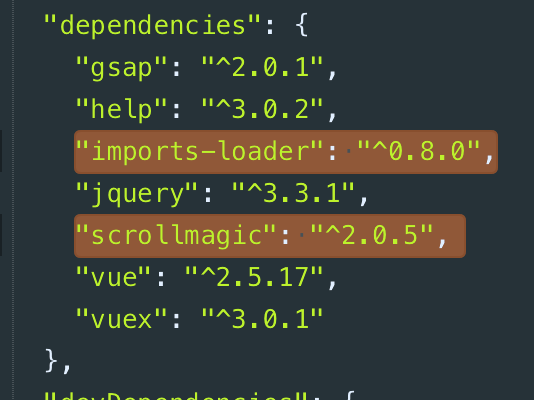
My code looks exactly like yours, doesn't it?
Off-topic
ScrollMagic has exactly 10k stars! :D

katerlouis
on 20 Aug 2018
following this, I'm exactly in the same position as @cdedreuille
 Xinod75
on 20 Aug 2018
Xinod75
on 20 Aug 2018
this setup works for Webpack 4, https://github.com/janpaepke/ScrollMagic/issues/324#issuecomment-382591182
 atav32
on 20 Sep 2018
atav32
on 20 Sep 2018
my setup is like this
import ScrollMagic from 'scrollmagic' import { TweenMax, TimelineLite } from 'gsap' import 'imports-loader?define=>false!scrollmagic/scrollmagic/uncompressed/plugins/debug.addIndicators' import 'imports-loader?define=>false!scrollmagic/scrollmagic/uncompressed/plugins/animation.gsap'Did you install scrollmagic and imports-loader?
npm i scrollmagic imports-loader
Thanks a lot!!
 khudia
on 18 Mar 2019
khudia
on 18 Mar 2019
I used this package
https://www.npmjs.com/package/scrollmagic-plugin-gsap
here is what my file looks like
import * as ScrollMagic from "scrollmagic";
import { TweenMax, TweenLite, TimelineMax, CSSPlugin, ScrollToPlugin, Draggable } from "gsap/all";
import DrawSVGPlugin from "../../vendor/gsap/DrawSVGPlugin";
import { ScrollMagicPluginGsap } from "scrollmagic-plugin-gsap";
ScrollMagicPluginGsap(ScrollMagic, TweenMax, TimelineMax);
//do stuff here
 audetcameron
on 22 May 2019
audetcameron
on 22 May 2019
I used this package
https://www.npmjs.com/package/scrollmagic-plugin-gsaphere is what my file looks like
import * as ScrollMagic from "scrollmagic"; import { TweenMax, TweenLite, TimelineMax, CSSPlugin, ScrollToPlugin, Draggable } from "gsap/all"; import DrawSVGPlugin from "../../vendor/gsap/DrawSVGPlugin"; import { ScrollMagicPluginGsap } from "scrollmagic-plugin-gsap"; ScrollMagicPluginGsap(ScrollMagic, TweenMax, TimelineMax); //do stuff here
@audetcameron your solution works perfect for me, Thanks!
 Dacredible
on 1 Jun 2019
Dacredible
on 1 Jun 2019
@audetcameron Thanks for the solution, I guess that package used this answer code
https://stackoverflow.com/questions/47465093/how-to-include-greensock-plugin-for-scrollmagic-in-a-reactjs-environment
 shashank-sharma
on 4 Jul 2019
shashank-sharma
on 4 Jul 2019
If you want to work with debug.addIndicators.js or animation.gsap you have to add also TimelineMax and TimelineLite cause they have dependencies. So I recommend adding all of these aliases:
alias: {
"TweenLite": path.resolve('node_modules', 'gsap/src/uncompressed/TweenLite.js'),
"TweenMax": path.resolve('node_modules', 'gsap/src/uncompressed/TweenMax.js'),
"TimelineLite": path.resolve('node_modules', 'gsap/src/uncompressed/TimelineLite.js'),
"TimelineMax": path.resolve('node_modules', 'gsap/src/uncompressed/TimelineMax.js'),
"ScrollMagic": path.resolve('node_modules', 'scrollmagic/scrollmagic/uncompressed/ScrollMagic.js'),
"animation.gsap": path.resolve('node_modules', 'scrollmagic/scrollmagic/uncompressed/plugins/animation.gsap.js'),
"debug.addIndicators": path.resolve('node_modules', 'scrollmagic/scrollmagic/uncompressed/plugins/debug.addIndicators.js')
}
And then import in your component what you need, for example:
import 'animation.gsap'
import 'debug.addIndicators'
 tommylinks
on 14 Aug 2019
tommylinks
on 14 Aug 2019
I used this package
https://www.npmjs.com/package/scrollmagic-plugin-gsaphere is what my file looks like
import * as ScrollMagic from "scrollmagic";
import { TweenMax, TweenLite, TimelineMax, CSSPlugin, ScrollToPlugin, Draggable } from "gsap/all";
import DrawSVGPlugin from "../../vendor/gsap/DrawSVGPlugin";
import { ScrollMagicPluginGsap } from "scrollmagic-plugin-gsap";


ScrollMagicPluginGsap(ScrollMagic, TweenMax, TimelineMax);

//do stuff here
Only working solution for me with webpack.
 sadikyalcin
on 27 Sep 2019
sadikyalcin
on 27 Sep 2019
I used this package
https://www.npmjs.com/package/scrollmagic-plugin-gsap
here is what my file looks likeimport * as ScrollMagic from "scrollmagic"; import { TweenMax, TweenLite, TimelineMax, CSSPlugin, ScrollToPlugin, Draggable } from "gsap/all"; import DrawSVGPlugin from "../../vendor/gsap/DrawSVGPlugin"; import { ScrollMagicPluginGsap } from "scrollmagic-plugin-gsap"; ScrollMagicPluginGsap(ScrollMagic, TweenMax, TimelineMax); //do stuff hereOnly working solution for me with webpack.
For people in the future reading this: This solution works with react without ejecting!
 DanielSchetritt
on 8 Nov 2019
DanielSchetritt
on 8 Nov 2019
Hi All,
After escalating this issue for 1 month I guess I found great solution.
So this issue shows that in React environment we can not get animation.gsap file.
This fix does not require any webpack changes except animation.gsap file itself.
Find these files in "node_module" directory tree (may have different location on you PC) and import it in this way to your working JS file (App.js for example).
import "../../node_modules/scrollmagic/scrollmagic/uncompressed/plugins/animation.gsap";
import "../../node_modules/scrollmagic/scrollmagic/uncompressed/plugins/debug.addIndicators";Go to animation.gsap and add these two lines of code at the beginning of file.
import { TimelineMax, TweenMax, TweenLite} from "gsap/all";
import ScrollMagic from "scrollmagic";- Go to debug.addIndicators and add this line of code at the beginning of file (in case if you need indicator debugger, but I strongly suggest not to skip this step).
import ScrollMagic from "scrollmagic"; - In animation.gsap find first function and delete all "root" variables and change them to variables that I provided below. ( you should find 8 of them).
Before:
(function (root, factory) {
    if (typeof define === 'function' && define.amd) {
        // AMD. Register as an anonymous module.
        define(['ScrollMagic', 'TweenMax', 'TimelineMax'], factory);
    } else if (typeof exports === 'object') {
        // CommonJS
        // Loads whole gsap package onto global scope.
        require('gsap');
        factory(require('scrollmagic'), TweenMax, TimelineMax);
    } else {
        // Browser globals
        factory(root.ScrollMagic || (root.jQuery && root.jQuery.ScrollMagic), root.TweenMax || root.TweenLite, root.TimelineMax || root.TimelineLite);
    }
}
After:
(function (root, factory) {
    if (typeof define === 'function' && define.amd) {
        // AMD. Register as an anonymous module.
        define(['ScrollMagic', 'TweenMax', 'TimelineMax'], factory);
    } else if (typeof exports === 'object') {
        // CommonJS
        // Loads whole gsap package onto global scope.
        require('gsap');
        factory(require('scrollmagic'), TweenMax, TimelineMax);
    } else {
        // Browser globals
        factory(ScrollMagic || (jQuery && jQuery.ScrollMagic), TweenMax || TweenLite, TimelineMax || TimelineLite);
    }
}
- In debug.addIndicators also delete all "root" variables ( you should find 4 of them ) and change them to variables that I provided below.
Before:
(function (root, factory) {
    if (typeof define === 'function' && define.amd) {
        // AMD. Register as an anonymous module.
        define(['ScrollMagic'], factory);
    } else if (typeof exports === 'object') {
            // CommonJS
            factory(require('scrollmagic'));
    } else {
            // no browser global export needed, just execute
        factory(root.ScrollMagic || (root.jQuery && root.jQuery.ScrollMagic));
    }
}
After:
(function (root, factory) {
    if (typeof define === 'function' && define.amd) {
        // AMD. Register as an anonymous module.
        define(['ScrollMagic'], factory);
    } else if (typeof exports === 'object') {
        // CommonJS
        factory(require('scrollmagic'));
    } else {
        // no browser global export needed, just execute
        factory(ScrollMagic || (jQuery && jQuery.ScrollMagic));
    }
}
I hope this solution will work for you.
In any case you can reach me for help.
 ilkinnamazov
on 25 Nov 2019
ilkinnamazov
on 25 Nov 2019
This doesn't work for GSAP 3...
Uncaught ReferenceError: TweenMax is not defined
    at animation.gsap.js:39
    at Object../node_modules/imports-loader/index.js?define=>false!./node_modules/scrollmagic/scrollmagic/uncompressed/plugins/animation.gsap.js (animation.gsap.js:44)
 dangelion
on 7 Apr 2020
dangelion
on 7 Apr 2020
It could be a syntax thing, Read the migration docs

audetcameron
on 8 Apr 2020
This doesn't work for GSAP 3...
Uncaught ReferenceError: TweenMax is not defined
    at animation.gsap.js:39
    at Object../node_modules/imports-loader/index.js?define=>false!./node_modules/scrollmagic/scrollmagic/uncompressed/plugins/animation.gsap.js (animation.gsap.js:44)
There is a current fix being made https://github.com/janpaepke/ScrollMagic/pull/920 referenced here https://github.com/epranka/scrollmagic-plugin-gsap/issues/5
audetcameron
on 8 Apr 2020
Using https://www.npmjs.com/package/scrollmagic-plugin-gsap totally saved my day.
    import ScrollMagic from 'scrollmagic'
    import { TweenMax, TimelineMax, Linear } from 'gsap'
    import 'imports-loader?define=>false!scrollmagic/scrollmagic/uncompressed/plugins/debug.addIndicators'
    import { ScrollMagicPluginGsap } from "scrollmagic-plugin-gsap";
    ScrollMagicPluginGsap(ScrollMagic, TweenMax, TimelineMax);
 WisdomSky
on 18 Apr 2020
WisdomSky
on 18 Apr 2020
(function (root, factory) {
if (typeof define === 'function' && define.amd) {
// AMD. Register as an anonymous module.
define(['ScrollMagic', 'TweenMax', 'TimelineMax'], factory);
} else if (typeof exports === 'object') {
// CommonJS
// Loads whole gsap package onto global scope.
require('gsap');
factory(require('scrollmagic'), TweenMax, TimelineMax);
} else {
// Browser globals
factory(ScrollMagic || (jQuery && jQuery.ScrollMagic), TweenMax || TweenLite, TimelineMax || TimelineLite);
}
}
This one worked for me, Thank you @ilkinnamazov
 Everkers
on 30 Apr 2020
Everkers
on 30 Apr 2020
Related issues
 house8
·
5Comments
house8
·
5Comments
 rynokins
·
4Comments
rynokins
·
4Comments
 rpolonsky
·
3Comments
rpolonsky
·
3Comments
 Paulimausi
·
7Comments
Paulimausi
·
7Comments
 johnwbaxter
·
3Comments
johnwbaxter
·
3Comments
Most helpful comment
I got it working with webpack 2 by providing aliases.
Then simply import the module like you normally would.
or