Screwdriver: provide Guide under an https:// URL https://docs.screwdriver.cd/
What happened:
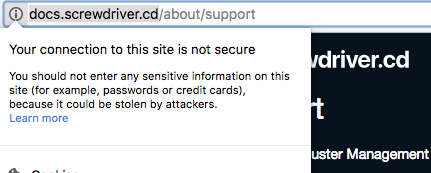
clicking on "i" next to the docs.screwdriver.cd/about/support URL in Chrome shows: "Your connection to the site is not secure"
What you expected to happen:
https://docs.screwdriver.cd being available
How to reproduce it:
navigate to http://docs.screwdriver.cd/ , click on "i" in the URL bar
(I wonder if we could use a Let's Encrypt SSL certificate - https://letsencrypt.org/ )
 dmitris
All 2 comments
This can be done using CloudFlare: https://hackernoon.com/set-up-ssl-on-github-pages-with-custom-domains-for-free-a576bdf51bc
but it won't be full https
 joelseq
on 28 Sep 2017
joelseq
on 28 Sep 2017
 FenrirUnbound
on 7 Oct 2017
FenrirUnbound
on 7 Oct 2017
🎉5
Was this page helpful?
0 / 5 - 0 ratings
Related issues
 catto
·
7Comments
catto
·
7Comments
 yokawara
·
5Comments
yokawara
·
5Comments
 tk3fftk
·
3Comments
tk3fftk
·
3Comments
 nkatzman
·
8Comments
catto
·
4Comments
nkatzman
·
8Comments
catto
·
4Comments
Most helpful comment
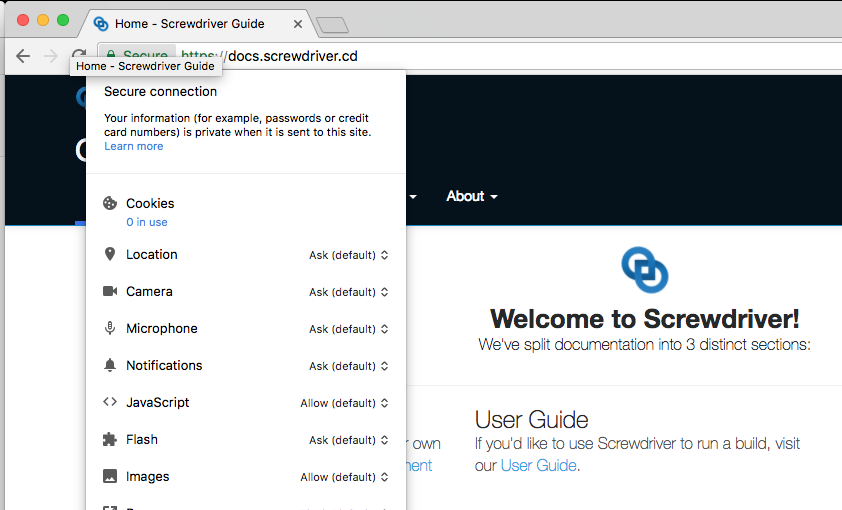
The guide is now hosted via HTTPS: https://docs.screwdriver.cd