Screentogif: Error importing PNG images from Corel
I attach two PNG images exported from Corel (_t0.png_, _t1.png_). I have two problems with this:
1) Project is set to size 376x210 px. The images also have a dimension of 376x210px. However, small ones are imported (see _import.png_). Please, what can you do about it?
2) When I try to export the project (see _png test.stg_) to Gif, I get an error. I attach error messages below. The error occurs regardless of the export method (1.0 / FFmpeg / Gifski).
Images and the project are here: test.zip
   v System.Threading.Tasks.Task.ThrowIfExceptional(Boolean includeTaskCanceledExceptions)
   v System.Threading.Tasks.Task.Wait(Int32 millisecondsTimeout, CancellationToken cancellationToken)
   v System.Threading.Tasks.Parallel.ForWorker[TLocal](Int32 fromInclusive, Int32 toExclusive, ParallelOptions parallelOptions, Action`1 body, Action`2 bodyWithState, Func`4 bodyWithLocal, Func`1 localInit, Action`1 localFinally)
   v System.Threading.Tasks.Parallel.For(Int32 fromInclusive, Int32 toExclusive, Action`1 body)
   v ScreenToGif.ImageUtil.ImageMethods.PaintTransparentAndCut(List`1 listToEncode, Color transparent, Int32 id, CancellationTokenSource tokenSource)
   v ScreenToGif.Windows.Other.Encoder.<Encode>d__24.MoveNext()
Internal error _IndexOutOfRangeException_:
   v ScreenToGif.ImageUtil.ImageMethods.<>c__DisplayClass0_1.<PaintTransparentAndCut>b__0(Int32 i)
   v System.Threading.Tasks.Parallel.<>c__DisplayClass17_0`1.<ForWorker>b__1()
   v System.Threading.Tasks.Task.InnerInvokeWithArg(Task childTask)
   v System.Threading.Tasks.Task.<>c__DisplayClass176_0.<ExecuteSelfReplicating>b__0(Object <p0>)
 Papouchcom
All 2 comments
Both t0.png and t1.png have 300 DPI.
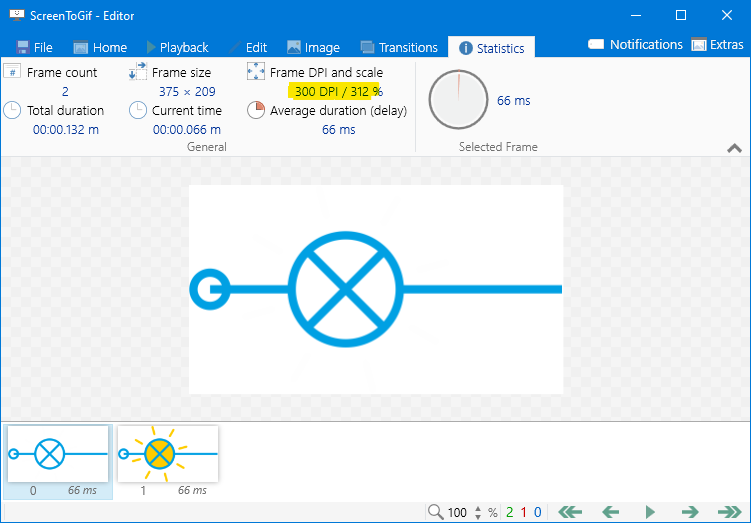
That breaks the Insert window, which tries to get the resolution of the image, but it's not prepared to deal with a different DPI (that needs to be fixed).
Right now, if you want to have a animation with both images, simply drop them in an empty editor, without creating a new project.
 NickeManarin
on 7 Apr 2020
NickeManarin
on 7 Apr 2020
The fix is currently available with v2.26.1.
NickeManarin
on 13 Aug 2020
Related issues
 mabbas64
·
13Comments
mabbas64
·
13Comments
 positr0nic
·
17Comments
positr0nic
·
17Comments
 Kristinita
·
18Comments
Kristinita
·
18Comments
 u2shana
·
14Comments
u2shana
·
14Comments
 levid7
·
16Comments
levid7
·
16Comments