Screentogif: [Feature Request] Make left-click on Tray icon do something
The system tray icon for ScreenToGif sits next to the icons for volume, wifi / internet access, clock etc. All of those icons respond to a single left-click, but ScreenToGif does nothing on single left-click. It doesn't do anything on left double-click either.
It would be useful (and provide consistent tray icon behavior) to have ScreenToGif's tray icon respond to a single left-click.
I would suggest something like the following:
Single left-click: Alternates between restoring the current ScreenToGif window (brought to front of window stack) and minimizing the window to the task bar, with each subsequent click.
Double left-click: Opens the User's preferred ScreenToGif window view (as specified by user in an Options setting). Choose from: Start Up window, Recorder, Webcam, Board, Editor.
Right-click: Behaves as it currently does (displays context menu) which is standard behavior.
In cases where no ScreenToGif window is already open, it would be better that single left-click on the tray icon displays the context menu, rather than just does nothing (because there is no window to restore).
Having clicks on an icon respond under certain window situations and not under others is confusing and inconsistent. It can give the false impression that the program is locked up and refusing to respond (because you're expecting some kind of response to your click action in the same way that it did when you tried it before).
 Quisquose
All 2 comments
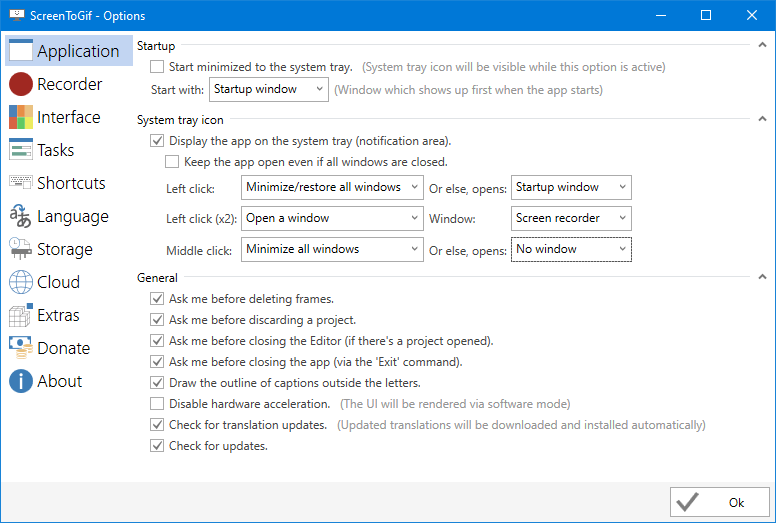
Done! How about this?
 NickeManarin
on 18 Nov 2019
NickeManarin
on 18 Nov 2019
Thank you NickeManarin. The user choices that you have implemented are even better than what I had hoped for!
Quisquose
on 18 Jan 2020
Related issues
 KrzysztofKarol
·
18Comments
KrzysztofKarol
·
18Comments
 positr0nic
·
17Comments
positr0nic
·
17Comments
 mabbas64
·
13Comments
mabbas64
·
13Comments
 spottedmahn
·
12Comments
spottedmahn
·
12Comments
 u2shana
·
14Comments
u2shana
·
14Comments
Most helpful comment
Done! How about this?