Screentogif: Blank screen - Buttons invisible
When starting up the application I get a blank window where the buttons are not visible. Tried already several things but can't get it working.
OS: Windows 10 - April Update
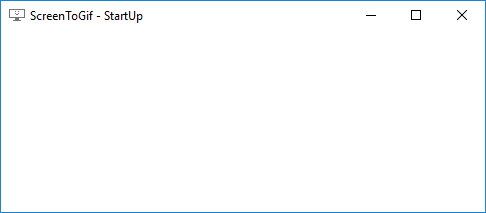
 xtbe
xtbe
All 9 comments
Hi, this is the second feedback about this problem that I've got. I still don't know for sure what's happening. :/
I'm assuming that you are running the latest release (v2.13.3). Can you right click the ScreenToGif icon on your notification area (system tray)? Try opening the editor or the recording, etc.
This could be an issue with a video driver, can you share with me the name/model of your graphics processor? Also the driver version?
If you have multiple monitors, try draging the window to another monitor, just to check if the rendering starts to work.
I'm running W10 1803, build 17134.48 with a GeForce GTX 970, driver version 398.11 and the app is running fine.
 NickeManarin
on 16 Jun 2018
NickeManarin
on 16 Jun 2018
https://github.com/RickStrahl/MarkdownMonster/issues/136
The workaround would be to disable hardware acceleration.
NickeManarin
on 16 Jun 2018
Hi,
It seems not possible to turn off Hardware Acceleration in Windows 10 (April update) this slider is gone.
I tried a few options by right-clicking in the sys tray, the "xxxxxx recording" options are displayed correctly. All the other ones result in blanks screens.
I'll see if I can find updated drivers for the GPU perhaps this could help.
UPDATE: I've the latest driver installed that is available for the laptop, result still the same
I agree this is probably a GPU (driver) error in combination with WPF
Only one monitor.
GPU running on the laptop with issues is an Intel HD Graphics HD5500. So this is an integrated GPU.
xtbe
on 16 Jun 2018
Can you try using this version?
https://1drv.ms/u/s!Atz6mWWOy6N8oOUKTu2EmDtzWwLtTg
This version has the hardware acceleration disabled. The UI looks a bit laggy because of that.
NickeManarin
on 27 Jun 2018
Btw, the recorders work because they have "hardware acceleration" disabled by default.
Another user with the same problem has a Intel integrated graphics too. Maybe there's a correlation.
NickeManarin
on 27 Jun 2018
Tried with the version you asked to test and it works correctly.
I don't experience any real annoying lag.
Tnx a lot
xtbe
on 27 Jun 2018
Just a note that this started happening to me all of a sudden as well. It looks just like the image in the top thread. Also using integrated intel graphics.
 choldgraf
on 1 Jun 2019
choldgraf
on 1 Jun 2019
Try updating the graphics card driver. I'm not sure what's hapening.
WPF uses DirectX 9 to render its elements.
NickeManarin
on 28 Sep 2019
Closed as external.
Anyway, if it happens again, run with hardware acceleration disabled by running the app in software rendering mode:
https://github.com/NickeManarin/ScreenToGif/wiki/Startup-parameters
NickeManarin
on 1 Sep 2020
Related issues
 Kristinita
·
4Comments
Kristinita
·
4Comments
 ShGKme
·
4Comments
ShGKme
·
4Comments
 spyoungtech
·
4Comments
spyoungtech
·
4Comments
 EirikBirkeland
·
5Comments
Kristinita
·
4Comments
EirikBirkeland
·
5Comments
Kristinita
·
4Comments
Most helpful comment
Btw, the recorders work because they have "hardware acceleration" disabled by default.
Another user with the same problem has a Intel integrated graphics too. Maybe there's a correlation.