Screentogif: [Enhancement Request] Deduce the same frames
While I recording the scene of typing process, the recorder records too many duplicate frames those have absolutely the same content, as human typing speed is much slower than the frame rate. That makes the file to large, and useless if one tends to present a lecture on some kind of programming skills.
Right now, I have to manually delete those redundant frames. And that is quick a huge amount of work to do. All I need is just keep those frames different to its previous.
Would you please kindly add some button in the toolbar to help me achieve this? Thanks.
 Esmool
All 8 comments
This process of deleting duplicated frames happens during the encoding of the image (watch for "Analyzing unchanged pixels").
Any frame that has no changes based on the previous frame gets deleted and the delay of previous frame is adjusted.
Are you asking to add a button to do this right after the recording?
 NickeManarin
on 23 Dec 2017
NickeManarin
on 23 Dec 2017
I'm going to write this out as a bug report just because it makes the most sense. Keep in mind it's really a feature request based on what I'm hoping is what @Esmool 's asking for.
Steps:
- Recorded a section of screen with no changes
- Used the editor to add "free text" to different places on the 1st, 10th, and 61st (and last) frames
- Click some kind of de-duplication button in the "Edit" tab
- Save the animation
Expected results: The only frames that should remain are the remaining 5 unique frames:
-1-               -2-                     -3-                  -4-                    -5-
[1] - [all the frames between 2 and 9] - [10] - [all the frames between 11 and 60] - [61]
Defect: many more than just 5 frames in the recording (watch for the little blips of black text):

[Note that the image above is in APNG format and can't be viewed by Internet Explorer or older browser versions.]
 vatterspun
on 25 Dec 2017
vatterspun
on 25 Dec 2017
@NickeManarin The feature you said is to reduce the final file size while saving the animation, and what I suggested is to enhance the watching experiences. The difference is right located at the point of the time delay.
I mean just delete the duplicate frame, not extend the delay time of its previous. And if the succeeding next frame (originally the 3rd frame) is still duplicate to the original previous one, delete it too.
@vatterspun suggestion seems to have common with mine.
Usually, while recording the typing process, what I want to provide the watcher is NOT the REAL TIME feeling of that process, but the result of its result. Illustrating the typing process is just to help watcher keep track with what I typed, but doesn't need them suffer the bothering real time typing process.
Additionally, I'm thinking about the duplicate condition could generalize to some kind of similarity check, Those two neighbor frames with similarity less then a specified threshold may be considered as duplicate. This is for the situation like unconscious mouse shake.
Esmool
on 25 Dec 2017
unique frames
I gave this some additional thought and actually have a possible trick you might run to enable what you're describing without a new feature from @NickeManarin ...
HOWTO - autocapture - only-whats-changed.docx
Those two neighbor frames with similarity less then a specified threshold may be considered as duplicate. This is for the situation like unconscious mouse shake.
So if the previous frame and the current one are 98% similar, it should delete one of them?
vatterspun
on 25 Dec 2017
sorry, typo, 'with similarity LARGER then a specified threshold ...'
Esmool
on 26 Dec 2017
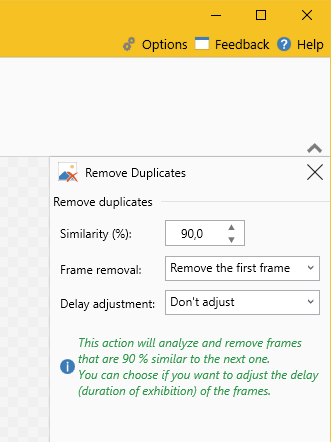
@Esmool Ok, I got it. A "Remove duplicate frames" with a configurable threshold.
NickeManarin
on 27 Dec 2017
Done! It will be available with v2.12.
NickeManarin
on 28 Jan 2018
Thank you so much~
Esmool
on 5 Feb 2018
Related issues
 duarteframos
·
3Comments
duarteframos
·
3Comments
 Kristinita
·
4Comments
Kristinita
·
4Comments
 ghost
·
4Comments
ghost
·
4Comments
 laiqun
·
4Comments
laiqun
·
4Comments
 ForkandBeard
·
4Comments
ForkandBeard
·
4Comments
Most helpful comment
Done! It will be available with v2.12.