Scrcpy: Icons are 99% transparent on Mi10
Environment
- Windows 10 x64
- scrcpy version: 1.12.1
- installation method: Windows release
- device model: Xiaomi Mi 10 5G
- Android version: 10
Describe the bug
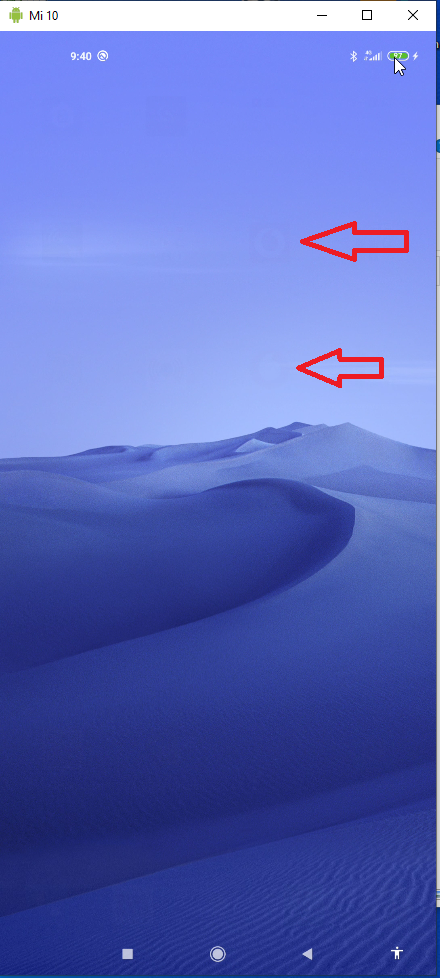
the device gets connectet. I see the screen, but the icons are to 99% transparent.
I get the folowing Output from your file:
INFO: scrcpy 1.12.1 <https://github.com/Genymobile/scrcpy>
D:\anforderungen\Android\scrcpy-win64\scrcpy-server: 1 file pushed. 5.8 MB/s (26202 bytes in 0.004s)
java.io.FileNotFoundException: /data/system/theme_config/theme_compatibility.xml: open failed: ENOENT (No such file or directory)
        at libcore.io.IoBridge.open(IoBridge.java:496)
        at java.io.FileInputStream.<init>(FileInputStream.java:159)
        at java.io.FileInputStream.<init>(FileInputStream.java:115)
        at java.io.FileReader.<init>(FileReader.java:58)
        at miui.content.res.ThemeCompatibilityLoader.getVersion(ThemeCompatibilityLoader.java:108)
        at miui.content.res.ThemeCompatibilityLoader.getConfigDocumentTree(ThemeCompatibilityLoader.java:126)
        at miui.content.res.ThemeCompatibilityLoader.loadConfig(ThemeCompatibilityLoader.java:59)
        at miui.content.res.ThemeCompatibility.<clinit>(ThemeCompatibility.java:31)
        at miui.content.res.ThemeCompatibility.isThemeEnabled(ThemeCompatibility.java:111)
        at android.content.res.MiuiResourcesImpl.<clinit>(MiuiResourcesImpl.java:41)
        at android.content.res.Resources.<init>(Resources.java:283)
        at android.content.res.MiuiResources.<init>(MiuiResources.java:49)
        at android.content.res.Resources.getSystem(Resources.java:204)
        at android.app.LoadedApk.<init>(LoadedApk.java:235)
        at android.app.ContextImpl.createSystemContext(ContextImpl.java:2430)
        at android.app.ActivityThread.getSystemContext(ActivityThread.java:2434)
        at java.lang.reflect.Method.invoke(Native Method)
        at com.genymobile.scrcpy.Workarounds.fillAppInfo(Workarounds.java:66)
        at com.genymobile.scrcpy.ScreenEncoder.streamScreen(ScreenEncoder.java:56)
        at com.genymobile.scrcpy.Server.scrcpy(Server.java:34)
        at com.genymobile.scrcpy.Server.main(Server.java:163)
        at com.android.internal.os.RuntimeInit.nativeFinishInit(Native Method)
        at com.android.internal.os.RuntimeInit.main(RuntimeInit.java:380)
Caused by: android.system.ErrnoException: open failed: ENOENT (No such file or directory)
        at libcore.io.Linux.open(Native Method)
        at libcore.io.ForwardingOs.open(ForwardingOs.java:167)
        at libcore.io.BlockGuardOs.open(BlockGuardOs.java:252)
        at libcore.io.IoBridge.open(IoBridge.java:482)
        ... 22 more
INFO: Initial texture: 1080x2336
 Bratmaxe1981
All 5 comments
I see the screen, but the icons are to 99% transparent.
Which icons? Like #1301?
 rom1v
on 21 Apr 2020
rom1v
on 21 Apr 2020
All App Icons are clearly transparent. If I click on an AppIcon, the App starts and all looks fine, but I can't see the AppIcons on HomeScreen.
Bratmaxe1981
on 21 Apr 2020
Screenshot - thats all what I can see.
Bratmaxe1981
on 21 Apr 2020
OK so the icons disappear, and you probably still see these traces due to video encoding artefacts (due to compression).
So it really looks like #1301. Did you turn screen off?
If you turn screen on, do the icon reappear? When you close scrcpy?
rom1v
on 21 Apr 2020
Yes thats the same problem. I used a batch, that automatic turn the display off. If I turn it on, I can see the icons.
Thanks.
Bratmaxe1981
on 21 Apr 2020
Related issues
 fleytman
·
4Comments
fleytman
·
4Comments
 udit7395
·
4Comments
udit7395
·
4Comments
 mttmllns
·
3Comments
mttmllns
·
3Comments
 jonnybrooks
·
3Comments
jonnybrooks
·
3Comments
 sennight
·
3Comments
sennight
·
3Comments
Most helpful comment
Yes thats the same problem. I used a batch, that automatic turn the display off. If I turn it on, I can see the icons.
Thanks.