Scrcpy: Can you support PC typing to mobile phone in Chinese?
Suddenly there was an idea. Our company's computers can't use entertainment software,however I need to chat with my family member and friends sometimes. VPN does't work on our company‘s network. Your project may help me...
 DavidWhom
All 16 comments
See #37 and #557.
Note that since v1.9, you can "synchronize clipboards" from computer to device, while preserving UTF-8.
So if you select chinese characters on your computer, press Ctrl+c, go to the scrcpy window, press Ctrl+Shift+v, you can then "paste" on Android (long-press on a textbox, then click "paste").
 rom1v
on 4 Jul 2019
rom1v
on 4 Jul 2019
@DavidWhom You may try ARDC.https://www.cnblogs.com/we-hjb/p/9220084.html
 lpful
on 7 Jul 2019
lpful
on 7 Jul 2019
@lpful Thankyou!it help me a lot. This app is what I've been looking for.
DavidWhom
on 8 Jul 2019
Hi, I am also a user from China. I also hope scrcpy can support keyboard input for Chinese input method. The copy and paste method is very useful but it is still not convenient enough for some situations such as some chat apps. Looking forward to that feature.
 qqlovekerry
on 11 Sep 2019
qqlovekerry
on 11 Sep 2019
Absolutely needed unicode input from PC directly to the App, please
 guermanp
on 1 Oct 2019
guermanp
on 1 Oct 2019
In this period of novel corona virus outbreak, almost all the students in China are taking online lessons at home. Many students use the phone all day long. This is not good for their eyes and posture. Using a computer is much better and convenient, but not all the families have a suitable computer or enough money to buy one.
In my case I installed scrcpy on a raspberry pi 3 (with USB keyboard and mouse) and connected to TV (or old monitor). Then my child can follow the online lessons on the big screen and interact with the teacher thanks to scrcpy. It works really well!
The only problem is that we cannot input chinese characters directly from the computer keyboard to the phone. I found a workaround by installing "remote keyboard" app (http://www.onyxbits.de/remotekeyboard) on the phone and typing the chinese characters inside the telnet terminal. It works, but it is not very convenient for daily use.
So I would like to ask the developers of scrcpy if they can focus their efforts in these days to solve the issue of typing chinese characters directly in scrcpy.
If you can do it, I am sure that many chinese children and their families will thank you a lot.
 pinootto
on 5 Mar 2020
pinootto
on 5 Mar 2020
@pinootto 你好,如果PC是Windows系统的话,可以试试看ARDC,https://www.cnblogs.com/we-hjb/p/9220084.html
lpful
on 5 Mar 2020
@pinootto Hi, I found that if the default input method is Gboard, I can input directly with my keyboard on my PC. And I am using Ubuntu 18.04 on my PC. Maybe you can have a try on raspberry pi to see whether it works.
qqlovekerry
on 5 Mar 2020
@pinootto 你好,如果PC是Windows系统的话,可以试试看ARDC,https://www.cnblogs.com/we-hjb/p/9220084.html
Thanks, but my computer is a raspberry pi with raspbian (GNU/Linux) as operating system.
pinootto
on 6 Mar 2020
@pinootto Hi, I found that if the default input method is Gboard, I can input directly with my keyboard on my PC. And I am using Ubuntu 18.04 on my PC. Maybe you can have a try on raspberry pi to see whether it works.
@qqlovekerry That is a good news! Thanks.
Do you know how to install Gboard on a chinese Vivo phone, that doesn't have Google Play?
pinootto
on 6 Mar 2020
@pinootto I think you need some specific methods to bypass the GREAT firewall. Or maybe try to get the APK file of Gboard. I think maybe you need some search work trying to find out the solution.
qqlovekerry
on 6 Mar 2020
@pinootto I think you need some specific methods to bypass the GREAT firewall. Or maybe try to get the APK file of Gboard. I think maybe you need some search work trying to find out the solution.
@qqlovekerry OK, thanks. I will try.
pinootto
on 6 Mar 2020
This issue has been discussed many times. There are some possible solutions here.
SocketIME has prototype now, but it needs more tuning for working reliable.
SocketIME demo
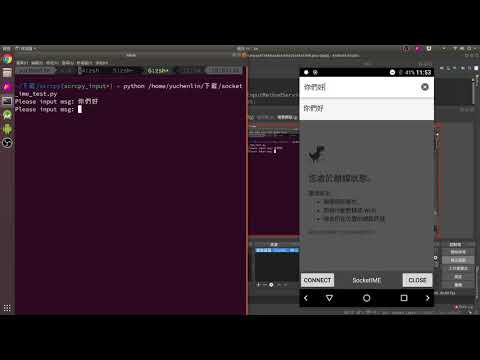
If people interesting on this area. They can simply try and contribute to related repo, scrcpy, SocketIME, ADBKeyBoard and so on.
Thanks.
 npes87184
on 6 Mar 2020
npes87184
on 6 Mar 2020
@pinootto I think you need some specific methods to bypass the GREAT firewall. Or maybe try to get the APK file of Gboard. I think maybe you need some search work trying to find out the solution.
@qqlovekerry OK, thanks. I will try.
@qqlovekerry I succeeded to install Gboard on the chinese phone.
It works perfectly and very convenient!
No need to install/use additional software on the PC.
Just install Gboard on the phone, select Gboard as input keyboard on the phone and then we can type chinese characters directly from the PC keyboard to the phone via scrcpy.
Thank you very much. Now my child is using scrcpy all day long for the online school.
pinootto
on 7 Mar 2020
Closing as duplicate of #37.
rom1v
on 9 Apr 2020
Please test #1426 (works on Android >= 7).
rom1v
on 25 May 2020
Related issues
 udit7395
·
4Comments
udit7395
·
4Comments
 SuryaElavazhagan
·
4Comments
SuryaElavazhagan
·
4Comments
 cordac1
·
4Comments
cordac1
·
4Comments
 swamikamal
·
3Comments
swamikamal
·
3Comments
 fleytman
·
4Comments
fleytman
·
4Comments
Most helpful comment
See #37 and #557.
Note that since v1.9, you can "synchronize clipboards" from computer to device, while preserving UTF-8.
So if you select chinese characters on your computer, press
Ctrl+c, go to the scrcpy window, pressCtrl+Shift+v, you can then "paste" on Android (long-press on a textbox, then click "paste").