I am using Xiaomi max 2 on macOS High Sierra 10.13.3
scrcpy v1.0

dependencies:
 - SDL 2.0.8
 - libavcodec 57.107.100
 - libavformat 57.83.100
 - libavutil 55.78.100
 Pong420
All 35 comments
Xiaomi Mi 6 has the same issue
 izayl
on 15 Mar 2018
izayl
on 15 Mar 2018
@Pong420 Maybe this issue can fix. But I have not test it.
izayl
on 15 Mar 2018
@izayl It seems to not be working for me
Pong420
on 15 Mar 2018
Duplicate of https://github.com/Genymobile/scrcpy/issues/18.
Already fixed on v1.1.
 rom1v
on 15 Mar 2018
rom1v
on 15 Mar 2018
@rom1v I have pull the newest code of master. But the problem still exist.
izayl
on 15 Mar 2018
scrcpy -v
?
rom1v
on 15 Mar 2018
Did you compile using prebuilt server v1.1?
rom1v
on 15 Mar 2018
sorry, how to check prebuilt server version?
v1.1 still not work
scrcpy v1.1

dependencies:
 - SDL 2.0.8
 - libavcodec 57.107.100
 - libavformat 57.83.100
 - libavutil 55.78.100
I find the reason of the issue,switch below option for obtain the permission of simulating Input

izayl
on 15 Mar 2018
Did you compile everything, or downloaded the prebuilt server (the Android part)?
If you don't know, please give the result of:
mesonconf x
(from the scrcpy root directory)
rom1v
on 15 Mar 2018
Solved, enable the permission of simulating Input work for me
Thanks all
Pong420
on 15 Mar 2018
@izayl Thank you very much! I added a question in the FAQ.
rom1v
on 15 Mar 2018
Ciao guys. Thank you so much for great work!
I'm on a vernee mix 2 (not a grat phone and probably a corner case).
I'm not able to click with left mouse. Only right. Unfortunately I can't find that option in my menu (doesn't exist at all). Is there a way for sending the option via ABD?
Using Windows (10 64bit)
I've tryed 1.0 1.1 1.2 (64bit) Vernee mix run android 7.0 security patch nov. 2017
 moamahi
on 13 Jun 2018
moamahi
on 13 Jun 2018
Nokia 8 does not have that option in developer settings. My problem turned out be a slightly weird one. If I move scrcpy window from the screen it started on to a different monitor, mouse inputs become unreponsive.
 halilozercan
on 18 Oct 2018
halilozercan
on 18 Oct 2018
@halilozercan https://github.com/Genymobile/scrcpy/issues/15
rom1v
on 18 Oct 2018
the screen off mirroring function does not work with either Ctrl+
o or terminal command …it says “unrecognised option”
help please.. my phone is poco F1
 saurabh02468
on 13 Jun 2019
saurabh02468
on 13 Jun 2019
the screen off mirroring function does not work with either Ctrl+o or terminal command …it says “unrecognised option”
(please do not post on an unrelated issue)
You need scrcpy v1.9.
scrcpy --version
Xiaomi Mi 6 has the same issue
My Xiaomi Mi 6 no problem in windows.
 xx299x
on 6 Aug 2019
xx299x
on 6 Aug 2019
I want to know recording MP4's format.
 dottyunnan
on 22 Dec 2019
dottyunnan
on 22 Dec 2019
why my android OPPO R15 no USB debugging(Security settings) option? so I cannot click my simulating screen .
 Ggot
on 3 Jan 2020
Ggot
on 3 Jan 2020
thanks this happened in xiaomi smartphone, but also occurred in a few devices like Oppo @Pong420
 mochadwi
on 16 Jan 2020
mochadwi
on 16 Jan 2020
thank you enabling USB debugging (security settings) worked on my phone mi 4
 n-3rd23
on 15 Apr 2020
n-3rd23
on 15 Apr 2020
On a Redmi 6A I get the popup "Sign in with you Mi Account" :-(
 mherweg
on 25 Apr 2020
mherweg
on 25 Apr 2020
I find the reason of the issue,switch below option for obtain the permission of simulating Input
No such setting exists for me on Android 8.1. Device is a Motorola Moto G5 Plus.

 SkyPaladin
on 9 May 2020
SkyPaladin
on 9 May 2020
In MIUI you are locked behind Mi Account link in order to enable ADBinput for keyboard and mouse. To bypass that (with root):
- Enable USB debugging
- Run any terminal as root
setprop persist.security.adbinput 1- That's all, nothing else is required
I dont believe root-less solution is possible because MIUI permission service will block any user-app trying to do the same.
 Kein
on 21 May 2020
Kein
on 21 May 2020
In MIUI you are locked behind Mi Account link in order to enable ADBinput for keyboard and mouse. To bypass that (with root):
1. Enable USB debugging

2. Run any terminal as root

3. `setprop persist.security.adbinput 1`

4. That's all, nothing else is required
I dont believe root-less solution is possible because MIUI permission service will block any user-app trying to do the same.
I'm assuming the permission service can't be safely disabled with adb, right?
 LosEagle
on 28 May 2020
LosEagle
on 28 May 2020
No, the security core cannot be uninstalled or disabled, it is rooted deep.
Kein
on 28 May 2020
how to enable this setting on Xiaomi Note 7 ?
this screen does not appear
 ahmedsallam544
on 3 Jul 2020
ahmedsallam544
on 3 Jul 2020
I find the reason of the issue,switch below option for obtain the permission of simulating Input
It need simcard to be inserted :((
 fareezMaple
on 22 Aug 2020
fareezMaple
on 22 Aug 2020
Bro I have not above usb debugging security setting in Relame U1
I want to control through keybord and mouse help???
 VBK007
on 24 Aug 2020
VBK007
on 24 Aug 2020
Read the thread
Kein
on 24 Aug 2020
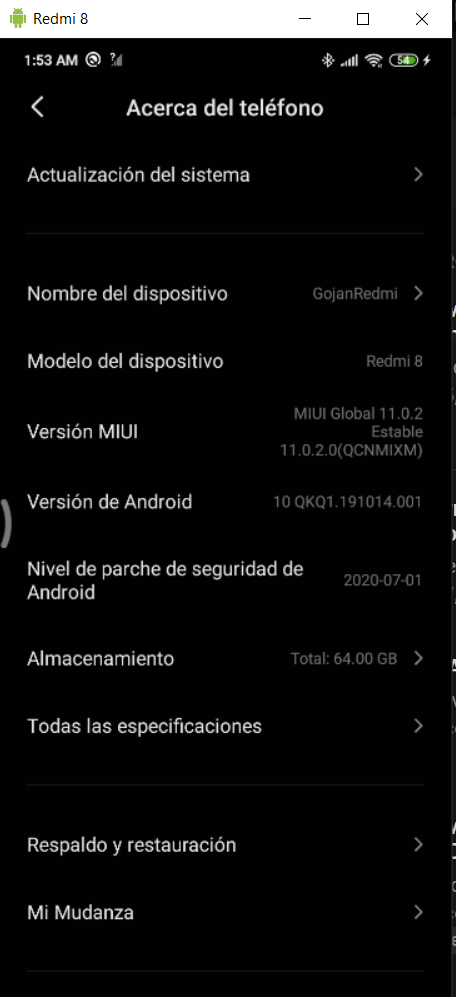
Man I have a Redmi 8 MIUI11 with Android 10
Click/Mouse doesn't work, I have enabled the developer options (the security options too) but the simulated entry doesn't appear.
If I Root my phone, can I access that option?
Thank you very much also in advance, you have done a great job with scrcpy, making life easier for hundreds (if not thousands) of people, I love you.
I really want to make PC control work 😢
 Gojan444
on 26 Aug 2020
Gojan444
on 26 Aug 2020
the security options too
Then it should work. What's the output in the console?
rom1v
on 26 Aug 2020
Then it should work. What's the output in the console?
Hi man, yesterday at the time of my comment the console did not show anything different, scrcpy showed the image and even some keyboard shortcuts (alt +) in my windows worked well.
So today I tried to restart both my PC and my SmartPhone, and then I got the "adb push" returned with value 1 Error.
I tried to fix it (by closing scrcpy and restart my xiaomi a couple times) and then Control (click) works well 😄 !
So forgive me for my earlier comment, I am happy that it finally works well, thank you very much!
Gojan444
on 26 Aug 2020
I find the reason of the issue,switch below option for obtain the permission of simulating Input
thanks this works for me!
 EnzoKronus
on 26 Aug 2020
EnzoKronus
on 26 Aug 2020
Related issues
 udit7395
·
4Comments
udit7395
·
4Comments
 singleNeuron
·
3Comments
singleNeuron
·
3Comments
 behzadpooldar
·
4Comments
behzadpooldar
·
4Comments
 targor
·
3Comments
targor
·
3Comments
 YurieCo
·
4Comments
YurieCo
·
4Comments
Most helpful comment
I find the reason of the issue,switch below option for obtain the permission of simulating Input