Scratchaddons: Clicking a link in the popup closes the popup
Describe the bug
Clicking a link in the popup (E.g. to a project, studio etc.) closes the popup, this means that any replies you were making to comments that hadn't been posted yet are lost, it also means that the scroll position in the popup is lost (Which is surprisingly sad if you have a bunch of messages).
To Reproduce
Click a link
Expected behavior
Popup opens the link in a new window without changing the focus from the popup
Device (please complete the following information):
- OS: ChromeOS
- Browser: Chrome
- Version: Latest
Additional context
no
 Explosion-Scratch
All 9 comments
I think this behaviour is intended by the browser developers. Probably have a draft feature so we can reopen the popup again and keep the texts inside?
 Hans5958
on 21 Nov 2020
Hans5958
on 21 Nov 2020
Related: #785
 mxmou
on 21 Nov 2020
mxmou
on 21 Nov 2020
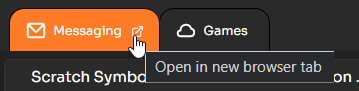
Afaik, this is intended by browsers. That's why I added a full screen mode for the messages popup, just click this button:
 WorldLanguages
on 21 Nov 2020
WorldLanguages
on 21 Nov 2020
It might be possible to try to make these links open in the background without changing the focus. If it's possible, I might do that, adding some UI indication that tells the user that the tab was opened in the background (in case they don't notice)
WorldLanguages
on 21 Nov 2020
It would be useful if it was possible to middle click the links when in tab view to open them in a new tab.
mxmou
on 22 Nov 2020
It would be useful if it was possible to middle click the links when in tab view to open them in a new tab.
I'm pretty sure you can do that for any link by holding control and press on the link.
 TheColaber
on 22 Nov 2020
TheColaber
on 22 Nov 2020
Some links in Scratch Messaging aren't links but onclick events, that should be fixed as well
WorldLanguages
on 22 Nov 2020
There should be a href atached to every link. That way the user can decide what to do with it.
TheColaber
on 22 Nov 2020
It would be useful if it was possible to middle click the links when in tab view to open them in a new tab.
I'm pretty sure you can do that for any link by holding control and press on the link.
That doesn't work for me (Chrome, ChromeOS) It opens them in a new tab but also closes the popup.
Explosion-Scratch
on 27 Nov 2020
Related issues
WorldLanguages
·
10Comments
 BoomerScratch
·
12Comments
BoomerScratch
·
12Comments
 Richienb
·
11Comments
Richienb
·
11Comments
 GrahamSH-LLK
·
8Comments
GrahamSH-LLK
·
8Comments
 pufferfish101007
·
4Comments
pufferfish101007
·
4Comments
Most helpful comment
Some links in Scratch Messaging aren't links but onclick events, that should be fixed as well