Scratch-www: Long instructions / notes and credits fields mess up layout
The picture says it all...
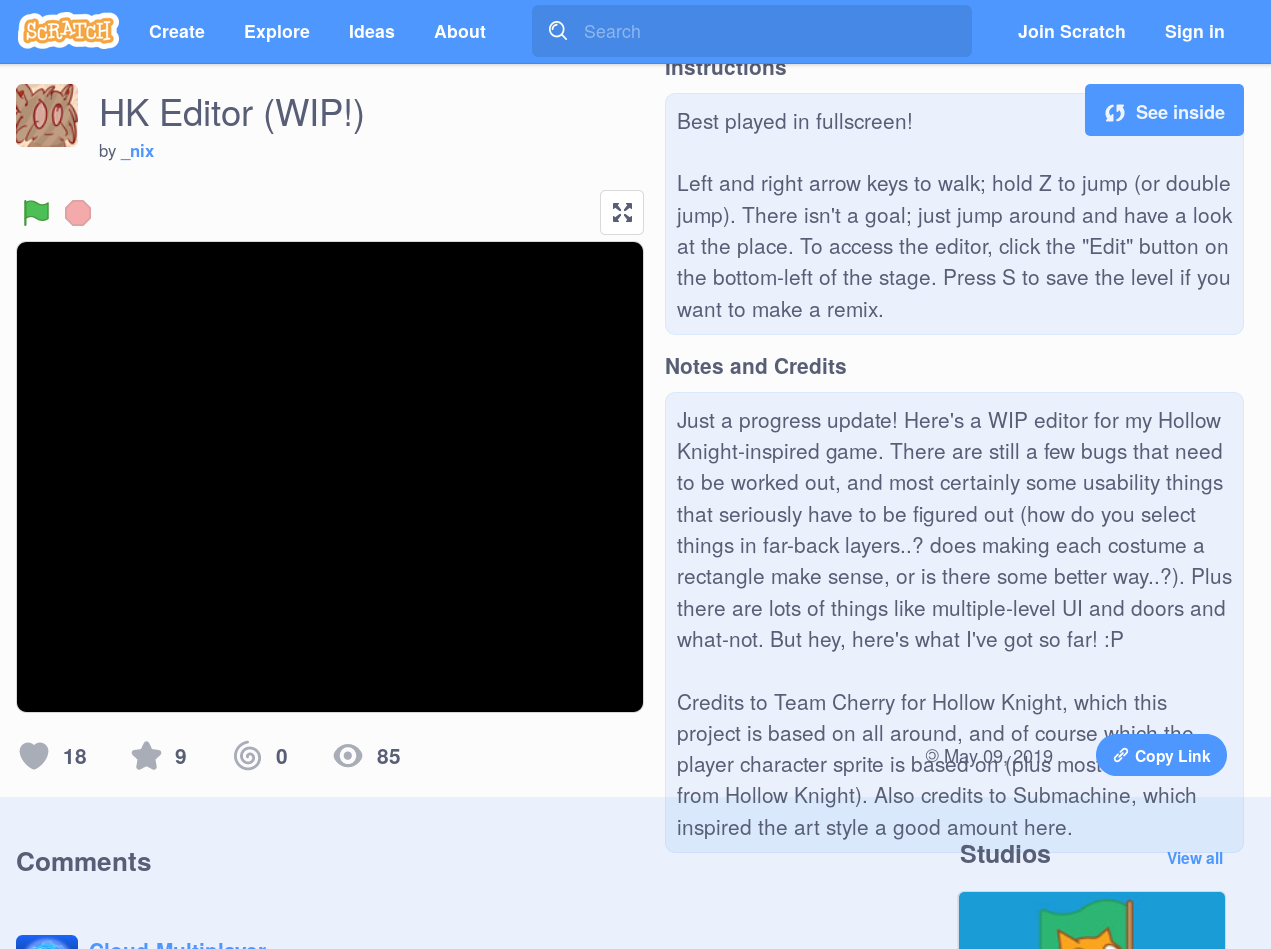
Steps to Reproduce
Open the page of a project with a lengthy instructions/N&C value, created by someone other than you. (This doesn't happen on your own project pages because the actual input fields don't appear to have an issue.)
Operating System and Browser
Firefox 66.0b3, Linux. Can't reproduce on Chromium.
/cc @thisandagain since this should be pretty high priority if it affects every Firefox user (needs repro on other devices / FF versions, but that is likely the case). I saw this happen on https://scratch.mit.edu (any project with long instructions/N&C).
 towerofnix
All 4 comments
Uh oh, this might be a problem I introduced with my recent change to that part of the site. I'll work on a fix right away.
Thanks for pointing this out, @towerofnix.
 benjiwheeler
on 24 May 2019
benjiwheeler
on 24 May 2019
repro: firefox 77 on windows 10, same project
 apple502j
on 25 May 2019
apple502j
on 25 May 2019
I repro'd it too, and made a much simplified use case using our html & css:
https://codepen.io/benjiwheeler/pen/earzje?editors=1100
Looks like the culprit may be this flexbox issue: https://stackoverflow.com/a/36247448
benjiwheeler
on 25 May 2019
Sorry to burst in and if this isn't the right place to point this out, but apparently this also happens on Chrome? According to this post: https://scratch.mit.edu/discuss/topic/352810/ the user is using Chrome and encounters the same problem.
Update: nvm, they seem to be using Microsoft Edge
 NilsTheBest
on 27 May 2019
NilsTheBest
on 27 May 2019
Related issues
benjiwheeler
·
4Comments
 mxmou
·
4Comments
mxmou
·
4Comments
 Kenny2github
·
3Comments
apple502j
·
4Comments
Kenny2github
·
3Comments
apple502j
·
4Comments
 mewtaylor
·
3Comments
mewtaylor
·
3Comments
Most helpful comment
Uh oh, this might be a problem I introduced with my recent change to that part of the site. I'll work on a fix right away.
Thanks for pointing this out, @towerofnix.